mirror of
https://github.com/AdguardTeam/AdGuardHome.git
synced 2026-03-04 00:01:12 -05:00
it dont work correctly #1302
Labels
No labels
P1: Critical
P2: High
P3: Medium
P4: Low
UI
bug
cannot reproduce
compatibility
dependencies
docker
documentation
duplicate
enhancement
enhancement
external libs
feature request
good first issue
help wanted
infrastructure
invalid
localization
needs investigation
performance
potential-duplicate
question
recurrent
research
snap
waiting for data
wontfix
No milestone
No project
No assignees
1 participant

Notifications
Due date
No due date set.
Dependencies
No dependencies set.
Reference
starred/AdGuardHome#1302
Loading…
Add table
Add a link
Reference in a new issue
No description provided.
Delete branch "%!s()"
Deleting a branch is permanent. Although the deleted branch may continue to exist for a short time before it actually gets removed, it CANNOT be undone in most cases. Continue?
Originally created by @BoBBer446 on GitHub (Feb 8, 2020).
https://forum.adguard.com/index.php?threads/adguard-home-not-working-correctly.37364/
i write a post on offical website, maybe anyone can help me?
@vorlif commented on GitHub (Feb 9, 2020):
Can you show us your client DNS configuration?
Windows:
ipconfig /allLinux:
cat /etc/resolv.conf@BoBBer446 commented on GitHub (Feb 9, 2020):
`C:\WINDOWS\system32>ipconfig /all
Windows-IP-Konfiguration
Hostname . . . . . . . . . . . . : DESKTOP-2IO0D3D
Primäres DNS-Suffix . . . . . . . :
Knotentyp . . . . . . . . . . . . : Hybrid
IP-Routing aktiviert . . . . . . : Nein
WINS-Proxy aktiviert . . . . . . : Nein
DNS-Suffixsuchliste . . . . . . . : fritz.box
Ethernet-Adapter Ethernet:
Medienstatus. . . . . . . . . . . : Medium getrennt
Verbindungsspezifisches DNS-Suffix:
Beschreibung. . . . . . . . . . . : Realtek PCIe FE Family Controller
Physische Adresse . . . . . . . . : DC-4A-3E-DE-CE-A5
DHCP aktiviert. . . . . . . . . . : Ja
Autokonfiguration aktiviert . . . : Ja
Drahtlos-LAN-Adapter LAN-Verbindung* 1:
Medienstatus. . . . . . . . . . . : Medium getrennt
Verbindungsspezifisches DNS-Suffix:
Beschreibung. . . . . . . . . . . : Microsoft Wi-Fi Direct Virtual Adapter
Physische Adresse . . . . . . . . : 62-6D-C7-F4-65-F9
DHCP aktiviert. . . . . . . . . . : Ja
Autokonfiguration aktiviert . . . : Ja
Drahtlos-LAN-Adapter LAN-Verbindung* 2:
Medienstatus. . . . . . . . . . . : Medium getrennt
Verbindungsspezifisches DNS-Suffix:
Beschreibung. . . . . . . . . . . : Microsoft Wi-Fi Direct Virtual Adapter #2
Physische Adresse . . . . . . . . : 62-6D-C7-F4-6D-F9
DHCP aktiviert. . . . . . . . . . : Ja
Autokonfiguration aktiviert . . . : Ja
Ethernet-Adapter Ethernet 2:
Medienstatus. . . . . . . . . . . : Medium getrennt
Verbindungsspezifisches DNS-Suffix:
Beschreibung. . . . . . . . . . . : TeamViewer VPN Adapter
Physische Adresse . . . . . . . . : 00-FF-A8-F8-B9-FE
DHCP aktiviert. . . . . . . . . . : Ja
Autokonfiguration aktiviert . . . : Ja
Drahtlos-LAN-Adapter WLAN:
Verbindungsspezifisches DNS-Suffix: fritz.box
Beschreibung. . . . . . . . . . . : Broadcom BCM43142 802.11 bgn Wi-Fi M.2 Adapter
Physische Adresse . . . . . . . . : 60-6D-C7-F4-65-F9
DHCP aktiviert. . . . . . . . . . : Ja
Autokonfiguration aktiviert . . . : Ja
IPv6-Adresse. . . . . . . . . . . : 2003:cf:5f2d:d100:6846:c8eb:362:30fe(Bevorzugt)
Temporäre IPv6-Adresse. . . . . . : 2003:cf:5f2d:d100:5c87:c24b:5a1f:1349(Bevorzugt)
Verbindungslokale IPv6-Adresse . : fe80::6846:c8eb:362:30fe%19(Bevorzugt)
IPv4-Adresse . . . . . . . . . . : 192.168.178.31(Bevorzugt)
Subnetzmaske . . . . . . . . . . : 255.255.255.0
Lease erhalten. . . . . . . . . . : Sonntag, 9. Februar 2020 11:21:33
Lease läuft ab. . . . . . . . . . : Mittwoch, 19. Februar 2020 11:29:28
Standardgateway . . . . . . . . . : fe80::464e:6dff:fe67:8555%19
192.168.178.1
DHCP-Server . . . . . . . . . . . : 192.168.178.1
DHCPv6-IAID . . . . . . . . . . . : 190868935
DHCPv6-Client-DUID. . . . . . . . : 00-01-00-01-1E-04-B8-FF-DC-4A-3E-DE-CE-A5
DNS-Server . . . . . . . . . . . : fd00::464e:6dff:fe67:8555
127.0.0.1
172.18.0.2
fd00::464e:6dff:fe67:8555
NetBIOS über TCP/IP . . . . . . . : Aktiviert
Ethernet-Adapter Bluetooth-Netzwerkverbindung:
Medienstatus. . . . . . . . . . . : Medium getrennt
Verbindungsspezifisches DNS-Suffix:
Beschreibung. . . . . . . . . . . : Bluetooth Device (Personal Area Network)
Physische Adresse . . . . . . . . : 60-6D-C7-F4-65-FA
DHCP aktiviert. . . . . . . . . . : Ja
Autokonfiguration aktiviert . . . : Ja
C:\WINDOWS\system32>`
I use WLAN
@BoBBer446 commented on GitHub (Feb 9, 2020):
raspberry pi 192.168.178.39
fb 192.168.178.1
I hope you can find a solution :)
@ghost commented on GitHub (Feb 9, 2020):
@BoBBer446 I read all comments https://forum.adguard.com/index.php?threads/adguard-home-not-working-correctly.37364 and it seems you had installed adguard home on raspberry pi (not FRITZ!Box router) then you need to set the assigned static IPv4 address as primary DNS (not 127.0.0.1) or you can use adguard's built-in DHCP server
Currently adguard home only perform DNS level blocking then it may not better as adblock extension, when add proxy support #391 you'll be able to apply cosmetic rules or you can try
https://github.com/AdguardTeam/AdguardBrowserExtension
Please follow relevant template and provide necessary details to re-produce when submit an issue next time
@ghost commented on GitHub (Feb 9, 2020):
Sorry i didn't notice your last two comments. I hope that above details may help to solve the problem
@BoBBer446 commented on GitHub (Feb 9, 2020):
yes, your're right i installed ad guard home on raspberry pi... it seems that this is a important information. Maybe can adguard home check the os an give the right ip.
but i has only one ip 192.168.178.39 as DNS ip and no secound ip.
i seems i have (like you sayed) use adguard dns (experimental!) function :/ i try it
@BoBBer446 commented on GitHub (Feb 9, 2020):
i try to explain:
My FritzBos hast ip 192.168.178.1
Raspberry pi 192.168.178.39
Both static ip
all my devices in my home netzwork has the same ip every time (static)
Adguard home is installed on raspberry pi.
@BoBBer446 commented on GitHub (Feb 9, 2020):
Windows DNS:

thats right?
@vorlif commented on GitHub (Feb 9, 2020):
@BoBBer446 First you have to change your DNS server to the Raspberry Pi as described by @ArchiveBase. (DHCP settings of the FritzBox). It also looks like your first DNS server is the IPv6 address of your FritzBox. So, you should enable IPv6 for your Raspberry Pi and switch the IPv6 DNS server on your FritzBox to the Raspberry Pi as well. (Alternatively deactivate IPv6 on the FritzBox). After that it should work.
But it is still strange that the setup guide of your AGH installation does not show the IP address of the Raspberry Pi. It is possible that your Raspberry Pi is not yet configured correctly. But I would first make the described changes and test it afterwards.
@vorlif commented on GitHub (Feb 9, 2020):
Leave the secondary DNS server empty for now.
@BoBBer446 commented on GitHub (Feb 9, 2020):
how i can set up ipv6 in adguard home?
@vorlif commented on GitHub (Feb 9, 2020):
This must be done through the operating system of your Raspberry Pi.
You can enter
lsb_release -ain a terminal of your Raspberry Pis and post it here.@BoBBer446 commented on GitHub (Feb 9, 2020):
i use libreelec and adguard home as docker:
`Using username "root".
root@192.168.178.39's password:
##############################################
LibreELEC
https://libreelec.tv
##############################################
LibreELEC (official): 9.2.0 (RPi2.arm)
LibreELEC:~ # lsb_release -a
LibreELEC (official): 9.2.0
LibreELEC:~ #
`
@vorlif commented on GitHub (Feb 9, 2020):
Ahh okay, now some things make sense.
Can you type in
ifconfigon your Raspberry Pi terminal and post the output here?@BoBBer446 commented on GitHub (Feb 9, 2020):
Okay, it is a little bit tricky. But i think we are on the right way.
I use my RPI with LibreElec as AdGuard Home Server.
Installed by LinuxServer.io Docker Repo.
The RPI has the ip 192.168.178.39
My Fritzbox has 192.168.178.1
At the config i disabled IP v6 on my Fritzbox
Now i go to > Heimnetz > Netzwerk > TAB Network Settings an scroll down to IP Settings:
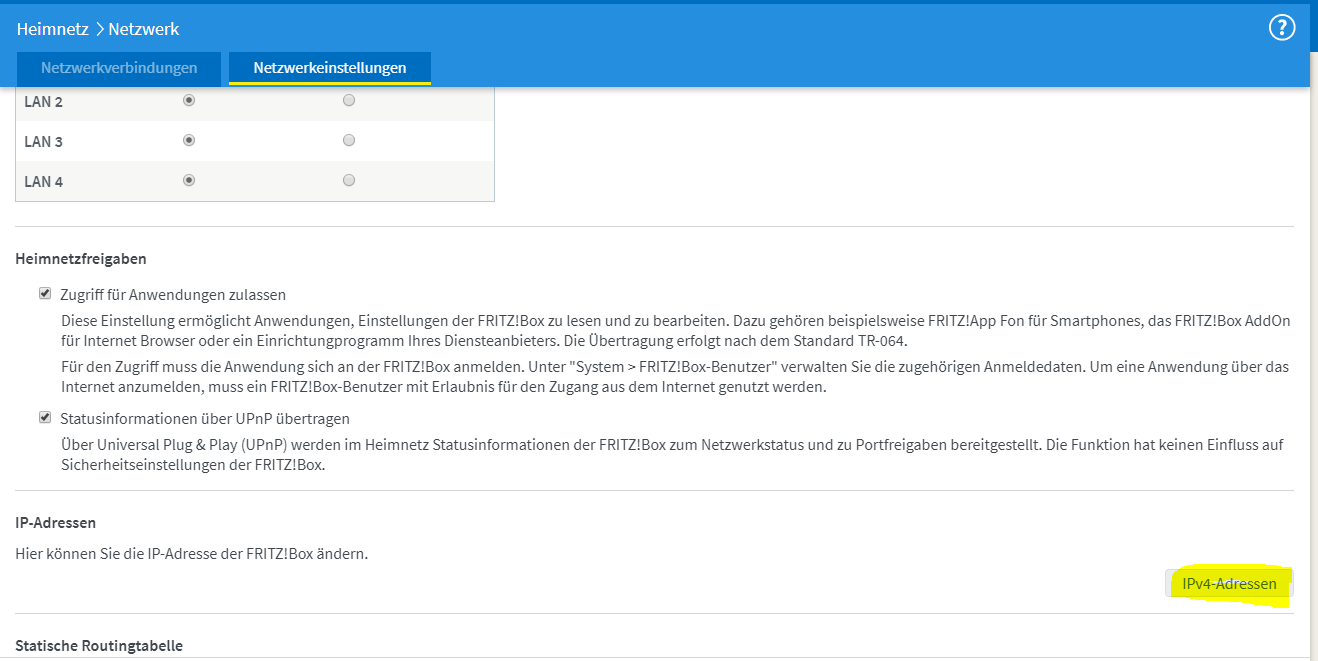
There i set the local DNS:

This is the ip v4 Address from my RPI
DHCP on FritzBox still activated.
On Windows i leave the DNS Settings:
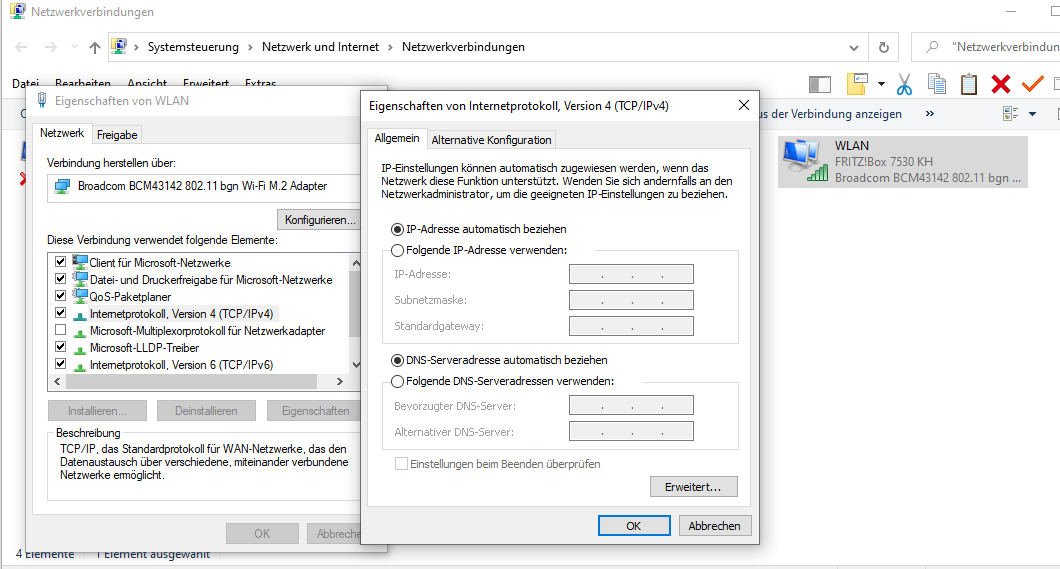
On Android Too
Some Ads are now away...adaway ;):)
My english is not hte best i hope you can read it :/
@Vorlif
`LibreELEC:~ # ifconfig
br-dae5aee4ab6e Link encap:Ethernet HWaddr 02:42:09:69:8E:F9
inet addr:172.18.0.1 Bcast:172.18.255.255 Mask:255.255.0.0
inet6 addr: fe80::42:9ff:fe69:8ef9/64 Scope:Link
UP BROADCAST RUNNING MULTICAST MTU:1500 Metric:1
RX packets:6916 errors:0 dropped:0 overruns:0 frame:0
TX packets:6318 errors:0 dropped:0 overruns:0 carrier:0
collisions:0 txqueuelen:0
RX bytes:2067603 (1.9 MiB) TX bytes:2558170 (2.4 MiB)
docker0 Link encap:Ethernet HWaddr 02:42:3C:25:BD:60
inet addr:172.17.0.1 Bcast:172.17.255.255 Mask:255.255.0.0
UP BROADCAST MULTICAST MTU:1500 Metric:1
RX packets:0 errors:0 dropped:0 overruns:0 frame:0
TX packets:0 errors:0 dropped:0 overruns:0 carrier:0
collisions:0 txqueuelen:0
RX bytes:0 (0.0 B) TX bytes:0 (0.0 B)
eth0 Link encap:Ethernet HWaddr B8:27:EB:78:A9:BF
UP BROADCAST MULTICAST MTU:1500 Metric:1
RX packets:0 errors:0 dropped:0 overruns:0 frame:0
TX packets:0 errors:0 dropped:0 overruns:0 carrier:0
collisions:0 txqueuelen:1000
RX bytes:0 (0.0 B) TX bytes:0 (0.0 B)
lo Link encap:Local Loopback
inet addr:127.0.0.1 Mask:255.0.0.0
inet6 addr: ::1/128 Scope:Host
UP LOOPBACK RUNNING MTU:65536 Metric:1
RX packets:299 errors:0 dropped:0 overruns:0 frame:0
TX packets:299 errors:0 dropped:0 overruns:0 carrier:0
collisions:0 txqueuelen:1000
RX bytes:109120 (106.5 KiB) TX bytes:109120 (106.5 KiB)
veth1b43154 Link encap:Ethernet HWaddr CE:2C:DE:FB:19:AD
inet6 addr: fe80::cc2c:deff:fefb:19ad/64 Scope:Link
UP BROADCAST RUNNING MULTICAST MTU:1500 Metric:1
RX packets:6916 errors:0 dropped:0 overruns:0 frame:0
TX packets:6371 errors:0 dropped:0 overruns:0 carrier:0
collisions:0 txqueuelen:0
RX bytes:2164427 (2.0 MiB) TX bytes:2575102 (2.4 MiB)
wlan0 Link encap:Ethernet HWaddr B8:27:EB:2D:FC:EA
inet addr:192.168.178.39 Bcast:192.168.178.255 Mask:255.255.255.0
UP BROADCAST RUNNING MULTICAST MTU:1500 Metric:1
RX packets:564693 errors:0 dropped:38610 overruns:0 frame:0
TX packets:276534 errors:0 dropped:0 overruns:0 carrier:0
collisions:0 txqueuelen:1000
RX bytes:758472357 (723.3 MiB) TX bytes:28665441 (27.3 MiB)
LibreELEC:~ #
`
@vorlif commented on GitHub (Feb 9, 2020):
Is good enough. ;-)
If you need IPv6, you need to enable it on your Raspberry Pi. Currently, is not activated. Unfortunately I have no experience with LibreELEC and cannot tell you how to activate it there. Otherwise your configuration should fit now.
@BoBBer446 commented on GitHub (Feb 9, 2020):
ipv6 seems to be worst for now - at the moment i dont need it :)
Thank you very much for helping :)