mirror of
https://github.com/AdguardTeam/AdGuardHome.git
synced 2026-03-04 00:01:12 -05:00
Incorrect interface responds back to client #1553
Labels
No labels
P1: Critical
P2: High
P3: Medium
P4: Low
UI
bug
cannot reproduce
compatibility
dependencies
docker
documentation
duplicate
enhancement
enhancement
external libs
feature request
good first issue
help wanted
infrastructure
invalid
localization
needs investigation
performance
potential-duplicate
question
recurrent
research
snap
waiting for data
wontfix
No milestone
No project
No assignees
1 participant

Notifications
Due date
No due date set.
Dependencies
No dependencies set.
Reference
starred/AdGuardHome#1553
Loading…
Add table
Add a link
Reference in a new issue
No description provided.
Delete branch "%!s()"
Deleting a branch is permanent. Although the deleted branch may continue to exist for a short time before it actually gets removed, it CANNOT be undone in most cases. Continue?
Originally created by @lenwar on GitHub (May 13, 2020).
Issue Details
I am running Adguard Home on a Ubiquity USG router (mips64 environment). In my environment I have a number of different VLANs with dedicated subnets. I use those to separate my IoT devices from my PC-network and from each other.
All devices use the same DNS-server entry
(( incomplete list of subnets/VLANs ))
192.168.25.0/24 (primary/PC LAN)
192.168.20.0/24 (guest LAN)
192.168.60.0/29 (Chromecast LAN)
192.168.60.8/29 (Home Assistant LAN)
...
192.168.60.32/27 (Other IoT Devices LAN)
Most (not all) networks talk to the DNS-server on 192.168.25.1 (which is open to most LANs that require DNS)
I currently have dnsmasq listening on port 53 (comes standard with the Ubiquity USG3 router) and forward the requests to AdGuard Home listening on port 5354. This however skews logging (can't see which device requests what in AdGuard Home, as everything comes from 'localhost'). For this reason I want to swap this round. (and point AdGuard Home to dnsmasq for the ARPA-addresses and local LAN-domain to point to my dnsmasq).
AdGuard Home listens on all interfaces (0.0.0.0) (as not all VLANs use the same DNS-entry and I can only select one entry to listen to)
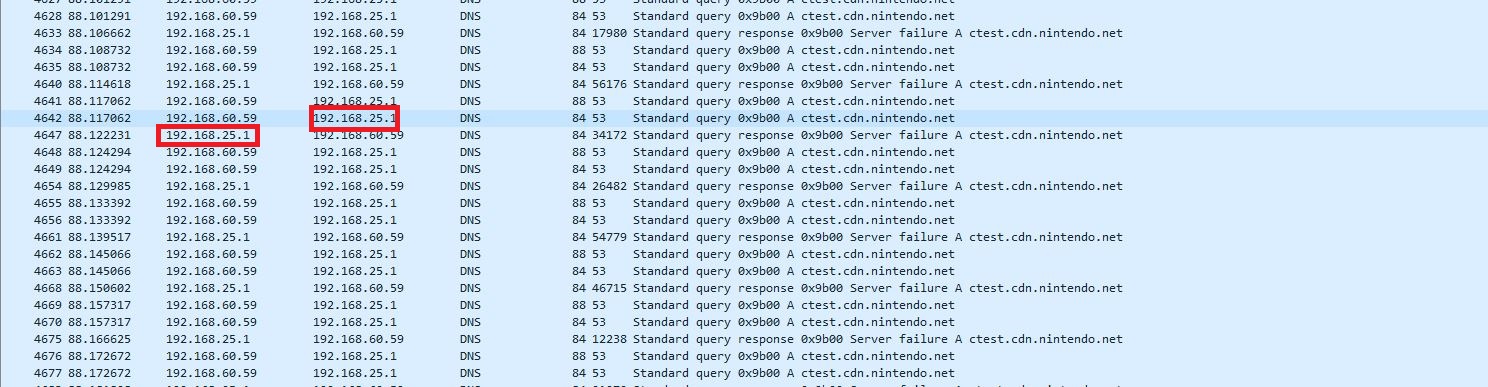
When using dnsmasq as DNS server: A client in (for example) LAN 192.168.60.32/27 does a DNS-request to 192.168.25.1, then 192.168.25.1 responds.
When using AdGuard Home as DNS Server: A client in LAN 192.168.60.32/27 does a DNS-request to 192.168.25.1, then 192.168.25.33 responds, and a number of clients don't seem to like that behaviour (at least the Nintendo Switch and Chromecasts)
(( See screenshots below for filtered tcpdump output in Wireshark ))
Expected Behavior
The DNS response from AdGuardHome should come from the interface it was requested to
Actual Behavior
The DNS response comes from the gateway address in the local subnet
Screenshots
Screenshot:
When using AdGuard Home as DNS-server:When using dnsmasq as DNS-server:
Additional Information
@ameshkov commented on GitHub (May 18, 2020):
@lenwar could you please check version 0.102? This bug has been fixed there.