Log ignore policy for Chatty Clients and/or domains #3491

Closed
opened 2026-03-04 03:44:09 -05:00 by deekerman · 30 comments
Owner

Originally created by @jumpsmm7 on GitHub (Feb 16, 2022).

Originally assigned to: @ainar-g, @Blakhard on GitHub.

Okay, So I know on the Query page we can filter by both Domain and Client. What I am proposing is to add a policy for ignoring clients in the log and statistics. I came about this suggestion because on my network, I have several chatty devices that always contact the same domains over and over and over again. What this proposal will do is allow for users to define logging policies for clients by the address, similarly to how this can already be done for defining individual dns servers and block policy per client basis. Ideally this would also exclude the clients from statistics posted on the AGH statistics page.

Originally created by @jumpsmm7 on GitHub (Feb 16, 2022). Originally assigned to: @ainar-g, @Blakhard on GitHub. Okay, So I know on the Query page we can filter by both Domain and Client. What I am proposing is to add a policy for ignoring clients in the log and statistics. I came about this suggestion because on my network, I have several chatty devices that always contact the same domains over and over and over again. What this proposal will do is allow for users to define logging policies for clients by the address, similarly to how this can already be done for defining individual dns servers and block policy per client basis. Ideally this would also exclude the clients from statistics posted on the AGH statistics page.
Author
Owner

@gspannu commented on GitHub (Feb 16, 2022):

+1

AGH needs a mechanism to exclude specific clients and/or domains from logs and statistics.
This feature is available in Pi-Hole and is a much needed feature that is missing from this fabulous solution.

Just as an added note:
The original OP of this issue is also the author responsible for making AGH available on AsusWRT Merlin Routers.

AGH installer is now available as part of Asus Merlin firmware itself (part of installed amtm)

This means there are now now many additional users who are running AGH directly on their Asus routers.

Problem:
Asus Routers have an inbuilt WAN check mechanism where a particular domain is queried every few seconds and this clogs up the log files as well as the statistics..... "chatty clients"

Please provide a mechanism to disable specific client/ domain logging and statistics?

@gspannu commented on GitHub (Feb 16, 2022): +1 **AGH needs a mechanism to exclude specific clients and/or domains from logs and statistics.** This feature is available in Pi-Hole and is a much needed feature that is missing from this fabulous solution. Just as an added note: `The original OP of this issue is also the author responsible for making AGH available on AsusWRT Merlin Routers.` ### AGH installer is now available as part of Asus Merlin firmware itself (part of installed amtm) _This means there are now now many additional users who are running AGH directly on their Asus routers._ Problem: Asus Routers have an inbuilt WAN check mechanism where a particular domain is queried every few seconds and this clogs up the log files as well as the statistics..... "chatty clients" **Please provide a mechanism to disable specific client/ domain logging and statistics?**
Author
Owner

@fernvenue commented on GitHub (Feb 17, 2022):

I think this feature request is truly needed, as the two comments above say, it includes two aspects:

  • Stop logging some requests based on some specific domains or clients.
  • Add exclusion filtering to the log viewer.

And these shouldn't affect the response of the request. Actually I have a similar situation that my DDNS service makes a request once a minute, it takes up a large part of my log, I really wanna ignore it too.

@fernvenue commented on GitHub (Feb 17, 2022): I think this feature request is truly needed, as the two comments above say, it includes two aspects: - Stop logging some requests based on some specific domains or clients. - Add exclusion filtering to the log viewer. And these shouldn't affect the response of the request. Actually I have a similar situation that my DDNS service makes a request once a minute, it takes up a large part of my log, I really wanna ignore it too.
Author
Owner

@gspannu commented on GitHub (Feb 17, 2022):

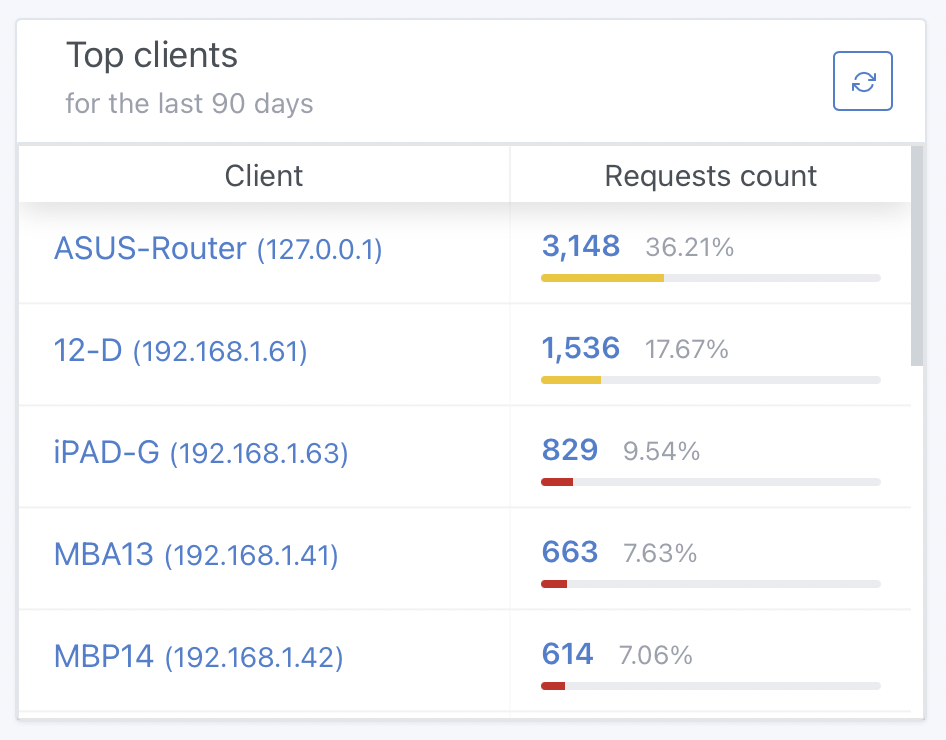
Just to showcase a chatty client...
Screenshot 1

This is just a few hours after clearing all statistics.
As you can see the router (127.0.0.1) has flooded the stats table.
And all these queries from the router (all expected and usual behaviour) just skew the overall statistics. The router is just pinging an address at regular intervals (as part of its WAN check) and there are thousands of these entries.

Screenshot 2
@gspannu commented on GitHub (Feb 17, 2022): **Just to showcase a chatty client...** <img width="473" alt="Screenshot 1" src="https://user-images.githubusercontent.com/137664/154439173-f4b72d5d-b33a-4ada-9b14-8ba1f25d3d8d.png"> This is just a few hours after clearing all statistics. As you can see the router (127.0.0.1) has flooded the stats table. And all these queries from the router (all expected and usual behaviour) just skew the overall statistics. The router is just pinging an address at regular intervals (as part of its WAN check) and there are thousands of these entries. <img width="944" alt="Screenshot 2" src="https://user-images.githubusercontent.com/137664/154441135-731045bf-7e6d-4f35-8d77-2198ad3c7c65.png">
Author
Owner

@ainar-g commented on GitHub (Feb 17, 2022):

Weird. I was under the impression that we already have a GitHub issue about this feature, as v0.108.0 is already developed with this in mind, but now I cannot find it anywhere. But yeah, this is already planned. Thanks for filing the issue.

@ainar-g commented on GitHub (Feb 17, 2022): Weird. I was under the impression that we already have a GitHub issue about this feature, as v0.108.0 is already developed with this in mind, but now I cannot find it anywhere. But yeah, this is already planned. Thanks for filing the issue.
Author
Owner

@gspannu commented on GitHub (Feb 17, 2022):

Weird. I was under the impression that we already have a GitHub issue about this feature, as v0.108.0 is already developed with this in mind, but now I cannot find it anywhere. But yeah, this is already planned. Thanks for filing the issue.

Thank you. That is wonderful news.
... Any estimated time frame when this becomes available in a beta/ edge release?

@gspannu commented on GitHub (Feb 17, 2022): > Weird. I was under the impression that we already have a GitHub issue about **this feature, as v0.108.0** is already developed with this in mind, but now I cannot find it anywhere. But yeah, **this is already planned**. Thanks for filing the issue. Thank you. That is wonderful news. ... Any _estimated time frame_ when this becomes available in a beta/ edge release?
Author
Owner

@ainar-g commented on GitHub (Feb 17, 2022):

No precise schedule, but it should be within the v0.108.0 cycle.

@ainar-g commented on GitHub (Feb 17, 2022): No precise schedule, but it should be within the v0.108.0 cycle.
Author
Owner

@agneevX commented on GitHub (Feb 17, 2022):

@gspannu pinging dns.msftncsi.com is something ASUS routers do to check for an active internet connection. It can be changed to an IP address which should reduce eliminate the queries made by the router.

@agneevX commented on GitHub (Feb 17, 2022): @gspannu pinging `dns.msftncsi.com` is something ASUS routers do to check for an active internet connection. It can be changed to an IP address which should ~reduce~ eliminate the queries made by the router.
Author
Owner

@gspannu commented on GitHub (Feb 17, 2022):

@gspannu pinging dns.msftncsi.com is something ASUS routers do to check for an active internet connection. It can be changed to an IP address which should reduce the queries.

That would be a good workaround for now...

How can this be done on the router?
Is there some command to change the NVRAM parameters or is there a setting in the GUI that will allow me to make this change?

I am running Asus Merlin 386.4 on a RT-AX88U router.

@gspannu commented on GitHub (Feb 17, 2022): > @gspannu pinging `dns.msftncsi.com` is something ASUS routers do to check for an active internet connection. It can be changed to an IP address which should reduce the queries. **That would be a good workaround for now...** How can this be done on the router? Is there some command to `change the NVRAM parameters` or is there `a setting in the GUI` that will allow me to make this change? _I am running Asus Merlin 386.4 on a RT-AX88U router._
Author
Owner

@agneevX commented on GitHub (Feb 17, 2022):

There's an advanced setting somewhere within WAN config, IIRC.

@agneevX commented on GitHub (Feb 17, 2022): There's an advanced setting somewhere within WAN config, IIRC.
Author
Owner

@agneevX commented on GitHub (Feb 17, 2022):

Here's a help article.

@agneevX commented on GitHub (Feb 17, 2022): [Here's a help article](https://www.asus.com/support/FAQ/1037370/).
Author
Owner

@gspannu commented on GitHub (Feb 17, 2022):

There's an advanced setting somewhere within WAN config, IIRC.
Here's a help article.

I don't think your suggestion will work... or I may have misunderstood your workaround.

The setting is in the Administration -> System Section
Default Setting: OFF
Screenshot 2
Even with the checkbox disabled, the route is sending out dns.msftncsi.com queries.

Settings that can be changed:
Screenshot 1
This still requires a domain name and its resolved IP address.

Question:
How will changing from dns.msftncsi.com to (let's say) google.com help... because now the router will be making loads of queries to google.com instead of dns.msftncsi.com and this will still be flooding the logs and the statistics.

Or have I totally misunderstood your suggestion?

@gspannu commented on GitHub (Feb 17, 2022): > There's an advanced setting somewhere within WAN config, IIRC. > [Here's a help article](https://www.asus.com/support/FAQ/1037370/). **I don't think your suggestion will work... or I may have misunderstood your workaround.** The setting is in the Administration -> System Section Default Setting: OFF <img width="470" alt="Screenshot 2" src="https://user-images.githubusercontent.com/137664/154529167-acf1259f-2107-4951-8082-f6b19d909469.png"> Even with the checkbox disabled, the route is sending out dns.msftncsi.com queries. Settings that can be changed: <img width="638" alt="Screenshot 1" src="https://user-images.githubusercontent.com/137664/154529482-171d831e-3968-4900-beee-cebfdceaf7d3.png"> This still requires a domain name and its resolved IP address. **Question:** How will changing from `dns.msftncsi.com` to (let's say) `google.com` help... because now the router will be making loads of queries to google.com instead of dns.msftncsi.com _and this will still be flooding the logs and the statistics._ **Or have I totally misunderstood your suggestion?**
Author
Owner

@agneevX commented on GitHub (Feb 17, 2022):

Select Ping and enter 8.8.8.8 or an IP address of your choice??

@agneevX commented on GitHub (Feb 17, 2022): Select Ping and enter 8.8.8.8 or an IP address of your choice??
Author
Owner

@WildByDesign commented on GitHub (Feb 17, 2022):

Weird. I was under the impression that we already have a GitHub issue about this feature, as v0.108.0 is already developed with this in mind, but now I cannot find it anywhere. But yeah, this is already planned. Thanks for filing the issue.

Link: https://github.com/AdguardTeam/AdGuardHome/issues/1717

@WildByDesign commented on GitHub (Feb 17, 2022): > Weird. I was under the impression that we already have a GitHub issue about this feature, as v0.108.0 is already developed with this in mind, but now I cannot find it anywhere. But yeah, this is already planned. Thanks for filing the issue. Link: https://github.com/AdguardTeam/AdGuardHome/issues/1717
Author
Owner

@gspannu commented on GitHub (Feb 17, 2022):

Select Ping and enter 8.8.8.8 or an IP address of your choice??

Tried it… the router is still sending the requests to dns.msftncsi.com. No change, same amount of traffic from 127.0.0.1

@gspannu commented on GitHub (Feb 17, 2022): > Select Ping and enter 8.8.8.8 or an IP address of your choice?? Tried it… the router is still sending the requests to dns.msftncsi.com. No change, same amount of traffic from 127.0.0.1
Author
Owner

@jumpsmm7 commented on GitHub (Feb 18, 2022):

Select Ping and enter 8.8.8.8 or an IP address of your choice??

@agneevX @gspannu
It cannot be overridden or turned off, the only thing that can be done is users can softly choose which domains it uses. This is hard-coded by asus into the router firmware code.

@jumpsmm7 commented on GitHub (Feb 18, 2022): > Select Ping and enter 8.8.8.8 or an IP address of your choice?? @agneevX @gspannu It cannot be overridden or turned off, the only thing that can be done is users can softly choose which domains it uses. This is hard-coded by asus into the router firmware code.
Author
Owner

@jumpsmm7 commented on GitHub (Feb 18, 2022):

Duplicate of #1717

@jumpsmm7 commented on GitHub (Feb 18, 2022): Duplicate of #1717
Author
Owner

@agneevX commented on GitHub (Feb 18, 2022):

@gspannu @jumpsmm7 Here's a relevant forum post you might find useful

@agneevX commented on GitHub (Feb 18, 2022): @gspannu @jumpsmm7 [Here's](https://www.snbforums.com/threads/network-flooded-by-dns-msftncsi-com-requests.61155/) a relevant forum post you might find useful
Author
Owner

@gspannu commented on GitHub (Feb 18, 2022):

@gspannu @jumpsmm7 Here's a relevant forum post you might find useful

Thanks. I used the @jumpsmm7 solution in the post and it works !
Thank you.

@gspannu commented on GitHub (Feb 18, 2022): > @gspannu @jumpsmm7 [Here's](https://www.snbforums.com/threads/network-flooded-by-dns-msftncsi-com-requests.61155/) a relevant forum post you might find useful Thanks. I used the @jumpsmm7 solution in the post and it works ! Thank you.
Author
Owner

@agneevX commented on GitHub (Feb 18, 2022):

It's great that it worked. BTW, I'm not involved on that thread.

@agneevX commented on GitHub (Feb 18, 2022): It's great that it worked. BTW, I'm not involved on that thread.
Author
Owner

@ainar-g commented on GitHub (Apr 18, 2023):

Implemented for both domains and clients on Edge and in the upcoming release.

@ainar-g commented on GitHub (Apr 18, 2023): Implemented for both domains and clients on Edge and in the upcoming release.
Author
Owner

@alexdelprete commented on GitHub (Apr 18, 2023):

Implemented for both domains and clients on Edge and in the upcoming release.

Any instructions on how to configure the exclusions for domains and clients?

Thanks.

@alexdelprete commented on GitHub (Apr 18, 2023): > Implemented for both domains and clients on Edge and in the upcoming release. Any instructions on how to configure the exclusions for domains and clients? Thanks.
Author
Owner

@ainar-g commented on GitHub (Apr 19, 2023):

@alexdelprete, both are in the UI. For domains, see Settings → General settings. For clients, the persistent client creation/update dialog window.

@ainar-g commented on GitHub (Apr 19, 2023): @alexdelprete, both are in the UI. For domains, see *Settings → General settings.* For clients, the persistent client creation/update dialog window.
Author
Owner

@alexdelprete commented on GitHub (Apr 19, 2023):

Thanks, I confused that new section with the ignored domains in the Logs Configuration section.

I configured my lan domain in the "Ignored Domains" and also reset statistics, but I'm still seeing info about local domain hosts in the homepage sections (top queried domains, top clients, etc.), is that normal?

@alexdelprete commented on GitHub (Apr 19, 2023): Thanks, I confused that new section with the ignored domains in the Logs Configuration section. I configured my lan domain in the "Ignored Domains" and also reset statistics, but I'm still seeing info about local domain hosts in the homepage sections (top queried domains, top clients, etc.), is that normal?
Author
Owner

@ainar-g commented on GitHub (Apr 19, 2023):

Did you add the precise hostnames or only upper-level domains? The matcher currently only works with full domain names, see #5720.

I'm also not sure what you mean about the top clients section, since these domain names are matched with the question part of the DNS message, not the client. Clients' statistics are ignored using the checkmarks in the aforementioned persistent client dialog.

@ainar-g commented on GitHub (Apr 19, 2023): Did you add the precise hostnames or only upper-level domains? The matcher currently only works with full domain names, see #5720. I'm also not sure what you mean about the top clients section, since these domain names are matched with the question part of the DNS message, not the client. Clients' statistics are ignored using the checkmarks in the aforementioned persistent client dialog.
Author
Owner

@alexdelprete commented on GitHub (Apr 19, 2023):

Hostname: mariadb
DNS domain: axel.dom
FQDN: mariadb.axel.dom

In the config section named "Ignored Domains" I input the DNS domain I want to be filtered

image

So that section is actually "Ignored FQDNs" that means it would only filter queries for axel.dom and not mariadb.axel.dom, correct?

That's why in #5720 wildcard support is being requested. I wrongly assumed you could filter on the DNS domain there, and specific clients in the clients section.

@alexdelprete commented on GitHub (Apr 19, 2023): Hostname: mariadb DNS domain: axel.dom FQDN: mariadb.axel.dom In the config section named "Ignored Domains" I input the DNS domain I want to be filtered ![image](https://user-images.githubusercontent.com/7027842/233144745-a00cc803-0697-4b8a-ad9d-d2d1f4004826.png) So that section is actually "Ignored FQDNs" that means it would only filter queries for `axel.dom` and not `mariadb.axel.dom`, correct? That's why in #5720 wildcard support is being requested. I wrongly assumed you could filter on the DNS domain there, and specific clients in the clients section.
Author
Owner

@ainar-g commented on GitHub (Apr 19, 2023):

Yes, to stop queries for mariadb.axel.dom from being recorded in the statistics you need to add mariadb.axel.dom in there.

@ainar-g commented on GitHub (Apr 19, 2023): Yes, to stop queries for `mariadb.axel.dom` from being recorded in the statistics you need to add `mariadb.axel.dom` in there.
Author
Owner

@alexdelprete commented on GitHub (Apr 19, 2023):

Thanks for clearing this up. I hope wildcard support will be implemented.

@alexdelprete commented on GitHub (Apr 19, 2023): Thanks for clearing this up. I hope wildcard support will be implemented.
Author
Owner

@jumpsmm7 commented on GitHub (Apr 20, 2023):

@ainar-g at a later date, it may be advantageous to add a match all capability for a specific set of domains. eg. *.axel.dom. This is not a must have now feature request, but just an observation. Great work on the timeliness and implementation of this feature. I look forward to continue sharing future ideas to keep AdGuardHome on the cutting edge.

@jumpsmm7 commented on GitHub (Apr 20, 2023): @ainar-g at a later date, it may be advantageous to add a match all capability for a specific set of domains. eg. `*.axel.dom`. This is not a must have now feature request, but just an observation. Great work on the timeliness and implementation of this feature. I look forward to continue sharing future ideas to keep AdGuardHome on the cutting edge.
Author
Owner

@diasdmhub commented on GitHub (Apr 30, 2023):

@ainar-g, I did not find an option to ignore domains only for specific clients.
For instance, if I were to ignore "google.com" log just for a single client, not all.
Is that possible?

@diasdmhub commented on GitHub (Apr 30, 2023): @ainar-g, I did not find an option to ignore domains only for specific clients. For instance, if I were to ignore "google.com" log just for a single client, not all. Is that possible?
Author
Owner

@xlionjuan commented on GitHub (Nov 29, 2024):

Haven't solved?

@xlionjuan commented on GitHub (Nov 29, 2024): Haven't solved?
Sign in to join this conversation.
No milestone
No project
No assignees
1 participant
Notifications
Due date
The due date is invalid or out of range. Please use the format "yyyy-mm-dd".

No due date set.

Dependencies

No dependencies set.

Reference
starred/AdGuardHome#3491
No description provided.