Private IP's PTR no answer [RFC1918 Private Address Space] #3625

Closed
opened 2026-03-04 03:59:23 -05:00 by deekerman · 23 comments
Owner

Originally created by @wuyifan66 on GitHub (Apr 16, 2022).

Prerequisites

  • [ yes] I am running the latest version
  • [ yes] I checked the documentation and found no answer
  • [ yes] I checked to make sure that this issue has not already been filed

Issue Details

  • Version of AdGuard Home server:
    v0.107.6

  • How did you install AdGuard Home:
    Docker

  • How did you setup DNS configuration:
    Upstream DNS Server:
    100.69.0.100
    [/68.100.in-addr.arpa/]100.69.0.100
    [/69.100.in-addr.arpa/]100.69.0.100
    [/99.23.172.in-addr.arpa/]100.69.0.100
    Private Reverse DNS Server:
    100.69.0.100

  • If it's a router or IoT, please write device model:
    /

  • CPU architecture:
    X86 E5-2680V3

  • Operating system and version:
    Centos 8

PS: The following contents include both Chinese and English with the same meaning.

Expected Behavior

When "private reverse DNS server" is set and "use private reverse DNS server" is turned on, when querying the PTR information of the RFC1918 Private IP (10.0.0.0/8 172.16.0.0/14 192.168.0.0/16), I should get a correct response instead of "non-existing domain"

当设置了“私人反向 DNS 服务器”,并且开启了“使用私人反向DNS服务器”,查询私有IP(10.0.0.0/8,172.16.0.0/14,192.168.0.0/16)的PTR信息时,应该得到正确的回应而不是“ Non-existent domain”

Actual Behavior

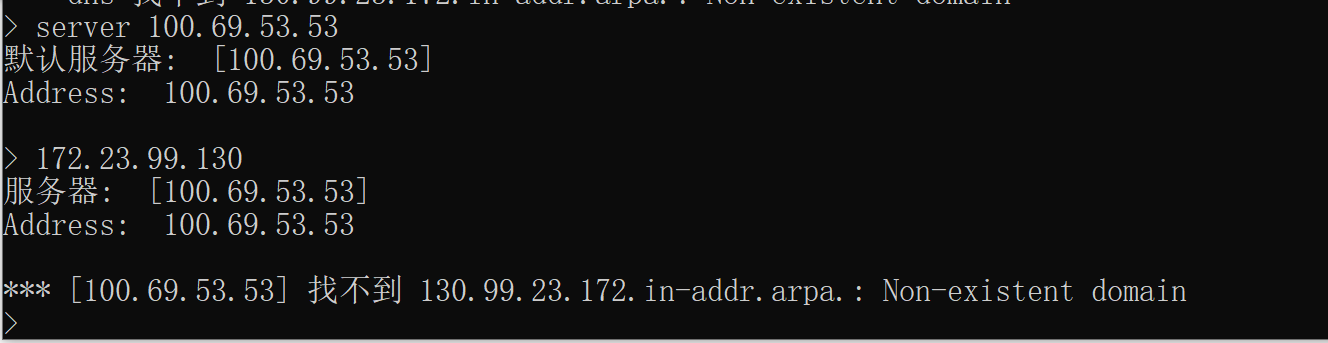
reverse DNS server is set and "use private reverse DNS server" is turned on,when querying the PTR information of the local IP ,get response "non-existing domain"(I can get a correct response by directly querying the upstream PTR server)

已经设置了“私人反向DNS服务器”,并且开启了“使用私人反向DNS服务器”,查询本地IP的PTR信息给出的回应仍然是“non-existing domain”。(直接查询上游PTR服务器可以得到正确的回应)

Screenshots

Screenshot: I set the private reverse DNS server: 我已经设置了反向DNS服务器:

seted1.png

then,test,no response
然而测试后没有回应:
noresponse.png

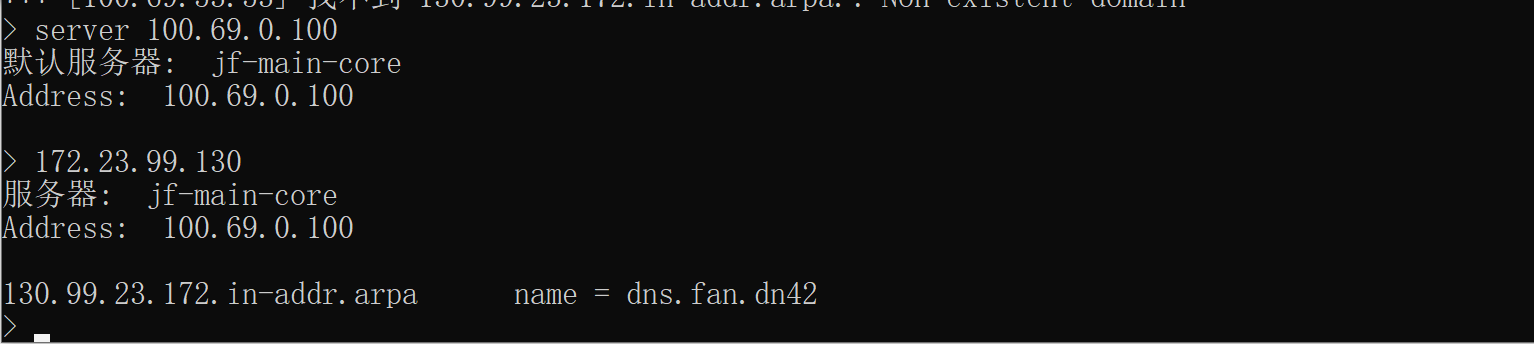
I can get a correct response by directly querying the upstream PTR server which same as the server in the adGuard's "private reverse DNS server"
直连上游反向DNS服务器是正常的
direct.png

Additional Information

In addition, I tried to turn on or off the "use private reverse DNS resolver" option, which didn't work.

I also tried to set up the upstream DNS server directly,
like this:
[/20.172.in-addr.arpa/]172.20.0.53
[/21.172.in-addr.arpa/]172.20.0.53
[/22.172.in-addr.arpa/]172.20.0.53

but it didn't work too. It seems that adguard has made special treatment for these private addresses (10.0.0.0/8,172.16.0.0/14,192.168.0.0/16).
not work >.<

Originally created by @wuyifan66 on GitHub (Apr 16, 2022). ### Prerequisites - [ yes] I am running the latest version - [ yes] I checked the documentation and found no answer - [ yes] I checked to make sure that this issue has not already been filed ### Issue Details <!-- Please include all relevant details about the environment you experienced the bug in. If possible, include the result of running `./AdGuardHome -v --version` from the installation directory. --> * **Version of AdGuard Home server:** v0.107.6 * **How did you install AdGuard Home:** Docker * **How did you setup DNS configuration:** Upstream DNS Server: `100.69.0.100` `[/68.100.in-addr.arpa/]100.69.0.100` `[/69.100.in-addr.arpa/]100.69.0.100` `[/99.23.172.in-addr.arpa/]100.69.0.100` Private Reverse DNS Server: `100.69.0.100` * **If it's a router or IoT, please write device model:** / * **CPU architecture:** X86 E5-2680V3 * **Operating system and version:** Centos 8 PS: The following contents include both Chinese and English with the same meaning. ### Expected Behavior When "private reverse DNS server" is set and "use private reverse DNS server" is turned on, when querying the PTR information of the RFC1918 Private IP (10.0.0.0/8 172.16.0.0/14 192.168.0.0/16), I should get a correct response instead of "non-existing domain" 当设置了“私人反向 DNS 服务器”,并且开启了“使用私人反向DNS服务器”,查询私有IP(10.0.0.0/8,172.16.0.0/14,192.168.0.0/16)的PTR信息时,应该得到正确的回应而不是“ Non-existent domain” ### Actual Behavior reverse DNS server is set and "use private reverse DNS server" is turned on,when querying the PTR information of the local IP ,get response "non-existing domain"(I can get a correct response by directly querying the upstream PTR server) 已经设置了“私人反向DNS服务器”,并且开启了“使用私人反向DNS服务器”,查询本地IP的PTR信息给出的回应仍然是“non-existing domain”。(直接查询上游PTR服务器可以得到正确的回应) ### Screenshots <details><summary>Screenshot:</summary> I set the private reverse DNS server: 我已经设置了反向DNS服务器: ![seted1.png](https://app.hnust.edu.cn/img01/2022/04/16/143bec1d55428.png) then,test,no response 然而测试后没有回应: ![noresponse.png](https://app.hnust.edu.cn/img01/2022/04/16/39bdfa9551437.png) I can get a correct response by directly querying the upstream PTR server which same as the server in the adGuard's "private reverse DNS server" 直连上游反向DNS服务器是正常的 ![direct.png](https://app.hnust.edu.cn/img01/2022/04/16/836b74ce83b35.png) </details> ### Additional Information <!-- Add any other context about the problem here. --> In addition, I tried to turn on or off the "use private reverse DNS resolver" option, which didn't work. I also tried to set up the upstream DNS server directly, like this: [/20.172.in-addr.arpa/]172.20.0.53 [/21.172.in-addr.arpa/]172.20.0.53 [/22.172.in-addr.arpa/]172.20.0.53 but it didn't work too. It seems that adguard has made special treatment for these private addresses (10.0.0.0/8,172.16.0.0/14,192.168.0.0/16). not work >.<
deekerman 2026-03-04 03:59:23 -05:00
  • closed this issue
  • added the
    duplicate
    label
Author
Owner

@wuyifan66 commented on GitHub (Apr 16, 2022):

verbose log
query 172.23.99.130's PTR

==============
2022/04/16 15:55:49.228107 1#81 [debug] github.com/AdguardTeam/dnsproxy/proxy.(*Proxy).udpHandlePacket(): Start handling new UDP packet from 100.68.38.119:61907
2022/04/16 15:55:49.228274 1#81 [debug] github.com/AdguardTeam/dnsproxy/proxy.(*Proxy).logDNSMessage(): IN: ;; opcode: QUERY, status: NOERROR, id: 38
;; flags: rd; QUERY: 1, ANSWER: 0, AUTHORITY: 0, ADDITIONAL: 0

;; QUESTION SECTION:
;130.99.23.172.in-addr.arpa. IN PTR

2022/04/16 15:55:49.228392 1#81 [debug] dns: "100.68.38.119:61907" requests an internal ip
2022/04/16 15:55:49.228468 1#81 [debug] github.com/AdguardTeam/dnsproxy/proxy.(*Proxy).logDNSMessage(): OUT: ;; opcode: QUERY, status: NXDOMAIN, id: 38
;; flags: qr rd ra; QUERY: 1, ANSWER: 0, AUTHORITY: 1, ADDITIONAL: 0

;; QUESTION SECTION:
;130.99.23.172.in-addr.arpa. IN PTR

;; AUTHORITY SECTION:
130.99.23.172.in-addr.arpa. 10 IN SOA fake-for-negative-caching.adguard.com. hostmaster.130.99.23.172.in-addr.arpa. 100500 1800 900 604800 86400

@wuyifan66 commented on GitHub (Apr 16, 2022): verbose log query 172.23.99.130's PTR ============== 2022/04/16 15:55:49.228107 1#81 [debug] github.com/AdguardTeam/dnsproxy/proxy.(*Proxy).udpHandlePacket(): Start handling new UDP packet from 100.68.38.119:61907 2022/04/16 15:55:49.228274 1#81 [debug] github.com/AdguardTeam/dnsproxy/proxy.(*Proxy).logDNSMessage(): IN: ;; opcode: QUERY, status: NOERROR, id: 38 ;; flags: rd; QUERY: 1, ANSWER: 0, AUTHORITY: 0, ADDITIONAL: 0 ;; QUESTION SECTION: ;130.99.23.172.in-addr.arpa. IN PTR 2022/04/16 15:55:49.228392 1#81 [debug] dns: "100.68.38.119:61907" requests an internal ip 2022/04/16 15:55:49.228468 1#81 [debug] github.com/AdguardTeam/dnsproxy/proxy.(*Proxy).logDNSMessage(): OUT: ;; opcode: QUERY, status: NXDOMAIN, id: 38 ;; flags: qr rd ra; QUERY: 1, ANSWER: 0, AUTHORITY: 1, ADDITIONAL: 0 ;; QUESTION SECTION: ;130.99.23.172.in-addr.arpa. IN PTR ;; AUTHORITY SECTION: 130.99.23.172.in-addr.arpa. 10 IN SOA fake-for-negative-caching.adguard.com. hostmaster.130.99.23.172.in-addr.arpa. 100500 1800 900 604800 86400
Author
Owner

@fernvenue commented on GitHub (Apr 16, 2022):

How do you manually query your upstream PTR servers?

dig -x 10.0.0.2 @10.0.0.1

Could you please try dig like this to your upstream and show us what's happen?

@fernvenue commented on GitHub (Apr 16, 2022): How do you manually query your upstream PTR servers? ``` dig -x 10.0.0.2 @10.0.0.1 ``` Could you please try dig like this to your upstream and show us what's happen?
Author
Owner

@wuyifan66 commented on GitHub (Apr 17, 2022):

upstream PTR servers is work and good

20220417141259.png

@wuyifan66 commented on GitHub (Apr 17, 2022): upstream PTR servers is work and good ![20220417141259.png](https://app.hnust.edu.cn/img01/2022/04/17/5ede6544f149e.png)
Author
Owner

@wuyifan66 commented on GitHub (Apr 17, 2022):

by the way, the upstream ptr server never get any ptr request of RFC1918 Private Address from the AdguardHome

@wuyifan66 commented on GitHub (Apr 17, 2022): by the way, the upstream ptr server never get any ptr request of RFC1918 Private Address from the AdguardHome
Author
Owner

@agneevX commented on GitHub (Apr 17, 2022):

Can confirm this issue and the fact that rDNS queries in those address spaces are not sent to upstreams, even if explicitly defined.

This also seems to be connected to an issue I reported a while ago, where specific rDNS queries do not appear in Query Log.

@agneevX commented on GitHub (Apr 17, 2022): Can confirm this issue and the fact that rDNS queries in those address spaces are not sent to upstreams, even if explicitly defined. This also seems to be connected to an issue I reported a while ago, where specific rDNS queries do not appear in Query Log.
Author
Owner

@wuyifan66 commented on GitHub (Apr 17, 2022):

Can confirm this issue and the fact that rDNS queries in those address spaces are not sent to upstreams, even if explicitly defined.

This also seems to be connected to an issue I reported a while ago, where specific rDNS queries do not appear in Query Log.

Can confirm this issue and the fact that rDNS queries in those address spaces are not sent to upstreams, even if explicitly defined.

This also seems to be connected to an issue I reported a while ago, where specific rDNS queries do not appear in Query Log.

yes, no query log, and as the verbose log show, Adguard seems hijack those Private IP. This definitely is a bug

@wuyifan66 commented on GitHub (Apr 17, 2022): > > Can confirm this issue and the fact that rDNS queries in those address spaces are not sent to upstreams, even if explicitly defined. > > This also seems to be connected to an issue I reported a while ago, where specific rDNS queries do not appear in Query Log. > Can confirm this issue and the fact that rDNS queries in those address spaces are not sent to upstreams, even if explicitly defined. > > This also seems to be connected to an issue I reported a while ago, where specific rDNS queries do not appear in Query Log. yes, no query log, and as the verbose log show, Adguard seems hijack those Private IP. This definitely is a bug
Author
Owner

@agneevX commented on GitHub (Apr 17, 2022):

This also seems to be connected to an issue I reported a while ago, where specific rDNS queries do not appear in Query Log.

#3526

@agneevX commented on GitHub (Apr 17, 2022): > This also seems to be connected to an issue I reported a while ago, where specific rDNS queries do not appear in Query Log. #3526
Author
Owner

@EugeneOne1 commented on GitHub (Apr 18, 2022):

@wuyifan66, hello. As far as I can see by the logs, AdGuard Home restrict the access to the information about addresses from internal network (172.23.99.130) for the external client (100.68.38.119). This is an intended behavior actually.

By default, AGH uses the set of networks defined by RFC 6303 to detect private networks. Check out this page for the detailed description. To clarify, AGH responds with NXDOMAIN for PTR requests from external addresses to the internal ones. Note also that all these requests are forwarded to the Private reverse DNS servers even if the common-purpose upstream servers are configured to handle these.

Luckily, since #3142 was implemented, it's possible to configure your own set of networks to consider them private. Currently, it's is only available in the edge builds, the nearest milestone for it is v0.108.0. If that helped? Thanks.

@EugeneOne1 commented on GitHub (Apr 18, 2022): @wuyifan66, hello. As far as I can see by the logs, AdGuard Home restrict the access to the information about addresses from internal network (`172.23.99.130`) for the external client (`100.68.38.119`). This is an intended behavior actually. By default, AGH uses the set of networks defined by [RFC 6303](https://tools.ietf.org/html/rfc6303) to detect private networks. Check out [this page](https://github.com/AdguardTeam/AdGuardHome/wiki/Configuration#upstreams-for-rdns) for the detailed description. To clarify, AGH responds with `NXDOMAIN` for PTR requests from external addresses to the internal ones. Note also that all these requests are forwarded to the **Private reverse DNS servers** even if the common-purpose upstream servers are configured to handle these. Luckily, since #3142 was implemented, it's possible to configure your own set of networks to consider them private. Currently, it's is only available in the edge builds, the nearest milestone for it is **v0.108.0**. If that helped? Thanks.
Author
Owner

@wuyifan66 commented on GitHub (Apr 19, 2022):

thanks, how to configure my own set of network in edge version? (v0.108.0-a.111+57171f0a)

@wuyifan66 commented on GitHub (Apr 19, 2022): thanks, how to configure my own set of network in edge version? (v0.108.0-a.111+57171f0a)
Author
Owner

@EugeneOne1 commented on GitHub (Apr 19, 2022):

@wuyifan66, use private_networks field of the AdGuardHome.yaml file as described here. I suppose that you most likely want to supplement the default set of networks with your own, so you'll need to list them like that for example:

- 10.0.0.0/8
- 172.16.0.0/12
- 192.168.0.0/16
- 127.0.0.0/8
- 169.254.0.0/16
- 192.0.2.0/24
- 198.51.100.0/24
- 203.0.113.0/24
- 255.255.255.255/32
- ::/128
- ::1/128
- fe80::/10
- 2001:db8::/32
- fd00::/8
- <custom_private_network>

Also, keep in mind that PTR requests for addresses from these networks are also handled only for clients with addresses from these networks. So that incorrectly chosen subnet may either restrict an access to some of them for some clients or cause clients' information leak (See #2704).

@EugeneOne1 commented on GitHub (Apr 19, 2022): @wuyifan66, use `private_networks` field of the `AdGuardHome.yaml` file as described [here](https://github.com/AdguardTeam/AdGuardHome/wiki/Configuration#rdns-private). I suppose that you most likely want to supplement the default set of networks with your own, so you'll need to list them like that for example: ``` - 10.0.0.0/8 - 172.16.0.0/12 - 192.168.0.0/16 - 127.0.0.0/8 - 169.254.0.0/16 - 192.0.2.0/24 - 198.51.100.0/24 - 203.0.113.0/24 - 255.255.255.255/32 - ::/128 - ::1/128 - fe80::/10 - 2001:db8::/32 - fd00::/8 - <custom_private_network> ``` Also, keep in mind that PTR requests for addresses from these networks are also handled only for clients with addresses from these networks. So that incorrectly chosen subnet may either restrict an access to some of them for some clients or cause clients' information leak (See #2704).
Author
Owner

@24fpsDaVinci commented on GitHub (Apr 25, 2022):

@wuyifan66, use private_networks field of the AdGuardHome.yaml file as described here. I suppose that you most likely want to supplement the default set of networks with your own, so you'll need to list them like that for example:

- 10.0.0.0/8
- 172.16.0.0/12
- 192.168.0.0/16
- 127.0.0.0/8
- 169.254.0.0/16
- 192.0.2.0/24
- 198.51.100.0/24
- 203.0.113.0/24
- 255.255.255.255/32
- ::/128
- ::1/128
- fe80::/10
- 2001:db8::/32
- fd00::/8
- <custom_private_network>

Also, keep in mind that PTR requests for addresses from these networks are also handled only for clients with addresses from these networks. So that incorrectly chosen subnet may either restrict an access to some of them for some clients or cause clients' information leak (See #2704).

PTR was not working for me on beta v0.108.0-b.6, in config yaml private_networks was blank [] and nslookup returned nxdomain. after adding these networks PTR is working

@24fpsDaVinci commented on GitHub (Apr 25, 2022): > @wuyifan66, use `private_networks` field of the `AdGuardHome.yaml` file as described [here](https://github.com/AdguardTeam/AdGuardHome/wiki/Configuration#rdns-private). I suppose that you most likely want to supplement the default set of networks with your own, so you'll need to list them like that for example: > > ``` > - 10.0.0.0/8 > - 172.16.0.0/12 > - 192.168.0.0/16 > - 127.0.0.0/8 > - 169.254.0.0/16 > - 192.0.2.0/24 > - 198.51.100.0/24 > - 203.0.113.0/24 > - 255.255.255.255/32 > - ::/128 > - ::1/128 > - fe80::/10 > - 2001:db8::/32 > - fd00::/8 > - <custom_private_network> > ``` > > Also, keep in mind that PTR requests for addresses from these networks are also handled only for clients with addresses from these networks. So that incorrectly chosen subnet may either restrict an access to some of them for some clients or cause clients' information leak (See #2704). PTR was not working for me on beta v0.108.0-b.6, in config yaml private_networks was blank [] and nslookup returned nxdomain. after adding these networks PTR is working
Author
Owner

@EugeneOne1 commented on GitHub (Apr 25, 2022):

@24fpsDaVinci, hello. Do you mean these networks with the desired network added? I'm asking because the empty ([]) value of private_networks is essentially the same set of networks but hardcoded and optimized. So if you just put the list without additions please let us know, this may be considered a bug.

@EugeneOne1 commented on GitHub (Apr 25, 2022): @24fpsDaVinci, hello. Do you mean these networks with the desired network added? I'm asking because the empty (`[]`) value of `private_networks` is essentially the same set of networks but hardcoded and optimized. So if you just put the list without additions please let us know, this may be considered a bug.
Author
Owner

@EugeneOne1 commented on GitHub (Apr 25, 2022):

@wuyifan66, any update since? Can we close the issue?

@EugeneOne1 commented on GitHub (Apr 25, 2022): @wuyifan66, any update since? Can we close the issue?
Author
Owner

@24fpsDaVinci commented on GitHub (Apr 25, 2022):

@24fpsDaVinci, hello. Do you mean these networks with the desired network added? I'm asking because the empty ([]) value of private_networks is essentially the same set of networks but hardcoded and optimized. So if you just put the list without additions please let us know, this may be considered a bug.

after further testing, the issue I have is back.
My original issue:
192.168.1.1 in private reverse dns
[/in-addr.arpa/]192.168.1.1 [/ip6.arpa/]192.168.1.1 in upstream
nslookup will return NXDOMAIN even though under client settings all hostnames are shown in the runtime clients table.

@24fpsDaVinci commented on GitHub (Apr 25, 2022): > @24fpsDaVinci, hello. Do you mean these networks with the desired network added? I'm asking because the empty (`[]`) value of `private_networks` is essentially the same set of networks but hardcoded and optimized. So if you just put the list without additions please let us know, this may be considered a bug. after further testing, the issue I have is back. My original issue: 192.168.1.1 in private reverse dns [/in-addr.arpa/]192.168.1.1 [/ip6.arpa/]192.168.1.1 in upstream nslookup will return NXDOMAIN even though under client settings all hostnames are shown in the runtime clients table.
Author
Owner

@ainar-g commented on GitHub (Apr 25, 2022):

@24fpsDaVinci, the configuration looks good, but I'm not sure why you mention runtime clients. AdGuard Home doesn't consult the runtime clients table when responding to PTR quiries. The runtime client data may contain data from different sources, not just rDNS, and is basically only used to show more information about the clients in the query log and on the dashboard.

Please provide an example of nslookup which doesn't work with AdGuard Home but does when you query 192.168.1.1 directly. Thanks.

@ainar-g commented on GitHub (Apr 25, 2022): @24fpsDaVinci, the configuration looks good, but I'm not sure why you mention runtime clients. AdGuard Home doesn't consult the runtime clients table when responding to PTR quiries. The runtime client data may contain data from different sources, not just rDNS, and is basically only used to show more information about the clients in the query log and on the dashboard. Please provide an example of `nslookup` which doesn't work with AdGuard Home but does when you query `192.168.1.1` directly. Thanks.
Author
Owner

@EugeneOne1 commented on GitHub (Apr 25, 2022):

@24fpsDaVinci, where do you perform the PTR requests from? Is this machine in the same network?

Also, which else upstream servers are used for private PTRs? Which ones of them aren't domain-specific? Which ones are above and below?

@EugeneOne1 commented on GitHub (Apr 25, 2022): @24fpsDaVinci, where do you perform the PTR requests from? Is this machine in the same network? Also, which else upstream servers are used for private PTRs? Which ones of them aren't domain-specific? Which ones are above and below?
Author
Owner

@24fpsDaVinci commented on GitHub (Apr 25, 2022):

@24fpsDaVinci, the configuration looks good, but I'm not sure why you mention runtime clients. AdGuard Home doesn't consult the runtime clients table when responding to PTR quiries. The runtime client data may contain data from different sources, not just rDNS, and is basically only used to show more information about the clients in the query log and on the dashboard.

Please provide an example of nslookup which doesn't work with AdGuard Home but does when you query 192.168.1.1 directly. Thanks.

[fedora@fedora ~]$ nslookup airport-extreme-basement.localdomain 192.168.1.1
Server:		192.168.1.1
Address:	192.168.1.1#53

Non-authoritative answer:
Name:	airport-extreme-basement.localdomain
Address: 192.168.1.247
[fedora@fedora ~]$ nslookup airport-extreme-basement.localdomain 192.168.1.3
Server:		192.168.1.3
Address:	192.168.1.3#53

** server can't find airport-extreme-basement.localdomain: NXDOMAIN

adguardhome is on 192.168.1.3

PTRs are working correctly now but regular nslookup is not working

@24fpsDaVinci commented on GitHub (Apr 25, 2022): > @24fpsDaVinci, the configuration looks good, but I'm not sure why you mention runtime clients. AdGuard Home doesn't consult the runtime clients table when responding to PTR quiries. The runtime client data may contain data from different sources, not just rDNS, and is basically only used to show more information about the clients in the query log and on the dashboard. > > Please provide an example of `nslookup` which doesn't work with AdGuard Home but does when you query `192.168.1.1` directly. Thanks. ``` [fedora@fedora ~]$ nslookup airport-extreme-basement.localdomain 192.168.1.1 Server: 192.168.1.1 Address: 192.168.1.1#53 Non-authoritative answer: Name: airport-extreme-basement.localdomain Address: 192.168.1.247 ``` ``` [fedora@fedora ~]$ nslookup airport-extreme-basement.localdomain 192.168.1.3 Server: 192.168.1.3 Address: 192.168.1.3#53 ** server can't find airport-extreme-basement.localdomain: NXDOMAIN ``` adguardhome is on 192.168.1.3 PTRs are working correctly now but regular nslookup is not working
Author
Owner

@24fpsDaVinci commented on GitHub (Apr 25, 2022):

@24fpsDaVinci, where do you perform the PTR requests from? Is this machine in the same network?

yes on the same network

Also, which else upstream servers are used for private PTRs? Which ones of them aren't domain-specific? Which ones are above and below?

its a simple network, no other upstream private ptrs or domain specific configs

@24fpsDaVinci commented on GitHub (Apr 25, 2022): > @24fpsDaVinci, where do you perform the PTR requests from? Is this machine in the same network? yes on the same network > Also, which else upstream servers are used for private PTRs? Which ones of them aren't domain-specific? Which ones are above and below? its a simple network, no other upstream private ptrs or domain specific configs
Author
Owner

@ainar-g commented on GitHub (Apr 25, 2022):

@24fpsDaVinci

PTRs are working correctly now but regular nslookup is not working

If all your local domain names are under localdomain then you need to add the following to your upstreams:

[/localdomain/]192.168.1.1
@ainar-g commented on GitHub (Apr 25, 2022): @24fpsDaVinci > PTRs are working correctly now but regular nslookup is not working If all your local domain names are under `localdomain` then you need to add the following to your upstreams: ```none [/localdomain/]192.168.1.1 ```
Author
Owner

@24fpsDaVinci commented on GitHub (Apr 25, 2022):

If all your local domain names are under localdomain then you need to add the following to your upstreams:

[/localdomain/]192.168.1.1

I have [//]192.168.1.1 for unqualified domain names, it should also resolve?

@24fpsDaVinci commented on GitHub (Apr 25, 2022): > If all your local domain names are under `localdomain` then you need to add the following to your upstreams: > > ``` > [/localdomain/]192.168.1.1 > ``` I have [//]192.168.1.1 for unqualified domain names, it should also resolve?
Author
Owner

@ainar-g commented on GitHub (Apr 26, 2022):

@24fpsDaVinci, in your example, airport-extreme-basement.localdomain, localdomain is a top-level domain while airport-extreme-basement, a second-level one. An unqualified domain name would be something like airport-extreme-basement without the localdomain.

@ainar-g commented on GitHub (Apr 26, 2022): @24fpsDaVinci, in your example, `airport-extreme-basement.localdomain`, `localdomain` is a top-level domain while `airport-extreme-basement`, a second-level one. An unqualified domain name would be something like `airport-extreme-basement` without the `localdomain`.
Author
Owner

@wuyifan66 commented on GitHub (Sep 10, 2022):

@EugeneOne1
I start to use the lastest edge version which is 0.108.0-a.273+782de99a. It works. The isssue can be closed.

But, I notice that the TTL of the PTR answer not work, which means the cache won't take effect on those PTR request when querying the private address which is set in the config.yaml. Is there any option I can set in order to enable the cache on those querys.

@wuyifan66 commented on GitHub (Sep 10, 2022): @EugeneOne1 I start to use the lastest edge version which is 0.108.0-a.273+782de99a. It works. The isssue can be closed. But, I notice that the TTL of the PTR answer not work, which means the cache won't take effect on those PTR request when querying the private address which is set in the config.yaml. Is there any option I can set in order to enable the cache on those querys.
Author
Owner

@ainar-g commented on GitHub (Sep 12, 2022):

@wuyifan66, great to hear that the issue is resolved. I'm not sure what you mean by “TTL doesn't work”. If you think that it's an issue with AdGuard Home, please file a separate issue or start a discussion if you are not sure.

@ainar-g commented on GitHub (Sep 12, 2022): @wuyifan66, great to hear that the issue is resolved. I'm not sure what you mean by “TTL doesn't work”. If you think that it's an issue with AdGuard Home, please file a separate issue or start a discussion if you are not sure.
Sign in to join this conversation.
No milestone
No project
No assignees
1 participant
Notifications
Due date
The due date is invalid or out of range. Please use the format "yyyy-mm-dd".

No due date set.

Dependencies

No dependencies set.

Reference
starred/AdGuardHome#3625
No description provided.