AdGuardHome seem's to leak memory until the machine dies #916

Closed
opened 2026-03-04 00:55:50 -05:00 by deekerman · 9 comments
Owner

Originally created by @Xuxe on GitHub (Sep 10, 2019).

AdGuard.txt

Issue Details

  • Version of AdGuard Home server:
    • Version: v0.98.1 [had the issue also with v0.97 and hotfixes]
  • How did you setup DNS configuration:
    • LXC Container, 1x Core, 512MB Memory, 1GB SWAP
  • Operating system and version:
    • Debian 10 - had the issue before with Ubuntu 18.04 also

Expected Behavior

AdGuard doesn't leaks memory until the machine gets unresponsive and ends in high cpu usage.
May relates to #905 ?
I have the issue with two instances of AdGuard Home with the same version and setup.

Actual Behavior

The memory usage constantly goes up:

Memory graph from 09.09.19 8:52 to 10.09.19 0:58:
grafik

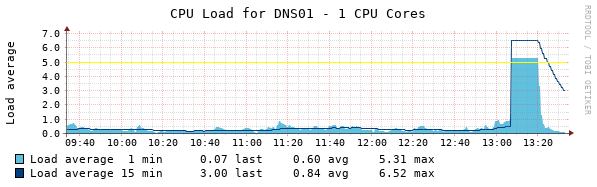
and ends with high cpu usage until the machine dies:

CPU graph of the last 4 Hours:
grafik

Additional Information

My current work a round is to set a CPU Quota of 50% with systemd, which helps to kill the process ASAP when the issue rises before it kills the complete system. This is what you can see in the Memory graphs when the usage drops and increments again.

Originally created by @Xuxe on GitHub (Sep 10, 2019). [AdGuard.txt](https://github.com/AdguardTeam/AdGuardHome/files/3596021/AdGuard.txt) ### Issue Details <!--- Please include all relevant details about the environment you experienced the bug in --> * **Version of AdGuard Home server:** * Version: v0.98.1 [had the issue also with v0.97 and hotfixes] * **How did you setup DNS configuration:** * LXC Container, 1x Core, 512MB Memory, 1GB SWAP * **Operating system and version:** * Debian 10 - had the issue before with Ubuntu 18.04 also ### Expected Behavior AdGuard doesn't leaks memory until the machine gets unresponsive and ends in high cpu usage. May relates to #905 ? I have the issue with two instances of AdGuard Home with the same version and setup. ### Actual Behavior The memory usage constantly goes up: Memory graph from 09.09.19 8:52 to 10.09.19 0:58: ![grafik](https://user-images.githubusercontent.com/6413398/64618495-a7a11e80-d3e0-11e9-82ba-cd917604792d.png) and ends with high cpu usage until the machine dies: CPU graph of the last 4 Hours: ![grafik](https://user-images.githubusercontent.com/6413398/64618372-6dd01800-d3e0-11e9-88ce-2060087f4c90.png) ### Additional Information My current work a round is to set a CPU Quota of 50% with systemd, which helps to kill the process ASAP when the issue rises before it kills the complete system. This is what you can see in the Memory graphs when the usage drops and increments again.
Author
Owner

@szolin commented on GitHub (Sep 10, 2019):

Hello!
Can you run this command and show the output?
ps aux | grep AdGuardHome

@szolin commented on GitHub (Sep 10, 2019): Hello! Can you run this command and show the output? `ps aux | grep AdGuardHome`
Author
Owner

@Xuxe commented on GitHub (Sep 10, 2019):

@szolin

Hi :)

this is the output:

root@dns01:~# ps aux | grep AdGuardHome
root 604 0.0 13.1 116836 68704 ? Ssl 13:21 0:08 /opt/AdGuard/AdGuardHome -s run
root 4515 0.0 0.1 3080 824 pts/2 S+ 14:00 0:00 grep AdGuardHome

Also added my config quickly to the issue, if needed.

@Xuxe commented on GitHub (Sep 10, 2019): @szolin Hi :) this is the output: root@dns01:~# ps aux | grep AdGuardHome root 604 0.0 13.1 116836 68704 ? Ssl 13:21 0:08 /opt/AdGuard/AdGuardHome -s run root 4515 0.0 0.1 3080 824 pts/2 S+ 14:00 0:00 grep AdGuardHome Also added my config quickly to the issue, if needed.
Author
Owner

@ameshkov commented on GitHub (Sep 10, 2019):

How many different clients does it have?

@szolin it'd be helpful if we had http/pprof registered: https://golang.org/pkg/net/http/pprof/

@ameshkov commented on GitHub (Sep 10, 2019): How many different clients does it have? @szolin it'd be helpful if we had http/pprof registered: https://golang.org/pkg/net/http/pprof/
Author
Owner

@Xuxe commented on GitHub (Sep 10, 2019):

@ameshkov

My current setup is:

2x PowerDNS Recursor with a PowerDNS Authorative for a local domain in front of AdGuard all clients talking to the PDNS Recursor and the recursors are talking to AdGuard for non local domains. Around 15-20 clients. The Recursors also do there own caching, there shouldn't be much load on AdGuard its self. What i see in the UI is 7k querys since the reset around an hour ago.

@Xuxe commented on GitHub (Sep 10, 2019): @ameshkov My current setup is: 2x PowerDNS Recursor with a PowerDNS Authorative for a local domain in front of AdGuard all clients talking to the PDNS Recursor and the recursors are talking to AdGuard for non local domains. Around 15-20 clients. The Recursors also do there own caching, there shouldn't be much load on AdGuard its self. What i see in the UI is 7k querys since the reset around an hour ago.
Author
Owner

@szolin commented on GitHub (Sep 10, 2019):

root 604 0.0 13.1 116836 68704 ? Ssl 13:21 0:08 /opt/AdGuard/AdGuardHome -s run

AGH uses 68mb of RAM - it's normal.
Are there any other processes that use more of your system memory?
When your CPU usage is 100% - what process uses it?

@szolin commented on GitHub (Sep 10, 2019): > root 604 0.0 13.1 116836 68704 ? Ssl 13:21 0:08 /opt/AdGuard/AdGuardHome -s run AGH uses 68mb of RAM - it's normal. Are there any other processes that use more of your system memory? When your CPU usage is 100% - what process uses it?
Author
Owner

@Xuxe commented on GitHub (Sep 10, 2019):

@szolin

Sorry if it was not clear. I had to reset the system because it was inaccesable by SSH or console. At the moment the issue doesn't exists. AdGuard is the only thing that runs in this LXC container.

As you can see from check mk event history:

grafik

The very first issue Check MK reports is DNS runs in a timeout. Then ASAP the system freaks out in terms of CPU. I try to cover you the ps output as soon as the memory increases again. I'm not sure if there is a way to reproduce it at the moment. I tested also to do a nslookup which isn't working too at that point.

Complete ps aux:

USER       PID %CPU %MEM    VSZ   RSS TTY      STAT START   TIME COMMAND
root         1  0.0  1.8  30116  9932 ?        Ss   13:19   0:00 /sbin/init
root        45  0.0  1.9  27568 10240 ?        Ss   13:19   0:00 /lib/systemd/systemd-journald
root        54  0.0  0.8  19544  4404 ?        Ss   13:19   0:00 /lib/systemd/systemd-udevd
root        61  0.0  0.6 156184  3396 ?        Ssl  13:19   0:00 /usr/sbin/rsyslogd -n -iNONE
root        62  0.0  0.4   5508  2308 ?        Ss   13:19   0:00 /usr/sbin/cron -f
message+    63  0.0  0.7   8968  3712 ?        Ss   13:19   0:00 /usr/bin/dbus-daemon --system --address=systemd: --nofork --nopidfile --systemd-activation --syslog-only
root        65  0.0  1.3  19384  7092 ?        Ss   13:19   0:00 /lib/systemd/systemd-logind
root       119  0.0  0.3   2416  1656 pts/1    Ss+  13:19   0:00 /sbin/agetty -o -p -- \u --noclear --keep-baud tty2 115200,38400,9600 linux
root       120  0.0  0.3   2416  1656 pts/1    Ss+  13:19   0:00 /sbin/agetty -o -p -- \u --noclear --keep-baud console 115200,38400,9600 linux
root       121  0.0  0.3   2416  1628 pts/0    Ss+  13:19   0:00 /sbin/agetty -o -p -- \u --noclear --keep-baud tty1 115200,38400,9600 linux
root       125  0.0  1.3  15852  7056 ?        Ss   13:19   0:00 /usr/sbin/sshd -D
root       278  0.0  0.7  43472  3856 ?        Ss   13:19   0:00 /usr/lib/postfix/sbin/master -w
postfix    280  0.0  1.3  43812  7016 ?        S    13:19   0:00 pickup -l -t unix -u -c
postfix    281  0.0  1.3  43864  7128 ?        S    13:19   0:00 qmgr -l -t unix -u
root       287  0.0  1.5  16904  8056 ?        Ss   13:19   0:00 sshd: root@pts/2
root       290  0.0  1.6  21020  8424 ?        Ss   13:19   0:00 /lib/systemd/systemd --user
root       291  0.0  0.5  22744  3024 ?        S    13:19   0:00 (sd-pam)
root       299  0.0  0.8   5244  4460 pts/2    Ss   13:19   0:00 -bash
root       604  0.0 13.1 116836 68964 ?        Ssl  13:21   0:18 /opt/AdGuard/AdGuardHome -s run
root      8990  0.0  0.5   7636  2664 pts/2    R+   14:45   0:00 ps aux
@Xuxe commented on GitHub (Sep 10, 2019): @szolin Sorry if it was not clear. I had to reset the system because it was inaccesable by SSH or console. At the moment the issue doesn't exists. AdGuard is the only thing that runs in this LXC container. As you can see from check mk event history: ![grafik](https://user-images.githubusercontent.com/6413398/64623654-9b6d8f00-d3e9-11e9-99a5-6df4a49199e7.png) The very first issue Check MK reports is DNS runs in a timeout. Then ASAP the system freaks out in terms of CPU. I try to cover you the ps output as soon as the memory increases again. I'm not sure if there is a way to reproduce it at the moment. I tested also to do a nslookup which isn't working too at that point. Complete ps aux: ``` USER PID %CPU %MEM VSZ RSS TTY STAT START TIME COMMAND root 1 0.0 1.8 30116 9932 ? Ss 13:19 0:00 /sbin/init root 45 0.0 1.9 27568 10240 ? Ss 13:19 0:00 /lib/systemd/systemd-journald root 54 0.0 0.8 19544 4404 ? Ss 13:19 0:00 /lib/systemd/systemd-udevd root 61 0.0 0.6 156184 3396 ? Ssl 13:19 0:00 /usr/sbin/rsyslogd -n -iNONE root 62 0.0 0.4 5508 2308 ? Ss 13:19 0:00 /usr/sbin/cron -f message+ 63 0.0 0.7 8968 3712 ? Ss 13:19 0:00 /usr/bin/dbus-daemon --system --address=systemd: --nofork --nopidfile --systemd-activation --syslog-only root 65 0.0 1.3 19384 7092 ? Ss 13:19 0:00 /lib/systemd/systemd-logind root 119 0.0 0.3 2416 1656 pts/1 Ss+ 13:19 0:00 /sbin/agetty -o -p -- \u --noclear --keep-baud tty2 115200,38400,9600 linux root 120 0.0 0.3 2416 1656 pts/1 Ss+ 13:19 0:00 /sbin/agetty -o -p -- \u --noclear --keep-baud console 115200,38400,9600 linux root 121 0.0 0.3 2416 1628 pts/0 Ss+ 13:19 0:00 /sbin/agetty -o -p -- \u --noclear --keep-baud tty1 115200,38400,9600 linux root 125 0.0 1.3 15852 7056 ? Ss 13:19 0:00 /usr/sbin/sshd -D root 278 0.0 0.7 43472 3856 ? Ss 13:19 0:00 /usr/lib/postfix/sbin/master -w postfix 280 0.0 1.3 43812 7016 ? S 13:19 0:00 pickup -l -t unix -u -c postfix 281 0.0 1.3 43864 7128 ? S 13:19 0:00 qmgr -l -t unix -u root 287 0.0 1.5 16904 8056 ? Ss 13:19 0:00 sshd: root@pts/2 root 290 0.0 1.6 21020 8424 ? Ss 13:19 0:00 /lib/systemd/systemd --user root 291 0.0 0.5 22744 3024 ? S 13:19 0:00 (sd-pam) root 299 0.0 0.8 5244 4460 pts/2 Ss 13:19 0:00 -bash root 604 0.0 13.1 116836 68964 ? Ssl 13:21 0:18 /opt/AdGuard/AdGuardHome -s run root 8990 0.0 0.5 7636 2664 pts/2 R+ 14:45 0:00 ps aux ```
Author
Owner

@szolin commented on GitHub (Sep 10, 2019):

AGH's system usage looks normal.
We need to see what it looks like when (or just before) your memory usage becomes too high.

@szolin commented on GitHub (Sep 10, 2019): AGH's system usage looks normal. We need to see what it looks like when (or just before) your memory usage becomes too high.
Author
Owner

@ameshkov commented on GitHub (Sep 10, 2019):

What about AGH logs?

@ameshkov commented on GitHub (Sep 10, 2019): What about AGH logs?
Author
Owner

@Xuxe commented on GitHub (Sep 11, 2019):

It looks like AdGuard is not the root cause. Somehow systemd socket activation which is used by Check_MK seems to leak memory and triggers that OOM condition on Debian 10 followed by high CPU usage from AdGuard as side effect.

I close the issue, sorry for blaming AGH. Thanks for AGH, keep up the work :)

@Xuxe commented on GitHub (Sep 11, 2019): It looks like AdGuard is not the root cause. Somehow systemd socket activation which is used by Check_MK seems to leak memory and triggers that OOM condition on Debian 10 followed by high CPU usage from AdGuard as side effect. I close the issue, sorry for blaming AGH. Thanks for AGH, keep up the work :)
Sign in to join this conversation.
No milestone
No project
No assignees
1 participant
Notifications
Due date
The due date is invalid or out of range. Please use the format "yyyy-mm-dd".

No due date set.

Dependencies

No dependencies set.

Reference
starred/AdGuardHome#916
No description provided.