1
0
Fork 0
mirror of https://github.com/Lidarr/Lidarr.git synced 2026-03-03 00:26:58 -05:00

Please increase max Kilobits Per Second in Quality tab #732

Open
opened 2026-02-20 12:06:36 -05:00 by deekerman · 12 comments
Owner

Originally created by @lidarruser on GitHub (May 11, 2020).

I want to upgrade my files until they're 24bit/192kHz. The minimum for that would be 4000kbps. But the max is only 1500 when I enable "advanced settings".

So can you please make the maximum 10,000kbps?

In addition, I noticed that the highest quality is WAV. Does renaming the title of a quality change how it searches for that quality? Going to assume if I rename the title to FLAC 192kHz, it'll still only search for .WAV right? So could you add more quality tiers? 24bit/48kHz, 24/96, 24/192, etc?

Rutracker has a 24/192 category (and the others) so I don't think it's too out of the way to suggest it...

Thank you!

AB#222

Originally created by @lidarruser on GitHub (May 11, 2020). I want to upgrade my files until they're 24bit/192kHz. The minimum for that would be 4000kbps. But the max is only 1500 when I enable "advanced settings". So can you please make the maximum 10,000kbps? In addition, I noticed that the highest quality is WAV. Does renaming the title of a quality change how it searches for that quality? Going to assume if I rename the title to FLAC 192kHz, it'll still only search for .WAV right? So could you add more quality tiers? 24bit/48kHz, 24/96, 24/192, etc? Rutracker has a 24/192 category (and the others) so I don't think it's too out of the way to suggest it... Thank you! [AB#222](https://dev.azure.com/Servarr/7ab38f4e-5a57-4d70-84f4-94dd9bc5d6df/_workitems/edit/222)
Author
Owner

@Qstick commented on GitHub (May 11, 2020):

Just drag the max to the top for unlimited

@Qstick commented on GitHub (May 11, 2020): Just drag the max to the top for unlimited
Author
Owner

@lidarruser commented on GitHub (May 11, 2020):

Yes, but I can't choose a minimum of 4000 because 1500 is the max... That's why I'm asking for 10,000 just to be safe. This is about more control over the minimum kbps.

@lidarruser commented on GitHub (May 11, 2020): Yes, but I can't choose a minimum of 4000 because 1500 is the max... That's why I'm asking for 10,000 just to be safe. This is about more control over the minimum kbps.
Author
Owner

@Qstick commented on GitHub (May 11, 2020):

The issue is it kills scaling for every other quality

@Qstick commented on GitHub (May 11, 2020): The issue is it kills scaling for every other quality
Author
Owner

@lidarruser commented on GitHub (May 11, 2020):

Are talking about scrollbar scaling and how increasing the range by that much will make it harder (or impossible) to choose a specific number? Thing is, it's already really annoying to choose a number this way. So why not just make the advanced setting be enabled by default? Typing>scrollbar. If anything, the scrollbar should be the advanced setting as even with 1500 as the max, you'd need to change your mouse DPI to even get close to the number you want. "Ok I want 320. No not 317.5... Not 321.2... Not... Guess that's close enough.........."

It reminds me of that meme where you have to manually press "+" starting from 1 until you reach your phone number. "1... 2... 3... 1-555-690-5900, finally."

It'll help all users...

@lidarruser commented on GitHub (May 11, 2020): Are talking about scrollbar scaling and how increasing the range by that much will make it harder (or impossible) to choose a specific number? Thing is, it's already really annoying to choose a number this way. So why not just make the advanced setting be enabled by default? Typing>scrollbar. If anything, the scrollbar should be the advanced setting as even with 1500 as the max, you'd need to change your mouse DPI to even get close to the number you want. "Ok I want 320. No not 317.5... Not 321.2... Not... Guess that's close enough.........." It reminds me of that meme where you have to manually press "+" starting from 1 until you reach your phone number. "1... 2... 3... 1-555-690-5900, finally." It'll help all users...
Author
Owner

@Qstick commented on GitHub (May 11, 2020):

You are one user speaking for 100k, most of which don’t want 24bit albums thus don’t have this issue. It needs to be thought out and done in a way that doesn’t have negative impacts on most of the user base. Average users don’t need decimal level accuracy, close close enough is good enough.....

In the mean time you can type the values in the db manually to get it working how you want.

@Qstick commented on GitHub (May 11, 2020): You are one user speaking for 100k, most of which don’t want 24bit albums thus don’t have this issue. It needs to be thought out and done in a way that doesn’t have negative impacts on most of the user base. Average users don’t need decimal level accuracy, close close enough is good enough..... In the mean time you can type the values in the db manually to get it working how you want.
Author
Owner

@lidarruser commented on GitHub (May 11, 2020):

I'm not going to respond to your ad-populum argument as that's a huge can of worms I don't want to go into. Vinyls (192kHz) being popular again, blah blah blah, it doesn't matter. If you know that my suggestion will ruin it for everyone else, then I'll go with your decision. If there's a way to get my quality tiers fixed without messing it for everyone else then that's great! Thank you for the suggestion!

Can you go into more detail with what settings you're talking about in regards to "type the values in the db manually"? When I try typing 4000 into the minimum box, it changes to 1490. Maybe you're talking about something else?

Thank you for responding!

@lidarruser commented on GitHub (May 11, 2020): I'm not going to respond to your ad-populum argument as that's a huge can of worms I don't want to go into. Vinyls (192kHz) being popular again, blah blah blah, it doesn't matter. If you know that my suggestion will ruin it for everyone else, then I'll go with your decision. If there's a way to get my quality tiers fixed without messing it for everyone else then that's great! Thank you for the suggestion! Can you go into more detail with what settings you're talking about in regards to "type the values in the db manually"? When I try typing 4000 into the minimum box, it changes to 1490. Maybe you're talking about something else? Thank you for responding!
Author
Owner

@bakerboy448 commented on GitHub (Jul 13, 2022):

Max can already be set to unlimited which is what the title and OP asked for.
You're asking to be able to set a minimum of 4000?

Just manually edit the quality table in the database and set the values you need.

@bakerboy448 commented on GitHub (Jul 13, 2022): Max can already be set to unlimited which is what the title and OP asked for. You're asking to be able to set a minimum of 4000? Just manually edit the quality table in the database and set the values you need.
Author
Owner

@romanr commented on GitHub (Mar 11, 2023):

Are talking about scrollbar scaling and how increasing the range by that much will make it harder (or impossible) to choose a specific number? Thing is, it's already really annoying to choose a number this way. So why not just make the advanced setting be enabled by default? Typing>scrollbar. If anything, the scrollbar should be the advanced setting as even with 1500 as the max, you'd need to change your mouse DPI to even get close to the number you want. "Ok I want 320. No not 317.5... Not 321.2... Not... Guess that's close enough.........."

It reminds me of that meme where you have to manually press "+" starting from 1 until you reach your phone number. "1... 2... 3... 1-555-690-5900, finally."

It'll help all users...

As long time Lidarr user I want to thank you and contributors for this great software.

There's a way to fix this problem with minimal effort and have everybody happy.
Please hear me out. If anything, I'm a UX designer with 10+ years of SaaS projects and difficult design decisions like this one.

image

The argument here is about ruining the experience of bitrate adjustment range slider for all users.
Let's ask first, the function of adjusting bitrate for quality settings - what is the use case?
For vast majority of users, they will only go to that screen, as OP (or me) did, because we reached the limit of allowed bitrate. Not because we wanted to play with adjustments and create very specific quality rules.
This range slider was added in times when audio standards were still not settled like in 2013 when this project started.
And possibly main reason for this range slider is because it allows to visualise the bitrate distribution without effort in integrating charts or drawing those lines on canvas.
When Lidarr started there was many different rates and formats. The download speeds were slower and costly. I remember upgrading music to 320kbps and how huge those files were at that time.
Look what we have now. It's either 320kbps or Lossless (and now 24bit Lossles).

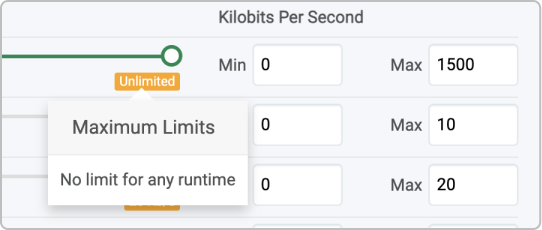
Now this limitation creates more problems. It is misleading to display "Unlimited" when it's in fact limited by max value of 1500.
image
I'm sure that not only me, but many others wasted time trying this and that, wondering why it's not "unlimited" until realising that it was from the times when 1500 was so large that nobody would imagine reaching that limit.

options:

  1. As it's famously said, great design is saying "No" nine times out of ten. Let's say No to the slider. Remove and change Min/Max inputs from Advanced to Basic settings mode.

  2. Another option is to add disabled attribute to range sliders. They'll still visualise the bitrates just not responding to touch. And enabling Min/Max for all settings modes.
    The quality management screen itself is one of most "advanced" screens and having those inputs there is understandable.

  3. Future proof option: add "unlimited" checkbox at max rate. No need for sliders or that can be disabled. This is most time consuming option

image

  1. Last option: not really the option. as more people move to High Res Lossless this issue will loom more and more. Flood the issue tracker and take contributors time to read reports, spending time again on same discussion.
@romanr commented on GitHub (Mar 11, 2023): > Are talking about scrollbar scaling and how increasing the range by that much will make it harder (or impossible) to choose a specific number? Thing is, it's already really annoying to choose a number this way. So why not just make the advanced setting be enabled by default? Typing>scrollbar. If anything, the scrollbar should be the advanced setting as even with 1500 as the max, you'd need to change your mouse DPI to even get close to the number you want. "Ok I want 320. No not 317.5... Not 321.2... Not... Guess that's close enough.........." > > It reminds me of that meme where you have to manually press "+" starting from 1 until you reach your phone number. "1... 2... 3... 1-555-690-5900, finally." > > It'll help all users... As long time Lidarr user I want to thank you and contributors for this great software. **There's a way to fix this problem with minimal effort and have everybody happy.** Please hear me out. If anything, I'm a UX designer with 10+ years of SaaS projects and difficult design decisions like this one. ![image](https://user-images.githubusercontent.com/329079/224513154-ef1cb10a-07a0-4bf2-968d-7cdbc6a0bdb8.png) The argument here is about ruining the experience of bitrate adjustment range slider for all users. Let's ask first, the function of adjusting bitrate for quality settings - what is the use case? For vast majority of users, they will only go to that screen, as OP (or me) did, because we reached the limit of allowed bitrate. Not because we wanted to play with adjustments and create very specific quality rules. This range slider was added in times when audio standards were still not settled like in 2013 when this project started. And possibly main reason for this range slider is because it allows to visualise the bitrate distribution without effort in integrating charts or drawing those lines on canvas. When Lidarr started there was many different rates and formats. The download speeds were slower and costly. I remember upgrading music to 320kbps and how huge those files were at that time. Look what we have now. It's either 320kbps or Lossless (and now 24bit Lossles). Now this limitation creates more problems. It is misleading to display "Unlimited" when it's in fact limited by max value of 1500. ![image](https://user-images.githubusercontent.com/329079/224513201-4901f8ce-d91d-4fce-b01a-6dd4bda22e06.png) I'm sure that not only me, but many others wasted time trying this and that, wondering why it's not "unlimited" until realising that it was from the times when 1500 was so large that nobody would imagine reaching that limit. ## options: 1. As it's famously said, great design is saying "No" nine times out of ten. Let's say No to the slider. Remove and change Min/Max inputs from Advanced to Basic settings mode. 2. Another option is to add `disabled` attribute to range sliders. They'll still visualise the bitrates just not responding to touch. And enabling Min/Max for all settings modes. The quality management screen itself is one of most "advanced" screens and having those inputs there is understandable. 3. Future proof option: add "unlimited" checkbox at max rate. No need for sliders or that can be disabled. This is most time consuming option ![image](https://user-images.githubusercontent.com/329079/224513265-48725f7c-7d21-4aa1-a05e-65f883226dca.png) 4. Last option: not really the option. as more people move to High Res Lossless this issue will loom more and more. Flood the issue tracker and take contributors time to read reports, spending time again on same discussion.
Author
Owner

@azukaar commented on GitHub (Feb 4, 2024):

It's much simpler than that, you could just have a different max for Flac that goes up to say 10k, and keep the others at 1.5k. There's no reason for the max to be coupled anyway

@azukaar commented on GitHub (Feb 4, 2024): It's much simpler than that, you could just have a different max for Flac that goes up to say 10k, and keep the others at 1.5k. There's no reason for the max to be coupled anyway
Author
Owner

@alucard91 commented on GitHub (Jan 11, 2025):

Here is another scenario which might add more reasons to address topic issue:
When library contains 24-Bit albums they are falling in "Cut-Off Unmet" category since they are on higher side of qualuty cutoff which is already odd. But also basically it's killing entire cutoff management since i can't bulk upgrade my library without downgrading this 24-Bit albums. Maybe increasing quality ceiling for lossless formats to 4000 will not be a great deal at the end?

@alucard91 commented on GitHub (Jan 11, 2025): Here is another scenario which might add more reasons to address topic issue: When library contains 24-Bit albums they are falling in "Cut-Off Unmet" category since they are on higher side of qualuty cutoff which is already odd. But also basically it's killing entire cutoff management since i can't bulk upgrade my library without downgrading this 24-Bit albums. Maybe increasing quality ceiling for lossless formats to 4000 will not be a great deal at the end?
Author
Owner

@bakerboy448 commented on GitHub (Jan 11, 2025):

Again, the value can already be set to unlimited.

The primary development team is engaged in over five applications, including Lidarr, Prowlarr, Radarr, Readarr, Whisparr, and Sonarr. Currently, there is approximately one active developer contributing to these projects, with none of the contributors working on them full-time. Additionally, all members involved, whether in development or support roles, are volunteers and do not receive compensation for their contributions. Each team member balances their commitments alongside full-time jobs, family responsibilities, and other personal obligations.

As a result, the list of tasks to be completed across these projects, along with the various backends and modules, is extensive, while the available time for addressing these tasks is limited.

Lidarr and Readarr have 0 active developers and no one from the community wants to contribute to Lidarr so it'll likely atrophy and die.

The fact that no one from the community has contributed to this issue and given it is easily resolved by setting unlimited - means it is not priority

@bakerboy448 commented on GitHub (Jan 11, 2025): Again, the value can already be set to unlimited. The primary development team is engaged in over five applications, including Lidarr, Prowlarr, Radarr, Readarr, Whisparr, and Sonarr. Currently, there is approximately one active developer contributing to these projects, with none of the contributors working on them full-time. Additionally, all members involved, whether in development or support roles, are volunteers and do not receive compensation for their contributions. Each team member balances their commitments alongside full-time jobs, family responsibilities, and other personal obligations. As a result, the list of tasks to be completed across these projects, along with the various backends and modules, is extensive, while the available time for addressing these tasks is limited. Lidarr and Readarr have 0 active developers and no one from the community wants to contribute to Lidarr so it'll likely atrophy and die. The fact that no one from the community has contributed to this issue and given it is easily resolved by setting unlimited - means it is not priority
Author
Owner

@alucard91 commented on GitHub (Jan 11, 2025):

Sad to hear that, theese projects are trully amazing when tailored to needs.
Huge respect to ones, making it possible

@alucard91 commented on GitHub (Jan 11, 2025): Sad to hear that, theese projects are trully amazing when tailored to needs. Huge respect to ones, making it possible
Sign in to join this conversation.
No milestone
No project
No assignees
1 participant
Notifications
Due date
The due date is invalid or out of range. Please use the format "yyyy-mm-dd".

No due date set.

Dependencies

No dependencies set.

Reference
starred/Lidarr-Lidarr#732
No description provided.