Download path fails to update with qBittorrent "Create Subfolder" setting #2779

Open
opened 2026-02-20 02:11:51 -05:00 by deekerman · 13 comments
Owner

Originally created by @CPU-Blanc on GitHub (Mar 29, 2023).

Is there an existing issue for this?

  • I have searched the existing open and closed issues

Current Behavior

When using the "Create Subfolder" setting in qBittorrent, the 'base' path of the torrent does not seem to update in Lidarr, causing issues with using things like Unpackarr to process archives. Lidarr will continue to look at only the original file, and not the new base directory made by qBittorent.

eg: If downloads/ is your download folder, you download a torrent with a single .rar file it'll do
downloads/torrentName/torrentName.rar and will only look there, rather than downloads/torrentName/

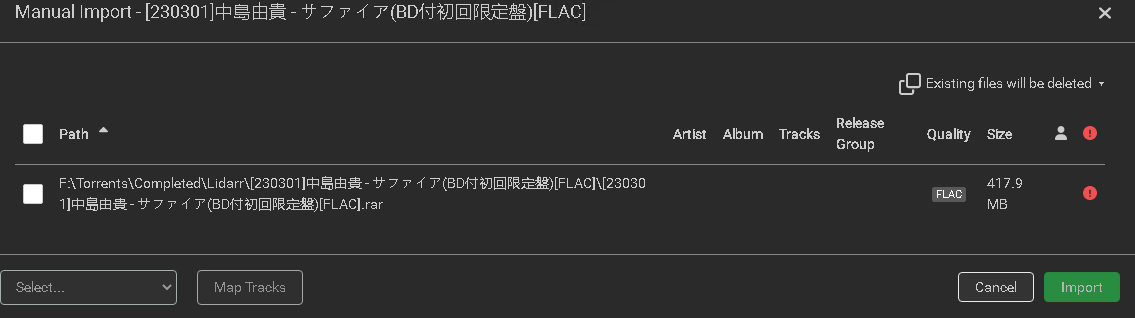
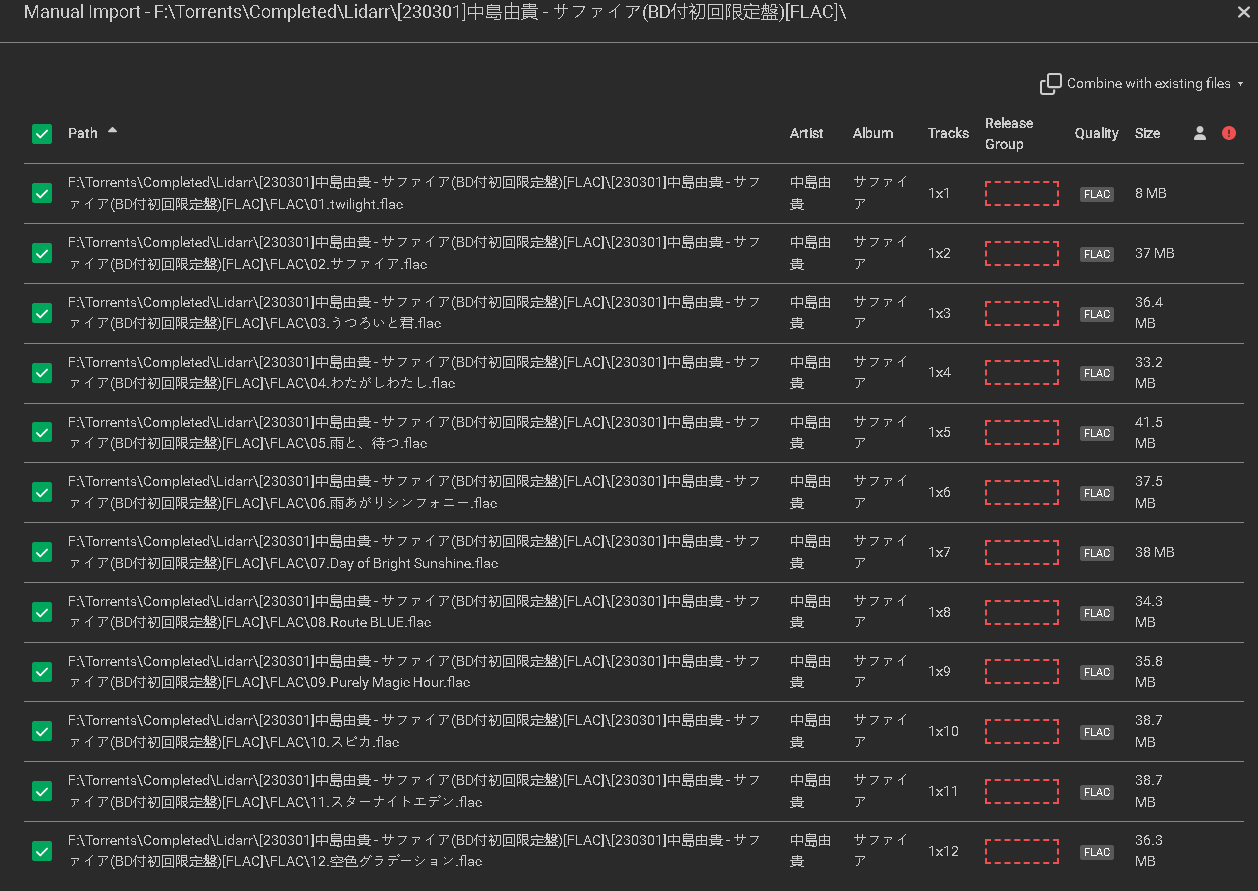
Confirmed it's not a permission error as using Manual Import from the queue, it only shows the .rar file. However, navigating to Wanted > Missing > Manual Import and pointing it to the new base folder, it sees the audio files just fine.

Expected Behavior

Lidarr to update to using the new subfolder created by qBitorrent as the torrent destination, allowing extracted files to be properly processed.

Steps To Reproduce

  1. Set a download path in qBitorrent /downloads
  2. Set Torrent Content Layout > Create Subfolder in qBittorent
  3. Extract the downloaded .rar either manually or using Unpackarr
  4. Observe Lidarr still looking at only the .zip file, and not the torrent's base directory, ignoring all the extracted files.

Environment

- OS: Windows Server 2016
- Lidarr: 1.1.4.3009
- Docker Install: No
- Using Reverse Proxy: Yes
- Browser: Google Chrome
- Database: Sqlite 3.36.0
- qBitorrent: 4.5.2

What branch are you running?

Nightly

Trace Logs?

Manual Import from the Queue:
image

Manual Import pointing to the base folder from Wanted > Missing:
image

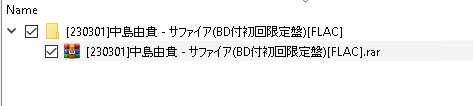
Torrent structure in qbt (folder is what is added by the settings):
image

Lidarr Trace logs during scan:
image

Lidarr Trace logs during queue probe:

2023-03-29 03:30:57.1|Trace|HttpClient|Req: [GET] http://localhost:8080/api/v2/torrents/info?category=lidarr
2023-03-29 03:30:57.1|Trace|ConfigService|Using default config value for 'proxyenabled' defaultValue:'False'
2023-03-29 03:30:57.1|Trace|HttpClient|Res: [GET] http://localhost:8080/api/v2/torrents/info?category=lidarr: 200.OK (1776 bytes) (2 ms)
2023-03-29 03:30:57.1|Trace|HttpClient|Response content (1776 bytes): [{"added_on":1680054603,"amount_left":0,"auto_tmm":true,"availability":-1,"category":"lidarr","completed":438216397,"completion_on":1680054710,"content_path":"F:\\Torrents\\Completed\\Lidarr\\[230301]中島由貴 - サファイア(BD付初回限定盤)[FLAC]\\[230301]中島由貴 - サファイア(BD付初回限定盤)[FLAC].rar","dl_limit":0,"dlspeed":0,"download_path":"F:\\Torrents\\Incomplete","downloaded":438678855,"downloaded_session":438678855,"eta":8640000,"f_l_piece_prio":false,"force_start":false,"hash":"e3f13137b0f226c2c8d849f4cc6fce7e663f55d7","infohash_v1":"e3f13137b0f226c2c8d849f4cc6fce7e663f55d7","infohash_v2":"","last_activity":1680054711,"magnet_uri":"magnet:?xt=urn:btih:e3f13137b0f226c2c8d849f4cc6fce7e663f55d7&dn=%5b230301%5d%e4%b8%ad%e5%b3%b6%e7%94%b1%e8%b2%b4%20-%20%e3%82%b5%e3%83%95%e3%82%a1%e3%82%a4%e3%82%a2(BD%e4%bb%98%e5%88%9d%e5%9b%9e%e9%99%90%e5%ae%9a%e7%9b%a4)%5bFLAC%5d.rar&tr=http%3a%2f%2fnyaa.tracker.wf%3a7777%2fannounce&tr=udp%3a%2f%2fopen.stealth.si%3a80%2fannounce&tr=udp%3a%2f%2ftracker.opentrackr.org%3a1337%2fannounce&tr=udp%3a%2f%2fexodus.desync.com%3a6969%2fannounce&tr=udp%3a%2f%2ftracker.torrent.eu.org%3a451%2fannounce","max_ratio":1,"max_seeding_time":10080,"name":"[230301]中島由貴 - サファイア(BD付初回限定盤)[FLAC]","num_complete":8,"num_incomplete":1,"num_leechs":0,"num_seeds":0,"priority":0,"progress":1,"ratio":0,"ratio_limit":1,"save_path":"F:\\Torrents\\Completed\\Lidarr","seeding_time":17,"seeding_time_limit":10080,"seen_complete":1680054710,"seq_dl":false,"size":438216397,"state":"pausedUP","super_seeding":false,"tags":"","time_active":123,"total_size":438216397,"tracker":"udp://exodus.desync.com:6969/announce","trackers_count":5,"up_limit":0,"uploaded":0,"uploaded_session":0,"upspeed":0}]
2023-03-29 03:30:57.1|Trace|ConfigService|Using default config value for 'enablecompleteddownloadhandling' defaultValue:'True'

From the above, it appears as though Lidarr might be using the content_path payload which is pointing to the original .rar, rather than the base folder for the torrent?

Originally created by @CPU-Blanc on GitHub (Mar 29, 2023). ### Is there an existing issue for this? - [X] I have searched the existing open and closed issues ### Current Behavior When using the "Create Subfolder" setting in qBittorrent, the 'base' path of the torrent does not seem to update in Lidarr, causing issues with using things like Unpackarr to process archives. Lidarr will continue to look at _only_ the original file, and not the new base directory made by qBittorent. eg: If `downloads/` is your download folder, you download a torrent with a single .rar file it'll do `downloads/torrentName/torrentName.rar` and will _only_ look there, rather than `downloads/torrentName/` Confirmed it's not a permission error as using Manual Import from the queue, it only shows the .rar file. However, navigating to Wanted > Missing > Manual Import and pointing it to the new base folder, it sees the audio files just fine. ### Expected Behavior Lidarr to update to using the new subfolder created by qBitorrent as the torrent destination, allowing extracted files to be properly processed. ### Steps To Reproduce 1. Set a download path in qBitorrent `/downloads` 2. Set `Torrent Content Layout` > `Create Subfolder` in qBittorent 3. Extract the downloaded .rar either manually or using Unpackarr 4. Observe Lidarr still looking at _only_ the .zip file, and not the torrent's base directory, ignoring all the extracted files. ### Environment ```markdown - OS: Windows Server 2016 - Lidarr: 1.1.4.3009 - Docker Install: No - Using Reverse Proxy: Yes - Browser: Google Chrome - Database: Sqlite 3.36.0 - qBitorrent: 4.5.2 ``` ### What branch are you running? Nightly ### Trace Logs? Manual Import from the Queue: ![image](https://user-images.githubusercontent.com/54823378/228593853-7ea494d6-5905-4fae-bf59-abbf5d8322d4.png) Manual Import pointing to the base folder from Wanted > Missing: ![image](https://user-images.githubusercontent.com/54823378/228594054-ac5c9d2c-580b-4277-9307-ca865597b7cb.png) Torrent structure in qbt (folder is what is added by the settings): ![image](https://user-images.githubusercontent.com/54823378/228594263-4d852d99-21ce-458e-a51d-913e3609eb41.png) Lidarr Trace logs during scan: ![image](https://user-images.githubusercontent.com/54823378/228594514-fa1df538-a9fc-4c7d-8d4a-47922fcd74be.png) Lidarr Trace logs during queue probe: ``` 2023-03-29 03:30:57.1|Trace|HttpClient|Req: [GET] http://localhost:8080/api/v2/torrents/info?category=lidarr 2023-03-29 03:30:57.1|Trace|ConfigService|Using default config value for 'proxyenabled' defaultValue:'False' 2023-03-29 03:30:57.1|Trace|HttpClient|Res: [GET] http://localhost:8080/api/v2/torrents/info?category=lidarr: 200.OK (1776 bytes) (2 ms) 2023-03-29 03:30:57.1|Trace|HttpClient|Response content (1776 bytes): [{"added_on":1680054603,"amount_left":0,"auto_tmm":true,"availability":-1,"category":"lidarr","completed":438216397,"completion_on":1680054710,"content_path":"F:\\Torrents\\Completed\\Lidarr\\[230301]中島由貴 - サファイア(BD付初回限定盤)[FLAC]\\[230301]中島由貴 - サファイア(BD付初回限定盤)[FLAC].rar","dl_limit":0,"dlspeed":0,"download_path":"F:\\Torrents\\Incomplete","downloaded":438678855,"downloaded_session":438678855,"eta":8640000,"f_l_piece_prio":false,"force_start":false,"hash":"e3f13137b0f226c2c8d849f4cc6fce7e663f55d7","infohash_v1":"e3f13137b0f226c2c8d849f4cc6fce7e663f55d7","infohash_v2":"","last_activity":1680054711,"magnet_uri":"magnet:?xt=urn:btih:e3f13137b0f226c2c8d849f4cc6fce7e663f55d7&dn=%5b230301%5d%e4%b8%ad%e5%b3%b6%e7%94%b1%e8%b2%b4%20-%20%e3%82%b5%e3%83%95%e3%82%a1%e3%82%a4%e3%82%a2(BD%e4%bb%98%e5%88%9d%e5%9b%9e%e9%99%90%e5%ae%9a%e7%9b%a4)%5bFLAC%5d.rar&tr=http%3a%2f%2fnyaa.tracker.wf%3a7777%2fannounce&tr=udp%3a%2f%2fopen.stealth.si%3a80%2fannounce&tr=udp%3a%2f%2ftracker.opentrackr.org%3a1337%2fannounce&tr=udp%3a%2f%2fexodus.desync.com%3a6969%2fannounce&tr=udp%3a%2f%2ftracker.torrent.eu.org%3a451%2fannounce","max_ratio":1,"max_seeding_time":10080,"name":"[230301]中島由貴 - サファイア(BD付初回限定盤)[FLAC]","num_complete":8,"num_incomplete":1,"num_leechs":0,"num_seeds":0,"priority":0,"progress":1,"ratio":0,"ratio_limit":1,"save_path":"F:\\Torrents\\Completed\\Lidarr","seeding_time":17,"seeding_time_limit":10080,"seen_complete":1680054710,"seq_dl":false,"size":438216397,"state":"pausedUP","super_seeding":false,"tags":"","time_active":123,"total_size":438216397,"tracker":"udp://exodus.desync.com:6969/announce","trackers_count":5,"up_limit":0,"uploaded":0,"uploaded_session":0,"upspeed":0}] 2023-03-29 03:30:57.1|Trace|ConfigService|Using default config value for 'enablecompleteddownloadhandling' defaultValue:'True' ``` From the above, it appears as though Lidarr might be using the `content_path` payload which is pointing to the original .rar, rather than the base folder for the torrent?
Author
Owner

@bakerboy448 commented on GitHub (May 15, 2023):

Qbit version? Seems odd it reports the path to the torrent's content as the rar itself

@bakerboy448 commented on GitHub (May 15, 2023): Qbit version? Seems odd it reports the path to the torrent's content as the rar itself
Author
Owner

@CPU-Blanc commented on GitHub (May 15, 2023):

Qbt version is in the original post under Environment, 4.5.2

@CPU-Blanc commented on GitHub (May 15, 2023): Qbt version is in the original post under Environment, 4.5.2
Author
Owner

@CPU-Blanc commented on GitHub (Oct 18, 2024):

Hate to bump my own issue, but this is still a problem, and I'm in a completely different environment now. Running everything in docker these days

  • OS: Ubuntu Server 24.04
  • Lidarr: 2.6.4.4402
  • Docker Install: Yes
  • Using Reverse Proxy: Yes
  • Browser: Firefox
  • Database: Sqlite 3.45.3
  • qBitorrent: 5.0.0

Exact same issue as above, it's scanning the rar file itself, not the path

@CPU-Blanc commented on GitHub (Oct 18, 2024): Hate to bump my own issue, but this is still a problem, and I'm in a completely different environment now. Running everything in docker these days - OS: Ubuntu Server 24.04 - Lidarr: 2.6.4.4402 - Docker Install: Yes - Using Reverse Proxy: Yes - Browser: Firefox - Database: Sqlite 3.45.3 - qBitorrent: 5.0.0 Exact same issue as above, it's scanning the rar file itself, not the path
Author
Owner

@mynameisbogdan commented on GitHub (Oct 18, 2024):

Can you post some recent trace logs then?

Because I use create subfolder too on all my arrs, just not with unpackerr and the OutputPath is set correctly.

Also qBit 5.0.0 should work, but is not quite fully supported as in bug-free as it's a major bump and bugs tend to happen in .0.

@mynameisbogdan commented on GitHub (Oct 18, 2024): Can you post some recent trace logs then? Because I use create subfolder too on all my arrs, just not with unpackerr and the OutputPath is set correctly. Also qBit 5.0.0 should work, but is not quite fully supported as in bug-free as it's a major bump and bugs tend to happen in .0.
Author
Owner

@CPU-Blanc commented on GitHub (Oct 18, 2024):

Trace with a forced refresh on the queue, then clicking manual import on the stuck item.
lidarr.trace.txt

root_path appears to be reporting correctly from qbt, but Lidarr just isn't using it?

@CPU-Blanc commented on GitHub (Oct 18, 2024): Trace with a forced refresh on the queue, then clicking manual import on the stuck item. [lidarr.trace.txt](https://github.com/user-attachments/files/17441722/lidarr.trace.txt) root_path appears to be reporting correctly from qbt, but Lidarr just isn't using it?
Author
Owner

@mynameisbogdan commented on GitHub (Oct 18, 2024):

root_path is a new field added quite recently to qBittorrent 5.0.0 by github.com/qbittorrent/qBittorrent@3999b9a4f9, so no, we don't use it as it.

The arrs are making use of content_path which is Absolute path of torrent content (root path for multifile torrents, absolute file path for singlefile torrents).

This issue is 100% related to your original bug report, but now you only have Japanese characters in the torrent name and so try to remove them by renaming the torrent in qBittorrent. The filenames in the archive also have Japanese characters?

@mynameisbogdan commented on GitHub (Oct 18, 2024): `root_path` is a new field added quite recently to qBittorrent 5.0.0 by https://github.com/qbittorrent/qBittorrent/commit/3999b9a4f9293db951231b9bcb5ac4df5eb05c36, so no, we don't use it as it. The arrs are making use of `content_path` which is `Absolute path of torrent content (root path for multifile torrents, absolute file path for singlefile torrents)`. [This issue](https://github.com/Unpackerr/unpackerr/issues/487) is 100% related to your original bug report, but now you only have Japanese characters in the torrent name and so try to remove them by renaming the torrent in qBittorrent. The filenames in the archive also have Japanese characters?
Author
Owner

@CPU-Blanc commented on GitHub (Oct 18, 2024):

I'm not sure I see how that's related. Unpackerr has worked completely as intended, it found the rar and extracted it. Lidarr simply isn't looking for the other files at all. The content_path is the rar file itself, not the subfolder containing the rar (and so the extracted folder)

So downloading foo.rar with subfolders enabled results in /downloads/foo/foo.rar. Unpacker extracts it, resulting in downloads/foo/foo/[...] but Lidarr, instead of scanning /downloads/foo as I'd expect, it is only looking at downloads/foo/foo.rar.

Manual import via Wanted on the subfolder works as expected. It's only in the queue.

In this case. Folder structure on disk:
image

Lidarr queue:
image
Queue manual import:
image
Wanted manual import targeting the subfolder:
image

@CPU-Blanc commented on GitHub (Oct 18, 2024): I'm not sure I see how that's related. Unpackerr has worked completely as intended, it found the rar and extracted it. Lidarr simply isn't looking for the other files at all. The `content_path` is the rar file itself, not the subfolder containing the rar (and so the extracted folder) So downloading `foo.rar` with subfolders enabled results in `/downloads/foo/foo.rar`. Unpacker extracts it, resulting in `downloads/foo/foo/[...]` but Lidarr, instead of scanning `/downloads/foo` as I'd expect, it is **only** looking at `downloads/foo/foo.rar`. Manual import via Wanted on the subfolder works as expected. It's only in the queue. In this case. Folder structure on disk: ![image](https://github.com/user-attachments/assets/326d19f3-d208-49f6-85ad-6389810f0bc4) Lidarr queue: ![image](https://github.com/user-attachments/assets/895441b8-9f0e-4e8f-8633-f6b6b05e7a29) Queue manual import: ![image](https://github.com/user-attachments/assets/344eeafc-376a-4488-a72c-96250f5b816d) Wanted manual import targeting the subfolder: ![image](https://github.com/user-attachments/assets/310f6ef9-7e8a-46f4-9bbd-2c77adb28270)
Author
Owner

@bakerboy448 commented on GitHub (Oct 18, 2024):

The content_path is the rar file itself

And this here is the issue; not supported in Starr I believe.

Also a little unusual for a torrent to only have a single rar and no folder based on what's described

@bakerboy448 commented on GitHub (Oct 18, 2024): > The content_path is the rar file itself And this here is the issue; not supported in Starr I believe. Also a little unusual for a torrent to only have a single rar and no folder based on what's described
Author
Owner

@mynameisbogdan commented on GitHub (Oct 18, 2024):

I'm not sure I see how that's related.

I'm seeing a bug report with unpackerr having issues with archives having Chinese characters so I'm gonna throw Japanese in the mix too since it's the same Unicode bag.

@bakerboy448 So that's the issue, the single archive file? root_path is a way to go around it, but it's going to be a PITA to add support for it around No subfolder since it might think you want to scan the full downloads folder.

@mynameisbogdan commented on GitHub (Oct 18, 2024): > I'm not sure I see how that's related. I'm seeing a bug report with unpackerr having issues with archives having Chinese characters so I'm gonna throw Japanese in the mix too since it's the same Unicode bag. @bakerboy448 So that's the issue, the single archive file? `root_path` is a way to go around it, but it's going to be a PITA to add support for it around `No subfolder` since it might think you want to scan the full downloads folder.
Author
Owner

@bakerboy448 commented on GitHub (Oct 18, 2024):

Yeah single archive file. Fix would be for qbit content layout to be set to always create subfolder - therefore won't be an issue.

Until qbit v5 stabilizes and documents the api properly - I'd be hesitant to put any qbit v5 specific code or functionality together [outside of the support done for the status renaming]

@bakerboy448 commented on GitHub (Oct 18, 2024): Yeah single archive file. Fix would be for qbit content layout to be set to always create subfolder - therefore won't be an issue. Until qbit v5 stabilizes and documents the api properly - I'd be hesitant to put any qbit v5 specific code or functionality together [outside of the support done for the status renaming]
Author
Owner

@CPU-Blanc commented on GitHub (Oct 18, 2024):

Yes, the torrent in question is just a single .rar file with no parent folder, I was hoping by using the always create subfolder option in qbt it could ensure consistency between torrents.

@bakerboy448 So that's the issue, the single archive file? root_path is a way to go around it, but it's going to be a PITA to add support for it around No subfolder since it might think you want to scan the full downloads folder.

You could perhaps some logic in arr to walk upwards from the content_path until the parent of the current path is the save_path?
ie: /downloads/foo.mp4 = /downloads/foo.mp4, downloads/foo/foo.mp4 = downloads/foo
At least that way it should be backwards compatible?

@CPU-Blanc commented on GitHub (Oct 18, 2024): Yes, the torrent in question is just a single .rar file with no parent folder, I was hoping by using the `always create subfolder` option in qbt it could ensure consistency between torrents. > @bakerboy448 So that's the issue, the single archive file? `root_path` is a way to go around it, but it's going to be a PITA to add support for it around `No subfolder` since it might think you want to scan the full downloads folder. You could perhaps some logic in arr to walk upwards from the content_path until the parent of the current path is the save_path? ie: `/downloads/foo.mp4` = `/downloads/foo.mp4`, `downloads/foo/foo.mp4` = `downloads/foo` At least that way it _should_ be backwards compatible?
Author
Owner

@CPU-Blanc commented on GitHub (Oct 18, 2024):

Yeah single archive file. Fix would be for qbit content layout to be set to always create subfolder - therefore won't be an issue.

It is set to always create subfolder

@CPU-Blanc commented on GitHub (Oct 18, 2024): > Yeah single archive file. Fix would be for qbit content layout to be set to always create subfolder - therefore won't be an issue. It _is_ set to always create subfolder
Author
Owner

@davidnewhall commented on GitHub (Apr 12, 2025):

I added the root_path to the qbittorrent output, so we could overcome this issue through Lidarr into Unpackerr.

https://github.com/qbittorrent/qBittorrent/pull/21066

Just needs to be added to Sonarr and ported to the rest.

@davidnewhall commented on GitHub (Apr 12, 2025): I added the `root_path` to the qbittorrent output, so we could overcome this issue through Lidarr into Unpackerr. https://github.com/qbittorrent/qBittorrent/pull/21066 Just needs to be added to Sonarr and ported to the rest.
Sign in to join this conversation.
No milestone
No project
No assignees
1 participant
Notifications
Due date
The due date is invalid or out of range. Please use the format "yyyy-mm-dd".

No due date set.

Dependencies

No dependencies set.

Reference
starred/Lidarr#2779
No description provided.