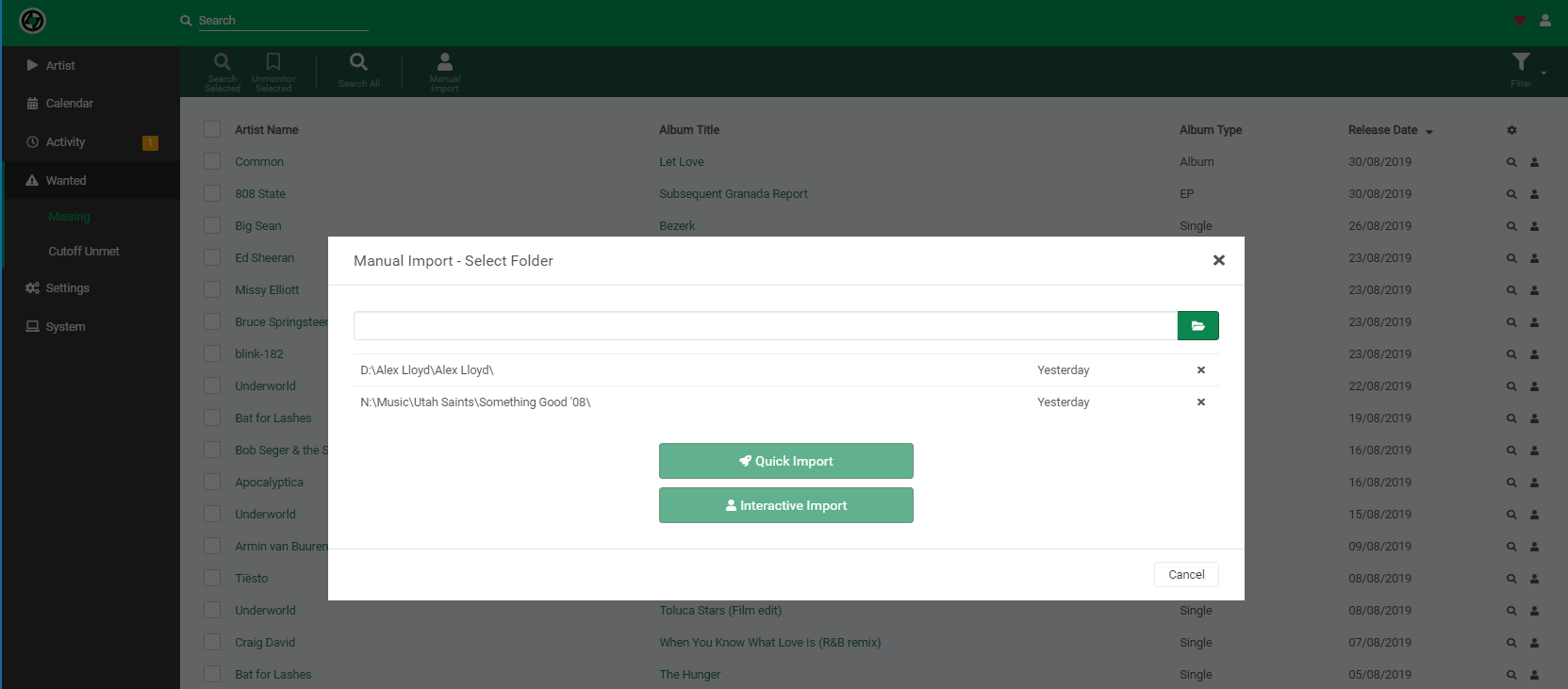
Manual Import dialogue infinite scrolling issue #593

Open
opened 2026-02-20 01:05:54 -05:00 by deekerman · 8 comments
Owner

Originally created by @skidaddl3 on GitHub (Aug 27, 2019).

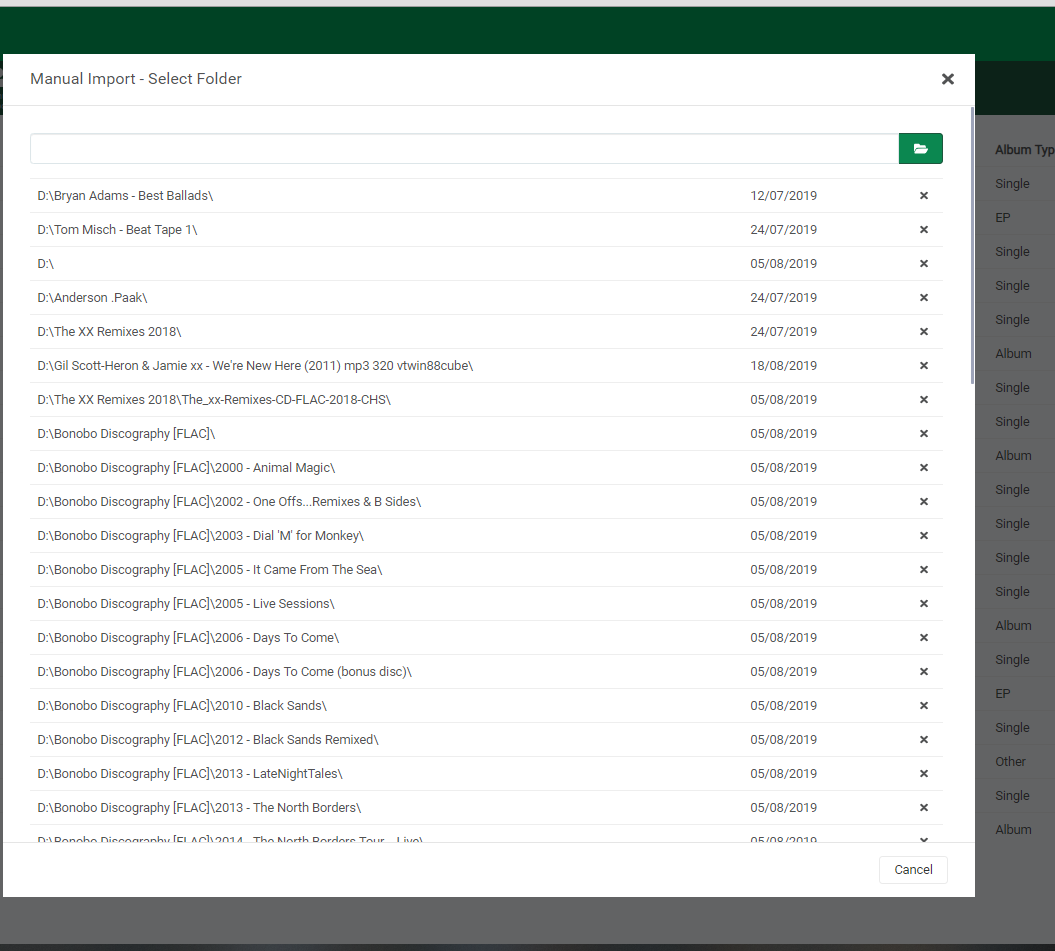
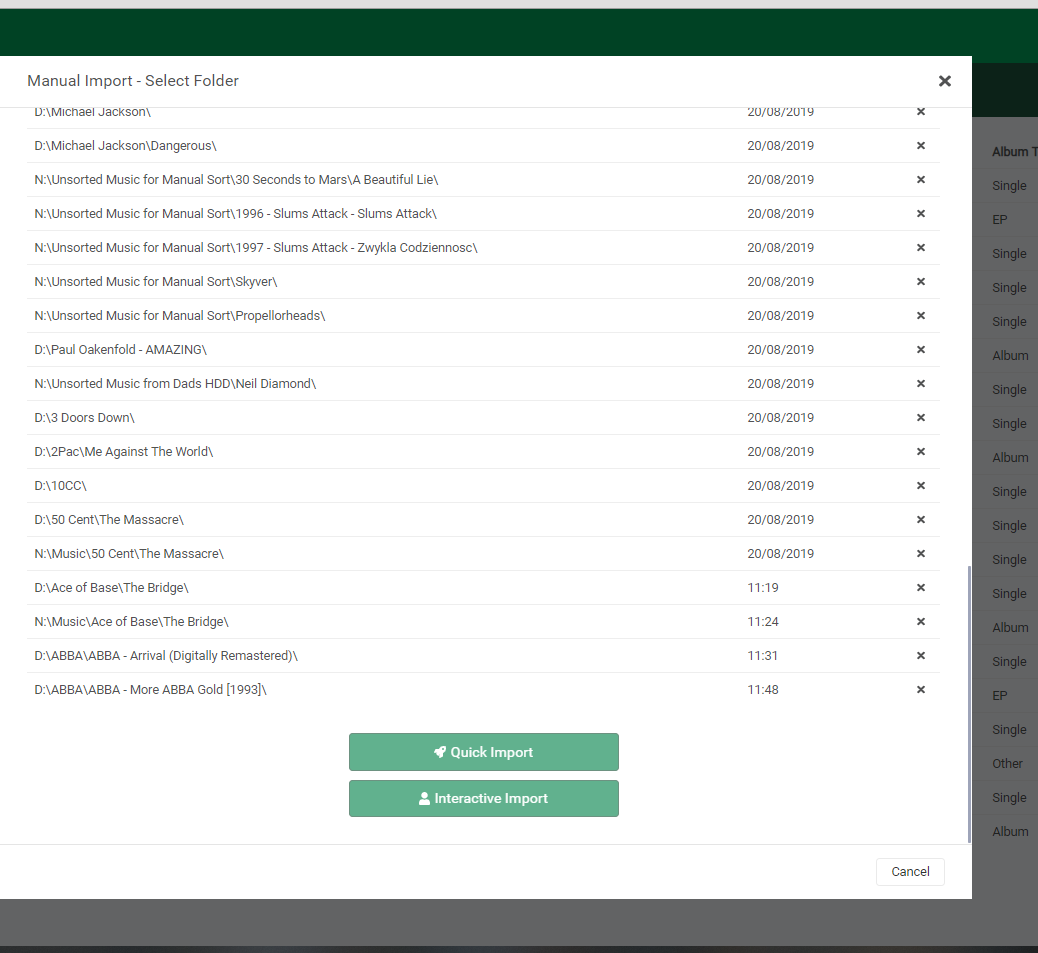
Is your feature request related to a problem? Please describe.
I'm always frustrated when I need to change a folder path on the Manual Import dialogue and scroll to the bottom to initiate the "interactive import" or the "quick import" function, once I find the folder path that I want.

Describe the solution you'd like

  1. Have the submit buttons on this page in the same footer as the following page to save time in scrolling down the list of your previous folder paths (which are typically obsolete anyway)

  2. Enable user sorting on the folder path history list.

  3. List the folder path history to newest first (if you're using the newest path as a copy/paste function for finding your path faster, makes more sense).

  4. Place the "quick import" and "interactive import" submit buttons before the folder path history list in the body of the dialogue, if it is not possible to put the buttons in the footer.

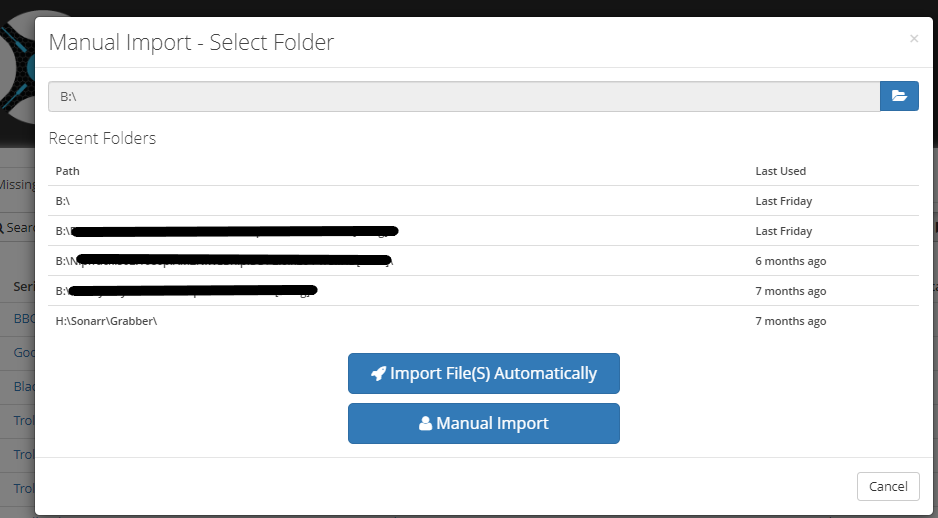
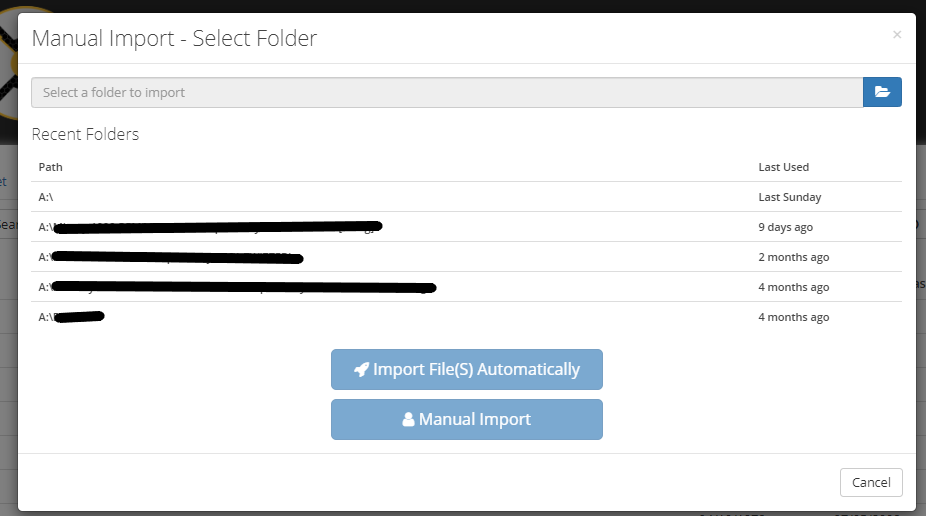
  5. Hard limit the folder path history list to limit the length of the import dialogue (Sonarr and Radarr respectively have a limit of 5 tuples

Describe alternatives you've considered
I don't trust Lidarr's quick import for large amounts of different artists and albums, yet.

Additional context
image
image

image

Sonarr Manual Import limit of 5 tuples:
sonarr

Radarr Manual Import limit of 5 tuples:
radarr

AB#317

Originally created by @skidaddl3 on GitHub (Aug 27, 2019). **Is your feature request related to a problem? Please describe.** I'm always frustrated when I need to change a folder path on the Manual Import dialogue and scroll to the bottom to initiate the "interactive import" or the "quick import" function, once I find the folder path that I want. **Describe the solution you'd like** 1. Have the submit buttons on this page in the same footer as the following page to save time in scrolling down the list of your previous folder paths (which are typically obsolete anyway) 2. Enable user sorting on the folder path history list. 3. List the folder path history to newest first (if you're using the newest path as a copy/paste function for finding your path faster, makes more sense). 4. Place the "quick import" and "interactive import" submit buttons before the folder path history list in the body of the dialogue, if it is not possible to put the buttons in the footer. 5. Hard limit the folder path history list to limit the length of the import dialogue (Sonarr and Radarr respectively have a limit of 5 tuples **Describe alternatives you've considered** I don't trust Lidarr's quick import for large amounts of different artists and albums, yet. **Additional context** ![image](https://user-images.githubusercontent.com/13662868/63821142-07cca500-c98b-11e9-9cf5-32f7b5a31a1e.png) ![image](https://user-images.githubusercontent.com/13662868/63821171-1d41cf00-c98b-11e9-9f4e-4bdb248ed409.png) ![image](https://user-images.githubusercontent.com/13662868/63821104-e966a980-c98a-11e9-96d8-c4b8939aaaac.png) Sonarr Manual Import limit of 5 tuples: ![sonarr](https://user-images.githubusercontent.com/13662868/63821859-ae19aa00-c98d-11e9-9ba3-d8c7678ecc92.png) Radarr Manual Import limit of 5 tuples: ![radarr](https://user-images.githubusercontent.com/13662868/63821865-b1149a80-c98d-11e9-929f-4e6f3ed0f296.png) [AB#317](https://dev.azure.com/Servarr/7ab38f4e-5a57-4d70-84f4-94dd9bc5d6df/_workitems/edit/317)
Author
Owner

@ta264 commented on GitHub (Aug 28, 2019):

Just delete some of the old folders you've already imported (press the x next to the folder name)

@ta264 commented on GitHub (Aug 28, 2019): Just delete some of the old folders you've already imported (press the x next to the folder name)
Author
Owner

@ta264 commented on GitHub (Aug 28, 2019):

PS this will be in the new Sonarr too, it's just just Lidarr being difficult

@ta264 commented on GitHub (Aug 28, 2019): PS this will be in the new Sonarr too, it's just just Lidarr being difficult
Author
Owner

@Qstick commented on GitHub (Aug 28, 2019):

Yea we can footer the buttons to make this a bit easier, but to @ta264 point, why do you have so many individual folders left?

@Qstick commented on GitHub (Aug 28, 2019): Yea we can footer the buttons to make this a bit easier, but to @ta264 point, why do you have so many individual folders left?
Author
Owner

@skidaddl3 commented on GitHub (Aug 30, 2019):

@ta264, @Qstick I thought this was an automation program?

@skidaddl3 commented on GitHub (Aug 30, 2019): @ta264, @Qstick I thought this was an automation program?
Author
Owner

@skidaddl3 commented on GitHub (Aug 30, 2019):

PS this will be in the new Sonarr too, it's just just Lidarr being difficult

What do you mean?
As in, just the ability to delete a historical path in the list? That's ok. As long as it doesn't slow the process down... More clicks are annoying

Just delete some of the old folders you've already imported (press the x next to the folder name)
Yea we can footer the buttons to make this a bit easier, but to @ta264 point, why do you have so many individual folders left?

I have never had to delete old folders already imported in Sonarr or Radarr...

@skidaddl3 commented on GitHub (Aug 30, 2019): > PS this will be in the new Sonarr too, it's just just Lidarr being difficult What do you mean? As in, just the ability to delete a historical path in the list? That's ok. As long as it doesn't slow the process down... More clicks are annoying > Just delete some of the old folders you've already imported (press the x next to the folder name) > Yea we can footer the buttons to make this a bit easier, but to @ta264 point, why do you have so many individual folders left? I have never had to delete old folders already imported in Sonarr or Radarr...
Author
Owner

@Qstick commented on GitHub (Aug 31, 2019):

It is an automation program if you use it correctly. The reason you don’t have this issue in Sonarr and Radarr is because you are not diving into individual series paths and adding as root folders or manual import sources. Based on your screenshots you have music everywhere. D: N: N:/Unsorted. @ta264 point was that Our UI came from Sonarr so you’ll have same issue on v3, also if you used Sonarr like you do Lidarr you would have a hundred folders as well.

We will fix the UI footer, but will not be automatic cleaning root folders/import sources. That’s something you need to control.

@Qstick commented on GitHub (Aug 31, 2019): It is an automation program if you use it correctly. The reason you don’t have this issue in Sonarr and Radarr is because you are not diving into individual series paths and adding as root folders or manual import sources. Based on your screenshots you have music everywhere. D: N: N:/Unsorted. @ta264 point was that Our UI came from Sonarr so you’ll have same issue on v3, also if you used Sonarr like you do Lidarr you would have a hundred folders as well. We will fix the UI footer, but will not be automatic cleaning root folders/import sources. That’s something you need to control.
Author
Owner

@skidaddl3 commented on GitHub (Aug 31, 2019):

It is an automation program if you use it correctly. The reason you don’t have this issue in Sonarr and Radarr is because you are not diving into individual series paths and adding as root folders or manual import sources. Based on your screenshots you have music everywhere. D: N: N:/Unsorted. @ta264 point was that Our UI came from Sonarr so you’ll have same issue on v3, also if you used Sonarr like you do Lidarr you would have a hundred folders as well.

We will fix the UI footer, but will not be automatic cleaning root folders/import sources. That’s something you need to control.

root folders

@skidaddl3 commented on GitHub (Aug 31, 2019): > It is an automation program if you use it correctly. The reason you don’t have this issue in Sonarr and Radarr is because you are not diving into individual series paths and adding as root folders or manual import sources. Based on your screenshots you have music everywhere. D: N: N:/Unsorted. @ta264 point was that Our UI came from Sonarr so you’ll have same issue on v3, also if you used Sonarr like you do Lidarr you would have a hundred folders as well. > > We will fix the UI footer, but will not be automatic cleaning root folders/import sources. That’s something you need to control. ![root folders](https://user-images.githubusercontent.com/13662868/64066068-d4bd3680-cc54-11e9-8a08-bf62bd36a6ac.png)
Author
Owner

@skidaddl3 commented on GitHub (Aug 31, 2019):

It is the Manual Import function from the Wanted>Missing page, not the managed artists area...
image

I have cleared a lot of the historical paths. To my understanding they're only there for importing music manually...
I'm not having issues actually having the artists match and import, I'm having issues with the interface.

@skidaddl3 commented on GitHub (Aug 31, 2019): It is the Manual Import function from the Wanted>Missing page, not the managed artists area... ![image](https://user-images.githubusercontent.com/13662868/64066095-236ad080-cc55-11e9-948c-a0d3352c58dc.png) I have cleared a lot of the historical paths. To my understanding they're only there for importing music manually... I'm not having issues actually having the artists match and import, I'm having issues with the interface.
Sign in to join this conversation.
No milestone
No project
No assignees
1 participant
Notifications
Due date
The due date is invalid or out of range. Please use the format "yyyy-mm-dd".

No due date set.

Dependencies

No dependencies set.

Reference
starred/Lidarr#593
No description provided.