mirror of
https://github.com/Lidarr/Lidarr.git
synced 2026-03-02 22:56:57 -05:00
Lidarr doesn't update track paths after root change and manual move. #674
Labels
No labels
Area: API
Area: Database
Area: Db-migration
Area: Download Clients
Area: Extras
Area: Import Lists
Area: Indexer
Area: Metadata API
Area: Notifications
Area: Organizer
Area: Parser
Area: Scanning
Area: Tooling
Area: UI
Area: Unit Tests
Area: Update API
On Hold: MetadataAPI Blocking
Priority: High
Priority: Low
Priority: Medium
Status: Accepted
Status: Cannot Reproduce
Status: Confirmed
Status: Don't Merge
Status: Help Wanted
Status: In Progress
Status: Info Needed
Status: Investigating
Status: Logs Needed
Status: Maybe One Day
Status: Needs Triage
Status: On Hold
Status: Ready for Review
Status: Unlikely
Status: Waiting for OP
Status: Won't Fix
Type: Bug
Type: Documentation
Type: Duplicate
Type: Enhancement
Type: Enhancement
Type: External Bug
Type: Feature Request
Type: Regression
Type: Support
Type: Support.
conflict
conflict
no-conflict
not-pulled
radarr-pull
readarr-pull
sonarr upstream
sonarr-pull
No milestone
No project
No assignees
1 participant

Notifications
Due date
No due date set.
Dependencies
No dependencies set.
Reference
starred/Lidarr#674
Loading…
Add table
Add a link
Reference in a new issue
No description provided.
Delete branch "%!s()"
Deleting a branch is permanent. Although the deleted branch may continue to exist for a short time before it actually gets removed, it CANNOT be undone in most cases. Continue?
Originally created by @SenorSmartyPants on GitHub (Feb 16, 2020).
Describe the bug
Tracks are displayed in lidarr, but the path is still the old path from before the root folder change for the artist.
To Reproduce
Steps to reproduce the behavior:
Expected behavior
After a refresh & scan, track paths should be updated to actual location on disk.
Screenshots

System info (please complete the following information):
@ta264 commented on GitHub (Feb 16, 2020):
Dupe of #1012, fixed in nightly
@ta264 commented on GitHub (Feb 16, 2020):
Wait I take it back, you are on nightly
@ta264 commented on GitHub (Feb 16, 2020):
So at what point did you actually move the files? I would expect the paths to be updated the first scan after the actual files moved.
@SenorSmartyPants commented on GitHub (Feb 16, 2020):
I've tried a couple different ways.
Move files first, then update root.
Update root, move files.
Doesn't seem to make a difference.
Just seems weird to be that if I do a scan, it still thinks the files are in the old location. When I assume the scan would see that they aren't
@SenorSmartyPants commented on GitHub (Feb 16, 2020):
Is there a different scan I should be running? "Refresh & scan" seems like the most appropriate.
@ta264 commented on GitHub (Feb 16, 2020):
Refresh and scan should detect the files have moved. I'm surprised it didn't. I'll have to try to replicate. Have you tried letting lidarr move the files itself?
@ta264 commented on GitHub (Feb 16, 2020):
Going to need some trace logs of it happening I think. Have you checked your log files for error?
@SenorSmartyPants commented on GitHub (Feb 16, 2020):
Refresh and Scan logs
Lidarr.trace.txt
Lidarr.debug.txt
@ta264 commented on GitHub (Feb 16, 2020):
It's trying to scan /music but that folder is empty so it skips the scan. What are the actual root folders you've changed from and to?
@SenorSmartyPants commented on GitHub (Feb 16, 2020):
/music is my old root. It is mounted in the container, but I have moved all my artists to my new root.
/storage/media/Music is my new root. It is full of artists.
I noticed another odd thing, not sure if it is related. But the two volumes mentioned above are displayed twice on /system/status
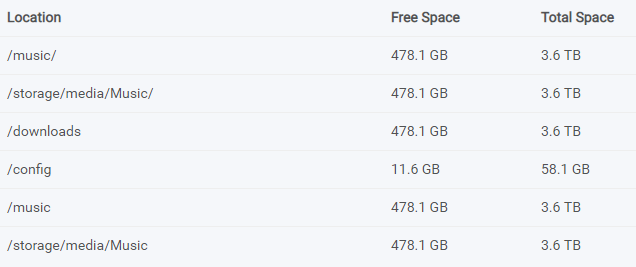
Here's my volumes section in docker-compose.yml
@ta264 commented on GitHub (Feb 16, 2020):
Ultimately your issue is that the old root still exists I think. Make sure all artists / lists are moved and delete the old one in media management. Then it should work I think.
@mbc0 commented on GitHub (Feb 16, 2020):
Don't know if it helps but I can confirm I have moved my path's around and renamed folders within paths and lidarr has kept track of all of this.
@SenorSmartyPants commented on GitHub (Feb 16, 2020):
I deleted the old root from media management root folders. Then also deleted the volume from docker-compose. Recreated the container and "Refresh & Scan" BBoys, all tracks are now gone. I R&S again still no tracks detected.
If I go to manual import it will list all the tracks on disk.
@ta264 commented on GitHub (Feb 16, 2020):
Ok I think this is most likely a support issue rather than a bug. Join the discord channel and hopefully someone can help or at least isolate the bug.
@ta264 commented on GitHub (Feb 16, 2020):
Turns out this does need a fix to deal with the case of manually mapped files.
@tehniemer commented on GitHub (Mar 7, 2020):
I'm having this same issue right now.
@tehniemer commented on GitHub (Mar 7, 2020):
I just switched from linuxserver/lidarr:latest to linuxserver/lidarr:preview and it seems to be behaving correctly now. Switching back to linuxserver/lidarr:latest and the problem returns.
@tehniemer commented on GitHub (Mar 8, 2020):
Nevermind, this is still having issues, while the albums show up under the artist now any operations preformed on them fail.
the new root folder is
/data/multimedia/Music/@tehniemer commented on GitHub (Mar 11, 2020):
The same behavior as #1107 is observed even after a fresh install.
@mrhotio commented on GitHub (Mar 15, 2020):
I'm gonna confirm this, only way I was able to recover was by deleting all artists and starting over......
@sebclark commented on GitHub (May 13, 2020):
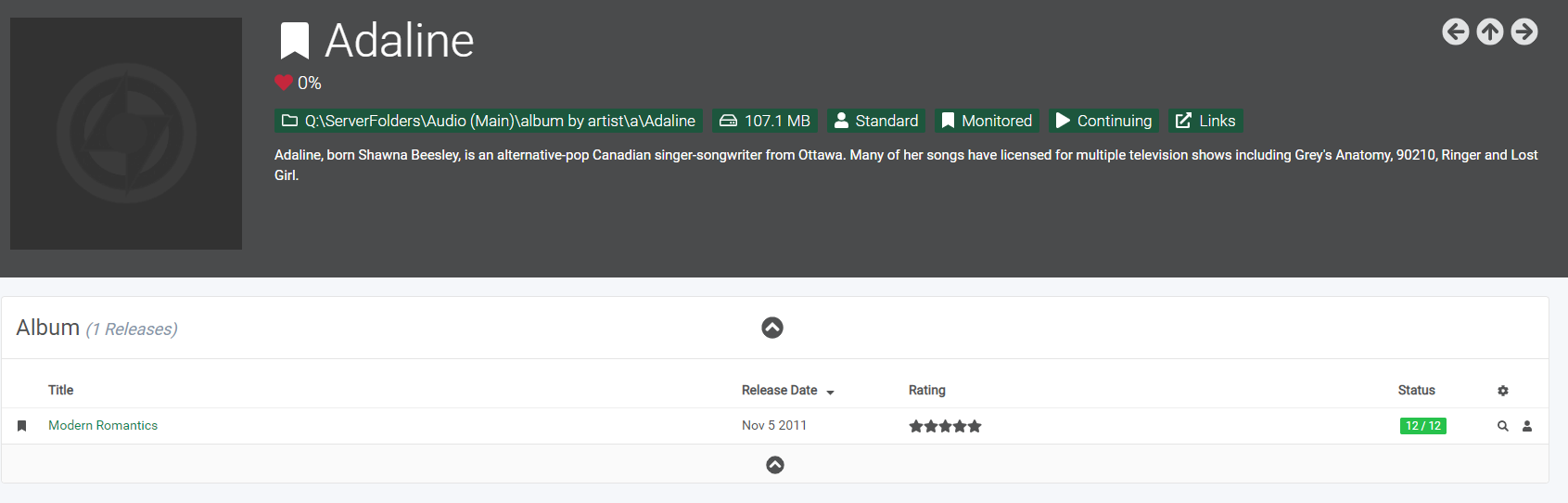
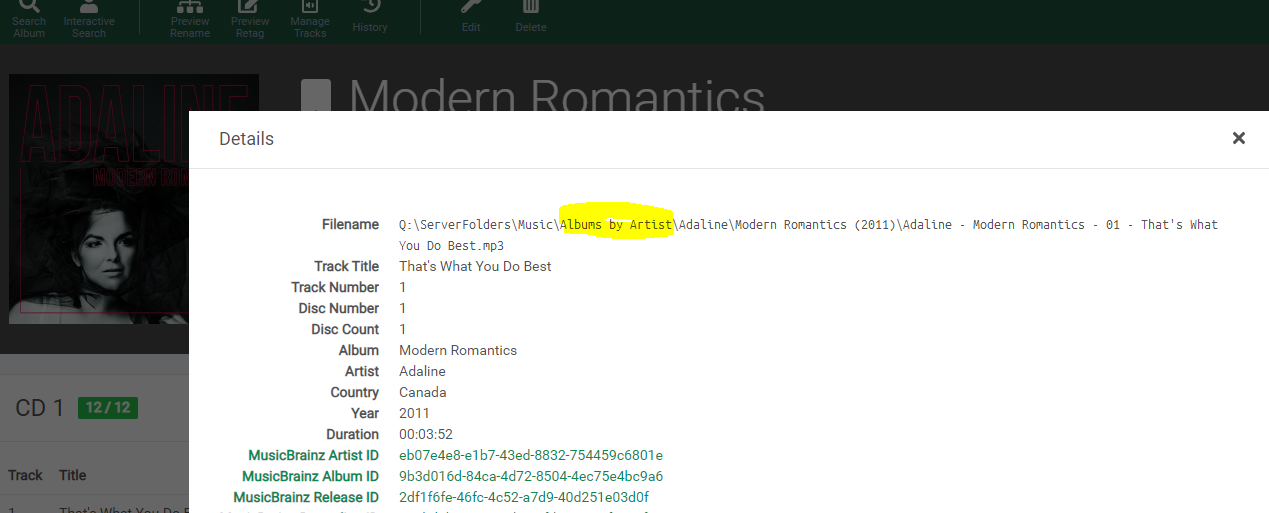
Part of this issue still exists (in todays nightly build). If you use the Mass Editor and when asked you pick "I will move the files myself", the assumption is that the Albums in the Artist's list will have their paths updated to still be sub folders of the Artists new folder. However what is happening is that the album/file paths arent being updated to match the Artist path (as you can test by doing a rescan and clicking the (i) beside any of the album tracks/files - they still show the original folder path).
If you pick "Move the files for me" everything works fine.
@duble08 commented on GitHub (Oct 4, 2020):
Is there any progress on this, or any work around solutions?
I just recently moved my library from J:\Music to Q:\Music. All naming and folder conventions are the same - it was literally a cut and paste of the whole music directory. I also used the mass editor to move the directories, selecting "I'll move the files myself". Any artist that had existing music files in the folders before the move now say "Loading track files failed" when I try to view the artist. Artists that hadn't yet downloaded anything (so there was never a previous folder for them) load the artist/album info fine. Lidarr has been downloading and sorting new downloads into the appropriate new folder location, for both previously added artists with bad "child directories" and newly added artists - I just simply can't view or modify any artists that had files and directories move from the old location to the new.
Looking at the logs, I'm getting the same errors as others. The errors state:
"J:\Music\artist\album\track\ is not a child of Q:\Music\artist"
I see this topic and several others like it are marked as closed. Has there been a solution posted that I'm not seeing? I tried going to the Discord channel, and it's not working. I've seen the reason for the error posted several times, but never a solution to fix it. How do I change the the album and track files (or child) to correspond with the new directory?
Thanks in advance!
@ta264 commented on GitHub (Oct 4, 2020):
It's fixed in nightly builds. But if it's affected you you'll need to start with a fresh lidarr and re-import everything
@duble08 commented on GitHub (Oct 4, 2020):
So just to confirm, the fix is to either change to nightly builds or completely reinstall Lidarr?
@ta264 commented on GitHub (Oct 4, 2020):
No, the fix is to wipe out your lidarr database and set everything up again. The issue cannot recur on nightly builds, but a nightly build won't repair the damage.
@tehniemer commented on GitHub (Oct 4, 2020):
I think your best bet is to move everything back to the location it was, restore a backup, then switch to nightly builds and change your paths.
@duble08 commented on GitHub (Oct 4, 2020):
Just wanted to throw an update out for my results...
I just got done updating to nightly build. I didn't move any files around before doing the update, didn't remove the database files. I didn't even have to re-scan.
After the nightly build update, everything is now working again. All artists are now accessible, and all tracks are showing up in the albums properly. Looks like (luckily) the fix for me was just changing over to nightly - no other work arounds were needed.
Thank you everybody for the help!