mirror of
https://github.com/SuiteCRM/SuiteCRM.git
synced 2026-03-02 19:16:58 -05:00
AOS_Quote quick edit not saved #1570
Labels
No labels
Area: API
Area: Campaigns
Area: Cases
Area: Clean Up
Area: Clean Up: Performance
Area: Dashlets
Area: Databases
Area: Developer Tools
Area: Elasticsearch
Area: Elasticsearch
Area: Emails
Area: Emails:Campaigns
Area: Emails:Cases
Area: Emails:Compose
Area: Emails:Config
Area: Emails:Templates
Area: Environment
Area: Installation
Area: Language
Area: Mobile
Area: Module
Area: PDFs
Area: PHP8
Area: Reports
Area: Studio
Area: Styling
Area: Upgrading
Area: Workflow
Area:Activity Stream
Area:Calls
Area:Import
Area:Projects
Area:Search
Area:Surveys
Area:Themes
Area:Users
Branch:Hotfix
Good First Issue
Hacktoberfest
Help Wanted
PR:Community Contribution
PR:Type:Enhancement
Priority:Critical
Priority:Important
Priority:Moderate
Severity: Major
Severity: Minor
Severity: Moderate
Status: Requires Code Review
Status: Requires Updates
Status: Stale
Status: Team Investigating
Status:Assessed
Status:Fix Proposed
Status:Needs Assessed
Status:Requires Automated Tests
Type: Bug
Type:Deprecated
Type:Discussion
Type:Duplicate
Type:Invalid
Type:Question
Type:Suggestion
Type:Suggestion
No milestone
No project
No assignees
1 participant

Notifications
Due date
No due date set.
Dependencies
No dependencies set.
Reference
starred/SuiteCRM-SuiteCRM#1570
Loading…
Add table
Add a link
Reference in a new issue
No description provided.
Delete branch "%!s()"
Deleting a branch is permanent. Although the deleted branch may continue to exist for a short time before it actually gets removed, it CANNOT be undone in most cases. Continue?
Originally created by @blloyd78 on GitHub (Jan 3, 2017).
Issue
Any value assigned to the "Opportunity" field on a quote is not saved when using the quick edit functionality - even when selected from the auto-complete options
Expected Behavior
Opportunity value should be saved.
Actual Behavior
The value is cleared and nothing is saved.
Possible Fix
Unknown
Steps to Reproduce
The field will automatically blank itself, and no data is saved.
Workaround
Using the "picker" tool to search and select the correct Opportunity. The selected result IS saved as expected.
This is an unsatisfactory long-term fix however as it severely impacts productivity by making the process much slower.
Context
Suggest medium priority as this could result in important contextual data being lost, or duplicate quotes being generated against Opportunities.
Your Environment
@shogunpol commented on GitHub (Jan 4, 2017):
@blloyd78 , an issue has been tested on recent version of SuiteCRM(7.7.9), and not appear, did you try it on fresh install or upgraded once?
@blloyd78 commented on GitHub (Jan 4, 2017):
This issue was tested on a live 7.7.9 install that has been upgraded from 7.7.8 in the past few days.
@shogunpol commented on GitHub (Jan 4, 2017):
@blloyd78 , two questions:
@blloyd78 commented on GitHub (Jan 4, 2017):
As requested:
I have also noted that any inline edits made to pre-populated Opportunity fields are not saved.
@shogunpol commented on GitHub (Jan 5, 2017):
@blloyd78 , do you have done some customisation on module (and instance), 3rd party and so on?
also, can you try an issue on our official demo, if still appear it will be some environmental issue.
@blloyd78 commented on GitHub (Jan 5, 2017):
The only 3rd party add-on installed is the QuickCRM Mobile Basic module - and that doesn't work on AOS_Quotes or AOS_Invoices.
@shogunpol commented on GitHub (Jan 5, 2017):
can you try an issue on our official demo, if still appear it will be some environmental issue.
@blloyd78 commented on GitHub (Jan 5, 2017):
I have created Test Quote A (quote #1) here: http://demo.suiteondemand.com/index.php?module=AOS_Quotes&action=DetailView&record=b3b2ded3-1acd-c78c-e57a-586e1a6ef225
I can confirm that the problem is present here too - inline changes to the Opportunity name are not saved. I have also found that the autocomplete/search function only works once. You cannot attempt a second inline edit without first reloading the quote.
@geconly commented on GitHub (Aug 10, 2017):
The inline edit does not work for the Contact or Account Either.
@horus68 commented on GitHub (Sep 20, 2017):
@geconly you missed the confirmation sign in each field. You need to click it before clicking away (I know, its strange!)
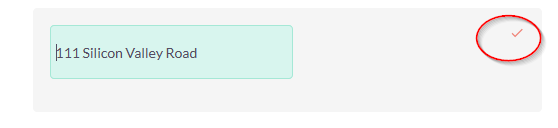
@blloyd78 Can you close this issue?
@blloyd78 commented on GitHub (Sep 20, 2017):
Can no longer recreate this issue on the 7.9.5 demo site
@geconly commented on GitHub (Sep 20, 2017):
The issue I am experiencing is NOT fixed.
You cannot edit inline the Name in the Lead detailview and have it save.
@horus68 commented on GitHub (Sep 20, 2017):
@geconly confirmed for the LEAD name.
I assume this is a different problem, because it requires 2 fields (first name and last name) as in Contacts module.
So please can you start a new issue?