mirror of
https://github.com/SuiteCRM/SuiteCRM.git
synced 2026-03-02 19:16:58 -05:00
Does anyone know how to get the group emails actually working? Are they broken? #2134
Labels
No labels
Area: API
Area: Campaigns
Area: Cases
Area: Clean Up
Area: Clean Up: Performance
Area: Dashlets
Area: Databases
Area: Developer Tools
Area: Elasticsearch
Area: Elasticsearch
Area: Emails
Area: Emails:Campaigns
Area: Emails:Cases
Area: Emails:Compose
Area: Emails:Config
Area: Emails:Templates
Area: Environment
Area: Installation
Area: Language
Area: Mobile
Area: Module
Area: PDFs
Area: PHP8
Area: Reports
Area: Studio
Area: Styling
Area: Upgrading
Area: Workflow
Area:Activity Stream
Area:Calls
Area:Import
Area:Projects
Area:Search
Area:Surveys
Area:Themes
Area:Users
Branch:Hotfix
Good First Issue
Hacktoberfest
Help Wanted
PR:Community Contribution
PR:Type:Enhancement
Priority:Critical
Priority:Important
Priority:Moderate
Severity: Major
Severity: Minor
Severity: Moderate
Status: Requires Code Review
Status: Requires Updates
Status: Stale
Status: Team Investigating
Status:Assessed
Status:Fix Proposed
Status:Needs Assessed
Status:Requires Automated Tests
Type: Bug
Type:Deprecated
Type:Discussion
Type:Duplicate
Type:Invalid
Type:Question
Type:Suggestion
Type:Suggestion
No milestone
No project
No assignees
1 participant

Notifications
Due date
No due date set.
Dependencies
No dependencies set.
Reference
starred/SuiteCRM-SuiteCRM#2134
Loading…
Add table
Add a link
Reference in a new issue
No description provided.
Delete branch "%!s()"
Deleting a branch is permanent. Although the deleted branch may continue to exist for a short time before it actually gets removed, it CANNOT be undone in most cases. Continue?
Originally created by @jbeima on GitHub (Jul 19, 2017).
I have done a fresh install of 7.9.2. Then I read that the patch to 7.9.3 carried a bug fix for group emails so I confirmed the challenge still exists in 7.9.3.
Here is what happens and what I have done:
Do a clean install.
Then create 3 admin users. The only data I entered was their first and last names and their positions with the company.
Then I configured the Outgoing email account and made sure it was working. All good.
Then I logged in as each of the 3 admin users one by one and setup their individual private email accounts. All worked perfectly.
Then I logged back in as my initial admin user, went into the Admin - Inbound Email.
Under this menu I created a group email account and entered all the settings for the company "info" email account. All staff member read and respond to the "info" email account.
I then logged in as one of the Admin Users and went into their email. Via All - Email
At the top I clicked on the "gear" to edit the email settings. On the user page I went down and clicked on the "Settings" button in the Email Settings section.
On the Mail Accounts Tab the group info account appeared, and I checked the box.
The on the General Tab under Folder Management the "INBOX" for the Info account showed up.
I went back to "All - Email" and by clicking on the folder at the top this user can now switch between both INBOX and email accounts perfectly. Also the user can select who they want to compose the email from just fine.
NOW here is where the challenge happens.
When I logout and log in as the second user.
I go into All - Email... Click The Gear... Click the Settings Button...
On the Mail Accounts Tab the Info account shows up, so I can click it.
HOWEVER back on the General Tab the INBOX for the General Account does NOT show up.
I have confirmed this is the same for any other user on the system.
The INBOX for the Group Email account only shows up for One User.
How do we get the INBOX to he selected by all the users which have the Group account activated?
Is this a bug? Am I doing something wrong?
John Beima
CDCI Development Inc.
jbeima@cdcidevelopment.com
@jbeima commented on GitHub (Jul 19, 2017):
I should have added.
The site is being run on a CentOS V:7.X web server with PHP V:7.1.6.
I am not sure if this is a PHP challenge, a CSS challenge, a JavaScript Challenge.
I am also using Google Chrome to access the site. Since I know THAT could be a factor as well.
@sergio91pt commented on GitHub (Jul 19, 2017):
@jbeima What bug fix are you talking about?
You created a group email account, but the account is not associated to a valid (group) user, so you probably can only open it with the account that created it due to #3719.
Right now you can't associate the account through the UI #3865, only manually through the database.
@jbeima commented on GitHub (Jul 21, 2017):
@sergio91pt The inbox can be accessed by any ONE user on the system. As long as you deactivate it for the current user that has it.
So it has nothing to so with the user that created it. If you follow the steps I mentioned above I already mentioned I created it with Admin #01 and am using it under Admin #02.
However Admin #03 can not view any mail.
THE BUG:
The bug is, this is a group account, under Folder Manager the INBOX should show up to be selected, once the group account is activated under the mail accounts.
All three users have the group account activated/checked under the mail accounts tab.
The INBOX should be showing up in the Folder Manager for all three accounts, and it only shows up for one. Once it is selected.
If it is NOT selected, then any of the 3 admins can select it and it works fine.
Everyone should be able to select it.
@jbeima commented on GitHub (Jul 21, 2017):
@sergio91pt - Bug #3865 is NOT effecting this since as I mentioned in my original post I am logging out and logging in as each user to edit that users settings.
I have already discovered this bug and was working around it.
As to bug #3719 I don't see this one. Each of my 3 users can ONLY select their own private email account. So I have never seen any traces of this.
@sergio91pt commented on GitHub (Jul 21, 2017):
I'm a relatively new user to SuiteCRM. My take on group email accounts is that they need to be associated with a group user (the type that you cannot assign a password/login as), thus my reference to #3865. I may be wrong tough, the lack of/inconsistent ACL checks do not help to determine the intended way to use this feature.
When I said #3719, I meant to link to the PR/code change and not the issue itself, as a possible reason to why you could open the mailbox in the 1st account.
@pabaillon commented on GitHub (Sep 26, 2017):
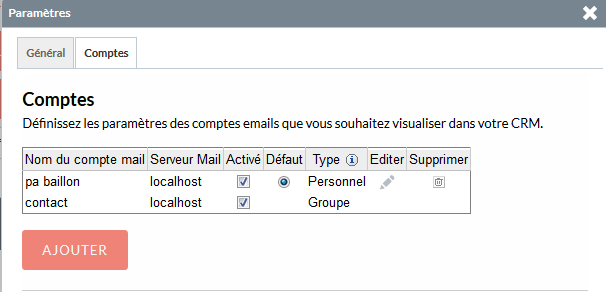
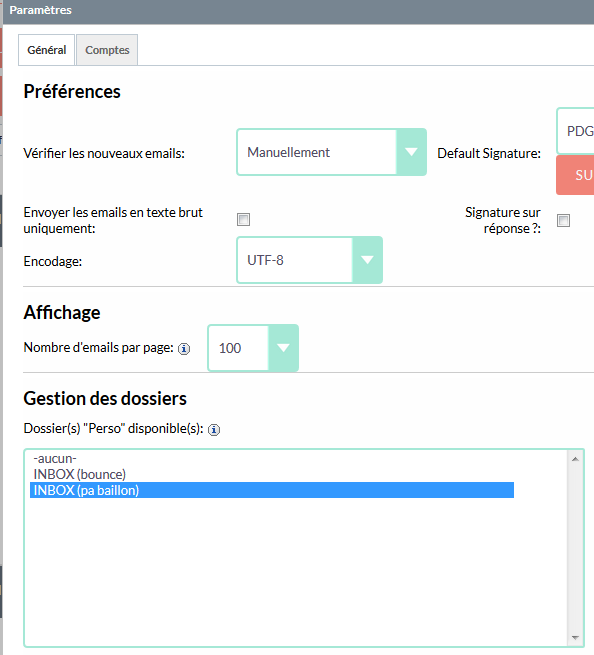
I have the same problem with group email. I can check it, but i can't see it...
@ppoudrier commented on GitHub (Nov 30, 2017):
I also have the exact same problem. Only one user is able to select the group inbox, noone else.
I'm using version 7.9.7 with php 7.0.24 on freebsd
@Dillon-Brown commented on GitHub (Mar 7, 2018):
This issue should now be resolved. Please re-open if this is still an issue you can replicate and provide clear steps for. Thanks.