mirror of
https://github.com/SuiteCRM/SuiteCRM.git
synced 2026-03-02 19:16:58 -05:00
AM_ProjectTemplates: Gantt View - Task Templates not showed according to order_number #3057
Labels
No labels
Area: API
Area: Campaigns
Area: Cases
Area: Clean Up
Area: Clean Up: Performance
Area: Dashlets
Area: Databases
Area: Developer Tools
Area: Elasticsearch
Area: Elasticsearch
Area: Emails
Area: Emails:Campaigns
Area: Emails:Cases
Area: Emails:Compose
Area: Emails:Config
Area: Emails:Templates
Area: Environment
Area: Installation
Area: Language
Area: Mobile
Area: Module
Area: PDFs
Area: PHP8
Area: Reports
Area: Studio
Area: Styling
Area: Upgrading
Area: Workflow
Area:Activity Stream
Area:Calls
Area:Import
Area:Projects
Area:Search
Area:Surveys
Area:Themes
Area:Users
Branch:Hotfix
Good First Issue
Hacktoberfest
Help Wanted
PR:Community Contribution
PR:Type:Enhancement
Priority:Critical
Priority:Important
Priority:Moderate
Severity: Major
Severity: Minor
Severity: Moderate
Status: Requires Code Review
Status: Requires Updates
Status: Stale
Status: Team Investigating
Status:Assessed
Status:Fix Proposed
Status:Needs Assessed
Status:Requires Automated Tests
Type: Bug
Type:Deprecated
Type:Discussion
Type:Duplicate
Type:Invalid
Type:Question
Type:Suggestion
Type:Suggestion
No milestone
No project
No assignees
1 participant

Notifications
Due date
No due date set.
Dependencies
No dependencies set.
Reference
starred/SuiteCRM-SuiteCRM#3057
Loading…
Add table
Add a link
Reference in a new issue
No description provided.
Delete branch "%!s()"
Deleting a branch is permanent. Although the deleted branch may continue to exist for a short time before it actually gets removed, it CANNOT be undone in most cases. Continue?
Originally created by @mayerelyashiv on GitHub (May 8, 2018).
In Project Template module, in gantt view, task templates aren't showed according to the value saved in am_tasktemplates.order_number.
This is unfriendly.
Issue
In Project Template module, if a user drag and drop a task template to change the order of a task, the change is saved but the result is not showed to the user until he goes in the detail view
Possible Fix
In /modules/AM_ProjectTemplates/controller.php
change
$tasks = $project_template->get_linked_beans('am_tasktemplates_am_projecttemplates','AM_TaskTemplates');with
$tasks = $project_template->get_linked_beans('am_tasktemplates_am_projecttemplates','AM_TaskTemplates','order_number');in /modules/AM_ProjectTemplates/views/view.ganttchart.php
change
$task_list = $this->bean->get_linked_beans('am_tasktemplates_am_projecttemplates','AM_TaskTemplates');with
$task_list = $this->bean->get_linked_beans('am_tasktemplates_am_projecttemplates','AM_TaskTemplates','order_number');Steps to Reproduce
https://demo.suiteondemand.com
Project Templates
View Detail
This (2-3-1) is the right sequence according to the order_number values.
View Gantt
Context
I think is a medium priority because you can actually change the order in Gantt View with drag and drop, but users can't see task templates have been affected until they look at the Project Template's Detail View Task Templates subpanel and they go into one of the Task Template Detail view.
The issue appers also when you want to create a Project from the Project Template (Task Templates aren't in order in the popup)
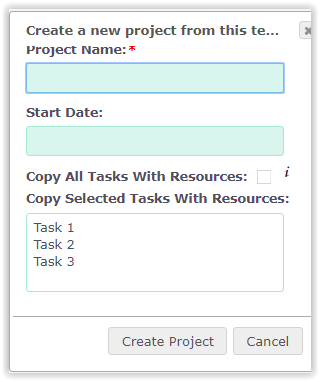
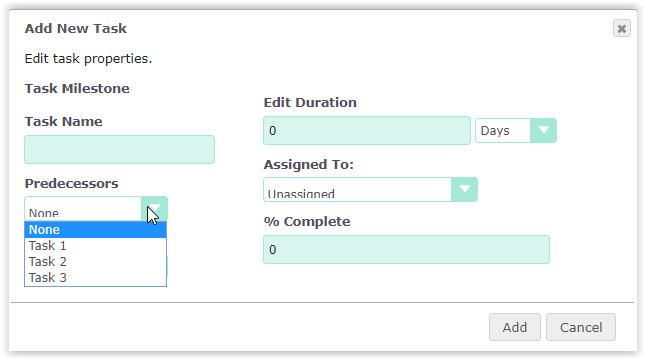
or you want to Add a new Task Template (Predecessors in the dropdown aren't ordered)
Your Environment
I've tested it on SuiteCRM v. 7.10.4 and 7.8.5
@Justin-Trueway commented on GitHub (Apr 23, 2020):
mayerelyashiv, you are amazing.
I have been frustrated with this issue for years. Twice I have tried to use the project templates, and each time I gave up after a couple of days of trying to figure out why the order was being jumbled. With your fix, I can finally throw out the task list PDF and use the template feature.
I am currently on version 7.11.13
Here is what I did:
nano /var/www/html/modules/AM_ProjectTemplates/controller.php
line 268
//Get project tasks
$project_template->load_relationship('am_tasktemplates_am_projecttemplates');
$tasks = $project_template->get_linked_beans('am_tasktemplates_am_projecttemplates', 'AM_TaskTemplates');
Changed to
//Get project tasks
$project_template->load_relationship('am_tasktemplates_am_projecttemplates');
$tasks = $project_template->get_linked_beans('am_tasktemplates_am_projecttemplates', 'AM_TaskTemplates','order_number');
nano /var/www/html/modules/AM_ProjectTemplates/views/view.ganttchart.php
line253
$this->bean->load_relationship('am_tasktemplates_am_projecttemplates');
$task_list = $this->bean->get_linked_beans('am_tasktemplates_am_projecttemplates', 'AM_TaskTemplates');
Changed to
$this->bean->load_relationship('am_tasktemplates_am_projecttemplates');
$task_list = $this->bean->get_linked_beans('am_tasktemplates_am_projecttemplates', 'AM_TaskTemplates', 'order_number');
I realize this change is not upgrade safe, and I will likely have to repeat after every upgrade until the changes are committed by the suitecrm developers.
@pgorod commented on GitHub (Apr 23, 2020):
Can one of you please start a PR with these changes?
@mayerelyashiv commented on GitHub (Apr 23, 2020):
Hi pgorod, i’m not used to do it. Could you help me please?
@pgorod commented on GitHub (Apr 23, 2020):
Yeah, sure.
Start with this, and then ask me when you get stuck:
https://docs.suitecrm.com/community/contributing-code/
Do you already use git locally?