mirror of
https://github.com/SuiteCRM/SuiteCRM.git
synced 2026-03-02 19:16:58 -05:00
System Upgrade failure #4017
Labels
No labels
Area: API
Area: Campaigns
Area: Cases
Area: Clean Up
Area: Clean Up: Performance
Area: Dashlets
Area: Databases
Area: Developer Tools
Area: Elasticsearch
Area: Elasticsearch
Area: Emails
Area: Emails:Campaigns
Area: Emails:Cases
Area: Emails:Compose
Area: Emails:Config
Area: Emails:Templates
Area: Environment
Area: Installation
Area: Language
Area: Mobile
Area: Module
Area: PDFs
Area: PHP8
Area: Reports
Area: Studio
Area: Styling
Area: Upgrading
Area: Workflow
Area:Activity Stream
Area:Calls
Area:Import
Area:Projects
Area:Search
Area:Surveys
Area:Themes
Area:Users
Branch:Hotfix
Good First Issue
Hacktoberfest
Help Wanted
PR:Community Contribution
PR:Type:Enhancement
Priority:Critical
Priority:Important
Priority:Moderate
Severity: Major
Severity: Minor
Severity: Moderate
Status: Requires Code Review
Status: Requires Updates
Status: Stale
Status: Team Investigating
Status:Assessed
Status:Fix Proposed
Status:Needs Assessed
Status:Requires Automated Tests
Type: Bug
Type:Deprecated
Type:Discussion
Type:Duplicate
Type:Invalid
Type:Question
Type:Suggestion
Type:Suggestion
No milestone
No project
No assignees
1 participant

Notifications
Due date
No due date set.
Dependencies
No dependencies set.
Reference
starred/SuiteCRM-SuiteCRM#4017
Loading…
Add table
Add a link
Reference in a new issue
No description provided.
Delete branch "%!s()"
Deleting a branch is permanent. Although the deleted branch may continue to exist for a short time before it actually gets removed, it CANNOT be undone in most cases. Continue?
Originally created by @MyBlissIT on GitHub (Sep 30, 2019).
I recently tried to upgrade from 7.11.7 to 7.11.8 and I get 500 error
Every step of the upgrade process was checked well before this, this error took place after step 3, or after Pre-flight check...
my link is: https://www.myblisstech.com/crm
@pgorod commented on GitHub (Sep 30, 2019):
What does your
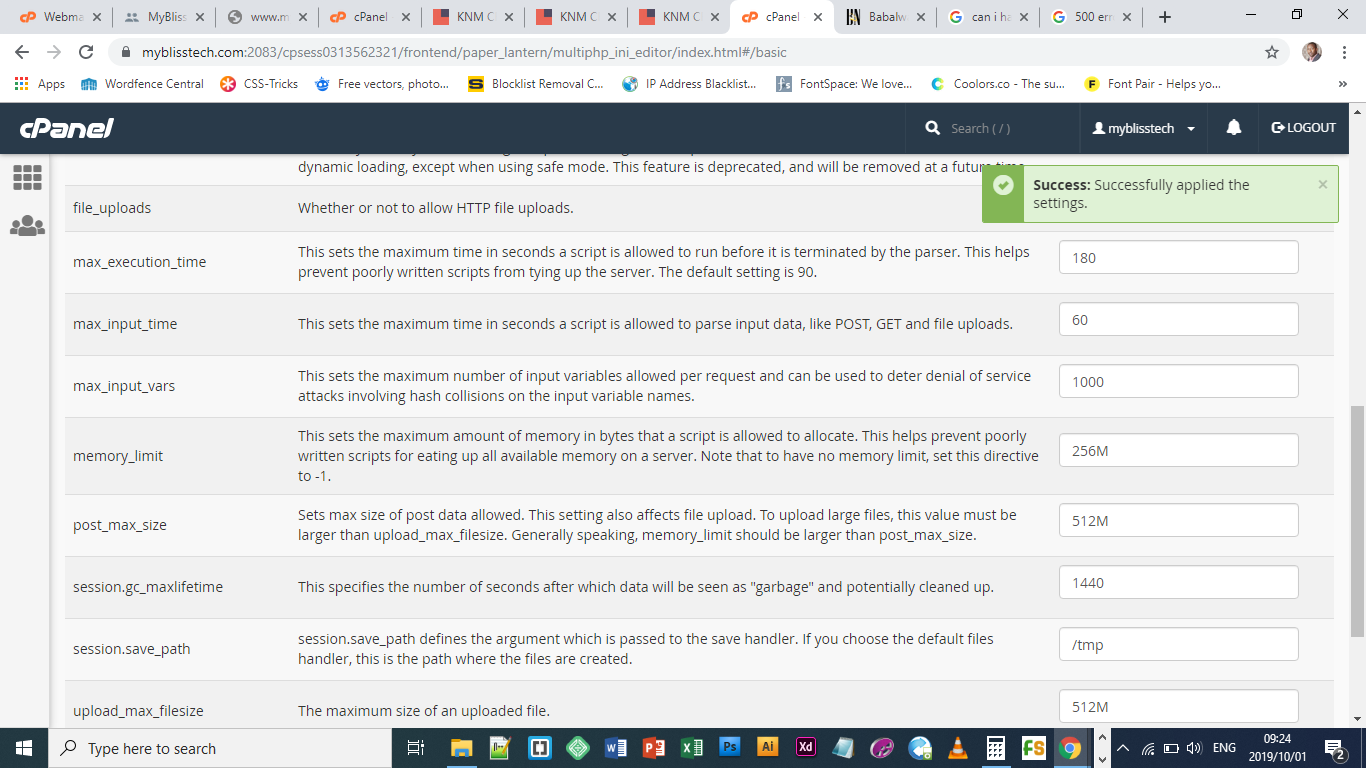
php_errors.logsay about that FATAL? Maybe you just have to increase some resources in yourphp.ini....memory_limit
max_upload_size
max_execution_time
@MyBlissIT commented on GitHub (Oct 1, 2019):
Here is my php.ini screenshot:
How can I locate the php.errors.log? Because the issue persists...
@pgorod commented on GitHub (Oct 1, 2019):
The web server log is defined in your
php.inialso. Sometimes it's calledphp_errors.log, sometimes justerrors.log, but you can give it any name you want.Some errors SuiteCRM doesn't have a chance to catch, because they're PHP errors and crash the web server process. So the web server log is really essential.
@MyBlissIT commented on GitHub (Oct 2, 2019):
This is my error message:
[30-Sep-2019 04:59:25 Etc/GMT] PHP Fatal error: Uncaught Error: Class 'ComposerAutoloaderInit220bd2cf97737b02d38e9edb1643e4fb' not found in /home/myblisstech/public_html/crm/vendor/autoload.php:7
Stack trace:
#0 /home/myblisstech/public_html/crm/include/entryPoint.php(65): require_once()
#1 /home/myblisstech/public_html/crm/index.php(47): require_once('/home/myblisste...')
#2 {main}
thrown in /home/myblisstech/public_html/crm/vendor/autoload.php on line 7
@pgorod commented on GitHub (Oct 3, 2019):
Do you have
composerinstalled?Can you run this from your root directory:
composer install --no-devI don't really know what's going wrong, but this might solve things, or provide you with further clues.
@MyBlissIT commented on GitHub (Oct 8, 2019):
I have 2 composer files named:
I managed to locate the Upgrade Wizard log and these are first 2 errors on the log:
Mon, 30 Sep 2019 04:59:20 +0000 [UpgradeWizard] - Starting file copy process...
Mon, 30 Sep 2019 04:59:21 +0000 [UpgradeWizard] - *** ERROR: could not copy file: /home/myblisstech/public_html/crm/vendor/zf1/zend-uri/composer.json
Mon, 30 Sep 2019 04:59:21 +0000 [UpgradeWizard] - *** ERROR: could not copy file: /home/myblisstech/public_html/crm/vendor/zf1/zend-uri/README.md
I also happen to come across this error log on SuiteCRM log (all logs via root directory)"
Mon Sep 30 04:38:48 2019 [2694365][1][FATAL] Unable to move move_uploaded_file to upload://SuiteCRM-Upgrade-7.11.x-to-7.11.8.zip You should try making the directory writable by the webserver
@Dillon-Brown commented on GitHub (Oct 8, 2019):
Hi @MyBlissIT, those logs indicate that the problem is with your file permissions which caused the UpgradeWizard to fail when it couldn't copy the files over. I would suggest taking a look at the SuiteCRM docs, specifically the "Set the correct permissions on the SuiteCRM directory" (Assuming you are on Linux) found here:
https://docs.suitecrm.com/admin/installation-guide/downloading-installing/
@MyBlissIT commented on GitHub (Oct 9, 2019):
Is there a way I can undo this upgrade?
I tried deleting upgrade files via cpanel but I still get the 500 error
@Dillon-Brown commented on GitHub (Oct 9, 2019):
@MyBlissIT If the upgrade failed part way through there isn't really a way to "revert" it, you'd typically just go to a backup. I guess theoretically you could try running a
composer installafter setting the correct permissions and then running the upgrade, not sure if you'd be able to get to that point if it managed to copy over some files though.@MyBlissIT commented on GitHub (Oct 9, 2019):
Let me start afresh then, I do not even know how to run a composer install...
My main challenge will be how will be able to upgrade in the future.
@mattlorimer commented on GitHub (Jun 7, 2020):
Please move this discussion to the forum if you are still having issues