Compose Email button in Activities shown twice and/or with wrong styling #4120

Closed
opened 2026-02-20 16:13:54 -05:00 by deekerman · 14 comments
Owner

Originally created by @ebogaard on GitHub (Nov 19, 2019).

Originally assigned to: @johnM2401 on GitHub.

Issue

When setting:

$sugar_config['enable_action_menu'] = false;

All action-menu options are presented as buttons. This goes for teh top buttons, as well as those in the subpanels.

In the Activities-subpanel, there is an issue witth the "Compose Email"-button, depending on the current user setting:

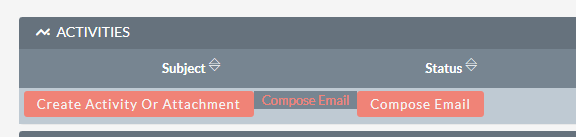
  1. "Email Client" = "External Email Client" => The button is shown twice, the second one non-functioning and without button-styling. See image below.
  2. "Email Client" = "SuiteCRM Email Client" => There is only one button, but this button doesn't have button-styling.
    activities-buttons

Expected Behavior

  1. Depending on the current user setting, only one or the other button should be shown
  2. The button styling should be in line with the other buttons

Actual Behavior

See issue.

Possible Fix

I'll provide a PR.

Steps to Reproduce

  1. Set "$sugar_config['enable_action_menu'] = false;" in config_override.php
  2. Check the buttons in Activities subpanel
  3. Change "Email Client"-setting in your personal profile
  4. Check the buttons in Activities subpanel again

Context

Your Environment

  • SuiteCRM Version used:
  • Browser name and version (e.g. Chrome Version 51.0.2704.63 (64-bit)):
  • Environment name and version (e.g. MySQL, PHP 7):
  • Operating System and version (e.g Ubuntu 16.04):
Originally created by @ebogaard on GitHub (Nov 19, 2019). Originally assigned to: @johnM2401 on GitHub. <!--- Provide a general summary of the issue in the **Title** above --> <!--- Before you open an issue, please check if a similar issue already exists or has been closed before. ---> <!--- If you have discovered a security risk please report it by emailing security@suitecrm.com. This will be delivered to the product team who handle security issues. Please don't disclose security bugs publicly until they have been handled by the security team. ---> #### Issue When setting: ``` $sugar_config['enable_action_menu'] = false; ``` All action-menu options are presented as buttons. This goes for teh top buttons, as well as those in the subpanels. In the Activities-subpanel, there is an issue witth the "Compose Email"-button, depending on the current user setting: 1. "Email Client" = "External Email Client" => The button is shown twice, the second one non-functioning and without button-styling. See image below. 1. "Email Client" = "SuiteCRM Email Client" => There is only one button, but this button doesn't have button-styling. ![activities-buttons](https://user-images.githubusercontent.com/4035997/69140434-cd266480-0ac2-11ea-8e9b-0ee452b12f57.png) #### Expected Behavior <!--- Tell us what should happen --> 1. Depending on the current user setting, only one or the other button should be shown 2. The button styling should be in line with the other buttons #### Actual Behavior <!--- Tell us what happens instead --> <!--- Also please check relevant logs (suitecrm.log, php error.log etc.) --> See issue. #### Possible Fix <!--- Not obligatory, but suggest a fix or reason for the bug --> I'll provide a PR. #### Steps to Reproduce <!--- Provide a link to a live example, or an unambiguous set of steps to --> <!--- reproduce this bug include code to reproduce, if relevant --> 1. Set "$sugar_config['enable_action_menu'] = false;" in config_override.php 2. Check the buttons in Activities subpanel 3. Change "Email Client"-setting in your personal profile 4. Check the buttons in Activities subpanel again #### Context <!--- How has this bug affected you? What were you trying to accomplish? --> <!--- If you feel this should be a low/medium/high priority then please state so --> #### Your Environment <!--- Include as many relevant details about the environment you experienced the bug in --> * SuiteCRM Version used: * Browser name and version (e.g. Chrome Version 51.0.2704.63 (64-bit)): * Environment name and version (e.g. MySQL, PHP 7): * Operating System and version (e.g Ubuntu 16.04):
Author
Owner

@Mac-Rae commented on GitHub (Nov 19, 2019):

Hi @ebogaard,

This issue has been confirmed to exist and is replicable in the latest 7.10.x version.

Thanks 👍

@Mac-Rae commented on GitHub (Nov 19, 2019): Hi @ebogaard, This issue has been confirmed to exist and is replicable in the latest 7.10.x version. Thanks :+1:
Author
Owner

@dtosun61 commented on GitHub (Nov 21, 2019):

When i apply fix, it doesn't fixed.
image

@dtosun61 commented on GitHub (Nov 21, 2019): When i apply fix, it doesn't fixed. ![image](https://user-images.githubusercontent.com/22373035/69306987-61670780-0c3a-11ea-91c0-bff132b4b473.png)
Author
Owner

@craigpanton commented on GitHub (Nov 27, 2019):

@dursuntosun Could you please try doing a repair and rebuild/clearing your cache and trying again? It appears to work from our testing.

@craigpanton commented on GitHub (Nov 27, 2019): @dursuntosun Could you please try doing a repair and rebuild/clearing your cache and trying again? It appears to work from our testing.
Author
Owner

@gunnicom commented on GitHub (Nov 27, 2019):

Duplicate https://github.com/salesagility/SuiteCRM/issues/7759

@gunnicom commented on GitHub (Nov 27, 2019): Duplicate https://github.com/salesagility/SuiteCRM/issues/7759
Author
Owner

@dtosun61 commented on GitHub (Nov 27, 2019):

@dursuntosun Could you please try doing a repair and rebuild/clearing your cache and trying again? It appears to work from our testing.

Sure, i did it. Let me check again.
Update: Changing my all code with new one. That is ok at the moment.
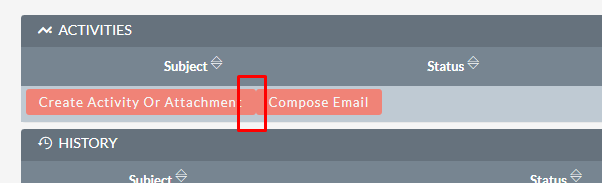
if possible can we make a space between two button.
image

@dtosun61 commented on GitHub (Nov 27, 2019): > @dursuntosun Could you please try doing a repair and rebuild/clearing your cache and trying again? It appears to work from our testing. Sure, i did it. Let me check again. Update: Changing my all code with new one. That is ok at the moment. if possible can we make a space between two button. ![image](https://user-images.githubusercontent.com/22373035/69780435-52dd9a80-11bc-11ea-828f-eb1ff97c4799.png)
Author
Owner

@Mac-Rae commented on GitHub (Nov 28, 2019):

@dursuntosun Ye that's a weird issue with all the individual button. Feel free to raise a new issue and we will take a look at it 👍

@Mac-Rae commented on GitHub (Nov 28, 2019): @dursuntosun Ye that's a weird issue with all the individual button. Feel free to raise a new issue and we will take a look at it :+1:
Author
Owner

@bunglex commented on GitHub (Jan 20, 2022):

This fix does not work for me. even after running repair and clearing out the cache. I had to change line104 to

$button = "<input class='button' onclick='$(document).openComposeViewModal(this);' data-module='". $bean->module_name . "' data-record-id='". $bean->id . "' data-module-name='" . $bean->name . "' data-email-address='" . $bean->email1 . " ' type='button' id='$inputID' value='$this->form_value'>";

and comment out lines 105>110 and also 131.

The button then works correctly

@bunglex commented on GitHub (Jan 20, 2022): This fix does not work for me. even after running repair and clearing out the cache. I had to change line104 to `$button = "<input class='button' onclick='$(document).openComposeViewModal(this);' data-module='". $bean->module_name . "' data-record-id='". $bean->id . "' data-module-name='" . $bean->name . "' data-email-address='" . $bean->email1 . " ' type='button' id='$inputID' value='$this->form_value'>";` and comment out lines 105>110 and also 131. The button then works correctly
Author
Owner

@SuiteBot commented on GitHub (Jan 20, 2022):

This issue has been mentioned on SuiteCRM. There might be relevant details there:

https://community.suitecrm.com/t/activity-subpanel-compose-email-button-duplicated/73865/11

@SuiteBot commented on GitHub (Jan 20, 2022): This issue has been mentioned on **SuiteCRM**. There might be relevant details there: https://community.suitecrm.com/t/activity-subpanel-compose-email-button-duplicated/73865/11
Author
Owner

@dtosun61 commented on GitHub (Feb 21, 2022):

Hello,
It comes back to 7.12.4. Please fix it. it was taken from new installation.
image

@dtosun61 commented on GitHub (Feb 21, 2022): Hello, It comes back to 7.12.4. Please fix it. it was taken from new installation. ![image](https://user-images.githubusercontent.com/22373035/154976869-7301213e-1825-443c-bb6b-c26ca033fc11.png)
Author
Owner

@craigpanton commented on GitHub (Feb 22, 2022):

Hi @dtosun61 ,

Thank you for indicating this issue has reappeared.

We will reopen the issue and a member of our team will assess soon.

@craigpanton commented on GitHub (Feb 22, 2022): > Hi @dtosun61 , Thank you for indicating this issue has reappeared. We will reopen the issue and a member of our team will assess soon.
Author
Owner

@pgorod commented on GitHub (Apr 6, 2022):

Please test PR https://github.com/salesagility/SuiteCRM/pull/9559

@pgorod commented on GitHub (Apr 6, 2022): Please test PR https://github.com/salesagility/SuiteCRM/pull/9559
Author
Owner

@gunnicom commented on GitHub (Nov 17, 2022):

Still not fixed in 7.12.7

@gunnicom commented on GitHub (Nov 17, 2022): Still not fixed in 7.12.7
Author
Owner

@Talboy commented on GitHub (Jan 12, 2023):

I can confirm that after upgrade from 7.12.7 --> 7.13 the problem persists!
I had hoped that the upgrade would fix this issue.

@Talboy commented on GitHub (Jan 12, 2023): I can confirm that after upgrade from 7.12.7 --> 7.13 the problem persists! I had hoped that the upgrade would fix this issue.
Author
Owner

@johnM2401 commented on GitHub (Jun 11, 2025):

Hey!

Thank you for raising this issue, and for everyone's contributions on this issue!

I have given this a few tries in the latest release, and I can no longer replicate this issue:

Image

Image


It looks as though this was resolved with the PR: https://github.com/salesagility/SuiteCRM/pull/9559

I'm going to close this off for now.
However, if you're still seeing this issue in the latest releases, please don't hesitate to get in touch.
Thank you again for your contributions to the project!

@johnM2401 commented on GitHub (Jun 11, 2025): Hey! Thank you for raising this issue, and for everyone's contributions on this issue! I have given this a few tries in the latest release, and I can no longer replicate this issue: ![Image](https://github.com/user-attachments/assets/20bb1167-9e28-461e-8edb-0d88ecad79ad) ![Image](https://github.com/user-attachments/assets/643353c0-8303-4953-8e1a-4f5a22a9b723) <br> It looks as though this was resolved with the PR: https://github.com/salesagility/SuiteCRM/pull/9559 I'm going to close this off for now. However, if you're still seeing this issue in the latest releases, please don't hesitate to get in touch. Thank you again for your contributions to the project!
Sign in to join this conversation.
No milestone
No project
No assignees
1 participant
Notifications
Due date
The due date is invalid or out of range. Please use the format "yyyy-mm-dd".

No due date set.

Dependencies

No dependencies set.

Reference
starred/SuiteCRM-SuiteCRM#4120
No description provided.