mirror of
https://github.com/SuiteCRM/SuiteCRM.git
synced 2026-03-02 19:16:58 -05:00
Installation routine of 7.11.18 doesn´t store default smtp email configuration #4521
Labels
No labels
Area: API
Area: Campaigns
Area: Cases
Area: Clean Up
Area: Clean Up: Performance
Area: Dashlets
Area: Databases
Area: Developer Tools
Area: Elasticsearch
Area: Elasticsearch
Area: Emails
Area: Emails:Campaigns
Area: Emails:Cases
Area: Emails:Compose
Area: Emails:Config
Area: Emails:Templates
Area: Environment
Area: Installation
Area: Language
Area: Mobile
Area: Module
Area: PDFs
Area: PHP8
Area: Reports
Area: Studio
Area: Styling
Area: Upgrading
Area: Workflow
Area:Activity Stream
Area:Calls
Area:Import
Area:Projects
Area:Search
Area:Surveys
Area:Themes
Area:Users
Branch:Hotfix
Good First Issue
Hacktoberfest
Help Wanted
PR:Community Contribution
PR:Type:Enhancement
Priority:Critical
Priority:Important
Priority:Moderate
Severity: Major
Severity: Minor
Severity: Moderate
Status: Requires Code Review
Status: Requires Updates
Status: Stale
Status: Team Investigating
Status:Assessed
Status:Fix Proposed
Status:Needs Assessed
Status:Requires Automated Tests
Type: Bug
Type:Deprecated
Type:Discussion
Type:Duplicate
Type:Invalid
Type:Question
Type:Suggestion
Type:Suggestion
No milestone
No project
No assignees
1 participant

Notifications
Due date
No due date set.
Dependencies
No dependencies set.
Reference
starred/SuiteCRM-SuiteCRM#4521
Loading…
Add table
Add a link
Reference in a new issue
No description provided.
Delete branch "%!s()"
Deleting a branch is permanent. Although the deleted branch may continue to exist for a short time before it actually gets removed, it CANNOT be undone in most cases. Continue?
Originally created by @Talleyrand on GitHub (Apr 27, 2021).
Issue
After a clean and new installation of SuiteCRM 7.11.18 after the first login appear on top of the content frame the message "Note: To send record assignment notifications, an SMTP server must be configured in Email Settings". Clicking on the link "Email Settings" leads to the form where all during the installation provided MANDATORY data regarding the mail server has disappered and need to be provided again.
Expected Behavior
The during the installation provided data should have been saved during the installation process
Actual Behavior
Asking for data of:
suitecrm.log
Tue Apr 27 13:57:05 2021 [269880][-none-][FATAL] SugarBean::populateDefaultValues $field_defs should be an array
Tue Apr 27 13:57:10 2021 [269880][-none-][FATAL] User update error: Temp User is not retrieved at ID 1, boolean given
Tue Apr 27 13:57:10 2021 [269880][-none-][FATAL] Email address save error
Tue Apr 27 13:57:14 2021 [269880][1][FATAL] SugarBean::populateDefaultValues $field_defs should be an array
Tue Apr 27 13:57:14 2021 [269880][1][FATAL] SugarBean::populateDefaultValues $field_defs should be an array
Tue Apr 27 13:57:15 2021 [269880][1][FATAL] SugarBean::populateDefaultValues $field_defs should be an array
Tue Apr 27 13:57:16 2021 [269880][1][FATAL] SugarBean::populateDefaultValues $field_defs should be an array
Tue Apr 27 13:57:58 2021 [272591][1][FATAL] log call at: modules/EmailMan/tpls/config.tpl:465 - styleChecked is not set
install.log
2021-04-27 11:57:10...Installation has completed *********
2021-04-27 11:57:16...populating the db with seed data
2021-04-27 11:57:16...Save configuration settings..
2021-04-27 11:57:16...save locale
2021-04-27 11:57:16...new Administration
2021-04-27 11:57:16...retrieveSettings
2021-04-27 11:57:16...AdminWizard OFF
2021-04-27 11:57:16...saveConfig
2021-04-27 11:57:16...new Configurator
2021-04-27 11:57:16...populateFromPost
2021-04-27 11:57:16...handleOverride
2021-04-27 11:57:16...addCronAllowedUser
2021-04-27 11:57:16...saveConfig
2021-04-27 11:57:16...new Currency
2021-04-27 11:57:16...retrieve
2021-04-27 11:57:16...DBG: save currency
2021-04-27 11:57:16...Save user settings..
2021-04-27 11:57:16...DBG: SugarThemeRegistry::getDefault
2021-04-27 11:57:26...installerHook: Info: custom/install/install_hooks.php not present, no custom hooks to execute
Steps to Reproduce
Your Environment
SuiteCRM Version used: 7.11.18
Browser name and version: all
PHP Built On: Linux localhost 3.10.0-1127.10.1.el7.x86_64 #1 SMP
Database Type: mysql
Database Version: 5.6.42-log
PHP Version: 7.3.27
Web Server: Apache/2.4.46 (Unix)
@johnM2401 commented on GitHub (Apr 28, 2021):
Hey,
I'm unable to replicate, I'm afraid.
I've filled in the details here, during the 7.11.18 install process:
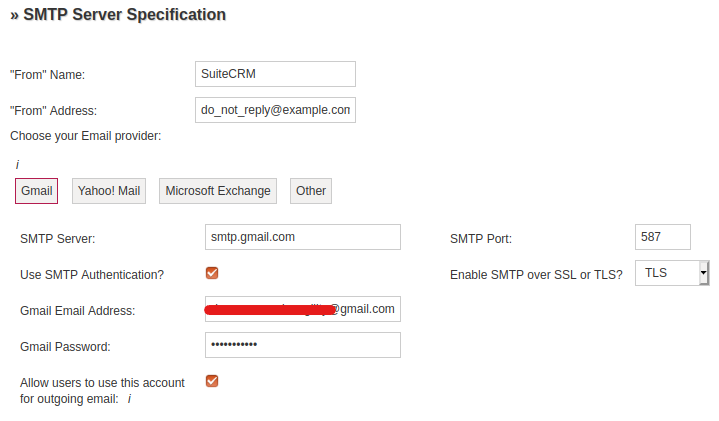
and they appear to have pulled into the Admin->Email Settings:
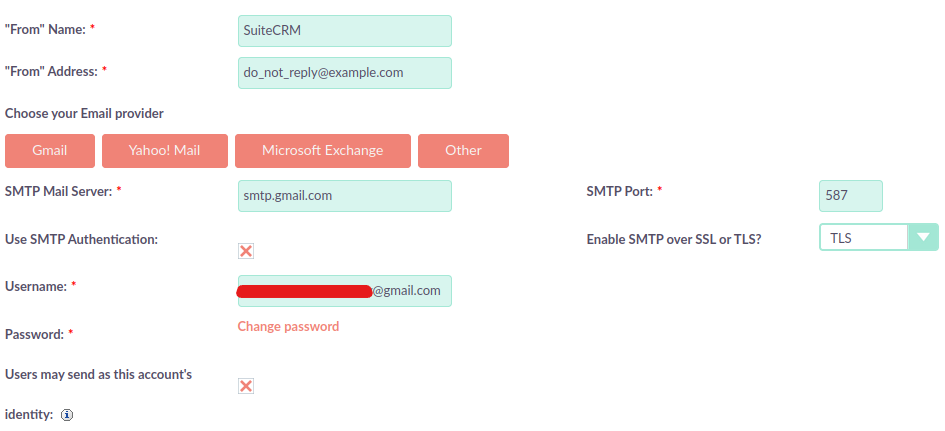
Was this the section you were referring to in the Install process?
Or have I perhaps missed something?
Oddly enough I do get similar errors in the suitecrm.log after installing, despite the values pulling across fine
Please let me know if I've missed any steps
Or, if any other users have noticed a similar issue, feel free to chip in with any relevant info!
@Talleyrand commented on GitHub (Apr 28, 2021):
Dear johnM2401,
sorry to have wasted your time but today I can´t reproduce it either anymore that way. I tried the same steps as yesterday, 5 times now.
But I found various issues related to that problem, please see #### Steps to Reproduce below.
As well as it´s possible origin by inspecting the database.
Checking the table "outbound_email" the following fields of the first record are empty after the installation
I expect the "Administration -> Email settings" window gets it´s data from config table, this is why it seems to be correct, but all other functions relay on the "outbound_email" table.
Best regards
Steps to Reproduce
Install a new version of SuiteCRM 7.11.18
Log in as administrator
Go to "Administration -> Email settings" => see that all data was saved and close by "Cancel"
Go to "Administration -> Outbound Email" click on edit for record named "system" => missing data (see screenshot_001.png)
Don´t fill in data and close by "Cancel"
Open another tab in your browser and go to "admin -> Profile", scroll down to email settings and click on "Settings"-button to open the popup window
Go back to the first tab and refresh page => You see now 2 records named "system"
Go to second tab again and click in the popup window on the tab "Mail Accounts" -> in the Outgoing SMTP Mail Servers section you see "Warning: Missing username and password for outgoing mail account." (see screenshot_002.png)
Populate "Incoming Email" with data as well as "Reply to Address:", leave "Outgoing SMTP Mail Server:" with it´s default selection "system" and click 2x on done.
Go to "Administration -> Outbound Email" click on edit for record named "system" => data partially filled in in both (see screenshot_003.png)
Click on "Send Test Email" and send to any email address -> Message "An email error occurred:Invalid address: (From): XXXXXXXXX"
@johnM2401 commented on GitHub (Apr 29, 2021):
Hey,
Thanks for getting back in touch!
It seems as though none of the screenshots have come through, I'm afraid. I can't see them here.
Would you be able to re-post them, if you get a chance?
For .4 in your Steps
When I navigate to the "System" outbound Account, all data appears to be filled in, except from the "From name" and "From Address" fields.
Is this what you see?
However, from .5 onwards, I am unable to replicate, i'm afraid
There only seems to be one "system" outbound account, even after going through Profile->Email Settings, and creating an Inbound Mail Account.
So, I get no errors/no failure to send test Email
For the sake of matching you as close as possible, can I ask where you got the Copy of SuiteCRM 7.11.18 you are using?
Was it just from the SuiteCRM website?
And, I don't expect it would make much difference, but are you using any Web Browser in particular?
Or does this occur regardless of browser used?
Thanks!
@serhiisamko091184 commented on GitHub (Mar 15, 2024):
Hello, @Talleyrand
The issue has been marked as stale because there has been no recent activity. It will be closed if no further activity occurs.
Thanks for your contributions.
Regards,
Serhii
@serhiisamko091184 commented on GitHub (Apr 9, 2024):
Hey @Talleyrand
Closing this issue due to inactivity.
Thank you.
Regards,
Serhii