Incorrect sorting of records #4539

Open
opened 2026-02-20 16:19:13 -05:00 by deekerman · 4 comments
Owner

Originally created by @Yousuf-Said on GitHub (May 25, 2021).

Issue

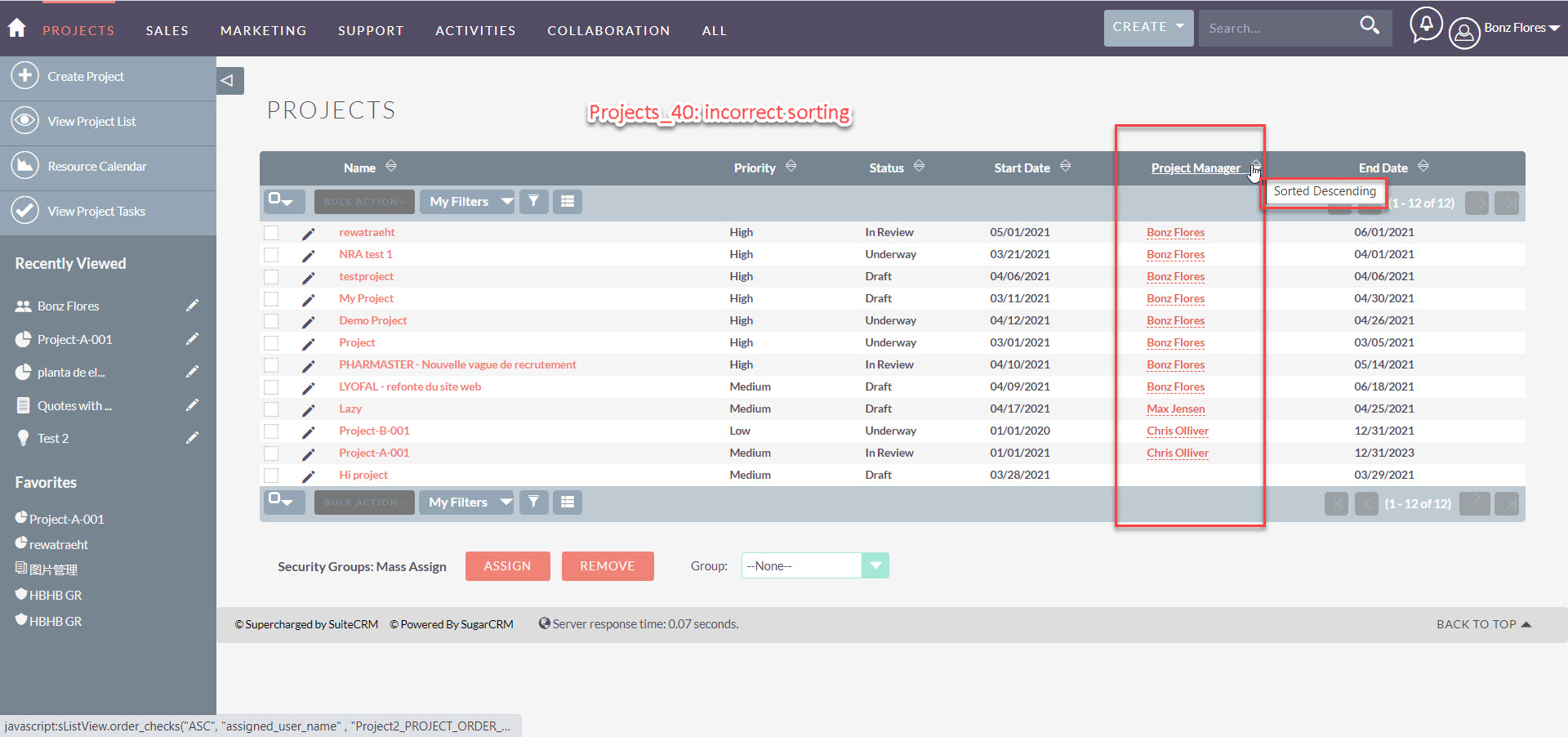
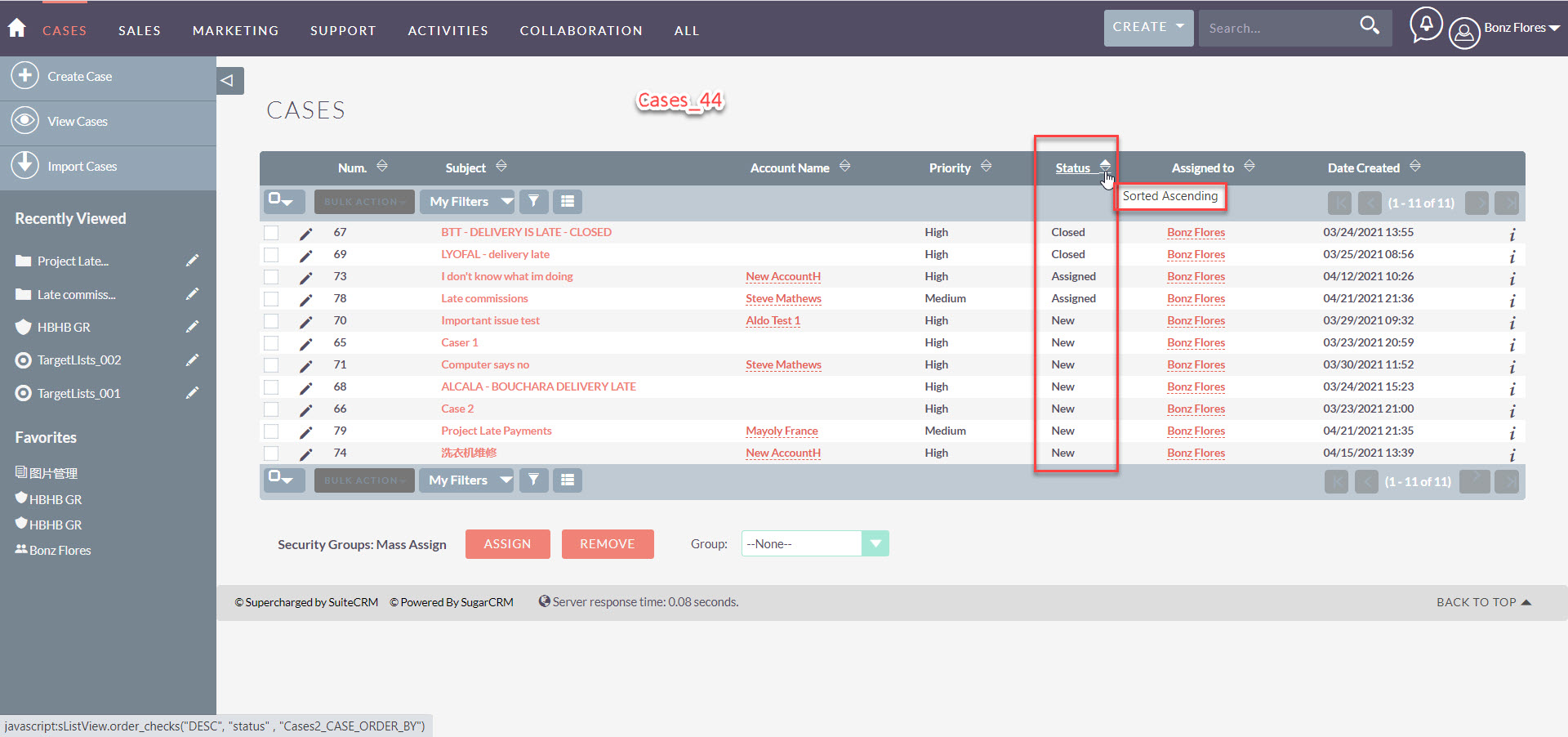
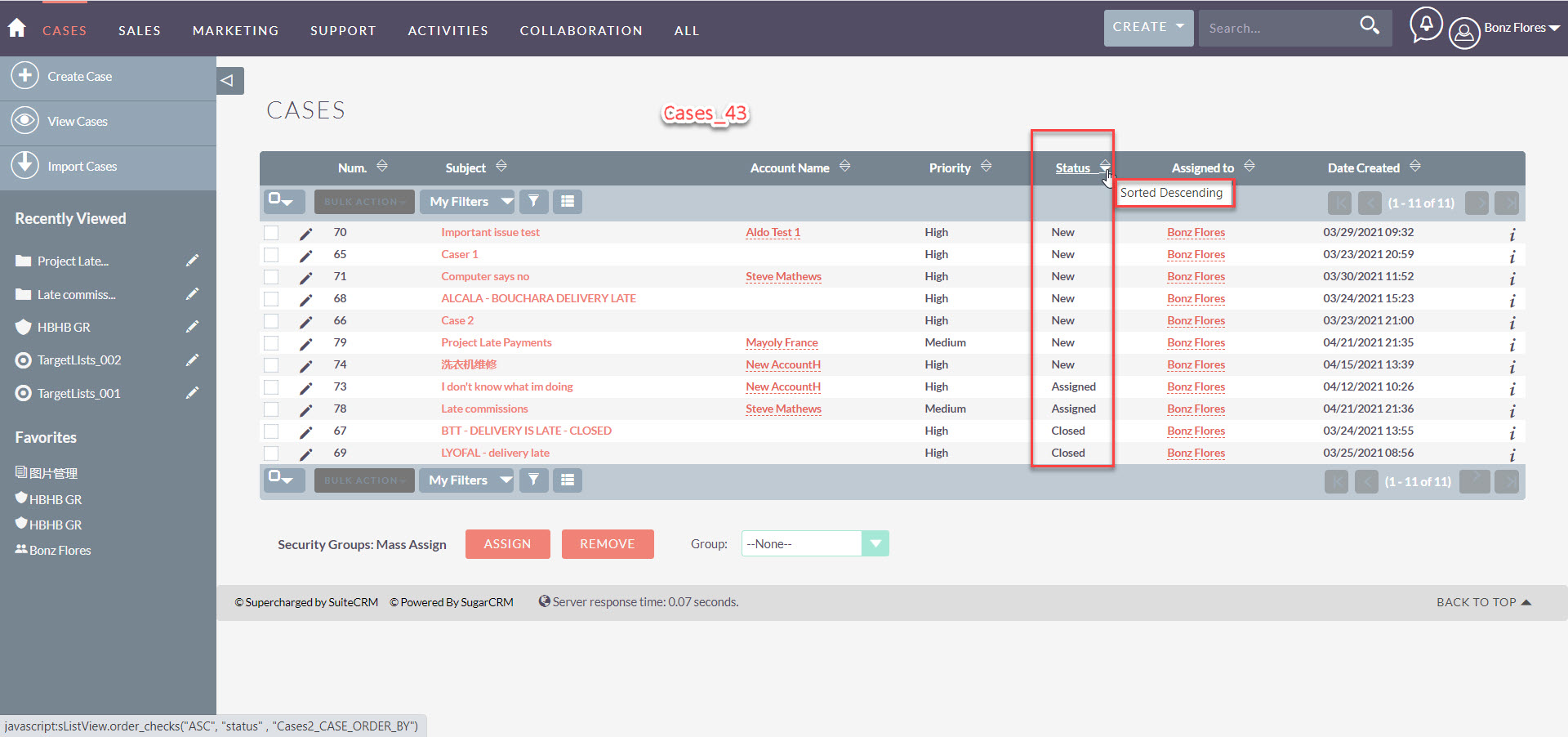
o The list of records is sorted in ascending order, but the sorting icon tip shows “Sorted Descending” or vice versa
projects_incorrect sorting_Desc
projects-incorrect sorting
2021-04-22_08-26-45
2021-04-22_08-26-27

Expected Behavior

The accounts list is sorted Ascending by City. The sorting icon next to City header shows 'Sorted Ascending'

Actual Behavior

The list of records is sorted in ascending order, but the sorting icon tip shows “Sorted Descending” or vice versa

Possible Fix

Steps to Reproduce

  1. In Accounts View List page,
    2.Click City column

These steps can also be repeated for other screens and other columns.

Context

Medium

Your Environment

  • SuiteCRM Version used: 7.11.19
  • Browser name and version: Version 90.0.4430.212 (Official Build) (64-bit)
  • Environment name and version (e.g. MySQL, PHP 7):
  • Operating System and version (e.g Ubuntu 16.04): MS Windows 10 pro
Originally created by @Yousuf-Said on GitHub (May 25, 2021). <!--- Provide a general summary of the issue in the **Title** above --> <!--- Before you open an issue, please check if a similar issue already exists or has been closed before. ---> <!--- If you have discovered a security risk please report it by emailing security@suitecrm.com. This will be delivered to the product team who handle security issues. Please don't disclose security bugs publicly until they have been handled by the security team. ---> #### Issue <!--- Provide a more detailed introduction to the issue itself, and why you consider it to be a bug --> <!--- Ensure that all code ``` is surrounded ``` by triple back quotes. This can also be done over multiple lines --> o The list of records is sorted in ascending order, but the sorting icon tip shows “Sorted Descending” or vice versa ![projects_incorrect sorting_Desc](https://user-images.githubusercontent.com/62739841/119472575-b33ba100-bd8d-11eb-897a-6c2dc6a33bbf.jpg) ![projects-incorrect sorting](https://user-images.githubusercontent.com/62739841/119472589-b59dfb00-bd8d-11eb-953b-56d99338c0ea.jpg) ![2021-04-22_08-26-45](https://user-images.githubusercontent.com/62739841/119472617-b9ca1880-bd8d-11eb-9d9c-fa8e11dc9412.jpg) ![2021-04-22_08-26-27](https://user-images.githubusercontent.com/62739841/119472688-ca7a8e80-bd8d-11eb-9e98-ae4ed6e65b12.jpg) #### Expected Behavior <!--- Tell us what should happen --> The accounts list is sorted Ascending by City. The sorting icon next to City header shows 'Sorted Ascending' #### Actual Behavior <!--- Tell us what happens instead --> <!--- Also please check relevant logs (suitecrm.log, php error.log etc.) --> The list of records is sorted in ascending order, but the sorting icon tip shows “Sorted Descending” or vice versa #### Possible Fix <!--- Not obligatory, but suggest a fix or reason for the bug --> #### Steps to Reproduce <!--- Provide a link to a live example, or an unambiguous set of steps to --> <!--- reproduce this bug include code to reproduce, if relevant --> 1. In Accounts View List page, 2.Click City column These steps can also be repeated for other screens and other columns. #### Context <!--- How has this bug affected you? What were you trying to accomplish? --> <!--- If you feel this should be a low/medium/high priority then please state so --> Medium #### Your Environment <!--- Include as many relevant details about the environment you experienced the bug in --> * SuiteCRM Version used: 7.11.19 * Browser name and version: Version 90.0.4430.212 (Official Build) (64-bit) * Environment name and version (e.g. MySQL, PHP 7): * Operating System and version (e.g Ubuntu 16.04): MS Windows 10 pro
Author
Owner

@verbeckii commented on GitHub (May 26, 2021):

hi

I also have this bug
and there is another behavior for me - need double click on the sorting column
the first click just re-render to correct shows “Sorted Descending” and the second click does resorting all listview results

@verbeckii commented on GitHub (May 26, 2021): hi I also have this bug and there is another behavior for me - need double click on the sorting column the first click just re-render to correct shows “Sorted Descending” and the second click does resorting all listview results
Author
Owner

@SuiteBot commented on GitHub (Jul 29, 2021):

This issue has been mentioned on SuiteCRM. There might be relevant details there:

https://community.suitecrm.com/t/order-by-issue-with-leads/80039/2

@SuiteBot commented on GitHub (Jul 29, 2021): This issue has been mentioned on **SuiteCRM**. There might be relevant details there: https://community.suitecrm.com/t/order-by-issue-with-leads/80039/2
Author
Owner

@tsmgeek commented on GitHub (Jul 29, 2021):

I can explain why sorting by Status does not work as expected.
Internally the Status field is stored as follows, its to parts <state>_<substate> just as a reference, then on display this is translated using the language files, sorting is happening on the DB which knows nothing about the language.
If you just want to sort between Open/Closed then use the State column, not Status.

I suspect when you sort by a related field its doing it on the id hence why it does not seem right, also watch out when sorting on text fields that may have spaces at the start as the DB will treat these differently.

- Unsorted
Open_New = New
Open_Assigned = Assigned
Closed = Closed

- Sorted ASC
Closed = Closed
Open_Assigned = Assigned
Open_New = New

- Sorted DESC
Open_New = New
Open_Assigned = Assigned
Closed = Closed
@tsmgeek commented on GitHub (Jul 29, 2021): I can explain why sorting by `Status` does not work as expected. Internally the `Status` field is stored as follows, its to parts `<state>_<substate>` just as a reference, then on display this is translated using the language files, sorting is happening on the DB which knows nothing about the language. If you just want to sort between `Open/Closed` then use the `State` column, not `Status`. I suspect when you sort by a related field its doing it on the `id` hence why it does not seem right, also watch out when sorting on text fields that may have spaces at the start as the DB will treat these differently. ``` - Unsorted Open_New = New Open_Assigned = Assigned Closed = Closed - Sorted ASC Closed = Closed Open_Assigned = Assigned Open_New = New - Sorted DESC Open_New = New Open_Assigned = Assigned Closed = Closed ```
Author
Owner

@verbeckii commented on GitHub (Jul 29, 2021):

@tsmgeek
thanks for explaining it make sense
but the sorting works incorrect in all other fields in my case e.x data_created, data_modified, name...
any fields I wanted to sort works correctly only with a double click on the sorting...

@verbeckii commented on GitHub (Jul 29, 2021): @tsmgeek thanks for explaining it make sense but the sorting works incorrect in all other fields in my case e.x data_created, data_modified, name... any fields I wanted to sort works correctly only with a double click on the sorting...
Sign in to join this conversation.
No milestone
No project
No assignees
1 participant
Notifications
Due date
The due date is invalid or out of range. Please use the format "yyyy-mm-dd".

No due date set.

Dependencies

No dependencies set.

Reference
starred/SuiteCRM-SuiteCRM#4539
No description provided.