mirror of
https://github.com/SuiteCRM/SuiteCRM.git
synced 2026-03-02 19:16:58 -05:00
API V8 Token Expiration DateTime isn't stored in UTC #4603
Labels
No labels
Area: API
Area: Campaigns
Area: Cases
Area: Clean Up
Area: Clean Up: Performance
Area: Dashlets
Area: Databases
Area: Developer Tools
Area: Elasticsearch
Area: Elasticsearch
Area: Emails
Area: Emails:Campaigns
Area: Emails:Cases
Area: Emails:Compose
Area: Emails:Config
Area: Emails:Templates
Area: Environment
Area: Installation
Area: Language
Area: Mobile
Area: Module
Area: PDFs
Area: PHP8
Area: Reports
Area: Studio
Area: Styling
Area: Upgrading
Area: Workflow
Area:Activity Stream
Area:Calls
Area:Import
Area:Projects
Area:Search
Area:Surveys
Area:Themes
Area:Users
Branch:Hotfix
Good First Issue
Hacktoberfest
Help Wanted
PR:Community Contribution
PR:Type:Enhancement
Priority:Critical
Priority:Important
Priority:Moderate
Severity: Major
Severity: Minor
Severity: Moderate
Status: Requires Code Review
Status: Requires Updates
Status: Stale
Status: Team Investigating
Status:Assessed
Status:Fix Proposed
Status:Needs Assessed
Status:Requires Automated Tests
Type: Bug
Type:Deprecated
Type:Discussion
Type:Duplicate
Type:Invalid
Type:Question
Type:Suggestion
Type:Suggestion
No milestone
No project
No assignees
1 participant

Notifications
Due date
No due date set.
Dependencies
No dependencies set.
Reference
starred/SuiteCRM-SuiteCRM#4603
Loading…
Add table
Add a link
Reference in a new issue
No description provided.
Delete branch "%!s()"
Deleting a branch is permanent. Although the deleted branch may continue to exist for a short time before it actually gets removed, it CANNOT be undone in most cases. Continue?
Originally created by @deuks on GitHub (Aug 23, 2021).
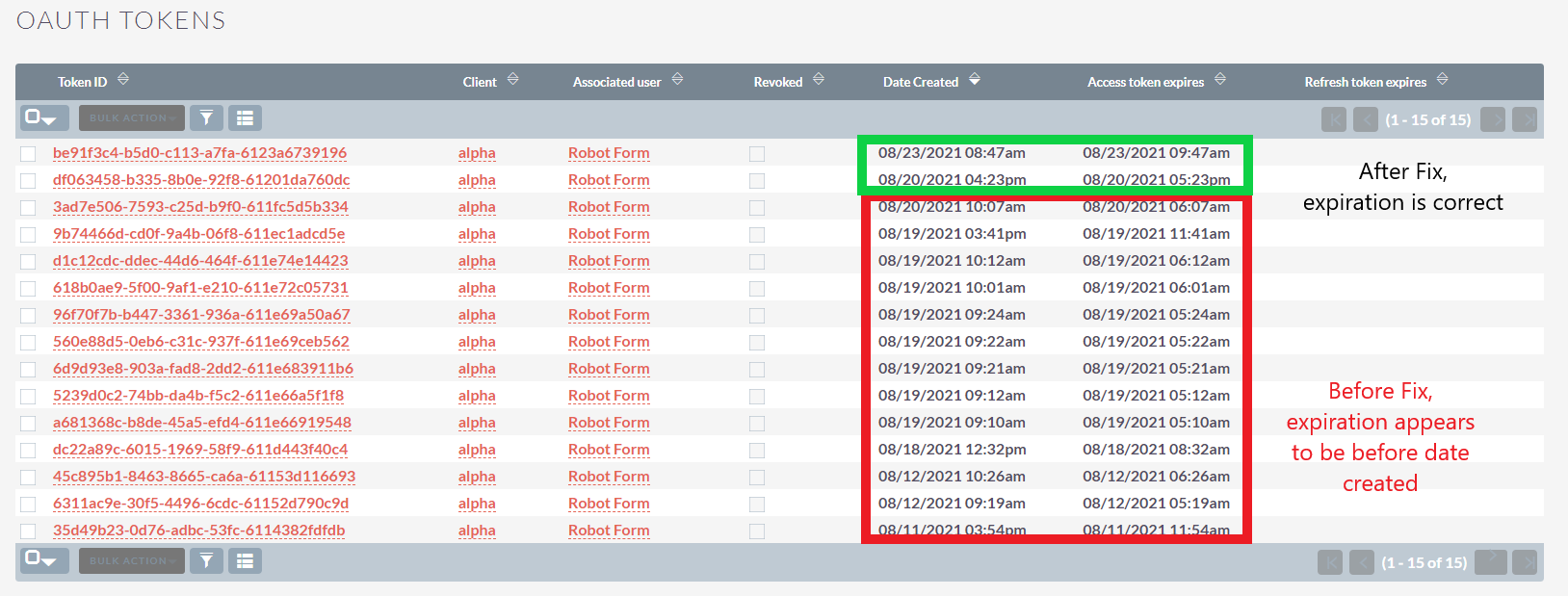
When creating an Access or Refresh Token using API V8, the expiration datetime isn't stored in UTC in the database.
Instead, the time zone it is stored in is based on the server's php.ini time zone. While I haven't experienced any issues regarding authentication, it does mean it appears wrong in the view.
Possible Fix
This is easily fixable by changing 1 singular line of code in 2 different files:
github.com/salesagility/SuiteCRM@f463031bee/Api/V8/OAuth2/Repository/AccessTokenRepository.php (L83)github.com/salesagility/SuiteCRM@f463031bee/Api/V8/OAuth2/Repository/RefreshTokenRepository.php (L50)Either of these format() functions needs to be changed to a getTimestamp(). We can then use gmdate() to properly format the token expiration datetime into UTC Y-m-d H:i:s. I have tested this and it fixed the issue. I can issue a pull request, but I haven't done one before so it will take some time.
To Reproduce:
@tsmgeek commented on GitHub (Aug 25, 2021):
https://github.com/bshaffer/oauth2-server-php/issues/570
As its a \DateTime object you should be able to do the following. Note that this changes the timezone of the DateTime object itself.
$accessTokenEntity->getExpiryDateTime()->setTimezone(new DateTimeZone('UTC'))->format('Y-m-d H:i:s')@deuks commented on GitHub (Aug 25, 2021):
Yeah that's works just as well. Might switch my fix to that, keeping everything within the DateTime object makes more sense than converting to a timestamp just to use gmdate. Thanks!
@J-Wick4 commented on GitHub (Nov 11, 2023):
I solved this problem by changing the PHP time server value to UTC in php.ini. In personal preferences in SuiteCRM, you can set your timezone.
date.timezone = "UTC"This method is upgrade safe.