mirror of
https://github.com/SuiteCRM/SuiteCRM.git
synced 2026-03-02 19:16:58 -05:00
A long text, in a PDF created in accordance with the design of a standard PDF-Template, is strangely positioned. #4875
Labels
No labels
Area: API
Area: Campaigns
Area: Cases
Area: Clean Up
Area: Clean Up: Performance
Area: Dashlets
Area: Databases
Area: Developer Tools
Area: Elasticsearch
Area: Elasticsearch
Area: Emails
Area: Emails:Campaigns
Area: Emails:Cases
Area: Emails:Compose
Area: Emails:Config
Area: Emails:Templates
Area: Environment
Area: Installation
Area: Language
Area: Mobile
Area: Module
Area: PDFs
Area: PHP8
Area: Reports
Area: Studio
Area: Styling
Area: Upgrading
Area: Workflow
Area:Activity Stream
Area:Calls
Area:Import
Area:Projects
Area:Search
Area:Surveys
Area:Themes
Area:Users
Branch:Hotfix
Good First Issue
Hacktoberfest
Help Wanted
PR:Community Contribution
PR:Type:Enhancement
Priority:Critical
Priority:Important
Priority:Moderate
Severity: Major
Severity: Minor
Severity: Moderate
Status: Requires Code Review
Status: Requires Updates
Status: Stale
Status: Team Investigating
Status:Assessed
Status:Fix Proposed
Status:Needs Assessed
Status:Requires Automated Tests
Type: Bug
Type:Deprecated
Type:Discussion
Type:Duplicate
Type:Invalid
Type:Question
Type:Suggestion
Type:Suggestion
No milestone
No project
No assignees
1 participant

Notifications
Due date
No due date set.
Dependencies
No dependencies set.
Reference
starred/SuiteCRM-SuiteCRM#4875
Loading…
Add table
Add a link
Reference in a new issue
No description provided.
Delete branch "%!s()"
Deleting a branch is permanent. Although the deleted branch may continue to exist for a short time before it actually gets removed, it CANNOT be undone in most cases. Continue?
Originally created by @timo-ecm2 on GitHub (Oct 18, 2022).
Issue
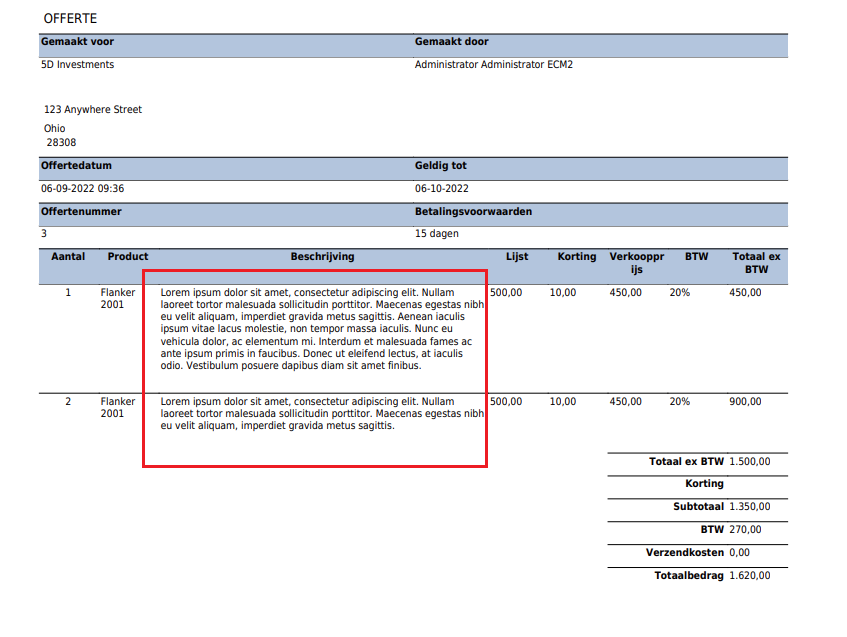
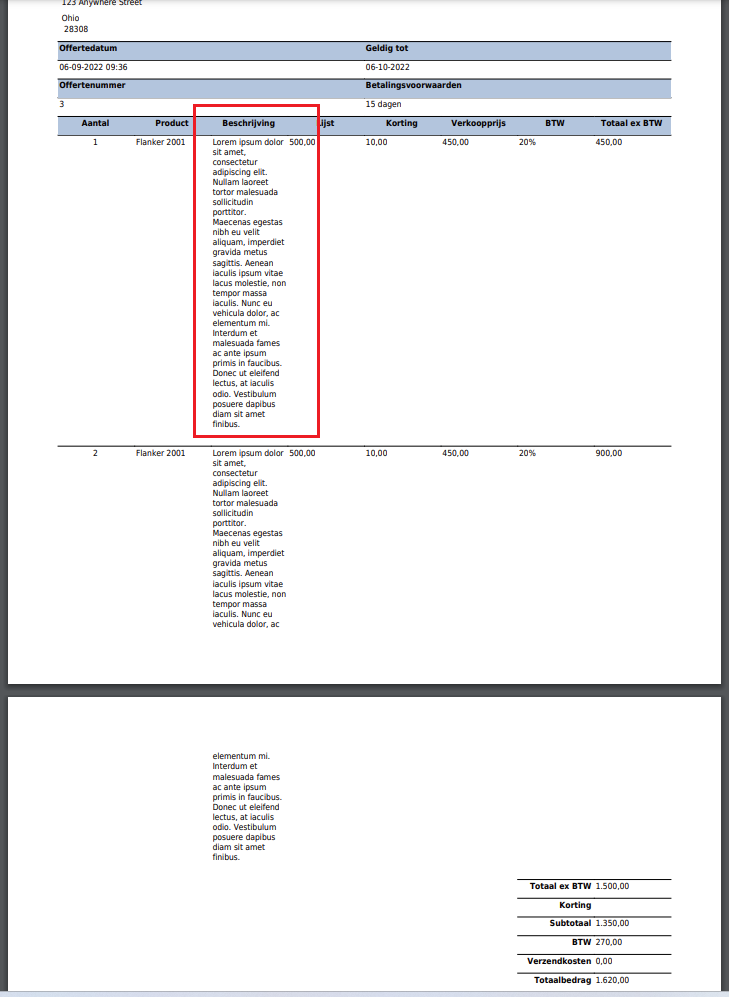
If you want to use a standard PDF-Templates for a Quote and you have a longer text for field "description" in a html-table, it sets the content on top of each other. I thought that in the past the table was "more" flexible, because of specific CSS for the html-table. In the past the result was more like the picture below "Expected Behavior".
After a few simple tweak, I managed to redo it. Is it possible that the PDF-generator used in "Suite CRM 7.12.6 Sugar Version 6.5.25 (Build 344)" in combination with "TinyMCE Version: 3.5.12 (2016-10-31)" changed the output with a result a less flexible html-table because of different CSS?
Expected Behavior
The PDF-generator should give a result like below.
Actual Behavior
The PDF-generator gives this result below.
Possible Fix
I don't know.
Steps to Reproduce
Your Environment
SuiteCRM Version used: 7.12.6
Browser name and version: Google Chrome Versie 104.0.5112.81 (Officiële build) (64-bits)
Environment name and version: MariaDB 10.5, PHP 7.4
Operating System and version User: Windows 11 - 22H2 - 22621.674
@GeeteshMehto commented on GitHub (Oct 19, 2022):
Hello sir, please assign this issue to me as i already worked on this kind of problem in past and has a great experience.
@timo-ecm2 commented on GitHub (Oct 20, 2022):
@GeeteshMehto , hi Geetesh again, also this one I am interested in finding out if it's anything. I hope you have a solid quality solution