mirror of
https://github.com/advplyr/audiobookshelf.git
synced 2026-03-02 22:46:56 -05:00
[Enhancement]: Customizable Folder Structures #870
Labels
No labels
authentication
awaiting release
backlog
bug
chapter editor
config-issue
ebooks
encoding/embedding
enhancement
help wanted
listening sessions & progress
planned
possible plugin
progress sync
sorting/filtering/searching
unable to reproduce
upload
users & permissions
waiting
No milestone
No project
No assignees
1 participant

Notifications
Due date
No due date set.
Dependencies
No dependencies set.
Reference
starred/audiobookshelf#870
Loading…
Add table
Add a link
Reference in a new issue
No description provided.
Delete branch "%!s()"
Deleting a branch is permanent. Although the deleted branch may continue to exist for a short time before it actually gets removed, it CANNOT be undone in most cases. Continue?
Originally created by @adfra on GitHub (Jan 1, 2023).
Describe the feature/enhancement
Hi there,
Loving audiobookshelf, but fixed folder structure is absolutely killing me. It's by far the No. 1 limitation I see.
Would suggest to provide a way in which the user can tell audiobookshelf what to find where. It could be as "simple" as keeping the current folder as the default setup but allowing for users to provide a simple config txt file in a folder, that specifies the structure that should be expected underneath that file.
Maybe a string with simple tags and separators for folder levels like (this example would be your current std):
[Author] | [Title] | [CD] | [Tracks]...which could then have sections (folders) of the whole collection be read with a different naming structure which in future could also combine multiple tags on one level such as:
[Author]+" - "+[Title] | [CD]+"_Track"+[Track]...or with multiple subfolders (eg for categories) it could look like this:
[Collection A] | [Tag] | [Collection B] | [IGNORE] | [Title] + " - " + [Author] | [Track]In regards to the "language" to define a structure I really like how Advanced Renamer (opensource) have solved this to allow completely flexible file renaming. Just as an inspiration maybe. https://www.advancedrenamer.com/
Anything that allows us to define the structures flexibly would be amazing. Manually renaming dozens to hundreds of folders is a huge pain (apart from the fact that - once renamed - in Windows Explorer I can't judge by authors name whether I might want to read something...).
Would really love to see this feature. Thanks for the amazing software this is already today!
Frank
@advplyr commented on GitHub (Jan 2, 2023):
There was discussion previously on custom folder patterns here https://github.com/advplyr/audiobookshelf/discussions/774
Most of the issues I see mentioned on this are about keeping multiple audio files in a single sub-folder and have each audio file treated as a separate book.
When it comes to what metadata is pulled from the folder/file names I see that as a separate issue.
Is this the problem you are having? You want each audio file to be read as a separate audiobook? Or is the issue you are having with the metadata being filled in from the scanner?
Can you also give an example folder structure that you currently have that is not compatible with Abs?
@advplyr commented on GitHub (Jan 2, 2023):
Oh and this is a duplicate of #528
@adfra commented on GitHub (Jan 12, 2023):
Hi AdvPlyr,
This is not about having multiple audio-books in one folder but more about flexibility how to structure the folder hierarchy that the books reside in. My structure for instance has a category layer and then the authors underneath that but the system can't automatically cope with it (which is understandable given the variety that's possible). So I create a library per category folder. It works, but is just so clunky. Also the fact that the book titles are hidden at the lowest level is really quite bad when you have a large collection and want to be able to browse via the folders as well. All this could be easily addressed if one was able to tell the system how to read all content below a certain folder level. (That way you can also import a sizeable collection with a different folder / file structure and rather the reworking the structure for hours you just update the definition file for that newly imported folder).
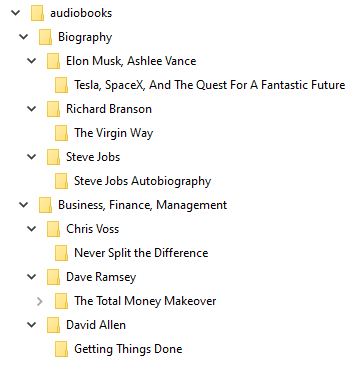
See my structure attached just for reference.
@advplyr commented on GitHub (Mar 31, 2023):
Duplicate of #528