Feature request: ability to take snapshots from webui #86

Closed
opened 2026-02-28 00:05:18 -05:00 by deekerman · 30 comments
Owner

Originally created by @jamo on GitHub (Jan 6, 2016).

I regularly run into situations where I would like to get a snapshot of the camera image, now I just kill motion/motioneye and take the snapshot with raspistill...

There was some discussion about it in #41 but I didn't find an issue for the feature request.

Also it would be nice it the snapshot feature would be accessible via http/rest api.

Originally created by @jamo on GitHub (Jan 6, 2016). I regularly run into situations where I would like to get a snapshot of the camera image, now I just kill motion/motioneye and take the snapshot with raspistill... There was some discussion about it in #41 but I didn't find an issue for the feature request. Also it would be nice it the snapshot feature would be accessible via http/rest api.
Author
Owner

@ccrisan commented on GitHub (Jan 6, 2016):

Yes, such a feature is planned, stay tuned!

@ccrisan commented on GitHub (Jan 6, 2016): Yes, such a feature is planned, stay tuned!
Author
Owner

@TimAEllis commented on GitHub (May 25, 2016):

Hey, just noticed this issue hasn't been touched in close to half a year. Any update on this feature request?

@TimAEllis commented on GitHub (May 25, 2016): Hey, just noticed this issue hasn't been touched in close to half a year. Any update on this feature request?
Author
Owner

@gdecostanzo commented on GitHub (Jul 22, 2016):

Is there a way to save snapshot jpg from Snapshot URL in Bash ? thanks

@gdecostanzo commented on GitHub (Jul 22, 2016): Is there a way to save snapshot jpg from Snapshot URL in Bash ? thanks
Author
Owner

@Samfox2 commented on GitHub (Nov 28, 2016):

curl -m 10 -o /tmp/snapshot.jpg http://192.168.x.xx:8765/picture/x/current

@Samfox2 commented on GitHub (Nov 28, 2016): curl -m 10 -o /tmp/snapshot.jpg http://192.168.x.xx:8765/picture/x/current
Author
Owner

@chrisf4lc0n commented on GitHub (Dec 22, 2016):

@Samfox2 You have to have streaming enabled for that to work and the the URL has to be replaced with whatever is in the "Snapshot URL".

@chrisf4lc0n commented on GitHub (Dec 22, 2016): @Samfox2 You have to have streaming enabled for that to work and the the URL has to be replaced with whatever is in the "Snapshot URL".
Author
Owner

@Cooper-Dale commented on GitHub (Feb 3, 2017):

I have streaming enabled, but i got no image:

`
pi@raspberrypi3:~ $ curl -m 10 -v -o /tmp/aaa.jpg http://192.168.1.7:8765/picture/1/current/

  • Hostname was NOT found in DNS cache
  • Trying 192.168.1.7...
    % Total % Received % Xferd Average Speed Time Time Time Current
    Dload Upload Total Spent Left Speed
    0 0 0 0 0 0 0 0 --:--:-- --:--:-- --:--:-- 0* Connected to 192.168.1.7 (192.168.1.7) port 8765 (#0)

GET /picture/1/current/ HTTP/1.1
User-Agent: curl/7.38.0
Host: 192.168.1.7:8765
Accept: /

< HTTP/1.1 200 OK
< Content-Length: 0
< Set-Cookie: motion_detected_1=false; Path=/
< Set-Cookie: monitor_info_1=33%26deg%3B; Path=/
< Set-Cookie: capture_fps_1=0.0; Path=/

  • Server motionEye/0.35.1 is not blacklisted
    < Server: motionEye/0.35.1
    < Etag: "da39a3ee5e6b4b0d3255bfef95601890afd80709"
    < Date: Fri, 03 Feb 2017 20:49:21 GMT
    < Content-Type: image/jpeg
    <
    0 0 0 0 0 0 0 0 --:--:-- --:--:-- --:--:-- 0
  • Connection #0 to host 192.168.1.7 left intact

`

@Cooper-Dale commented on GitHub (Feb 3, 2017): I have streaming enabled, but i got no image: ` pi@raspberrypi3:~ $ curl -m 10 -v -o /tmp/aaa.jpg http://192.168.1.7:8765/picture/1/current/ * Hostname was NOT found in DNS cache * Trying 192.168.1.7... % Total % Received % Xferd Average Speed Time Time Time Current Dload Upload Total Spent Left Speed 0 0 0 0 0 0 0 0 --:--:-- --:--:-- --:--:-- 0* Connected to 192.168.1.7 (192.168.1.7) port 8765 (#0) > GET /picture/1/current/ HTTP/1.1 > User-Agent: curl/7.38.0 > Host: 192.168.1.7:8765 > Accept: */* > < HTTP/1.1 200 OK < Content-Length: 0 < Set-Cookie: motion_detected_1=false; Path=/ < Set-Cookie: monitor_info_1=33%26deg%3B; Path=/ < Set-Cookie: capture_fps_1=0.0; Path=/ * Server motionEye/0.35.1 is not blacklisted < Server: motionEye/0.35.1 < Etag: "da39a3ee5e6b4b0d3255bfef95601890afd80709" < Date: Fri, 03 Feb 2017 20:49:21 GMT < Content-Type: image/jpeg < 0 0 0 0 0 0 0 0 --:--:-- --:--:-- --:--:-- 0 * Connection #0 to host 192.168.1.7 left intact `
Author
Owner

@MrMontesa commented on GitHub (May 4, 2017):

Hey all,
I came accross the same thing as I want to curl a "live" snapshot by URL. I got the same auth error as @Cooper-Dale and tried curl's auth implementation with "curl -u user:pass", which doesnt work either.

When reading thought the issues here I came to know that Motioneye did not implement basic auth but rather a security token based auth. curl -H "Authorization: Token xxxxxxxxxxxxxx" might help her but not too sure. I would need some help on how the string needs to look like.

Else official "curl" support to download a snapshot would be appreciated.
Any questions, let me know. Thanks

@MrMontesa commented on GitHub (May 4, 2017): Hey all, I came accross the same thing as I want to curl a "live" snapshot by URL. I got the same auth error as @Cooper-Dale and tried curl's auth implementation with _"curl -u user:pass"_, which doesnt work either. When reading thought the issues here I came to know that Motioneye did not implement basic auth but rather a security token based auth. _curl -H "Authorization: Token xxxxxxxxxxxxxx"_ might help her but not too sure. I would need some help on how the string needs to look like. Else official "curl" support to download a snapshot would be appreciated. Any questions, let me know. Thanks
Author
Owner

@ccrisan commented on GitHub (May 4, 2017):

One could use the snapshot url that's available from the settings panel, in the video streaming section. It includes the required signature.

@ccrisan commented on GitHub (May 4, 2017): One could use the snapshot url that's available from the settings panel, in the video streaming section. It includes the required signature.
Author
Owner

@MrMontesa commented on GitHub (May 7, 2017):

Thanks for info.
I might be missing something then. My "Video streaming" section is completly empty.

motioneye_streaming_video

I'm running a Pi Zero W with noir 2 cam. Motion is installed from the default repos.

@MrMontesa commented on GitHub (May 7, 2017): Thanks for info. I might be missing something then. My "Video streaming" section is completly empty. ![motioneye_streaming_video](https://cloud.githubusercontent.com/assets/600125/25779160/1a7a7bbc-3312-11e7-9c5e-240948775955.PNG) I'm running a Pi Zero W with noir 2 cam. Motion is installed from the default repos.
Author
Owner

@ccrisan commented on GitHub (May 7, 2017):

Just enable Advanced Options.

@ccrisan commented on GitHub (May 7, 2017): Just enable Advanced Options.
Author
Owner

@MrMontesa commented on GitHub (May 7, 2017):

Thanks for your swift reply. From a comment in #434 I assume the advanced options are only available in MotioneyeOS, right? I'm running the default raspbian.
Here's a screen from my settings pane.

motioneye_settings_pane

@MrMontesa commented on GitHub (May 7, 2017): Thanks for your swift reply. From a comment in [#434](https://github.com/ccrisan/motioneye/issues/434#issuecomment-282489166 ) I assume the advanced options are only available in MotioneyeOS, right? I'm running the default raspbian. Here's a screen from my settings pane. ![motioneye_settings_pane](https://cloud.githubusercontent.com/assets/600125/25779248/063231b6-3314-11e7-923d-e7c00d87f79d.PNG)
Author
Owner

@chrisf4lc0n commented on GitHub (May 7, 2017):

You have to flick the "Video Streaming" switch on and then you will see it.

@chrisf4lc0n commented on GitHub (May 7, 2017): You have to flick the "Video Streaming" switch on and then you will see it.
Author
Owner

@ccrisan commented on GitHub (May 7, 2017):

It's Advanced Settings in fact (mea cupla) and it's right there in your screenshot.

@ccrisan commented on GitHub (May 7, 2017): It's Advanced Settings in fact (mea cupla) and it's right there in your screenshot.
Author
Owner

@MrMontesa commented on GitHub (May 8, 2017):

Argh, dump me. Could have seen the "Advanced settings" switch myself.
After enabling "video streaming" and grabbing the URL containing the token, I was able to curl images directly from another host in my LAN. Great stuff! Very neat way to integrate Motioneye into other systems.
Again, thanks much for this nice piece of software.

@MrMontesa commented on GitHub (May 8, 2017): Argh, dump me. Could have seen the "Advanced settings" switch myself. After enabling "video streaming" and grabbing the URL containing the token, I was able to curl images directly from another host in my LAN. Great stuff! Very neat way to integrate Motioneye into other systems. Again, thanks much for this nice piece of software.
Author
Owner

@zZzimi commented on GitHub (May 14, 2017):

Hi ccrisan!

Is there any solution to use different resolution at streaming and the snapshot? I want to use lower resolution if I do a stream and higher when I create a snapshot. Thanks your answer!

@zZzimi commented on GitHub (May 14, 2017): Hi ccrisan! Is there any solution to use different resolution at streaming and the snapshot? I want to use lower resolution if I do a stream and higher when I create a snapshot. Thanks your answer!
Author
Owner

@ccrisan commented on GitHub (May 14, 2017):

@zZzimi unfortunately there's no such possibility. Currently motion only provides one stream.

@ccrisan commented on GitHub (May 14, 2017): @zZzimi unfortunately there's no such possibility. Currently motion only provides one stream.
Author
Owner

@v1k-t0r commented on GitHub (Jul 13, 2017):

@MrMontesa Can you provide working example please

@v1k-t0r commented on GitHub (Jul 13, 2017): @MrMontesa Can you provide working example please
Author
Owner

@MrMontesa commented on GitHub (Jul 14, 2017):

@vganyn
1st, you have to get your token. The explanation how to get it is above.
2nd you can create a URL like this:
http://$YOUR_IP:8765/picture/1/current/?_username=admin&_signature=$your_token_goes_here
3rd: process the URL with whatever tool you need (e.g. curl, etc)

@MrMontesa commented on GitHub (Jul 14, 2017): @vganyn 1st, you have to get your token. The explanation how to get it is above. 2nd you can create a URL like this: http://$YOUR_IP:8765/picture/1/current/?_username=admin&_signature=$your_token_goes_here 3rd: process the URL with whatever tool you need (e.g. curl, etc)
Author
Owner

@v1k-t0r commented on GitHub (Jul 14, 2017):

@MrMontesa I did 1st & 2nd. Problem with 3rd.(

curl -H "Authorization: Token $token" -v -o /tmp/aaa.jpg http://192.168.1.13:8765/picture/1/current/?_username=$user&_signature=$token
[1] 27563
$ *   Trying 192.168.1.13...
  % Total    % Received % Xferd  Average Speed   Time    Time     Time  Current
                                 Dload  Upload   Total   Spent    Left  Speed
  0     0    0     0    0     0      0      0 --:--:-- --:--:-- --:--:--     0* Connected to 192.168.1.13 (192.168.1.13) port 8765 (#0)
> GET /picture/1/current/?_username=$user HTTP/1.1
> Host: 192.168.1.13:8765
> User-Agent: curl/7.47.0
> Accept: */*
> Authorization: Token $token_here
> 
< HTTP/1.1 403 Forbidden
< Date: Fri, 14 Jul 2017 08:35:32 GMT
< Content-Length: 42
< Content-Type: application/json
< Server: motionEye/0.36
< 
{ [42 bytes data]
100    42  100    42    0     0   7193      0 --:--:-- --:--:-- --:--:--  8400
* Connection #0 to host 192.168.1.13 left intact
@v1k-t0r commented on GitHub (Jul 14, 2017): @MrMontesa I did 1st & 2nd. Problem with 3rd.( ``` curl -H "Authorization: Token $token" -v -o /tmp/aaa.jpg http://192.168.1.13:8765/picture/1/current/?_username=$user&_signature=$token [1] 27563 $ * Trying 192.168.1.13... % Total % Received % Xferd Average Speed Time Time Time Current Dload Upload Total Spent Left Speed 0 0 0 0 0 0 0 0 --:--:-- --:--:-- --:--:-- 0* Connected to 192.168.1.13 (192.168.1.13) port 8765 (#0) > GET /picture/1/current/?_username=$user HTTP/1.1 > Host: 192.168.1.13:8765 > User-Agent: curl/7.47.0 > Accept: */* > Authorization: Token $token_here > < HTTP/1.1 403 Forbidden < Date: Fri, 14 Jul 2017 08:35:32 GMT < Content-Length: 42 < Content-Type: application/json < Server: motionEye/0.36 < { [42 bytes data] 100 42 100 42 0 0 7193 0 --:--:-- --:--:-- --:--:-- 8400 * Connection #0 to host 192.168.1.13 left intact ```
Author
Owner

@MrMontesa commented on GitHub (Jul 14, 2017):

This is not HTTP auth, so you can ignore the -H parameter of curl. Secondly, iirc the user is always admin.
This command works for me:
curl -o ./image.jpg 'http://192.168.23.17:8765/picture/1/current/?_username=admin&_signature=my_token'

@MrMontesa commented on GitHub (Jul 14, 2017): This is not HTTP auth, so you can ignore the -H parameter of curl. Secondly, iirc the user is always admin. This command works for me: `curl -o ./image.jpg 'http://192.168.23.17:8765/picture/1/current/?_username=admin&_signature=my_token'`
Author
Owner

@v1k-t0r commented on GitHub (Jul 14, 2017):

@MrMontesa Work like a charm with my username. Thank you very much!

@v1k-t0r commented on GitHub (Jul 14, 2017): @MrMontesa Work like a charm with my username. Thank you very much!
Author
Owner

@MrMontesa commented on GitHub (Jul 21, 2017):

I have the problem that quite often curl exits with code 0 but did not download any image. In verbose mode it looks like this:

swa@nuc:~$ curl -vvv -m 10 -o /tmp/image.jpg 'http://192.168.23.17:8765/picture/1/current/?_username=admin&_signature=$my_token'
* Hostname was NOT found in DNS cache
*   Trying 192.168.23.17...
  % Total    % Received % Xferd  Average Speed   Time    Time     Time  Current
                                 Dload  Upload   Total   Spent    Left  Speed
  0     0    0     0    0     0      0      0 --:--:-- --:--:-- --:--:--     0* Connected to 192.168.23.17 (192.168.23.17) port 8765 (#0)
> GET /picture/1/current/?_username=admin&_signature=$my_token HTTP/1.1
> User-Agent: curl/7.38.0
> Host: 192.168.23.17:8765
> Accept: */*
>
< HTTP/1.1 200 OK
< Content-Length: 0
< Set-Cookie: motion_detected_1=false; Path=/
< Set-Cookie: monitor_info_1=; Path=/
< Set-Cookie: capture_fps_1=0.0; Path=/
* Server motionEye/0.35.2 is not blacklisted
< Server: motionEye/0.35.2
< Etag: "da39a3ee5e6b4b0d3255bfef95601890afd80709"
< Date: Fri, 21 Jul 2017 08:06:54 GMT
< Content-Type: image/jpeg
<
  0     0    0     0    0     0      0      0 --:--:-- --:--:-- --:--:--     0
* Connection #0 to host 192.168.23.17 left intact
swa@nuc:~$ ls -al /tmp/image.jpg
ls: Zugriff auf /tmp/image.jpg nicht möglich: Datei oder Verzeichnis nicht gefunden

As you can see the Download counters are all 0. When trying multiple times in a row with the same command, curl is suddenly able to get the image. This looks like this:

swa@nuc:/var/lib/openhab2$ /usr/bin/curl -vvv -m 10 -o /tmp/image.jpg 'http://192.168.23.17:8765/picture/1/current/?_username=admin&_signature=$my_token'
* Hostname was NOT found in DNS cache
*   Trying 192.168.23.17...
  % Total    % Received % Xferd  Average Speed   Time    Time     Time  Current
                                 Dload  Upload   Total   Spent    Left  Speed
  0     0    0     0    0     0      0      0 --:--:-- --:--:-- --:--:--     0* Connected to 192.168.23.17 (192.168.23.17) port 8765 (#0)
> GET /picture/1/current/?_username=admin&_signature=$my_token HTTP/1.1
> User-Agent: curl/7.38.0
> Host: 192.168.23.17:8765
> Accept: */*
>
< HTTP/1.1 200 OK
< Content-Length: 28635
< Set-Cookie: motion_detected_1=false; Path=/
< Set-Cookie: monitor_info_1=; Path=/
< Set-Cookie: capture_fps_1=2.1; Path=/
* Server motionEye/0.35.2 is not blacklisted
< Server: motionEye/0.35.2
< Etag: "bbdb5e21d61aedce55ed6dcab1e6375f03b449b7"
< Date: Fri, 21 Jul 2017 08:07:23 GMT
< Content-Type: image/jpeg
<
{ [data not shown]
100 28635  100 28635    0     0   565k      0 --:--:-- --:--:-- --:--:--  582k
* Connection #0 to host 192.168.23.17 left intact
swa@nuc:~$ ls -al /tmp/image.jpg
-rw-r--r-- 1 swa swa 28635 Jul 21 10:08 /tmp/image.jpg

The Download counters are properly filled with data and the image got downloaded.

Is it possible to increase logging on motioneye end to see whats going on?
Thanks

@MrMontesa commented on GitHub (Jul 21, 2017): I have the problem that quite often curl exits with code 0 but did not download any image. In verbose mode it looks like this: ``` swa@nuc:~$ curl -vvv -m 10 -o /tmp/image.jpg 'http://192.168.23.17:8765/picture/1/current/?_username=admin&_signature=$my_token' * Hostname was NOT found in DNS cache * Trying 192.168.23.17... % Total % Received % Xferd Average Speed Time Time Time Current Dload Upload Total Spent Left Speed 0 0 0 0 0 0 0 0 --:--:-- --:--:-- --:--:-- 0* Connected to 192.168.23.17 (192.168.23.17) port 8765 (#0) > GET /picture/1/current/?_username=admin&_signature=$my_token HTTP/1.1 > User-Agent: curl/7.38.0 > Host: 192.168.23.17:8765 > Accept: */* > < HTTP/1.1 200 OK < Content-Length: 0 < Set-Cookie: motion_detected_1=false; Path=/ < Set-Cookie: monitor_info_1=; Path=/ < Set-Cookie: capture_fps_1=0.0; Path=/ * Server motionEye/0.35.2 is not blacklisted < Server: motionEye/0.35.2 < Etag: "da39a3ee5e6b4b0d3255bfef95601890afd80709" < Date: Fri, 21 Jul 2017 08:06:54 GMT < Content-Type: image/jpeg < 0 0 0 0 0 0 0 0 --:--:-- --:--:-- --:--:-- 0 * Connection #0 to host 192.168.23.17 left intact swa@nuc:~$ ls -al /tmp/image.jpg ls: Zugriff auf /tmp/image.jpg nicht möglich: Datei oder Verzeichnis nicht gefunden ``` As you can see the Download counters are all 0. When trying multiple times in a row with the same command, curl is suddenly able to get the image. This looks like this: ``` swa@nuc:/var/lib/openhab2$ /usr/bin/curl -vvv -m 10 -o /tmp/image.jpg 'http://192.168.23.17:8765/picture/1/current/?_username=admin&_signature=$my_token' * Hostname was NOT found in DNS cache * Trying 192.168.23.17... % Total % Received % Xferd Average Speed Time Time Time Current Dload Upload Total Spent Left Speed 0 0 0 0 0 0 0 0 --:--:-- --:--:-- --:--:-- 0* Connected to 192.168.23.17 (192.168.23.17) port 8765 (#0) > GET /picture/1/current/?_username=admin&_signature=$my_token HTTP/1.1 > User-Agent: curl/7.38.0 > Host: 192.168.23.17:8765 > Accept: */* > < HTTP/1.1 200 OK < Content-Length: 28635 < Set-Cookie: motion_detected_1=false; Path=/ < Set-Cookie: monitor_info_1=; Path=/ < Set-Cookie: capture_fps_1=2.1; Path=/ * Server motionEye/0.35.2 is not blacklisted < Server: motionEye/0.35.2 < Etag: "bbdb5e21d61aedce55ed6dcab1e6375f03b449b7" < Date: Fri, 21 Jul 2017 08:07:23 GMT < Content-Type: image/jpeg < { [data not shown] 100 28635 100 28635 0 0 565k 0 --:--:-- --:--:-- --:--:-- 582k * Connection #0 to host 192.168.23.17 left intact swa@nuc:~$ ls -al /tmp/image.jpg -rw-r--r-- 1 swa swa 28635 Jul 21 10:08 /tmp/image.jpg ``` The Download counters are properly filled with data and the image got downloaded. Is it possible to increase logging on motioneye end to see whats going on? Thanks
Author
Owner

@Samfox2 commented on GitHub (Jul 21, 2017):

I have the same problem.
What I did (as a dirty workaround) was putting the curl command in a loop and exit the loop if a file was written.

@Samfox2 commented on GitHub (Jul 21, 2017): I have the same problem. What I did (as a dirty workaround) was putting the curl command in a loop and exit the loop if a file was written.
Author
Owner

@MrMontesa commented on GitHub (Jul 21, 2017):

Thanks for info and good to know that its not limited to my local system. And yeah, for testing I did the same. But I do rely on a 3rd party application (openhab2) which uses the java curl library where this cant be done. So I'm keen on getting behind this issue.

@MrMontesa commented on GitHub (Jul 21, 2017): Thanks for info and good to know that its not limited to my local system. And yeah, for testing I did the same. But I do rely on a 3rd party application (openhab2) which uses the java curl library where this cant be done. So I'm keen on getting behind this issue.
Author
Owner

@MrMontesa commented on GitHub (Jul 24, 2017):

I did a lot of testing ending up in tcpdumps and came to know that motioneye does not seem to send the image but sends an HTTP response of 200 - OK.
Since this is a new story I created #601 in order to analyze and troubleshoot in more detail. Would love to see some traction in the new ticket.

@MrMontesa commented on GitHub (Jul 24, 2017): I did a lot of testing ending up in tcpdumps and came to know that motioneye does not seem to send the image but sends an HTTP response of 200 - OK. Since this is a new story I created #601 in order to analyze and troubleshoot in more detail. Would love to see some traction in the new ticket.
Author
Owner

@ccrisan commented on GitHub (Aug 5, 2017):

This should be fixed with 0.36.1. Also the next version will have manual snapshot support using a button on the camera frame (added with github.com/ccrisan/motioneye@55035be462).

@ccrisan commented on GitHub (Aug 5, 2017): This should be fixed with 0.36.1. Also the next version will have manual snapshot support using a button on the camera frame (added with https://github.com/ccrisan/motioneye/commit/55035be4624bad97e8fd262aa5b91aa196c373e2).
Author
Owner

@jshep321 commented on GitHub (Jan 23, 2020):

Hi all,
Thought I'd share the "remote" snapshot button I found!
Motion has the native ability to remotely trigger a snapshot. In Motioneye the control port for this is on 7999. The below curl command causes the "lastsnap.jpg" (and associated datestamped file) to be stored in the /var/lib/motioneye/Camera1 directory.

curl -s -o /dev/null http://127.0.0.1:7999/0/action/snapshot #this causes a snapshot

Then I can copy/link to that using my bash program...

@jshep321 commented on GitHub (Jan 23, 2020): Hi all, Thought I'd share the "remote" snapshot button I found! Motion has the native ability to remotely trigger a snapshot. In Motioneye the control port for this is on 7999. The below curl command causes the "lastsnap.jpg" (and associated datestamped file) to be stored in the /var/lib/motioneye/Camera1 directory. `curl -s -o /dev/null http://127.0.0.1:7999/0/action/snapshot #this causes a snapshot ` Then I can copy/link to that using my bash program...
Author
Owner

@kiteloopdesign commented on GitHub (Jan 16, 2022):

Hi all, Thought I'd share the "remote" snapshot button I found! Motion has the native ability to remotely trigger a snapshot. In Motioneye the control port for this is on 7999. The below curl command causes the "lastsnap.jpg" (and associated datestamped file) to be stored in the /var/lib/motioneye/Camera1 directory.

curl -s -o /dev/null http://127.0.0.1:7999/0/action/snapshot #this causes a snapshot

Then I can copy/link to that using my bash program...

By the way, this one works for me, but implies ssh'ing into the Raspberry pi. Tried with my local IP instead of the loopback IP but that doesn't seem to work...

EDIT: ok this does the trick now

curl -o image.jpg http://192.168.1.58/picture/1/current/

@kiteloopdesign commented on GitHub (Jan 16, 2022): > Hi all, Thought I'd share the "remote" snapshot button I found! Motion has the native ability to remotely trigger a snapshot. In Motioneye the control port for this is on 7999. The below curl command causes the "lastsnap.jpg" (and associated datestamped file) to be stored in the /var/lib/motioneye/Camera1 directory. > > `curl -s -o /dev/null http://127.0.0.1:7999/0/action/snapshot #this causes a snapshot ` > > Then I can copy/link to that using my bash program... By the way, this one works for me, but implies ssh'ing into the Raspberry pi. Tried with my local IP instead of the loopback IP but that doesn't seem to work... EDIT: ok this does the trick now `curl -o image.jpg http://192.168.1.58/picture/1/current/`
Author
Owner

@kiteloopdesign commented on GitHub (Jan 16, 2022):

Finally found where this "button" is... Adding it here in case it can help someone

image

@kiteloopdesign commented on GitHub (Jan 16, 2022): Finally found where this "button" is... Adding it here in case it can help someone ![image](https://user-images.githubusercontent.com/17339330/149674804-a372b741-b88e-4130-a6a8-3b795fd2b631.png)
Author
Owner

@starbasessd commented on GitHub (Jan 16, 2022):

@kiteloopdesign Or you can:
Settings, Still Images, Enable Manual Snapshots
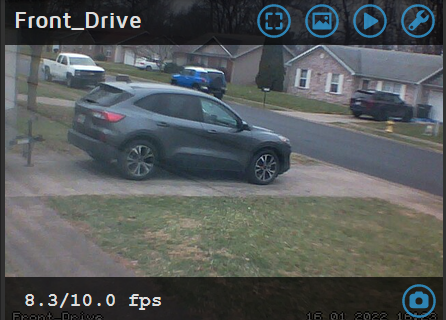
and when you click in a frame, you get the camera button in the lower right of the picture:
image

@starbasessd commented on GitHub (Jan 16, 2022): @kiteloopdesign Or you can: Settings, Still Images, Enable Manual Snapshots and when you click in a frame, you get the camera button in the lower right of the picture: ![image](https://user-images.githubusercontent.com/20134429/149678703-9e8504d3-7e2e-404b-a653-c353616d6a8f.png)
Sign in to join this conversation.
No milestone
No project
No assignees
1 participant
Notifications
Due date
The due date is invalid or out of range. Please use the format "yyyy-mm-dd".

No due date set.

Dependencies

No dependencies set.

Reference
starred/motioneye#86
No description provided.