mirror of
https://github.com/photoprism/photoprism.git
synced 2026-03-02 22:57:18 -05:00
Index: More accurate and resilient handling of related files and photo stacks #1259
Labels
No labels
ai
android
api
auth
awesome
bug
bug
ci
cli
config
database
declined
deprecated
docker
docs 📚
documents
duplicate
easy
enhancement
enhancement
enhancement
epic
faces
feedback wanted
frontend
hacktoberfest
help wanted
idea
in-progress
incomplete
index
invalid
ios
labels
live
live
low-priority
macos
member-feature
metadata
mobile
nas
needs-analysis
no-coding-required
no-coding-required
observability
performance
places
please-test
plus-feature
priority
pro-feature
question
raspberry-pi
raw
released
released
released
research
resolved
security
sharing
tested
tests
third-party-issue
thumbnails
upgrade
upstream-issue
ux
vector
video
waiting
won't fix
won't fix
No milestone
No project
No assignees
1 participant

Notifications
Due date
No due date set.
Dependencies
No dependencies set.
Reference
starred/photoprism#1259
Loading…
Add table
Add a link
Reference in a new issue
No description provided.
Delete branch "%!s()"
Deleting a branch is permanent. Although the deleted branch may continue to exist for a short time before it actually gets removed, it CANNOT be undone in most cases. Continue?
Originally created by @inthreedee on GitHub (Dec 19, 2021).
Originally assigned to: @lastzero on GitHub.
What does not work as expected?
Background
When capturing an HDR image, my iPhone captures both the HDR version and standard version at the same time as two separately named HEIC photos with otherwise identical metadata.
Bug
When these two photos are uploaded, jpegs are generated in the sidecar directory but only one of those jpegs gets shown in the Photoprism files UI. I have prepared a set of files to reproduce this (see the repro steps below for the download).
Workaround
Re-index with a "Complete re-scan" two times (re-indexing without a complete re-scan does nothing). The first re-index will generate a yml file for the jpeg that is missing from the UI, and the second re-index will finally cause the jpeg to show in the list.
Screenshots

Here is the files list after I upload and index the two photos the first time:
Here is the sidecar directory at this point, note the missing yml file:

After re-indexing with a complete re-scan, the files list in the UI has not changed, but the sidecar directory looks like this now:

Now, one more re-scan is required. After two complete scan re-indexes, the files list finally updates:

How can we reproduce it?
Steps to reproduce the behavior:
What behavior do you expect?
All sidecar files should be properly created and indexed with the first indexing.
What version you are using?
211215-93b26f19-Linux-aarch64
@lastzero commented on GitHub (Jan 3, 2022):
I can't reproduce it locally 👀 The second JPEG sidecar is always visible! 👇
After indexing the test files once...
After uploading the test files...
Trying again with only one worker to see if this makes a difference.
Edit: Yes! So it's some kind of timing issue (too).
@lastzero commented on GitHub (Jan 3, 2022):
Seems related files were intentionally skipped to fix #394 two years ago.
@lastzero commented on GitHub (Jan 3, 2022):
Related files (e.g. JPEG, XMP, ...) should now be correctly added to existing stacks if the main file (e.g. HEIF, Video, RAW, ...) was stacked previously. Please help testing to make sure we did not forget to cover an edge case! 👍
@inthreedee commented on GitHub (Jan 3, 2022):
For testing, I set the preview in my docker-compose and it pulled this version: 220103-1a4158c7-Linux-aarch64. I'm hosting on an RPi 4 and the number of workers is set to 2.
Unfortunately, it doesn't seem to have fully fixed it. After uploading the test photos and indexing, the jpg is still missing from the files list:

However, some progress has been made because the sidecar directory seems to have all the right files now:

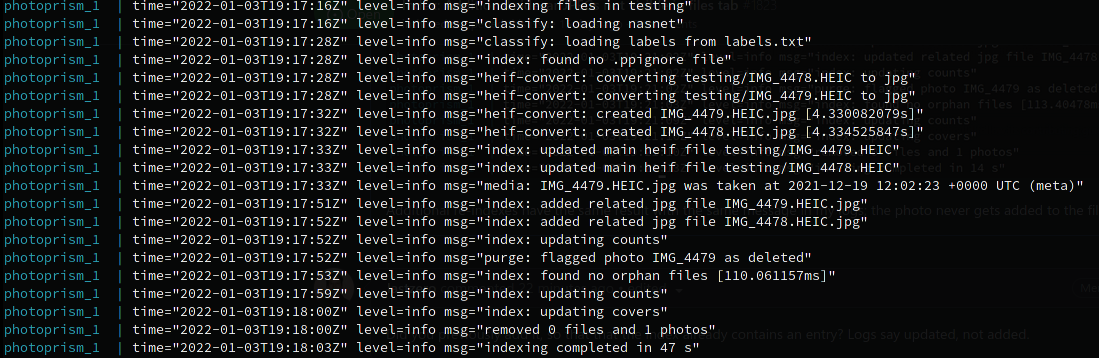
The problem shows up in my logs. It seems to be marking the photo as deleted:

Additional re-indexes have the same result with the same message in my logs; the photo never gets added to the files list.
@lastzero commented on GitHub (Jan 3, 2022):
Did you previously add it, so that that the index already contains an entry? Logs say updated, not added.
@inthreedee commented on GitHub (Jan 3, 2022):
Sorry, that log is taken from the second indexing attempt, but these were freshly uploaded today for testing. Here's the initial upload, which shows basically the same thing:
@lastzero commented on GitHub (Jan 3, 2022):
Thanks for testing, looks like it's indexing with two workers this time. Concurrency is hard. Going to take another look tomorrow.
@lastzero commented on GitHub (Jan 3, 2022):
Tested again.... this is how it looks on my side with a clean index and existing sidecar JPEGs:
The log message index: stacked main heif file debug/IMG_4478.HEIC has 1 related file is important here.
Once again with a clean index after removing the sidecar JPEGs:
Whatever I do, there are 4 files visible in the files tab after initial indexing.
Can you repeat the test with debug mode enabled?
@lastzero commented on GitHub (Jan 3, 2022):
Another test with a clean index,
--workers=1, and no pre-existing sidecar JPEGs or YAMLs:Works every single time 🙄
@inthreedee commented on GitHub (Jan 3, 2022):
I deleted the photos/sidecar files, re-indexed, and performed the test again with debugging enabled:
This is a second indexing attempt with complete rescan checked:
I tried indexing two more times and got the same results. It keeps flagging the photo as deleted.
@lastzero commented on GitHub (Jan 5, 2022):
If it does not work with this, I lose faith.
@lastzero commented on GitHub (Jan 5, 2022):
When unstacking, make sure the photo Name (see Settings tab in photo edit dialog) does not match the file Name of the file you want to unstack. It then does not get renamed and related files should now be unstacked together with it.
@lastzero commented on GitHub (Jan 5, 2022):
This change will also extract and index the HDR flag from HEIC files for easier debugging, see Files tab.
@inthreedee commented on GitHub (Jan 5, 2022):
I pulled version
220105-d67e3258-Linux-aarch64And indexing now works properly; the extra file doesn't get marked for deletion anymore! 🎉 Hooray! I also see the HDR tag now, which is great. Is that tag searchable to quickly find all HDR photos?
And now for the bad news:
Since you made some updates to stacking, I thought I'd test that for you as well and I ran into a problem with re-stacking. Unstacking works as you describe, but when I tried to re-stack the photos, one of the photos went missing and I couldn't get it to re-appear despite multiple re-indexing attempts.
I'll walk you through everything with logs and screenshots. This is going to be quite thorough, bear with me. I've marked the broken restacking below in large text if you just want to scroll down to that.
Here's the log for the first indexing where everything seems to work perfectly
Afterwards, all files have been correctly indexed:

I noticed I only have one yml file in my sidecar directory instead of one for each photo. I assume this is the correct behavior at this point:

Up to this point, everything seems perfect.
Next, I went on to test stacking behavior. You said:
For my first test, I wanted to confirm that the renaming does happen as you described.
Here's the log for the unstacking
As expected, the file gets renamed:

But there is a leftover sidecar jpg in the original stack:

My question at this point is, why didn't it first switch that original stack's name over to IMG_4479 before unstacking IMG_4478? Would that avoid creating this mess? This is probably a separate, low priority issue that could be worked on at some point in the future, but it seems like the unstacking behavior could be made smarter. I don't think users are going to know to check the Name field first before unstacking their photos; they would expect this to be handled for them.
For my next test, let's start over and unstack it "correctly" to confirm that works:
Unstack log
I see two unstacked photos now:

And everything looks good in the sidecar directory too:

The broken re-stacking is here
Next, I tested what happens if I want to re-stack these photos. This results in a missing photo:
Re-stacking log
The result is IMG_4479 has disappeared completely from the UI. It still exists in my originals and sidecar directories, but this is what I see in the UI now.

Only the one photo in the timeline:
And this is the files tab:

The files are still on the server though:


In the UI, IMG_4479 is nowhere to be found, despite multiple re-indexing attempts.
Re-index with complete re-scan
I tested this four separate times, deleting and re-uploading the photos each time, and only once was the file correctly re-stacked.
Here's the log from the one time it correctly re-stacked
@lastzero commented on GitHub (Jan 5, 2022):
OMG, this is starting to escalate! Taking a look tomorrow.
@lastzero commented on GitHub (Jan 5, 2022):
updated yaml file IMG_4479.ymldoesn't look right for sure as related files should not be searched in the sidecar folder anymore with the most recent changes (you didn't use the latest development preview from what I see).Does it work with a clean index and the latest preview image?
@inthreedee commented on GitHub (Jan 5, 2022):
Oh I see, a new preview image was released while I was in the middle of testing this. I'll pull it, try again, and report back.
@lastzero commented on GitHub (Jan 5, 2022):
It's expected that the PRIMARY files remains in the stack as you can't unstack it. Now if you unstack the HEIC file for it, this may cause a problem in that the newly created JPEG has the same hash as the one that remains in the stack because it's the primary. So the fix may simply be to disable the buttons. Somehow related to what I wrote in december as it's not really possible to know where a JPEG really originates from until after the fact (when you compare hashes for example). This is all getting super complicated now.
@lastzero commented on GitHub (Jan 5, 2022):
Am I right in thinking that the original problem - the second JPEG was not visible on the Files tab - is solved? Do you still need to unstack the other HEIC now?
@inthreedee commented on GitHub (Jan 5, 2022):
220105-c5301a68-Linux-aarch64
The first unstack/restack test worked fine.
Restack/reindex log
The second unstack/restack test, it broke again.
Restack/reindex log
@inthreedee commented on GitHub (Jan 5, 2022):
This original problem is indeed solved. Thanks so much for fixing that! This new stacking problem just came about because I thought I'd give stacking a thorough testing for you. My bad 😆
@inthreedee commented on GitHub (Jan 5, 2022):
This sounds like a reasonable solution to that problem. If the only one the user can unstack is the secondary photo, then they can't make that mistake anymore. 👍
@inthreedee commented on GitHub (Jan 7, 2022):
@graciousgrey This problem with broken re-stacking, presumably created by the changes here, still exists: https://github.com/photoprism/photoprism/issues/1823#issuecomment-1006037831
If we need a separate issue for it, let me know and I'll create one.
@inthreedee commented on GitHub (Jan 7, 2022):
I see there were some commits yesterday. @lastzero If those were meant to address the broken re-stacking mentioned above, let me know and I'll give it another test.
@lastzero commented on GitHub (Jan 7, 2022):
Can you test with a clean index and today's stable release again?
If the issue persists, please create a new issue for it incl test files 👍
@inthreedee commented on GitHub (Jan 7, 2022):
Seems to be fixed 👍 The difference I noticed in this release is that both images were marked unstackable instead of just the one I unstacked. To re-stack them, I had to set both images back to stackable, and then they were properly stacked without one of them going missing like before. Thanks!