mirror of
https://github.com/photoprism/photoprism.git
synced 2026-03-02 22:57:18 -05:00
Enable toggle of EXIF info in the corner of the image, even for shared albums #1498
Labels
No labels
ai
android
api
auth
awesome
bug
bug
ci
cli
config
database
declined
deprecated
docker
docs 📚
documents
duplicate
easy
enhancement
enhancement
enhancement
epic
faces
feedback wanted
frontend
hacktoberfest
help wanted
idea
in-progress
incomplete
index
invalid
ios
labels
live
live
low-priority
macos
member-feature
metadata
mobile
nas
needs-analysis
no-coding-required
no-coding-required
observability
performance
places
please-test
plus-feature
priority
pro-feature
question
raspberry-pi
raw
released
released
released
research
resolved
security
sharing
tested
tests
third-party-issue
thumbnails
upgrade
upstream-issue
ux
vector
video
waiting
won't fix
won't fix
No milestone
No project
No assignees
1 participant

Notifications
Due date
No due date set.
Dependencies
No dependencies set.
Reference
starred/photoprism#1498
Loading…
Add table
Add a link
Reference in a new issue
No description provided.
Delete branch "%!s()"
Deleting a branch is permanent. Although the deleted branch may continue to exist for a short time before it actually gets removed, it CANNOT be undone in most cases. Continue?
Originally created by @danielvrsek on GitHub (Jul 21, 2022).
First of all, hi. I really like Photoprism and I think it would suit much better to what I am using it for, if the following feature was implemented.
Is your feature request related to a problem? Please describe.
I think that many users of Photoprism are also photographers. I think that also many of the photographers would like to see metadata of a photo while browsing it. Right now, one has to be logged in and have permissions for editing the photo and only then you can see metadata scattered on the whole page.
Describe the solution you'd like
I was thinking that solution similiar to what Lightroom Classic uses, would be really easy to implement and also very useful.
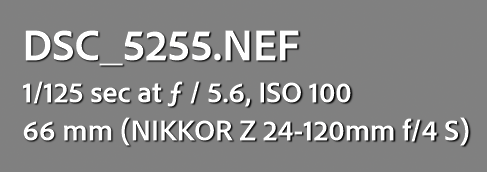
Lightroom Classic has an overlay over the photo with some basic parameters. Note also the filename. Right now, all I can see when I look at the detail of the photo, is it's Title, which is automatically generated and most of my photos are titled "Unknown / 2022", which is not what I want.
Here is a simple overlay that would cover all the metadata that I think would be great to see when toggled.
Describe alternatives you've considered
Instead of overlay, it could be a read-only modal window toggled either from a top-right corner with a Information icon, or by pressing "i".

I didn't find a feature request similiar to this. Hopefully I was searching thouroughly enough.
I am a software engineer in .NET and React with extensive experience in C. In case you were interested, I could try to take care of this feature request, as I would really like to have it implemented.
@lastzero commented on GitHub (Jul 22, 2022):
You will see the filename when you sort by filename. Might add customization options in a future release. A redesign of the full screen viewer is planned as well.
@graciousgrey commented on GitHub (Jul 22, 2022):
Related issues: https://github.com/photoprism/photoprism/issues/1164 & https://github.com/photoprism/photoprism/issues/1307 :)
Changes for the fullscreen mode require #1307 to be implemented. Regarding #1164 it is important to take care of the scrolling performance when loading additional information as far as I remember
@graciousgrey commented on GitHub (Jul 11, 2025):
It is now possible to display the filename instead of the title on the card view:
An initial version of a sidebar in the viewer has also been released:
More information will be added over time: