mirror of
https://github.com/photoprism/photoprism.git
synced 2026-03-02 22:57:18 -05:00
Date not recognized / Date from picture name #247
Labels
No labels
ai
android
api
auth
awesome
bug
bug
ci
cli
config
database
declined
deprecated
docker
docs 📚
documents
duplicate
easy
enhancement
enhancement
enhancement
epic
faces
feedback wanted
frontend
hacktoberfest
help wanted
idea
in-progress
incomplete
index
invalid
ios
labels
live
live
low-priority
macos
member-feature
metadata
mobile
nas
needs-analysis
no-coding-required
no-coding-required
observability
performance
places
please-test
plus-feature
priority
pro-feature
question
raspberry-pi
raw
released
released
released
research
resolved
security
sharing
tested
tests
third-party-issue
thumbnails
upgrade
upstream-issue
ux
vector
video
waiting
won't fix
won't fix
No milestone
No project
No assignees
1 participant

Notifications
Due date
No due date set.
Dependencies
No dependencies set.
Reference
starred/photoprism#247
Loading…
Add table
Add a link
Reference in a new issue
No description provided.
Delete branch "%!s()"
Deleting a branch is permanent. Although the deleted branch may continue to exist for a short time before it actually gets removed, it CANNOT be undone in most cases. Continue?
Originally created by @don-sh on GitHub (May 13, 2020).
Originally assigned to: @lastzero on GitHub.
Hi there,
Thanks for this great project!
I have a problem with the application not picking up the correct date for some pictures.
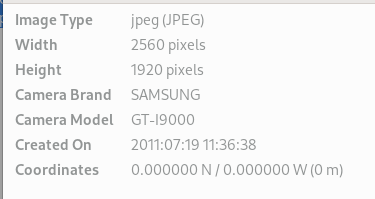
E.g. I have a picture (2011-07-19 11.36.39.jpg) which was taken on 2011-07-19.
From the import logs I can see the date recognized as 2018-07-20.
But in the gui the taken date is the import date (May 13, 2020).
But where does the 2018 come from? And shouldn't the name of the picture be used if there is no other information available?
Same with pictures from WhatsApp, Signal and screenshots from Android. There is no information about the date but from the naming:
WhasApp
2014-08-25_17.15.33.jpg
IMG-20161224-WA0014.jpg
Signal
signal-2018-08-21-100217.jpg
Android screen capture
Screenshot_20190201-212530_Fennec_F-Droid.png
@machetto commented on GitHub (May 14, 2020):
I have the same problem. I pulled latest docker image today and imported a few older photos. They were captured in 2003 however they are displayed as made in year 2020.
Update: "Create Date" attribute in EXIF contains correct date. However "GPS Date/Time" attribute contains incorrect date. It is probably because I set GPS coordinates using "GeoSetter" tool and it set the attribute incorrectly. So basically the question is what EXIF attribute is used to determine a photo's date?
Update 2: I fixed the "GPS Date/Time" attribute however the photos still got imported with the 2020 year in their date. Below is an output from exiftool.
W:\photos>exiftool -time:all -s CRW_0267.jpg
FileModifyDate : 2020:05:14 20:51:39+10:00
FileAccessDate : 2020:05:14 21:09:24+10:00
FileCreateDate : 2020:05:14 20:51:39+10:00
ModifyDate : 2003:12:07 17:51:51
GPSTimeStamp : 11:51:51
GPSDateStamp : 2003:12:07
CreateDate : 2003:12:07 17:51:51+06:00
MetadataDate : 2003:12:07 17:51:51+06:00
GPSDateTime : 2003:12:07 11:51:51Z
@lastzero commented on GitHub (May 14, 2020):
Can you test again with today's build after you've set
PHOTOPRISM_SIDECAR_JSONto "true"?This will automatically create JSON sidecar files using
exiftoolso that we can extract additional metadata we can't find in common Exif headers (like in Videos and XMP).You can also provide us with test files, either attached to this issue or via email to hello@photoprism.org!
Guessing the date from the filename is not implemented yet, not sure if this is a "must have" for our first release!? Problem is that there are MANY time and date formats and sometimes it might look like a date, but it's not. There is not one single standard like in Exif.
@don-sh commented on GitHub (May 14, 2020):
With this method it almost works. Within the application the correct date is shown but it gets named wrong and consequently put in the wrong directory in the Originals folder.
Picture I used (2011-07-19 11.36.39.jpg)
Well, it could be a quick win; I think many people have whatsapp/signal pictures in their galleries.
Thanks for your effort!
@lastzero commented on GitHub (May 14, 2020):
@don-sh Thanks! Maybe I can have a look at this tomorrow :)
@lastzero commented on GitHub (May 15, 2020):
@don-sh It should work now, although there's a potential issue with the JPEG parser. Created an issue for this, maybe @dsoprea can help.
@dsoprea commented on GitHub (May 15, 2020):
I'll take a look at this tonight.
@don-sh commented on GitHub (May 15, 2020):
@lastzero Yes, works now. Thanks!
@dsoprea commented on GitHub (May 15, 2020):
@lastzero It's not clear what the fix was. Are you using exiftool? It'd be odd that ExifTool would recognize it since these names exist in the standard but not in the file. In the raw EXIF data, tags are represented as IDs, and CreateDate is not a standard name so there's no standard ID for it. So, it's unclear where that' would be coming from and how. CreateDate looks to be a valid property in XMP, but, then, we're dealing with JPEGs, not XMPs...
@alxjsn commented on GitHub (May 15, 2020):
Right now, when a file is marked as "unknown" it appears at the top when sorting by newest. Can this behavior be changed to move those photos to the end?
@lastzero commented on GitHub (May 15, 2020):
@alxjsn That's why we added the quality filter. If we always move them to the end and you have 50k+ photos, like we do, you will never see them in practice.
@lastzero commented on GitHub (May 15, 2020):
@dsoprea The main bug here was that the JPEG Exif header could not be properly parsed, see issue I created in your repository. The fallback to the "brute force" Exif search method is a temporary fix.
@lastzero commented on GitHub (May 15, 2020):
Possible that CreateDate is XMP, can be stored in JPEG headers too. Exiftool can read it, but we didn't have time to directly extract it yet.
@dsoprea commented on GitHub (May 16, 2020):
Okay, so there's a couple of things. First, the tag is 0x9004, as shown here:
The proper tag name, per the spec and the go-exif config, is "DateTimeDigitized".
I had checked the segments for XMP data, but there was no extra data there (I know that this was just a suggestion on your part):
@lastzero You have seen XMP data/properties in JPEGs, before? That's interesting. If it was a bit more prevalent, I'd be interested in supporting it, though that did not end-up being the case, here.
When I dumped the EXIF data, it looks like that 9004 tag is being used in a non-standard place (in the IFD0 IFD rather than the EXIF IFD), so we just ignore it:
Looking through Phil's code, it looks like it's in a non-standard place for him, too. He must just be backing off to a IFD-agnostic search for the tag within his lookup. This is rare and I don't really like to encourage this kind of behavior (I'm referring to the suites or manufacturers, now), but at least we can provide some help to the poor individual who needs their data at any cost. https://github.com/dsoprea/go-jpeg-image-structure/issues/11
I'll take a look at the header thing, which I don't actually see any mention of, above.
@lastzero commented on GitHub (May 16, 2020):
Added that to our list of fallback values for
DateTimeOriginal(TakenAtin our database).Good to know, was on my todo but didn't have time yesterday. Thanks for checking!
Yes, at least Adobe is doing it (probably whenever you edit metadata in Lightroom and maybe even Photoshop): https://github.com/photoprism/photoprism/issues/243#issuecomment-583728781
The ladybug jpeg should contain Exif and XMP data segments: https://github.com/photoprism/photoprism/tree/develop/internal/meta/testdata
@alxjsn commented on GitHub (May 16, 2020):
Can we have that same behavior for videos? Currently videos without dates show up in the main view as well. I uploaded a video to demo as an example.
@lastzero commented on GitHub (May 16, 2020):
We currently need exiftool to get the date, so all videos might end up in review with sidecar-json turned off.
@lastzero commented on GitHub (May 20, 2020):
@don-sh Docker build that can read dates from file names is soon available, see https://travis-ci.org/github/photoprism/photoprism/builds/689233399 for current status
Please test, I'm going to the park now and will be back later :)
@don-sh commented on GitHub (May 21, 2020):
Great, you actually did it! Thanks.
I will test it next week - after the holidays.
EDIT:
@lastzero I just tested some sample pictures and it worked quite well! I had to delete the docker volumes to make it work though (re-indexing also didn't help).
WhatsApp
2014-08-25_17.15.33.jpg ✓
IMG-20161224-WA0014.jpg ✓
VID-20161223-WA0000.mp4 ✓
Signal
signal-2018-08-21-100217.jpg ✓
signal-2020-05-07-222654.mp4 ✓
Android screen capture
Screenshot_20190201-212530_Fennec_F-Droid.png ✕
This is not really a problem for me as I only have a handful of those.
I will do a new import of my whole library now and report if I find any issues.
EDIT2:
No more issues after re-importing my whole library.