mirror of
https://github.com/photoprism/photoprism.git
synced 2026-03-02 22:57:18 -05:00
Indexer: Restore missing files when they are found again #502
Labels
No labels
ai
android
api
auth
awesome
bug
bug
ci
cli
config
database
declined
deprecated
docker
docs 📚
documents
duplicate
easy
enhancement
enhancement
enhancement
epic
faces
feedback wanted
frontend
hacktoberfest
help wanted
idea
in-progress
incomplete
index
invalid
ios
labels
live
live
low-priority
macos
member-feature
metadata
mobile
nas
needs-analysis
no-coding-required
no-coding-required
observability
performance
places
please-test
plus-feature
priority
pro-feature
question
raspberry-pi
raw
released
released
released
research
resolved
security
sharing
tested
tests
third-party-issue
thumbnails
upgrade
upstream-issue
ux
vector
video
waiting
won't fix
won't fix
No milestone
No project
No assignees
1 participant

Notifications
Due date
No due date set.
Dependencies
No dependencies set.
Reference
starred/photoprism#502
Loading…
Add table
Add a link
Reference in a new issue
No description provided.
Delete branch "%!s()"
Deleting a branch is permanent. Although the deleted branch may continue to exist for a short time before it actually gets removed, it CANNOT be undone in most cases. Continue?
Originally created by @jean-louis67 on GitHub (Nov 16, 2020).
Originally assigned to: @lastzero on GitHub.
The server hosting my photoprism instance has been restarted. It turns out that the local disk of the partition containing Originals was not mounted.
After restarting photopism, the total number of photos decreased very quickly (7800 → 5500 approximately), kind of de-indexing I suppose. I stopped photoprism as soon as I noticed it.
So I mounted the disk and restarted photoprism.
I launched an indexing, but it fails quite quickly and I still cannot find the missing photos:
Thank you in advance for your assistance!
@lastzero commented on GitHub (Nov 16, 2020):
Can you pull the latest image? Thought it might be a good idea to configure volumes in our Dockerfile as some users forget to mount storage, but had similar issues with our demo. Second build seems OK.
@jean-louis67 commented on GitHub (Nov 16, 2020):
Thank you very much for your (super) fast response!
There are no more errors, but I still only see 5500 photos
Maybe we have to wait a bit.
For example, the indexing process did find many archived photos. But none appear for the moment in the application
Or maybe I have to force indexing (but how?) Because 1mn30 seems an ultra short time for more than 8000 photos
@lastzero commented on GitHub (Nov 16, 2020):
They are also not shown in archive?
@lastzero commented on GitHub (Nov 16, 2020):
Complete reindex might help.
@jean-louis67 commented on GitHub (Nov 16, 2020):
Yes, I will do that. But is it possible to launch it as a command line?
@lastzero commented on GitHub (Nov 16, 2020):
index -a
@jean-louis67 commented on GitHub (Nov 16, 2020):
Thank you very much.
I think it takes about ten hours. I'll keep you informed.
@lastzero commented on GitHub (Nov 16, 2020):
Are you using MySQL instead of MariaDB?
@jean-louis67 commented on GitHub (Nov 16, 2020):
Yes
@lastzero commented on GitHub (Nov 16, 2020):
See #599
@lastzero commented on GitHub (Nov 16, 2020):
What the failed query does is setting the photo quality to -1 if there is no primary JPEG file for displaying it in search results. With our latest release, the query is working on MySQL 8 and the photo count is reduced accordingly.
@alexislefebvre commented on GitHub (Nov 16, 2020):
@jean-louis67 Do you see your missing photos in the “Library > Hidden” section?
@jean-louis67 commented on GitHub (Nov 16, 2020):
Thank you Alexis four your interest.
index - a ended as follow:

I still only have 5572 photos.
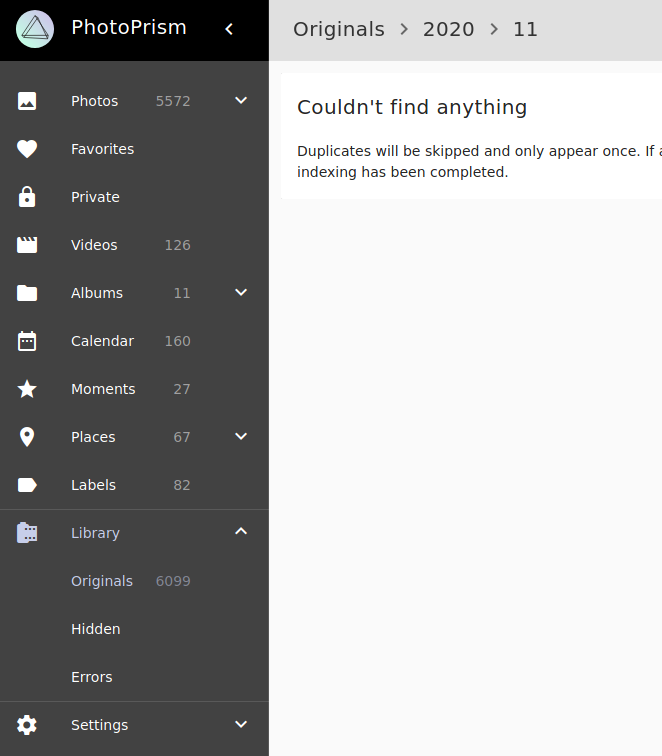
If I look at the directory /photoprism/Originals/2020/11, I found 47 photos:

But in the application, the corresponding folder is considered as empty:
Last info, _select count(*) from photos__returns 7940
I think I'm going to let it all rest a bit ...
@lastzero commented on GitHub (Nov 16, 2020):
Might those be duplicates? Were they archived? Are they fully standards compliant? There is an issue in our Exif library that could cause files not to get indexed, probably when they contain unexpected metadata: #600
@oscar-b commented on GitHub (Nov 17, 2020):
I think I'm having the same issue. When upgrading PP to the latest version (was running one from 1-2 months ago) I got a problem with the folder of photos mounted to
originals, the permissions didn't allow PP to access the folder. This seems to have caused all photos the be marked as "Archived", and skipped during re-index (usingphotoprism index -a) and no way to get them back.These files doesn't show up anywhere (Photos->Archive is empty, Library->Originals show the folders but empty).
I'm sure a DB wipe would solve it, but let me know if you want to troubleshoot it @lastzero
@lastzero commented on GitHub (Nov 17, 2020):
@oscar-b Thanks! Your hint might help finding the issue. Files get flagged as missing when they are gone. When no files are left, a photo gets flagged as deleted / archived. We have to handle that case different than a manual delete, so that we can un-delete when files can be found again. Also, photos may have been manually archived and then their files physically deleted. In that case, they should NOT be un-deleted automatically.
@lastzero commented on GitHub (Nov 20, 2020):
Hopefully just fixed this in #568
@oscar-b commented on GitHub (Nov 20, 2020):
Will test it later tonight, is there a new Docker build yet?
@lastzero commented on GitHub (Nov 20, 2020):
Yes, although there seems to be an issue with our Raspberry Pi build.
@oscar-b commented on GitHub (Nov 20, 2020):
Running
photoprism index -adoesn't resolve my library, still getting:But not sure if the fix you pushed is supposed to being able to fix this after the fact, or just making sure the initial state doesn't happen?
@jean-louis67 commented on GitHub (Nov 21, 2020):
Hello
Thank you very much to each participant of this issue for your efforts and explanations.
I just redone an index -a, but that didn't make the missing photos reappear.
That said, it's been a while since I wanted to thoroughly review my way of working with PhotoPrism, which involved a reinitialization of the database. This is what I am doing, and therefore this problem is not blocking me. I will now be careful that the files are accessible before launching or relaunching PhotoPrism.
@lastzero commented on GitHub (Nov 21, 2020):
New image not yet available, just implemented batch approve... now looking at other bugs.
@lastzero commented on GitHub (Nov 21, 2020):
Just started a new Docker build for testing. Available soon.
@oscar-b commented on GitHub (Nov 21, 2020):
@lastzero The
photoprism index -alooked the same (index: skipped archived main jpg file), but afterwards the files are visible under Photos->Archive, which they weren't before! So if that's the expected behavior in this case, it looks fine to me!It would be nice if it displayed a counter in the menu next to Archive.
It wasn't completely obvious how to un-archive, since that wasn't possible to do in list mode (?) which I was using thinking it would be easiest to select multiple photos in that mode.
I got a crash when running index one more time after unarchiving all files, but another index run after that seems to chug along. Interested in that one off crash?
@alexislefebvre commented on GitHub (Nov 21, 2020):
This error looks like this other one: https://github.com/photoprism/photoprism/issues/600#issuecomment-727545399
@lastzero commented on GitHub (Nov 21, 2020):
@oscar-b I'm going to have a look at the fatal error now.
@lastzero commented on GitHub (Nov 26, 2020):
Closing this since no negative test reports came in.