1
0
Fork 0
mirror of https://github.com/pikvm/pikvm.git synced 2026-03-02 18:16:56 -05:00

Broken firstboot script #261

Closed
opened 2026-02-20 13:23:28 -05:00 by deekerman · 10 comments
Owner

Originally created by @wnark on GitHub (May 29, 2021).

Originally assigned to: @mdevaev on GitHub.

Describe the bug
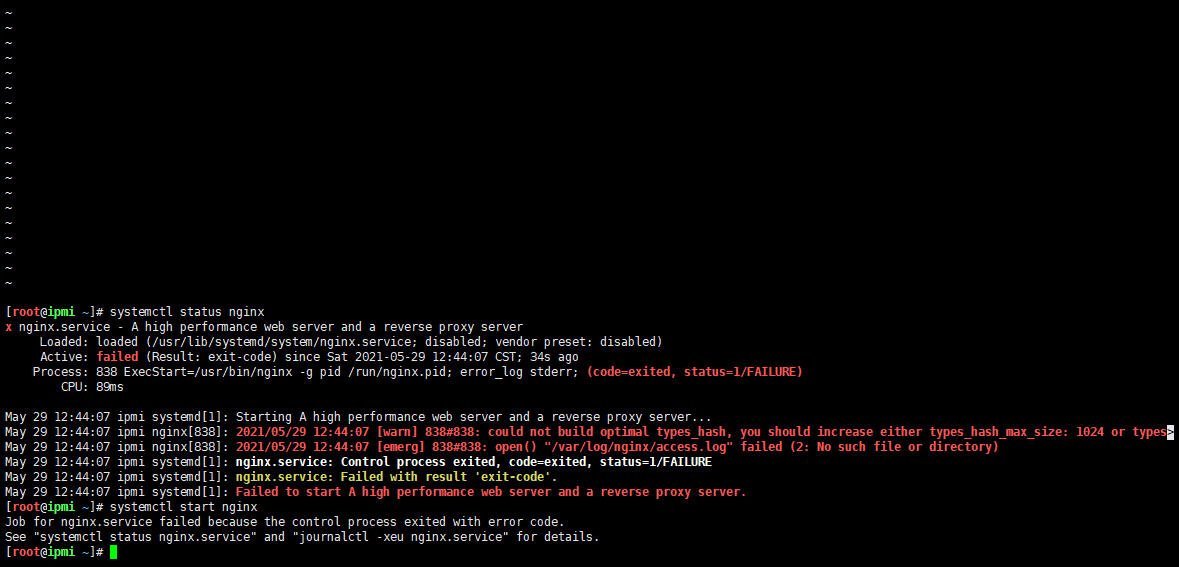
The created image nginx cannot start normally,Can not be accessed through the browser

To Reproduce
Steps to reproduce the behavior, like:
1.Use https://github.com/pikvm/pikvm/blob/master/pages/building_os.md to compile and get the image
2.Mirror configuration file

root@Hostname:~/os# cat  config.mk 
# rpi3 for Raspberry Pi 3; rpi2 for the version 2, zerow for ZeroW
BOARD = rpi3
#
# # Hardware configuration
PLATFORM = v0-hdmi
#
# # Target hostname
HOSTNAME = ipmi
#
# # ru_RU, etc. UTF-8 only
LOCALE = en_US
#
# # See /usr/share/zoneinfo
TIMEZONE = Asia/Shanghai
#
# # For SSH root user
ROOT_PASSWD = root
#
# # Web UI credentials: user=admin, password=<this>
WEBUI_ADMIN_PASSWD = admin
#
# # IPMI credentials: user=admin, password=<this>
IPMI_ADMIN_PASSWD = admin
#
# # SD card device
CARD = /dev/mmcblk0

WIFI_ESSID = "ChinaNet-Qh2V"
WIFI_PASSWD = "cckexand"

3.Write the image after make into the micro sd card, put it into the Raspberry Pi 3b, and connect to the power supply

Expected behavior
You can start nginx and use it normally

Screenshots
image

Pi-KVM info:

  • RPi 3B
  • v0-hdmi
  • CSI bridge

[root@ipmi ~]# pacman -Q | grep kvmd
kvmd 2.80-1
kvmd-fan 0.1-1
kvmd-oled 0.3-1
kvmd-platform-v0-hdmi-rpi3 2.80-1
kvmd-webterm 0.39-1

[root@ipmi ~]# pacman -Q | grep ustreamer
ustreamer 3.27-1

[root@ipmi ~]# uname -a
Linux ipmi 5.10.23-2-ARCH #1 SMP Fri Mar 19 00:22:18 MSK 2021 armv7l GNU/Linux

Additional context
ssh is normal, the current direct phenomenon is that nginx cannot be started
My image is a brand new image. There was no problem when I made it with the same steps a few weeks ago, so it may not be related to my steps.
I am using the Ubuntu20.04 server in the United States, and the network did not prompt download failure when compiling.
Because VPS does not provide archlinux, I used Ubuntu to compile, and everything was normal for the previous few times.

Originally created by @wnark on GitHub (May 29, 2021). Originally assigned to: @mdevaev on GitHub. **Describe the bug** The created image nginx cannot start normally,Can not be accessed through the browser **To Reproduce** Steps to reproduce the behavior, like: 1.Use https://github.com/pikvm/pikvm/blob/master/pages/building_os.md to compile and get the image 2.Mirror configuration file ``` root@Hostname:~/os# cat config.mk # rpi3 for Raspberry Pi 3; rpi2 for the version 2, zerow for ZeroW BOARD = rpi3 # # # Hardware configuration PLATFORM = v0-hdmi # # # Target hostname HOSTNAME = ipmi # # # ru_RU, etc. UTF-8 only LOCALE = en_US # # # See /usr/share/zoneinfo TIMEZONE = Asia/Shanghai # # # For SSH root user ROOT_PASSWD = root # # # Web UI credentials: user=admin, password=<this> WEBUI_ADMIN_PASSWD = admin # # # IPMI credentials: user=admin, password=<this> IPMI_ADMIN_PASSWD = admin # # # SD card device CARD = /dev/mmcblk0 WIFI_ESSID = "ChinaNet-Qh2V" WIFI_PASSWD = "cckexand" ``` 3.Write the image after make into the micro sd card, put it into the Raspberry Pi 3b, and connect to the power supply **Expected behavior** You can start nginx and use it normally **Screenshots** ![image](https://user-images.githubusercontent.com/24355466/120058177-b4194f00-c07b-11eb-917f-ddefd8bd25d0.png) **Pi-KVM info:** - RPi 3B - v0-hdmi - CSI bridge [root@ipmi ~]# pacman -Q | grep kvmd kvmd 2.80-1 kvmd-fan 0.1-1 kvmd-oled 0.3-1 kvmd-platform-v0-hdmi-rpi3 2.80-1 kvmd-webterm 0.39-1 [root@ipmi ~]# pacman -Q | grep ustreamer ustreamer 3.27-1 [root@ipmi ~]# uname -a Linux ipmi 5.10.23-2-ARCH #1 SMP Fri Mar 19 00:22:18 MSK 2021 armv7l GNU/Linux **Additional context** ssh is normal, the current direct phenomenon is that nginx cannot be started My image is a brand new image. There was no problem when I made it with the same steps a few weeks ago, so it may not be related to my steps. I am using the Ubuntu20.04 server in the United States, and the network did not prompt download failure when compiling. Because VPS does not provide archlinux, I used Ubuntu to compile, and everything was normal for the previous few times.
deekerman 2026-02-20 13:23:28 -05:00
  • closed this issue
  • added the
    type:bug
    label
Author
Owner

@mdevaev commented on GitHub (May 29, 2021):

Don't start nginx. You need kvmd-nginx. It must be runned by default.

@mdevaev commented on GitHub (May 29, 2021): Don't start `nginx`. You need `kvmd-nginx`. It must be runned by default.
Author
Owner

@wnark commented on GitHub (May 29, 2021):

Don't start nginx. You need kvmd-nginx. It must be runned by default.
image
There seems to be a problem with generating the certificate

@wnark commented on GitHub (May 29, 2021): > Don't start `nginx`. You need `kvmd-nginx`. It must be runned by default. ![image](https://user-images.githubusercontent.com/24355466/120060248-44aa5c00-c089-11eb-93e3-8dfe84af55e7.png) There seems to be a problem with generating the certificate
Author
Owner

@mdevaev commented on GitHub (May 29, 2021):

Run this:

rw
echo 'FIRSTBOOT=1' > /boot/pikvm.txt
reboot

After booting run journalctl -u pikvm-firstboot and the output here.

@mdevaev commented on GitHub (May 29, 2021): Run this: ``` rw echo 'FIRSTBOOT=1' > /boot/pikvm.txt reboot ``` After booting run `journalctl -u pikvm-firstboot` and the output here.
Author
Owner

@wnark commented on GitHub (May 29, 2021):

image

@wnark commented on GitHub (May 29, 2021): ![image](https://user-images.githubusercontent.com/24355466/120060456-87b8ff00-c08a-11eb-9637-7b8605acaf96.png)
Author
Owner

@wnark commented on GitHub (May 29, 2021):

Sorry, I clicked the wrong button

@wnark commented on GitHub (May 29, 2021): Sorry, I clicked the wrong button
Author
Owner

@wnark commented on GitHub (May 29, 2021):

Run this:

rw
echo 'FIRSTBOOT=1' > /boot/pikvm.txt
reboot

After booting run journalctl -u pikvm-firstboot and the output here.

[root@ipmi ~]# rw
[root@ipmi ~]# cat /boot/pikvm.txt
FIRSTBOOT=1
[root@ipmi ~]# echo 'FIRSTBOOT=1' > /boot/pikvm.txt
[root@ipmi ~]# reboot
[root@ipmi ~]#
Socket error Event: 32 Error: 10053.
Connection closing...Socket close.

Connection closed by foreign host.

Disconnected from remote host(raspberry) at 14:29:11.

Type `help' to learn how to use Xshell prompt.
[C:~]$

Host 'ipmi' resolved to fe80::ba27:ebff:fed9:931b.
Connecting to fe80::ba27:ebff:fed9:931b:22...
Connection established.
To escape to local shell, press 'Ctrl+Alt+]'.

WARNING! The remote SSH server rejected X11 forwarding request.
_____ _ _ ____ ____ __
| __ () | |/ /\ \ / / / |
| |__) | __ | ' / \ \ / /| \ / |
| / | () | < \ / / | |/| |
| | | | | . \ \ / | | | |
|
| |
| ||_\ / || |_|

Welcome to Pi-KVM - Open Source IP-KVM based on Raspberry Pi
____________________________________________________________________________

The root filesystem of Pi-KVM is mounted in read-only mode by default.
Use command "rw" to remount it in the RW-mode and "ro" to switch it back.

To prevent kernel messages from printing to the terminal use "dmesg -n 1".

To change KVM password use command "kvmd-htpasswd set admin".

Useful links:
  * https://pikvm.org
  * https://wiki.archlinux.org/index.php/Network_configuration

[root@ipmi ~]# journalctl -u pikvm-firstboot
-- Journal begins at Wed 2021-05-19 22:11:54 CST, ends at Sat 2021-05-29 14:30:19 CST. --
-- No entries --
[root@ipmi ~]#

@wnark commented on GitHub (May 29, 2021): > Run this: > > ``` > rw > echo 'FIRSTBOOT=1' > /boot/pikvm.txt > reboot > ``` > > After booting run `journalctl -u pikvm-firstboot` and the output here. [root@ipmi ~]# rw [root@ipmi ~]# cat /boot/pikvm.txt FIRSTBOOT=1 [root@ipmi ~]# echo 'FIRSTBOOT=1' > /boot/pikvm.txt [root@ipmi ~]# reboot [root@ipmi ~]# Socket error Event: 32 Error: 10053. Connection closing...Socket close. Connection closed by foreign host. Disconnected from remote host(raspberry) at 14:29:11. Type `help' to learn how to use Xshell prompt. [C:\~]$ Host 'ipmi' resolved to fe80::ba27:ebff:fed9:931b. Connecting to fe80::ba27:ebff:fed9:931b:22... Connection established. To escape to local shell, press 'Ctrl+Alt+]'. WARNING! The remote SSH server rejected X11 forwarding request. _____ _ _ ____ ____ __ | __ (_) | |/ /\ \ / / \/ | | |__) | __ | ' / \ \ / /| \ / | | ___/ | (__) | < \ \/ / | |\/| | | | | | | . \ \ / | | | | |_| |_| |_|\_\ \/ |_| |_| Welcome to Pi-KVM - Open Source IP-KVM based on Raspberry Pi ____________________________________________________________________________ The root filesystem of Pi-KVM is mounted in read-only mode by default. Use command "rw" to remount it in the RW-mode and "ro" to switch it back. To prevent kernel messages from printing to the terminal use "dmesg -n 1". To change KVM password use command "kvmd-htpasswd set admin". Useful links: * https://pikvm.org * https://wiki.archlinux.org/index.php/Network_configuration [root@ipmi ~]# journalctl -u pikvm-firstboot -- Journal begins at Wed 2021-05-19 22:11:54 CST, ends at Sat 2021-05-29 14:30:19 CST. -- -- No entries -- [root@ipmi ~]#
Author
Owner

@mdevaev commented on GitHub (May 29, 2021):

Try rw; systemctl enable pikvm-bootconfig; reboot. And journalctl again.

@mdevaev commented on GitHub (May 29, 2021): Try `rw; systemctl enable pikvm-bootconfig; reboot`. And journalctl again.
Author
Owner

@mdevaev commented on GitHub (May 29, 2021):

Edited ^^^

@mdevaev commented on GitHub (May 29, 2021): Edited ^^^
Author
Owner

@wnark commented on GitHub (May 29, 2021):

Try rw; systemctl enable pikvm-bootconfig; reboot. And journalctl again.

image
Still doesn't look good

@wnark commented on GitHub (May 29, 2021): > Try `rw; systemctl enable pikvm-bootconfig; reboot`. And journalctl again. ![image](https://user-images.githubusercontent.com/24355466/120061094-17ac7800-c08e-11eb-937f-1c7262a2c4c2.png) Still doesn't look good
Author
Owner

@mdevaev commented on GitHub (May 29, 2021):

Okay, fixed I guess. Update os build environment (git pull --rebase), run make os again and reflash the image.

@mdevaev commented on GitHub (May 29, 2021): Okay, fixed I guess. Update `os` build environment (`git pull --rebase`), run `make os` again and reflash the image.
Sign in to join this conversation.
No milestone
No project
No assignees
1 participant
Notifications
Due date
The due date is invalid or out of range. Please use the format "yyyy-mm-dd".

No due date set.

Dependencies

No dependencies set.

Reference
starred/pikvm-pikvm#261
No description provided.