mirror of
https://github.com/pikvm/pikvm.git
synced 2026-03-02 18:16:56 -05:00
Webrtc test feedback on Raspberry Pi 2B and zerow #282
Labels
No labels
component:documentation
help wanted
resolution:delayed
resolution:duplicate
resolution:fixed
resolution:invalid
resolution:rejected
resolution:wontfix
success story
type:bug
type:bug
type:feature
type:question
type:question
No milestone
No project
No assignees
1 participant

Notifications
Due date
No due date set.
Dependencies
No dependencies set.
Reference
starred/pikvm-pikvm#282
Loading…
Add table
Add a link
Reference in a new issue
No description provided.
Delete branch "%!s()"
Deleting a branch is permanent. Although the deleted branch may continue to exist for a short time before it actually gets removed, it CANNOT be undone in most cases. Continue?
Originally created by @wnark on GitHub (Jun 24, 2021).
Originally assigned to: @mdevaev on GitHub.
Describe the bug
Hello, I try to use WebRTC on Raspberry Pi 2B, when I execute it manually
systemctl enable --now kvmd-janus
Although there are open options on the web page, WebRTC cannot be used.
Is webrtc only available for Raspberry Pi 4B, is this determined by the hardware?
To Reproduce
Expected behavior
i can use h264
Screenshots

Desktop (please complete the following information):
Pi-KVM info:
[root@ipmi ~]# pacman -Q | grep kvmd
kvmd 3.6-1
kvmd-fan 0.1-1
kvmd-oled 0.3-1
kvmd-platform-v0-hdmi-rpi2 3.6-1
kvmd-webterm 0.39-1
ustreamer 4.4-1
Linux ipmi 5.10.23-2-ARCH #1 SMP Fri Mar 19 00:22:18 MSK 2021 armv7l GNU/Linux
Additional context
By the way, what does memsink do? I can't find it on Google
@wnark commented on GitHub (Jun 24, 2021):
Because I think the CPU and memory usage of Raspberry Pi 2B is not high, I want to try it on Raspberry Pi 2B.
@mdevaev commented on GitHub (Jun 24, 2021):
Add to
/etc/kvmd/override.yaml:@mdevaev commented on GitHub (Jun 25, 2021):
PS: Memsink is my own shared memory protocol.
@wnark commented on GitHub (Jun 25, 2021):
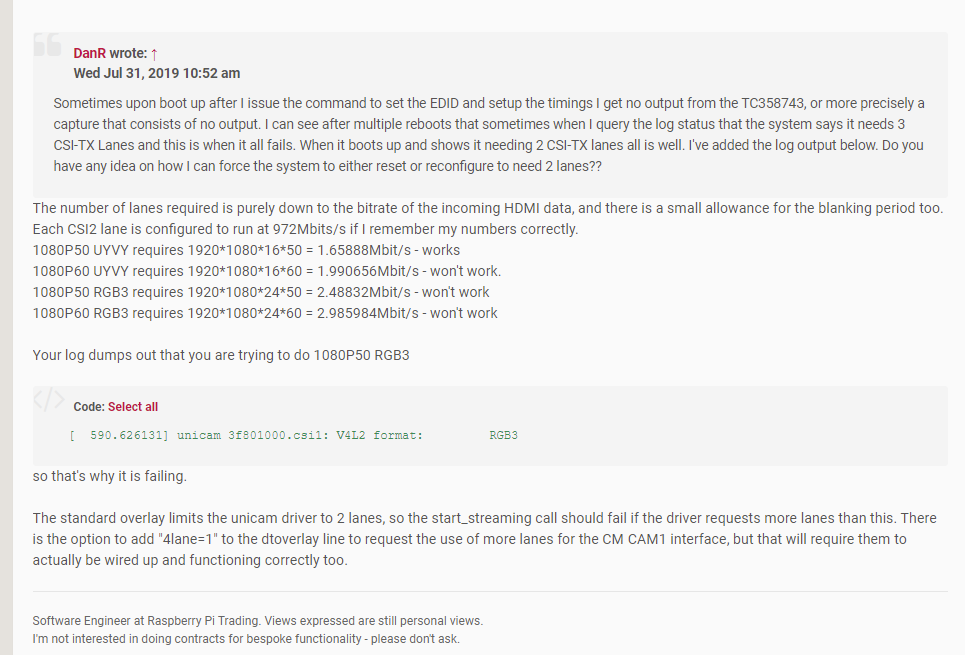
Hello, how do you see the real frame rate of the transmission? I checked the information and found that the Raspberry Pi uses 2-channel CSI, which should only support 1080P 25 frames at most. The higher frame rate is now supported because the tc358743 chip is used to compress the video stream into h264 and then transmit it to the Raspberry Pi ? I find the CPU usage of the Raspberry Pi is not high.
@wnark commented on GitHub (Jun 25, 2021):
https://www.raspberrypi.org/forums/viewtopic.php?t=120702&start=575
https://fluxcoil.net/wiki/hardwarerelated/raspberry_pi_4_tc358743
I have checked some information. Even if the video stream is compressed to h264 using tc358743, the video on the Raspberry Pi 2/3/4B is only up to 1080P50 frames? That is, the picture above me is 50 frames? Although I can't detect it.
@wnark commented on GitHub (Jun 25, 2021):
By the way, when I play the game with pikvm, the screen is torn. I don't know if it is because the acquisition rate of tc358743 is not high enough, and it needs 1080P60 frames to be better?
@wnark commented on GitHub (Jun 25, 2021):
It’s a bit strange. According to the information found, when the Raspberry Pi 4B is used in conjunction with tc358743, even if 2-csi is used, it can reach 1080P50 frames. This seems to be the limit, but the limit of PIKVM is 25 frames, which is different. The reason for encoding?
@wnark commented on GitHub (Jun 25, 2021):
In view of the weak CPU performance of the Raspberry Pi zerow and the ability to communicate only via wifi, it is recommended that if you use the Raspberry Pi zerow, only use webrtc to transmit images, which will put a lot of pressure on bandwidth. Even 1080P can run smoothly. Of course, you can also add a w5500 to the Raspberry Pi zerow, but after calculating the cost, it is actually similar to 3B. If you add a network port, it is better to buy a 3B.
The SPI communication speed is 10Mb/s. Using webrtc+zero(w)+w5500 may be the lowest cost solution, and you can even watch videos remotely.
I don't know whether the CPU occupies higher using spi or the CPU occupancy of WiFi.
If anyone is interested, you can try it.
@arch1mede commented on GitHub (Jun 25, 2021):
RPI 2X is NOT recommended, RPI3B "shouldn't" be recommended, its just not worth the effort to get one of these working but can understand why one would use it. 0w works but is very slow compared to a RPI4. The max you are going to get from this is 1920x1080p50Hz, 25 is the max fps you are going to get from this from a perfect scenario but the way its being utilized, you are not going to see this. What you are looking at is DYNAMIC FPS.
Please review: https://github.com/pikvm/pikvm/blob/master/pages/Community_FAQ.md#why-so-much-latency-between-the-screen-and-target
I would invest in a RPI4 and reuse your 2/3B's for something else, like pihole or something. Recommending this be closed.
@mdevaev commented on GitHub (Jul 4, 2021):
@wnark
I suppose so.
The reason is the limited bandwidth of CSI. You can't transfer more than 25 fps. RPi4 has only 2 lanes. For a larger frame rate, you need 4.
Due to the CPU weakness, I don't recommend using WebRTC on anything other than Pi 4. Officially adding this functionality for older boards is a low priority task. I really recommend that you buy a Pi 4 with the smallest amount of RAM and forget about all the problems.
@mdevaev commented on GitHub (Jul 4, 2021):
However, if you find a way to use WebRTC, it will be great.