mirror of
https://github.com/pikvm/pikvm.git
synced 2026-03-02 18:16:56 -05:00
Add option to download .iso file from internet #305
Labels
No labels
component:documentation
help wanted
resolution:delayed
resolution:duplicate
resolution:fixed
resolution:invalid
resolution:rejected
resolution:wontfix
success story
type:bug
type:bug
type:feature
type:question
type:question
No milestone
No project
No assignees
1 participant

Notifications
Due date
No due date set.
Dependencies
No dependencies set.
Reference
starred/pikvm-pikvm#305
Loading…
Add table
Add a link
Reference in a new issue
No description provided.
Delete branch "%!s()"
Deleting a branch is permanent. Although the deleted branch may continue to exist for a short time before it actually gets removed, it CANNOT be undone in most cases. Continue?
Originally created by @ghost on GitHub (Aug 10, 2021).
Originally assigned to: @mdevaev on GitHub.
hi, please add field where i can put direct link to .iso image like
https://releases.ubuntu.com/20.04.2.0/ubuntu-20.04.2.0-desktop-amd64.isoand you just make wget and save .iso locally, also will need download progress, and download speed, thanks.@mdevaev commented on GitHub (Aug 10, 2021):
Already implemented, please update OS to get this. In web UI press "Select image to upload".
@mdevaev commented on GitHub (Aug 10, 2021):
Duplicate of #148
@ghost commented on GitHub (Oct 12, 2021):
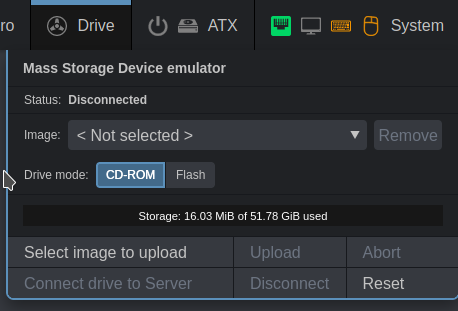
I downloaded today last build, but i cannot find option to upload file from internet.
@mdevaev commented on GitHub (Oct 12, 2021):
Press "Select image to upload"
@ghost commented on GitHub (Oct 13, 2021):
if i press Press
"Select image to upload"i will upload to raspberry image from MY PC, pikvm open explorer to select iso image, but i want to upload to raspberry file from internet!@mdevaev commented on GitHub (Oct 13, 2021):
Please show KVMD version in about dialog. Also try to remove the browser cache and press "select" after that.
@ghost commented on GitHub (Oct 13, 2021):
also i open pikvm in incognito mode, same result
@mdevaev commented on GitHub (Oct 13, 2021):
Upgrade the OS.
rw; pacman -Syu; reboot.@ghost commented on GitHub (Oct 13, 2021):
i have problem, my date and time is to old
how i can update it from NTP? also it will be useful to auto update date and time every time when pikvm connecting to network, because RPI don't have RTC clock
@ghost commented on GitHub (Oct 13, 2021):
i unable to change time and date
@ghost commented on GitHub (Oct 13, 2021):
my fault, i enabled automatic update
timedatectl set-ntp onand after enabling i cannot change time and date, i off timedatectl and all ok, need to do something with time and date, because after install pikvm i received wrong time and date, and i cannot update pikvm :(also problem with lost option to upload file directly from internet was successfully fixed with your instruction. best regards
@mdevaev commented on GitHub (Oct 13, 2021):
Run
sed -i -e 's/#NTP=$/NTP=0.arch.pool.ntp.org 1.arch.pool.ntp.org 2.arch.pool.ntp.org 3.arch.pool.ntp.org/g' /etc/systemd/timesyncd.conf, reboot and try again.@ghost commented on GitHub (Oct 25, 2021):
this method not working (time and date not updating automatically after reboot)
@mdevaev commented on GitHub (Oct 25, 2021):
Move wifi settings to systemd-networkd and everything will be ok: https://docs.pikvm.org/wifi/