1
0
Fork 0
mirror of https://github.com/pikvm/pikvm.git synced 2026-03-02 18:16:56 -05:00

Mass storage emulation / mounting issue #35

Closed
opened 2026-02-20 13:19:03 -05:00 by deekerman · 10 comments
Owner

Originally created by @tryallthethings on GitHub (Aug 15, 2020).

Originally assigned to: @mdevaev on GitHub.

I noticed two things while playing around with the mass storage mount feature.

  1. When first connected to my computer pikvm provided a "Linux File-CD Gadget USB Device" device listed as a DVD/CD-Rom drive. After playing around with mounting / unmounting 2 images I disconnected the USB cable between pikvm and my computer. After reconnecting pikvm provided the same device name but the type changed from DVD drive to Disk drive. The drive mode will always be the last one I choose before disconnecting the USB cable but it never changes when I change the drive mode in pikvm.
    image
    mmc_2020-08-15_16-09-57

  2. The flash drive mode does not work at all with the two ISO images I tested. CD-ROM works with both images although the 4GB ISO won't show up (as expected) but at least Windows is detecting that something was "inserted" into the virtual drive and pops up an explorer window. I've tried swapping around the images and disk modes but flash doesn't work in any combination. I can see that something with the appropriate size was mounted but the filesystem is always RAW.
    image

[2020-08-15 17:15:05 kvmd.service] --- kvmd.plugins.msd.otg.helpers INFO --- Unlocking the drive ...
[2020-08-15 17:15:05 kvmd.service] --- kvmd.plugins.msd.otg.helpers INFO --- Executing helper ['/usr/bin/sudo', '--non-interactive', '/usr/bin/kvmd-helper-otgmsd-unlock', 'unlock'] ...
[2020-08-15 17:15:05 kvmd.service] --- kvmd : TTY=unknown ; PWD=/ ; USER=root ; COMMAND=/usr/bin/kvmd-helper-otgmsd-unlock unlock
[2020-08-15 17:15:05 kvmd.service] --- pam_unix(sudo:session): session opened for user root by (uid=0)
[2020-08-15 17:15:05 kvmd.service] --- pam_unix(sudo:session): session closed for user root
[2020-08-15 17:15:05 kvmd.service] --- kvmd.plugins.msd.otg.helpers INFO --- Console: Sending SIGUSR1 to MSD 'file-storage' kernel thread with pid=396 ...
[2020-08-15 17:15:05 kvmd.service] --- aiohttp.access INFO --- [admin (token) / 100.126.161.74] 'POST /msd/disconnect HTTP/1.0' => 200; size=193 --- referer='https://xxx.xxx.xxx.xxx/kvm/'; user_agent='Mozilla/5.0 (Windows NT 6.3; Win64; x64) AppleWebKit/537.36 (KHTML, like Gecko) Chrome/84.0.4147.125 Safari/537.36'
[2020-08-15 17:15:05 kvmd.service] --- kvmd.apps.kvmd.streamer INFO --- Console: ================================================================================
[2020-08-15 17:15:05 kvmd.service] --- kvmd.apps.kvmd.streamer INFO --- Console: -- ERROR [1518.288 stream] -- Can't open device: No such file or directory
[2020-08-15 17:15:05 kvmd.service] --- kvmd.apps.kvmd.streamer INFO --- Console: -- INFO [1518.288 stream] -- Sleeping 1 seconds before new stream init ...
[2020-08-15 17:15:06 kvmd.service] --- kvmd.apps.kvmd.streamer INFO --- Console: ================================================================================
[2020-08-15 17:15:06 kvmd.service] --- kvmd.apps.kvmd.streamer INFO --- Console: -- ERROR [1519.288 stream] -- Can't open device: No such file or directory
[2020-08-15 17:15:06 kvmd.service] --- kvmd.apps.kvmd.streamer INFO --- Console: -- INFO [1519.288 stream] -- Sleeping 1 seconds before new stream init ...
[2020-08-15 17:15:07 kvmd.service] --- aiohttp.access INFO --- [admin (token) / 100.126.161.74] 'POST /msd/set_params?image=AcronisBootablePEMedia_Win.iso HTTP/1.0' => 200; size=193 --- referer='https://xxx.xxx.xxx.xxx/kvm/'; user_agent='Mozilla/5.0 (Windows NT 6.3; Win64; x64) AppleWebKit/537.36 (KHTML, like Gecko) Chrome/84.0.4147.125 Safari/537.36'
[2020-08-15 17:15:07 kvmd.service] --- kvmd.apps.kvmd.streamer INFO --- Console: ================================================================================
[2020-08-15 17:15:07 kvmd.service] --- kvmd.apps.kvmd.streamer INFO --- Console: -- ERROR [1520.288 stream] -- Can't open device: No such file or directory
[2020-08-15 17:15:07 kvmd.service] --- kvmd.apps.kvmd.streamer INFO --- Console: -- INFO [1520.288 stream] -- Sleeping 1 seconds before new stream init ...
[2020-08-15 17:15:08 kvmd.service] --- kvmd.apps.kvmd.streamer INFO --- Console: ================================================================================
[2020-08-15 17:15:08 kvmd.service] --- kvmd.apps.kvmd.streamer INFO --- Console: -- ERROR [1521.289 stream] -- Can't open device: No such file or directory
[2020-08-15 17:15:08 kvmd.service] --- kvmd.apps.kvmd.streamer INFO --- Console: -- INFO [1521.289 stream] -- Sleeping 1 seconds before new stream init ...
[2020-08-15 17:15:09 kvmd.service] --- kvmd.apps.kvmd.streamer INFO --- Console: ================================================================================
[2020-08-15 17:15:09 kvmd.service] --- kvmd.apps.kvmd.streamer INFO --- Console: -- ERROR [1522.289 stream] -- Can't open device: No such file or directory
[2020-08-15 17:15:09 kvmd.service] --- kvmd.apps.kvmd.streamer INFO --- Console: -- INFO [1522.289 stream] -- Sleeping 1 seconds before new stream init ...
[2020-08-15 17:15:10 kvmd.service] --- kvmd.plugins.msd.otg.helpers INFO --- Unlocking the drive ...
[2020-08-15 17:15:10 kvmd.service] --- kvmd.plugins.msd.otg.helpers INFO --- Executing helper ['/usr/bin/sudo', '--non-interactive', '/usr/bin/kvmd-helper-otgmsd-unlock', 'unlock'] ...
[2020-08-15 17:15:10 kvmd.service] --- kvmd : TTY=unknown ; PWD=/ ; USER=root ; COMMAND=/usr/bin/kvmd-helper-otgmsd-unlock unlock
[2020-08-15 17:15:10 kvmd.service] --- pam_unix(sudo:session): session opened for user root by (uid=0)
[2020-08-15 17:15:10 kvmd.service] --- kvmd.apps.kvmd.streamer INFO --- Console: ================================================================================
[2020-08-15 17:15:10 kvmd.service] --- kvmd.apps.kvmd.streamer INFO --- Console: -- ERROR [1523.289 stream] -- Can't open device: No such file or directory
[2020-08-15 17:15:10 kvmd.service] --- kvmd.apps.kvmd.streamer INFO --- Console: -- INFO [1523.289 stream] -- Sleeping 1 seconds before new stream init ...
[2020-08-15 17:15:10 kvmd.service] --- pam_unix(sudo:session): session closed for user root
[2020-08-15 17:15:10 kvmd.service] --- kvmd.plugins.msd.otg.helpers INFO --- Console: Sending SIGUSR1 to MSD 'file-storage' kernel thread with pid=396 ...
[2020-08-15 17:15:10 kvmd.service] --- aiohttp.access INFO --- [admin (token) / 100.126.161.74] 'POST /msd/connect HTTP/1.0' => 200; size=193 --- referer='https://xxx.xxx.xxx.xxx/kvm/'; user_agent='Mozilla/5.0 (Windows NT 6.3; Win64; x64) AppleWebKit/537.36 (KHTML, like Gecko) Chrome/84.0.4147.125 Safari/537.36'

My PC is running Windows 8.1 and I'm using a RPi 4 2GB with the official pikvm image. USB connection is made through a USB2 splitter cable.
Edit: Doesn't work either with USB-C.

KVMD: 1.88
Streamer: 1.21 (ustreamer)
HAS_PDEATHSIG: Yes
WITH_GPIO: Yes
WITH_OMX: Yes
WITH_PTHREAD_NP: Yes
WITH_SETPROCTITLE: Yes
Linux kernel:
Machine: armv7l
Release: 5.4.51-2-ARCH
Version: #1 SMP PREEMPT Sat Aug 8 23:15:21 UTC 2020

Edit 2:
Images tested:

  • Windows 10 1909
  • Acronis WinPE
  • Ubuntu 18.04
  • archlinux-2020.08.01-x86_64.iso
  • Clonezilla Live 2.6.5
Originally created by @tryallthethings on GitHub (Aug 15, 2020). Originally assigned to: @mdevaev on GitHub. I noticed two things while playing around with the mass storage mount feature. 1. When first connected to my computer pikvm provided a "Linux File-CD Gadget USB Device" device listed as a DVD/CD-Rom drive. After playing around with mounting / unmounting 2 images I disconnected the USB cable between pikvm and my computer. After reconnecting pikvm provided the same device name but the type changed from DVD drive to Disk drive. The drive mode will always be the last one I choose before disconnecting the USB cable but it never changes when I change the drive mode in pikvm. ![image](https://user-images.githubusercontent.com/11146296/90314156-dccbc000-df11-11ea-9b83-3a82fe7307de.png) ![mmc_2020-08-15_16-09-57](https://user-images.githubusercontent.com/11146296/90314316-0507ee80-df13-11ea-8781-67876a564c43.png) 2. The flash drive mode does not work at all with the two ISO images I tested. CD-ROM works with both images although the 4GB ISO won't show up (as expected) but at least Windows is detecting that something was "inserted" into the virtual drive and pops up an explorer window. I've tried swapping around the images and disk modes but flash doesn't work in any combination. I can see that something with the appropriate size was mounted but the filesystem is always RAW. ![image](https://user-images.githubusercontent.com/11146296/90314194-2b795a00-df12-11ea-9b5c-e28491e68654.png) > [2020-08-15 17:15:05 kvmd.service] --- kvmd.plugins.msd.otg.helpers INFO --- Unlocking the drive ... > [2020-08-15 17:15:05 kvmd.service] --- kvmd.plugins.msd.otg.helpers INFO --- Executing helper ['/usr/bin/sudo', '--non-interactive', '/usr/bin/kvmd-helper-otgmsd-unlock', 'unlock'] ... > [2020-08-15 17:15:05 kvmd.service] --- kvmd : TTY=unknown ; PWD=/ ; USER=root ; COMMAND=/usr/bin/kvmd-helper-otgmsd-unlock unlock > [2020-08-15 17:15:05 kvmd.service] --- pam_unix(sudo:session): session opened for user root by (uid=0) > [2020-08-15 17:15:05 kvmd.service] --- pam_unix(sudo:session): session closed for user root > [2020-08-15 17:15:05 kvmd.service] --- kvmd.plugins.msd.otg.helpers INFO --- Console: Sending SIGUSR1 to MSD 'file-storage' kernel thread with pid=396 ... > [2020-08-15 17:15:05 kvmd.service] --- aiohttp.access INFO --- [admin (token) / 100.126.161.74] 'POST /msd/disconnect HTTP/1.0' => 200; size=193 --- referer='https://xxx.xxx.xxx.xxx/kvm/'; user_agent='Mozilla/5.0 (Windows NT 6.3; Win64; x64) AppleWebKit/537.36 (KHTML, like Gecko) Chrome/84.0.4147.125 Safari/537.36' > [2020-08-15 17:15:05 kvmd.service] --- kvmd.apps.kvmd.streamer INFO --- Console: ================================================================================ > [2020-08-15 17:15:05 kvmd.service] --- kvmd.apps.kvmd.streamer INFO --- Console: -- ERROR [1518.288 stream] -- Can't open device: No such file or directory > [2020-08-15 17:15:05 kvmd.service] --- kvmd.apps.kvmd.streamer INFO --- Console: -- INFO [1518.288 stream] -- Sleeping 1 seconds before new stream init ... > [2020-08-15 17:15:06 kvmd.service] --- kvmd.apps.kvmd.streamer INFO --- Console: ================================================================================ > [2020-08-15 17:15:06 kvmd.service] --- kvmd.apps.kvmd.streamer INFO --- Console: -- ERROR [1519.288 stream] -- Can't open device: No such file or directory > [2020-08-15 17:15:06 kvmd.service] --- kvmd.apps.kvmd.streamer INFO --- Console: -- INFO [1519.288 stream] -- Sleeping 1 seconds before new stream init ... > [2020-08-15 17:15:07 kvmd.service] --- aiohttp.access INFO --- [admin (token) / 100.126.161.74] 'POST /msd/set_params?image=AcronisBootablePEMedia_Win.iso HTTP/1.0' => 200; size=193 --- referer='https://xxx.xxx.xxx.xxx/kvm/'; user_agent='Mozilla/5.0 (Windows NT 6.3; Win64; x64) AppleWebKit/537.36 (KHTML, like Gecko) Chrome/84.0.4147.125 Safari/537.36' > [2020-08-15 17:15:07 kvmd.service] --- kvmd.apps.kvmd.streamer INFO --- Console: ================================================================================ > [2020-08-15 17:15:07 kvmd.service] --- kvmd.apps.kvmd.streamer INFO --- Console: -- ERROR [1520.288 stream] -- Can't open device: No such file or directory > [2020-08-15 17:15:07 kvmd.service] --- kvmd.apps.kvmd.streamer INFO --- Console: -- INFO [1520.288 stream] -- Sleeping 1 seconds before new stream init ... > [2020-08-15 17:15:08 kvmd.service] --- kvmd.apps.kvmd.streamer INFO --- Console: ================================================================================ > [2020-08-15 17:15:08 kvmd.service] --- kvmd.apps.kvmd.streamer INFO --- Console: -- ERROR [1521.289 stream] -- Can't open device: No such file or directory > [2020-08-15 17:15:08 kvmd.service] --- kvmd.apps.kvmd.streamer INFO --- Console: -- INFO [1521.289 stream] -- Sleeping 1 seconds before new stream init ... > [2020-08-15 17:15:09 kvmd.service] --- kvmd.apps.kvmd.streamer INFO --- Console: ================================================================================ > [2020-08-15 17:15:09 kvmd.service] --- kvmd.apps.kvmd.streamer INFO --- Console: -- ERROR [1522.289 stream] -- Can't open device: No such file or directory > [2020-08-15 17:15:09 kvmd.service] --- kvmd.apps.kvmd.streamer INFO --- Console: -- INFO [1522.289 stream] -- Sleeping 1 seconds before new stream init ... > [2020-08-15 17:15:10 kvmd.service] --- kvmd.plugins.msd.otg.helpers INFO --- Unlocking the drive ... > [2020-08-15 17:15:10 kvmd.service] --- kvmd.plugins.msd.otg.helpers INFO --- Executing helper ['/usr/bin/sudo', '--non-interactive', '/usr/bin/kvmd-helper-otgmsd-unlock', 'unlock'] ... > [2020-08-15 17:15:10 kvmd.service] --- kvmd : TTY=unknown ; PWD=/ ; USER=root ; COMMAND=/usr/bin/kvmd-helper-otgmsd-unlock unlock > [2020-08-15 17:15:10 kvmd.service] --- pam_unix(sudo:session): session opened for user root by (uid=0) > [2020-08-15 17:15:10 kvmd.service] --- kvmd.apps.kvmd.streamer INFO --- Console: ================================================================================ > [2020-08-15 17:15:10 kvmd.service] --- kvmd.apps.kvmd.streamer INFO --- Console: -- ERROR [1523.289 stream] -- Can't open device: No such file or directory > [2020-08-15 17:15:10 kvmd.service] --- kvmd.apps.kvmd.streamer INFO --- Console: -- INFO [1523.289 stream] -- Sleeping 1 seconds before new stream init ... > [2020-08-15 17:15:10 kvmd.service] --- pam_unix(sudo:session): session closed for user root > [2020-08-15 17:15:10 kvmd.service] --- kvmd.plugins.msd.otg.helpers INFO --- Console: Sending SIGUSR1 to MSD 'file-storage' kernel thread with pid=396 ... > [2020-08-15 17:15:10 kvmd.service] --- aiohttp.access INFO --- [admin (token) / 100.126.161.74] 'POST /msd/connect HTTP/1.0' => 200; size=193 --- referer='https://xxx.xxx.xxx.xxx/kvm/'; user_agent='Mozilla/5.0 (Windows NT 6.3; Win64; x64) AppleWebKit/537.36 (KHTML, like Gecko) Chrome/84.0.4147.125 Safari/537.36' My PC is running Windows 8.1 and I'm using a RPi 4 2GB with the official pikvm image. USB connection is made through a USB2 splitter cable. Edit: Doesn't work either with USB-C. KVMD: 1.88 Streamer: 1.21 (ustreamer) HAS_PDEATHSIG: Yes WITH_GPIO: Yes WITH_OMX: Yes WITH_PTHREAD_NP: Yes WITH_SETPROCTITLE: Yes Linux kernel: Machine: armv7l Release: 5.4.51-2-ARCH Version: #1 SMP PREEMPT Sat Aug 8 23:15:21 UTC 2020 Edit 2: Images tested: - Windows 10 1909 - Acronis WinPE - Ubuntu 18.04 - archlinux-2020.08.01-x86_64.iso - Clonezilla Live 2.6.5
Author
Owner

@tryallthethings commented on GitHub (Aug 15, 2020):

Similar behavior on my laptop (also running Windows 8.1). If the disk mode was flash when connected to the machine even the CD-ROM disk mode doesn't work until I disconnect and reconnect the pikvm.

@tryallthethings commented on GitHub (Aug 15, 2020): Similar behavior on my laptop (also running Windows 8.1). If the disk mode was flash when connected to the machine even the CD-ROM disk mode doesn't work until I disconnect and reconnect the pikvm.
Author
Owner

@mdevaev commented on GitHub (Aug 15, 2020):

The drive mode will always be the last one I choose before disconnecting the USB cable but it never changes when I change the drive mode in pikvm.

This is because you can't change the type of USB device that is already connected without actually disabling it. If we disable OTG to restart the device, we will also disable the keyboard. This is a limitation of libcomposite in the Linux kernel.

The flash drive mode does not work at all with the two ISO images I tested.

I believe this is a Windows issue. I have tested flash mode on the BIOS and on Linux and it works. I can't significantly affect the functionality of MSD since it is implemented by the standard kernel interface.

@mdevaev commented on GitHub (Aug 15, 2020): > The drive mode will always be the last one I choose before disconnecting the USB cable but it never changes when I change the drive mode in pikvm. This is because you can't change the type of USB device that is already connected without actually disabling it. If we disable OTG to restart the device, we will also disable the keyboard. This is a limitation of libcomposite in the Linux kernel. > The flash drive mode does not work at all with the two ISO images I tested. I believe this is a Windows issue. I have tested flash mode on the BIOS and on Linux and it works. I can't significantly affect the functionality of MSD since it is implemented by the standard kernel interface.
Author
Owner

@tryallthethings commented on GitHub (Aug 15, 2020):

This is because you can't change the type of USB device that is already connected without actually disabling it. If we disable OTG to restart the device, we will also disable the keyboard. This is a limitation of libcomposite in the Linux kernel.

It was just something I observed. Trying to report things as detailed as possible. I couldn't care less about the device category as long as it works 😄

I believe this is a Windows issue. I have tested flash mode on the BIOS and on Linux and it works. I can't significantly affect the functionality of MSD since it is implemented by the standard kernel interface.

Not, not Windows exclusive. I did some more testing.

  • VMware ESXi server 6.7: didn't detect any devices regardless of disk mode.
  • My Laptop - BIOS: did detect CD-ROM drives in the BIOS. Flash also worked for small ISO files. Windows 10 ISO (4GB) doesn't work. The smaller Acronis Windows PE ISO (553MB) works in CD-ROM but not in flash.
  • My laptop - booted in Kali Linux: detects images mounted as CD-ROM, nothing as flash. Or let's say: same as Windows. It detects something with the right size but I can't access it. Although after I disconnected the USB-cable between pikvm and my laptop and reconnected it started working just fine. (except Clonezilla in CD-ROM mode but that might be a different issue as Flash works fine)
@tryallthethings commented on GitHub (Aug 15, 2020): > This is because you can't change the type of USB device that is already connected without actually disabling it. If we disable OTG to restart the device, we will also disable the keyboard. This is a limitation of libcomposite in the Linux kernel. It was just something I observed. Trying to report things as detailed as possible. I couldn't care less about the device category as long as it works :smile: > I believe this is a Windows issue. I have tested flash mode on the BIOS and on Linux and it works. I can't significantly affect the functionality of MSD since it is implemented by the standard kernel interface. Not, not Windows exclusive. I did some more testing. - VMware ESXi server 6.7: didn't detect any devices regardless of disk mode. - My Laptop - BIOS: did detect CD-ROM drives in the BIOS. Flash also worked for small ISO files. Windows 10 ISO (4GB) doesn't work. The smaller Acronis Windows PE ISO (553MB) works in CD-ROM but not in flash. - My laptop - booted in Kali Linux: detects images mounted as CD-ROM, nothing as flash. Or let's say: same as Windows. It detects something with the right size but I can't access it. Although after I disconnected the USB-cable between pikvm and my laptop and reconnected it started working just fine. (except Clonezilla in CD-ROM mode but that might be a different issue as Flash works fine)
Author
Owner

@tryallthethings commented on GitHub (Aug 15, 2020):

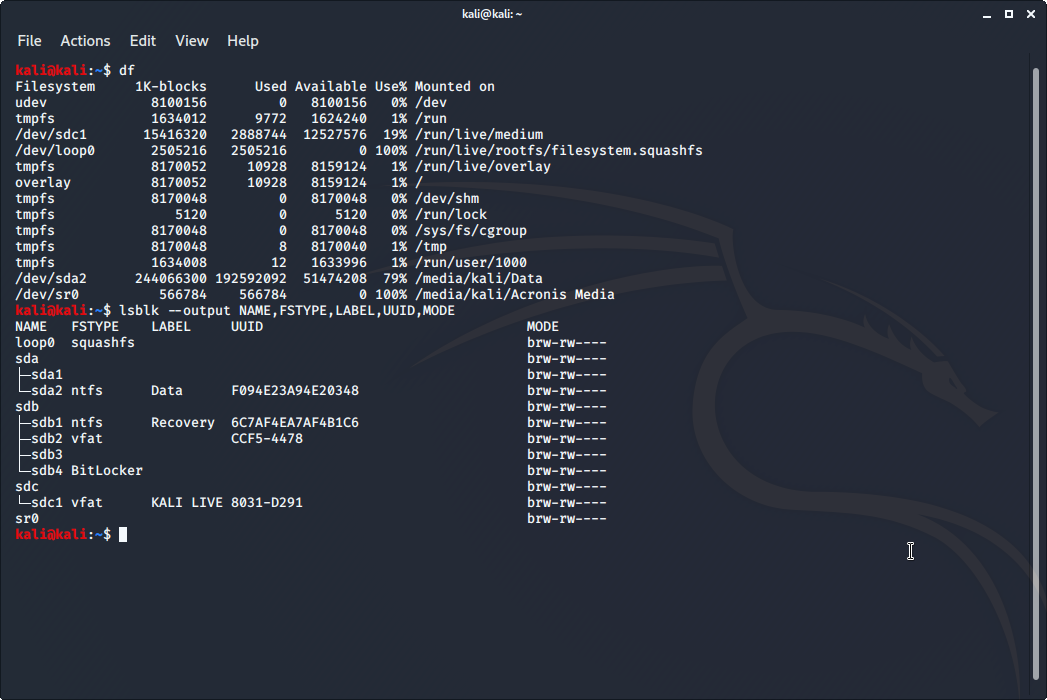
Here's a screenshot of the Kali Linux system with the Arch Linux ISO mounted. No idea why it identifies itself as Acronis media (/dev/sr0). Might be an artifact of a previous ISO I had mounted.
Screenshot_2020-08-16_04-35-59

@tryallthethings commented on GitHub (Aug 15, 2020): Here's a screenshot of the Kali Linux system with the Arch Linux ISO mounted. No idea why it identifies itself as Acronis media (/dev/sr0). Might be an artifact of a previous ISO I had mounted. ![Screenshot_2020-08-16_04-35-59](https://user-images.githubusercontent.com/11146296/90325572-a0ce4480-df7d-11ea-993c-18db01485eee.png)
Author
Owner

@mdevaev commented on GitHub (Aug 15, 2020):

Although after I disconnected the USB-cable between pikvm and my laptop and reconnected it started working just fine.

If you change the emulation type, you must either reconnect the cable or restart the server.

Windows 10 ISO (4GB) doesn't work.

You mean it's impossible to boot from it? You can't just switch the mode to a flash drive and load from it, your image must be prepared in a special way. For example, bootable ISO files for arch linux contain not only CD-ROM attributes, but also Flash. This is why they can be booted regardless of the type of media.

@mdevaev commented on GitHub (Aug 15, 2020): > Although after I disconnected the USB-cable between pikvm and my laptop and reconnected it started working just fine. If you change the emulation type, you must either reconnect the cable or restart the server. > Windows 10 ISO (4GB) doesn't work. You mean it's impossible to boot from it? You can't just switch the mode to a flash drive and load from it, your image must be prepared in a special way. For example, bootable ISO files for arch linux contain not only CD-ROM attributes, but also Flash. This is why they can be booted regardless of the type of media.
Author
Owner

@tryallthethings commented on GitHub (Aug 16, 2020):

If you change the emulation type, you must either reconnect the cable or restart the server.

Good to know. A hint next to the switch would be great to inform about that. I wasn't aware of it.

You mean it's impossible to boot from it? You can't just switch the mode to a flash drive and load from it, your image must be prepared in a special way. For example, bootable ISO files for arch linux contain not only CD-ROM attributes, but also Flash. This is why they can be booted regardless of the type of media.

Yes, it doesn't show up as a bootable device while the other images did. I just wanted the image contents to show up in the virtual drive for a first test. I only tested BIOS / Linux because you suggested that both worked for you. The images I've tested are all bootable so that can't be an issue.
Can you show me where in the code you create / change the cd-rom / flash devices so I can do some more research?

@tryallthethings commented on GitHub (Aug 16, 2020): > If you change the emulation type, you must either reconnect the cable or restart the server. Good to know. A hint next to the switch would be great to inform about that. I wasn't aware of it. > You mean it's impossible to boot from it? You can't just switch the mode to a flash drive and load from it, your image must be prepared in a special way. For example, bootable ISO files for arch linux contain not only CD-ROM attributes, but also Flash. This is why they can be booted regardless of the type of media. Yes, it doesn't show up as a bootable device while the other images did. I just wanted the image contents to show up in the virtual drive for a first test. I only tested BIOS / Linux because you suggested that both worked for you. The images I've tested are all bootable so that can't be an issue. Can you show me where in the code you create / change the cd-rom / flash devices so I can do some more research?
Author
Owner

@mdevaev commented on GitHub (Aug 16, 2020):

Here the init (on rpi boot) code: https://github.com/pikvm/kvmd/blob/master/kvmd/apps/otg/init.py#L123

Here the api code: https://github.com/pikvm/kvmd/blob/master/kvmd/plugins/msd/otg/init.py#L273

@mdevaev commented on GitHub (Aug 16, 2020): Here the init (on rpi boot) code: https://github.com/pikvm/kvmd/blob/master/kvmd/apps/otg/__init__.py#L123 Here the api code: https://github.com/pikvm/kvmd/blob/master/kvmd/plugins/msd/otg/__init__.py#L273
Author
Owner

@tryallthethings commented on GitHub (Dec 2, 2020):

I think this ticket can be closed.
The two takeaways here should be

  1. Windows is a special snowflake and the .ISOs require extra work to be used in PiKVM (see https://github.com/pikvm/pikvm/blob/master/pages/cookbook.md#create-a-microsoft-windows-based-flash-disk-image for instructions)
  2. switching between flash and CD-ROM mode requires to reconnect the USB-cable / restart the server.
@tryallthethings commented on GitHub (Dec 2, 2020): I think this ticket can be closed. The two takeaways here should be 1. Windows is a special snowflake and the .ISOs require extra work to be used in PiKVM (see https://github.com/pikvm/pikvm/blob/master/pages/cookbook.md#create-a-microsoft-windows-based-flash-disk-image for instructions) 2. switching between flash and CD-ROM mode requires to reconnect the USB-cable / restart the server.
Author
Owner

@mdevaev commented on GitHub (Dec 2, 2020):

special snowflake

🤣

The second should also be solved by restarting the server. My experience shows this. Could you confirm this too?

As far as I can tell right now, this problem doesn't have a software solution. In v3, there is a USB breaker circuit for this.

@mdevaev commented on GitHub (Dec 2, 2020): > special snowflake :rofl: The second should also be solved by restarting the server. My experience shows this. Could you confirm this too? As far as I can tell right now, this problem doesn't have a software solution. In v3, there is a USB breaker circuit for this.
Author
Owner

@tryallthethings commented on GitHub (Dec 4, 2020):

I've just tried it. Rebooting the server works for me too. I suppose because during POST the USB-connection is severed for a moment.

@tryallthethings commented on GitHub (Dec 4, 2020): I've just tried it. Rebooting the server works for me too. I suppose because during POST the USB-connection is severed for a moment.
Sign in to join this conversation.
No milestone
No project
No assignees
1 participant
Notifications
Due date
The due date is invalid or out of range. Please use the format "yyyy-mm-dd".

No due date set.

Dependencies

No dependencies set.

Reference
starred/pikvm-pikvm#35
No description provided.