1
0
Fork 0
mirror of https://github.com/pikvm/pikvm.git synced 2026-03-02 18:16:56 -05:00

Cannot detect boot drive, when using flash mode #447

Closed
opened 2026-02-20 13:27:13 -05:00 by deekerman · 12 comments
Owner

Originally created by @techmadot on GitHub (Apr 10, 2022).

Originally assigned to: @mdevaev on GitHub.

Describe the bug

I'm using PiKVMHat.
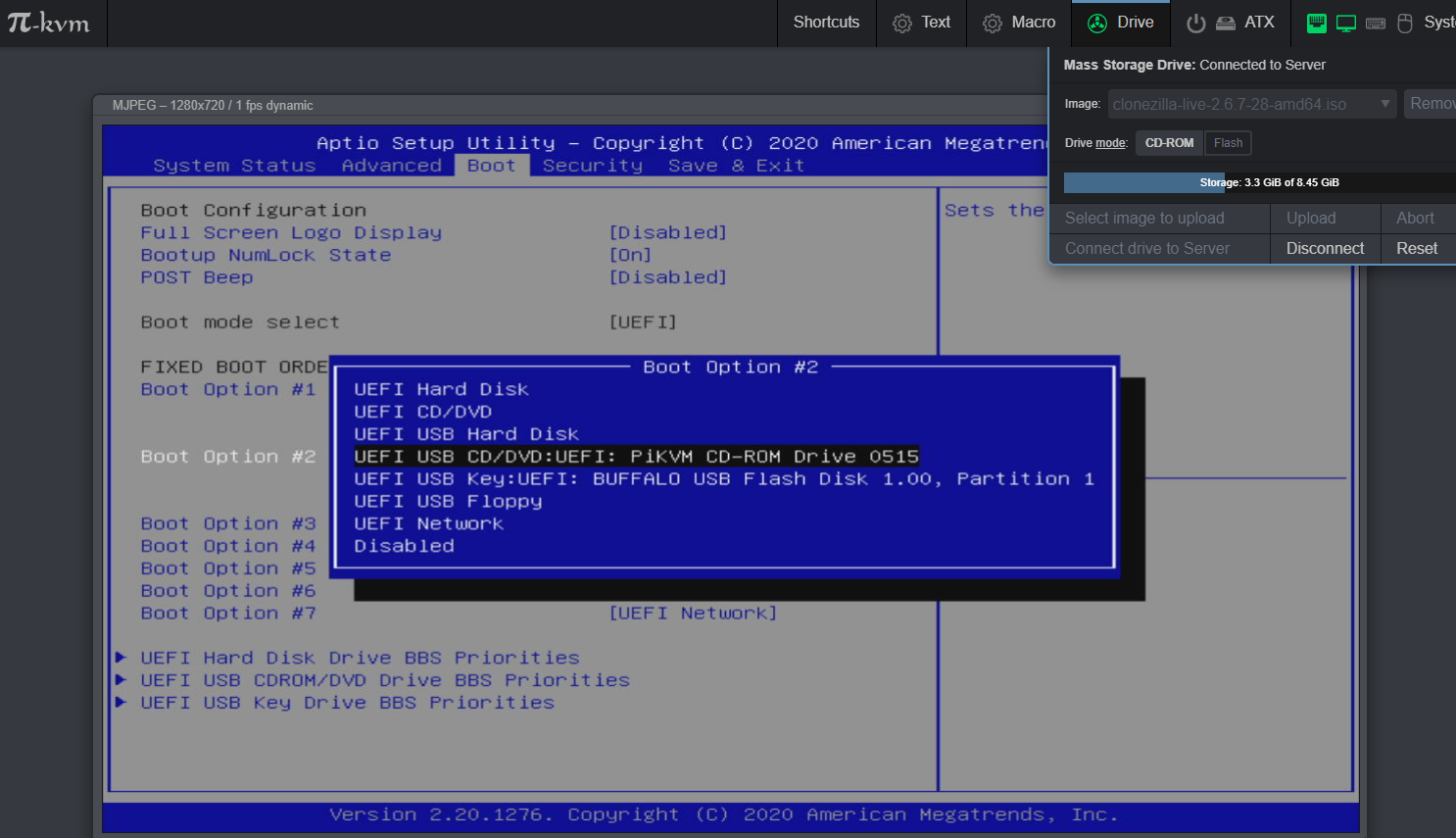
In my environment, I couldn't select the CD-ROM drive as the boot drive in the BIOS (UEFI) when selecting Flash mode.
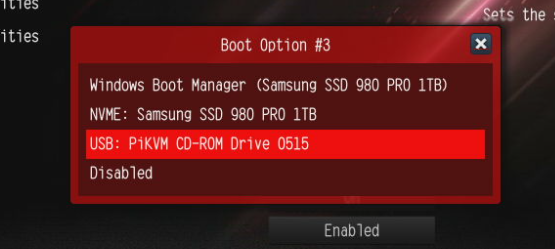
However, in CD-ROM drive mode, it was detected as a boot drive.

After Windows starts, Flash mode is working fine.

I want to use an iso, usb memory image larger than 2.2GB, so please give me some advice.

The image data was created from a physical USB stick (for the Ubuntu 21.04 installer).
It has also been confirmed that it can be booted from this USB stick.
also, PiKVM Usb connects directly to the rear USB on the motherboard (not via Hub).

To Reproduce
Steps to reproduce the behavior, like:

  1. Create an image from a bootable USB stick
  2. Mount "Drive Mode" is Flash
  3. Reboot Target Computer , enter BIOS(UEFI) Screen
  4. Check boot device selection menu, See error

Expected behavior

PiKVM devices are listed as boot devices

Screenshots

Using Motherboard is ASRock B550 Phantom Gaming 4

image

This issue has occurred in other environments as well.

Using Motherboard is A520M PRO-C DASH

image

when selected CD-ROM mode (Good case)
image

Desktop (please complete the following information):

  • OS:
    • Windows10
  • Browser [e.g. chrome, safari]
    • using Chrome (100.0.4896.75
  • Version [e.g. 22]
  • VNC client (if used)
    • None

PiKVM info:

  • Raspberry Pi board version [e.g. RPi 4]
    • RPi 4 (Memory 4GB)
  • PiKVM platform [e.g. v2-hdmi]
    • v3-hdmi-rpi4
  • Video capture type [e.g. CSI bridge]
    • CSI bridge
  • KVMD version: pacman -Q | grep kvmd
    • kvmd 3.80-1
    • kvmd-fan 0.20-1
    • kvmd-oled 0.12-1
    • kvmd-platform-v3-hdmi-rpi4 3.80-1
    • kvmd-webterm 0.41-1
  • uStreamer version: pacman -Q | grep ustreamer
    • ustreamer 5.3-1
  • Linux kernel: uname -a
    • Linux pikvm 5.15.25-15-rpi-ARCH #1 SMP Sat Apr 9 20:36:24 MSK 2022 armv7l GNU/Linux

Additional context
Add any other context about the problem here.

Originally created by @techmadot on GitHub (Apr 10, 2022). Originally assigned to: @mdevaev on GitHub. **Describe the bug** I'm using PiKVMHat. In my environment, I couldn't select the CD-ROM drive as the boot drive in the BIOS (UEFI) when selecting Flash mode. However, in CD-ROM drive mode, it was detected as a boot drive. After Windows starts, Flash mode is working fine. I want to use an iso, usb memory image larger than 2.2GB, so please give me some advice. The image data was created from a physical USB stick (for the Ubuntu 21.04 installer). It has also been confirmed that it can be booted from this USB stick. also, PiKVM Usb connects directly to the rear USB on the motherboard (not via Hub). **To Reproduce** Steps to reproduce the behavior, like: 1. Create an image from a bootable USB stick 2. Mount "Drive Mode" is Flash 3. Reboot Target Computer , enter BIOS(UEFI) Screen 4. Check boot device selection menu, See error **Expected behavior** PiKVM devices are listed as boot devices **Screenshots** ### Using Motherboard is ASRock B550 Phantom Gaming 4 ![image](https://user-images.githubusercontent.com/101812623/162611207-769e783c-5a34-4724-a6d2-99d5ed12e497.png) This issue has occurred in other environments as well. ### Using Motherboard is A520M PRO-C DASH ![image](https://user-images.githubusercontent.com/101812623/162611872-131dfb23-55f5-4dc4-ac75-8eb35d1f9ddb.png) when selected CD-ROM mode (Good case) ![image](https://user-images.githubusercontent.com/101812623/162611950-8eb46e01-fd6f-43e1-8ff1-a46ff05e5f4e.png) **Desktop (please complete the following information):** - OS: - Windows10 - Browser [e.g. chrome, safari] - using Chrome (100.0.4896.75 - Version [e.g. 22] - VNC client (if used) - None **PiKVM info:** - Raspberry Pi board version [e.g. RPi 4] - RPi 4 (Memory 4GB) - PiKVM platform [e.g. v2-hdmi] - v3-hdmi-rpi4 - Video capture type [e.g. CSI bridge] - CSI bridge - KVMD version: `pacman -Q | grep kvmd` - kvmd 3.80-1 - kvmd-fan 0.20-1 - kvmd-oled 0.12-1 - kvmd-platform-v3-hdmi-rpi4 3.80-1 - kvmd-webterm 0.41-1 - uStreamer version: `pacman -Q | grep ustreamer` - ustreamer 5.3-1 - Linux kernel: `uname -a` - Linux pikvm 5.15.25-15-rpi-ARCH #1 SMP Sat Apr 9 20:36:24 MSK 2022 armv7l GNU/Linux **Additional context** Add any other context about the problem here.
deekerman 2026-02-20 13:27:13 -05:00
Author
Owner

@arch1mede commented on GitHub (Apr 12, 2022):

I just tested this on my test NUC, I can see both cdrom and flash drives. However, I will point out that I needed to select legacy to view them.

@arch1mede commented on GitHub (Apr 12, 2022): I just tested this on my test NUC, I can see both cdrom and flash drives. However, I will point out that I needed to select legacy to view them.
Author
Owner

@mdevaev commented on GitHub (Apr 12, 2022):

Did you try usb hard drive option?

@mdevaev commented on GitHub (Apr 12, 2022): Did you try usb hard drive option?
Author
Owner

@techmadot commented on GitHub (Apr 13, 2022):

Thank you advices.
I tried it.

case 1 (Still failed)

USB Hard disk boot order has been selected as the highest priority.
But this failed.

case 2 (Success)

I changed uefi mode to ''CSM".
And, boot mode selected Legacy + UEFI, then PiKVM CDROM appeared.

image

image

As a result, it doesn't seem to be recognized in UEFI Only mode.
Is this a specification? Is there any chance that it will be resolved in the future?

@techmadot commented on GitHub (Apr 13, 2022): Thank you advices. I tried it. ### case 1 (Still failed) USB Hard disk boot order has been selected as the highest priority. But this failed. ### case 2 (Success) I changed uefi mode to ''CSM". And, boot mode selected Legacy + UEFI, then PiKVM CDROM appeared. ![image](https://user-images.githubusercontent.com/101812623/163159730-eb966fed-cdf0-4f6d-bb91-352a25152bcf.png) ![image](https://user-images.githubusercontent.com/101812623/163160322-9b7c8846-eb55-4264-9938-d6f3498586ef.png) As a result, it doesn't seem to be recognized in UEFI Only mode. Is this a specification? Is there any chance that it will be resolved in the future?
Author
Owner

@mdevaev commented on GitHub (Apr 13, 2022):

It seems this is a compatibility problem. To fix it I need the motherboard with this bug to analyze the USB protocol features.

@mdevaev commented on GitHub (Apr 13, 2022): It seems this is a compatibility problem. To fix it I need the motherboard with this bug to analyze the USB protocol features.
Author
Owner

@chuck-r commented on GitHub (Jul 27, 2022):

Is the image you are trying to boot Secure Boot compatible? Many machines with Secure Boot enabled will simply not show boot options that aren't Secure Boot-compatible. Turning off Secure Boot may fix your issue. The Secure Boot option is usually in the Security section.

I know that Ubuntu used to be Secure Boot compatible, but I'm not sure if that's still the case. Regardless, the method used to write the USB drive might make a difference. The best way to write an Ubuntu ISO to a USB drive is using a tool like Balena Etcher or Win32DiskImager that effectively does a raw write of the file to the drive, partition table and all. If you use a "flash drive creator" tool such as UNetbootin/Rufus/Universal USB Installer, they may make modifications to the original, intended layout which may no longer be Secure Boot compatible -- leading to the boot option not showing up on a Secure Boot-enabled EFI.

@chuck-r commented on GitHub (Jul 27, 2022): Is the image you are trying to boot Secure Boot compatible? Many machines with Secure Boot enabled will simply not show boot options that aren't Secure Boot-compatible. Turning off Secure Boot may fix your issue. The Secure Boot option is usually in the Security section. I know that Ubuntu *used* to be Secure Boot compatible, but I'm not sure if that's still the case. Regardless, the method used to write the USB drive might make a difference. The best way to write an Ubuntu ISO to a USB drive is using a tool like Balena Etcher or Win32DiskImager that effectively does a raw write of the file to the drive, partition table and all. If you use a "flash drive creator" tool such as UNetbootin/Rufus/Universal USB Installer, they may make modifications to the original, intended layout which may no longer be Secure Boot compatible -- leading to the boot option not showing up on a Secure Boot-enabled EFI.
Author
Owner

@mdevaev commented on GitHub (Aug 1, 2022):

@techmadot please try the new KVMD 3.133+ and enable "writable" flag in MSD menu. It may fix this problem.

@mdevaev commented on GitHub (Aug 1, 2022): @techmadot please try the new KVMD 3.133+ and enable "writable" flag in MSD menu. It may fix this problem.
Author
Owner

@techmadot commented on GitHub (Aug 5, 2022):

I tried last version.
but not fixed this problem.

image

if CSM is enabled, i can see bootable menu
image

@techmadot commented on GitHub (Aug 5, 2022): I tried last version. but not fixed this problem. ![image](https://user-images.githubusercontent.com/101812623/183066808-2ec5ff6f-c10f-4b59-ad28-a98c2fec7f36.png) if CSM is enabled, i can see bootable menu ![image](https://user-images.githubusercontent.com/101812623/183067112-02c54c7a-846e-499e-ae87-faf2632fbc9e.png)
Author
Owner

@mdevaev commented on GitHub (Aug 5, 2022):

Got it. So this is not the same problem like with Steam Deck.

@mdevaev commented on GitHub (Aug 5, 2022): Got it. So this is not the same problem like with Steam Deck.
Author
Owner

@mdevaev commented on GitHub (Jan 24, 2025):

Hello. Latest PiKVM can emulate DVD, so probably it should solve the problem with booting big images.

@mdevaev commented on GitHub (Jan 24, 2025): Hello. Latest PiKVM can emulate DVD, so probably it should solve the problem with booting big images.
Author
Owner

@chuck-r commented on GitHub (Mar 11, 2025):

Confirmed that it's working for me! I started work on a kernel patch back in 2016 or so for this, but found with the then-current version of f_mass_storage.c that I would have to write a DVD emulation layer and it never went anywhere (not to mention all of the locked-down specs and such). I'm glad to see this is finally working! This isn't a custom patch set and is an upstream kernel fix, correct?

@chuck-r commented on GitHub (Mar 11, 2025): Confirmed that it's working for me! I started work on a kernel patch back in 2016 or so for this, but found with the then-current version of f_mass_storage.c that I would have to write a DVD emulation layer and it never went anywhere (not to mention all of the locked-down specs and such). I'm glad to see this is finally working! This isn't a custom patch set and is an upstream kernel fix, correct?
Author
Owner

@mdevaev commented on GitHub (Mar 11, 2025):

@chuck-r I wrote it myself based on few incomplete patches and my own understanding of SCSI.

@mdevaev commented on GitHub (Mar 11, 2025): @chuck-r I wrote it myself based on few incomplete patches and my own understanding of SCSI.
Author
Owner

@mdevaev commented on GitHub (Mar 11, 2025):

I suppose it can be closed :)

@mdevaev commented on GitHub (Mar 11, 2025): I suppose it can be closed :)
Sign in to join this conversation.
No milestone
No project
No assignees
1 participant
Notifications
Due date
The due date is invalid or out of range. Please use the format "yyyy-mm-dd".

No due date set.

Dependencies

No dependencies set.

Reference
starred/pikvm-pikvm#447
No description provided.