mirror of
https://github.com/pikvm/pikvm.git
synced 2026-03-02 18:16:56 -05:00
[SOLVED] UEFI setup screen broken with ASRock H670 PG Riptide #457
Labels
No labels
component:documentation
help wanted
resolution:delayed
resolution:duplicate
resolution:fixed
resolution:invalid
resolution:rejected
resolution:wontfix
success story
type:bug
type:bug
type:feature
type:question
type:question
No milestone
No project
No assignees
1 participant

Notifications
Due date
No due date set.
Dependencies
No dependencies set.
Reference
starred/pikvm-pikvm#457
Loading…
Add table
Add a link
Reference in a new issue
No description provided.
Delete branch "%!s()"
Deleting a branch is permanent. Although the deleted branch may continue to exist for a short time before it actually gets removed, it CANNOT be undone in most cases. Continue?
Originally created by @syuu1228 on GitHub (Apr 20, 2022).
Originally assigned to: @mdevaev on GitHub.
Describe the bug
I found how to fix this issue but reporting anyway,
Similar with #4 or #78, UEFI setup screen broken on ASRock H670 PG Riptide (everything else is working fine, only UEFI setup screen).
Not only right side of the screen doesn't appear correctly, the video output is completely frozen.
To Reproduce
Screenshots
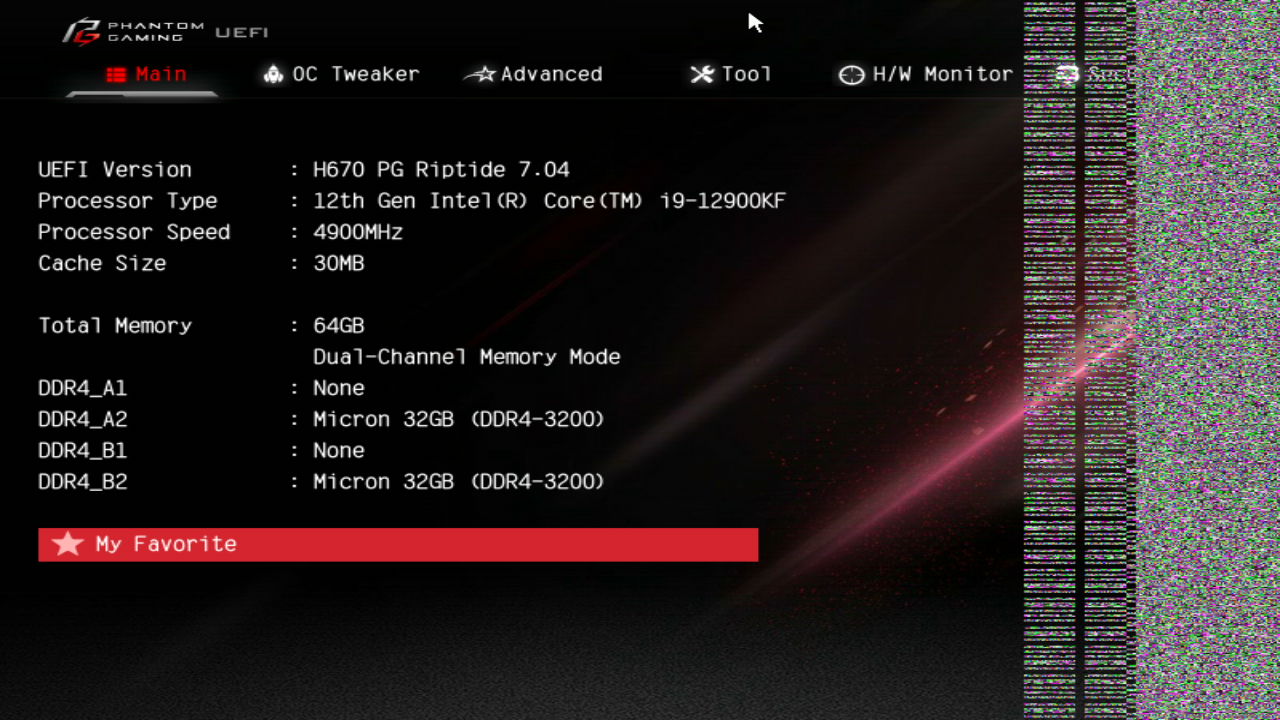

Additional context
GPU is MSI GeForce GTX 1050 2GT LP
How to fix the issue
Just like GA-H77-DS3H issue(#78) change EDID solved the issue.
After I applied "1920x1080 as preferred. Useful for Gigabyte GA-H77-DS3H or Intel NUC" it works perfectly.
@arch1mede commented on GitHub (Apr 21, 2022):
Hi! Thank you for reporting this, can you change the title to add in the [SOLVED]? This way we can reference this to others. You can also remove the PiKVM info and additional context verbiage, as its non relevant.
@mdevaev commented on GitHub (Apr 21, 2022):
Edited.
@arch1mede could you document it on the edid page? Like Gigabyte motherboard
@mdevaev commented on GitHub (Apr 22, 2022):
Documented
@Jyny commented on GitHub (May 31, 2022):
This also fix the same issue on MSI motherboard.
After I applied 1920x1080 as preferred it works perfectly for me.
motherboard model: MSI MAG B660M MORTAR WIFI DDR4
video out: iGPU
@korhojoa commented on GitHub (Sep 5, 2022):
Quite similar, MSI PRO Z690-A WIFI DDR4 with iGPU also was helped by using the 1920x1080 EDID