1
0
Fork 0
mirror of https://github.com/pikvm/pikvm.git synced 2026-03-02 18:16:56 -05:00

The certificate has expired #520

Closed
opened 2026-02-20 14:00:44 -05:00 by deekerman · 5 comments
Owner

Originally created by @wnark on GitHub (Aug 30, 2022).

Originally assigned to: @mdevaev on GitHub.

Describe the bug
When using wget to download, it prompts: The certificate has expired

To Reproduce

  1. Download the image from the official website, and then swipe into the sd card:v2-hdmi-rpi4-latest.img.xz
  2. pacman -Syu
  3. wget https://raw.githubusercontent.com/th3drk0ne/DKN-Fan-Controller/main/install-pikvm.sh
  4. show :The certificate has expired

Expected behavior
can be downloaded normally

Screenshots
image

PiKVM info:

  • Raspberry Pi board version :RPi 4
  • PiKVM platform v2-hdmi
  • Video capture type CSI bridge
  • KVMD version: kvmd 3.141-1
  • uStreamer version: ustreamer 5.21-1
  • Linux kernel: Linux pikvm 5.15.34-4-rpi-ARCH #1 SMP Tue Jul 5 12:10:16 MSK 2022 armv7l GNU/Linux
Originally created by @wnark on GitHub (Aug 30, 2022). Originally assigned to: @mdevaev on GitHub. **Describe the bug** When using wget to download, it prompts: The certificate has expired **To Reproduce** 1. Download the image from the official website, and then swipe into the sd card:v2-hdmi-rpi4-latest.img.xz 2. pacman -Syu 3. wget https://raw.githubusercontent.com/th3drk0ne/DKN-Fan-Controller/main/install-pikvm.sh 4. show :The certificate has expired **Expected behavior** can be downloaded normally **Screenshots** ![image](https://user-images.githubusercontent.com/24355466/187452907-0ad2849f-4f90-41ac-9f62-d4610bd096be.png) **PiKVM info:** - Raspberry Pi board version :RPi 4 - PiKVM platform v2-hdmi - Video capture type CSI bridge - KVMD version: kvmd 3.141-1 - uStreamer version: ustreamer 5.21-1 - Linux kernel: Linux pikvm 5.15.34-4-rpi-ARCH #1 SMP Tue Jul 5 12:10:16 MSK 2022 armv7l GNU/Linux
Author
Owner

@mdevaev commented on GitHub (Sep 2, 2022):

You have a problem with system clock. Check timedatectl

@mdevaev commented on GitHub (Sep 2, 2022): You have a problem with system clock. Check `timedatectl`
Author
Owner

@wnark commented on GitHub (Sep 7, 2022):

You have a problem with system clock. Check timedatectl

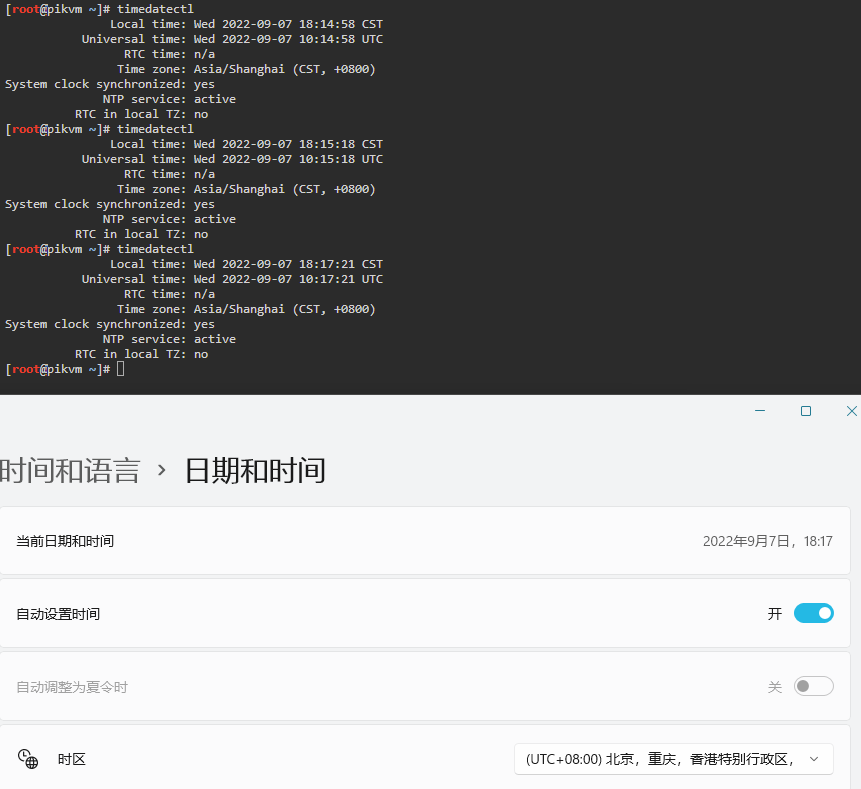
Hello, I checked that the time is correct, the only possibility is that the time zone is wrong, so I modified the time zone, the local time is completely correct after modifying the time zone, but I still found the same error
image

@wnark commented on GitHub (Sep 7, 2022): > You have a problem with system clock. Check `timedatectl` Hello, I checked that the time is correct, the only possibility is that the time zone is wrong, so I modified the time zone, the local time is completely correct after modifying the time zone, but I still found the same error ![image](https://user-images.githubusercontent.com/24355466/188854285-afec468e-70d6-4073-92f9-7b4b8c5d5d28.png)
Author
Owner

@wnark commented on GitHub (Sep 7, 2022):

You have a problem with system clock. Check timedatectl

It may be a bug of wget
https://archlinuxarm.org/forum/viewtopic.php?f=57&t=16070

@wnark commented on GitHub (Sep 7, 2022): > You have a problem with system clock. Check `timedatectl` It may be a bug of wget https://archlinuxarm.org/forum/viewtopic.php?f=57&t=16070
Author
Owner

@mdevaev commented on GitHub (Sep 7, 2022):

You can use curl instead of wget in this case.

@mdevaev commented on GitHub (Sep 7, 2022): You can use curl instead of wget in this case.
Author
Owner

@mdevaev commented on GitHub (Sep 7, 2022):

In any case, this problem is not on our side.

@mdevaev commented on GitHub (Sep 7, 2022): In any case, this problem is not on our side.
Sign in to join this conversation.
No milestone
No project
No assignees
1 participant
Notifications
Due date
The due date is invalid or out of range. Please use the format "yyyy-mm-dd".

No due date set.

Dependencies

No dependencies set.

Reference
starred/pikvm-pikvm#520
No description provided.