mirror of
https://github.com/pikvm/pikvm.git
synced 2026-03-02 18:16:56 -05:00
No BIOS/UEFI access on GA-H77-DS3H #68
Labels
No labels
component:documentation
help wanted
resolution:delayed
resolution:duplicate
resolution:fixed
resolution:invalid
resolution:rejected
resolution:wontfix
success story
type:bug
type:bug
type:feature
type:question
type:question
No milestone
No project
No assignees
1 participant

Notifications
Due date
No due date set.
Dependencies
No dependencies set.
Reference
starred/pikvm-pikvm#68
Loading…
Add table
Add a link
Reference in a new issue
No description provided.
Delete branch "%!s()"
Deleting a branch is permanent. Although the deleted branch may continue to exist for a short time before it actually gets removed, it CANNOT be undone in most cases. Continue?
Originally created by @zsmbrvr on GitHub (Sep 21, 2020).
Originally assigned to: @mdevaev on GitHub.
Describe the bug
I get a blank/black screen when I try to enter the BIOS/UEFI or Boot option menu on GA-H77-DS3H.
The Web UI shows that the TC358743 has a resolution of 1280x720, But there's no signal.
Pi-KVM info:
Additional context
GPU is a Sapphire RX480 Nitro+ 4GB
CPU Xeon E3-1230v2 (no iGPU)
CSM made no difference, installed latest BIOS update and the issue remains.
I think the issue might be with the EDID info the computer gets from the TC358743.
@mdevaev commented on GitHub (Sep 21, 2020):
Try connecting the monitor and see in its settings what resolution, frequency, and other parameters are transmitted during UEFI.
@mdevaev commented on GitHub (Sep 21, 2020):
In addition to pikvm, do you have a connected monitor or hdmi dummy plug? In other words, is pikvm the only video output device?
@zsmbrvr commented on GitHub (Sep 21, 2020):
The Pi is the only one connected.
Sadly the only monitor I've got shows 1080p as UEFI resolution, but it is clearly wrong, since Windows boot is stretched.
I did try with a HDMI dummy plug and with the HDMI monitor plugged in. With the monitor, I had the BIOS on it, with the dummy I had no image on PiKVM.
@mdevaev commented on GitHub (Sep 21, 2020):
Wait, didn't you come to discord with this problem?)
@zsmbrvr commented on GitHub (Sep 21, 2020):
Tried multiple EDID, boot splash is still 1280x720.
Can boot Ubuntu ISO.
@zsmbrvr commented on GitHub (Sep 21, 2020):
Well, after spending a few hours with @mdevaev trying to find a solution and giving up for the night, I managed to solve it.
I didn't realise that I was setting the EDID temporarily and a reboot of the PI would reset it.
I finally made it work with this EDID:
00 FF FF FF FF FF FF 00 52 62 88 88 00 88 88 88 1C 15 01 03 80 00 00 78 0A EE 91 A3 54 4C 99 26 0F 50 54 25 40 00 01 00 01 00 01 00 01 00 01 00 01 00 01 01 01 01 D5 1B 00 50 50 00 19 40 08 20 B8 00 80 00 10 00 00 1E EC 2C 80 A0 70 38 1A 40 30 20 35 00 40 44 21 00 00 1E 00 00 00 FC 00 50 49 2D 4B 56 4D 20 56 69 64 65 6F 0A 00 00 00 FD 00 32 3D 0F 2E 0F 00 00 00 00 00 00 00 00 01 4D 02 03 04 00 DE 0D 20 A0 30 58 12 20 30 20 34 00 F0 B4 00 00 00 18 E0 15 00 A0 40 00 16 30 30 20 34 00 00 00 00 00 00 18 B4 14 00 A0 50 D0 11 20 30 20 35 00 80 D8 10 00 00 18 AB 22 A0 A0 50 84 1A 30 30 20 36 00 B0 0E 11 00 00 18 00 00 00 00 00 00 00 00 00 00 00 00 00 00 00 00 00 00 00 00 00 00 00 00 00 00 00 00 00 00 00 00 00 00 00 00 00 00 00 00 00 00 00 00 00 00 00 00 00 00 00 45All it does is set 1280x1024 as recommended / default resolution and the BIOS accepts it.
An alternative is this:
00 FF FF FF FF FF FF 00 52 62 88 88 00 88 88 88 1C 15 01 03 80 00 00 78 0A EE 91 A3 54 4C 99 26 0F 50 54 25 40 00 01 00 01 00 01 00 01 00 01 00 01 00 01 01 01 01 D3 2C 80 A0 70 38 1A 40 30 20 35 00 40 44 21 00 00 1E 7E 1D 00 A0 50 00 19 40 30 20 37 00 80 00 10 00 00 1E 00 00 00 FC 00 50 49 2D 4B 56 4D 20 56 69 64 65 6F 0A 00 00 00 FD 00 32 3D 0F 2E 0F 00 00 00 00 00 00 00 00 01 C4 02 03 04 00 DE 0D 20 A0 30 58 12 20 30 20 34 00 F0 B4 00 00 00 18 E0 15 00 A0 40 00 16 30 30 20 34 00 00 00 00 00 00 18 B4 14 00 A0 50 D0 11 20 30 20 35 00 80 D8 10 00 00 18 AB 22 A0 A0 50 84 1A 30 30 20 36 00 B0 0E 11 00 00 18 00 00 00 00 00 00 00 00 00 00 00 00 00 00 00 00 00 00 00 00 00 00 00 00 00 00 00 00 00 00 00 00 00 00 00 00 00 00 00 00 00 00 00 00 00 00 00 00 00 00 00 451920x1080 as recommended / default resolution and the BIOS accepts it.
To test:
in your favourite editor save the above as
/root/edid.hexThen:
v4l2-ctl --device=/dev/video0 --set-edid=file=/root/edid.hex --fix-edid-checksumsDO NOT REBOOT the Pi. Just your PC. Check if the BIOS boot splash is displayed at 1280x1024 OR 1920x1080.
@mdevaev commented on GitHub (Nov 3, 2020):
Another EDID for Intel NUC:
@RUHavingFun commented on GitHub (Sep 2, 2021):
Having a similar issue with GA-Z77X-UP4. The first EDID helps correct the initial BIOS screen. I get 800x600. However, still goes black when entering the BIOS. I have downloaded the EDID tool. But not at all sure how to produce a good new EDID hex string. I have tried importing the first one above and modifying and exporting to get the HEX. But still no luck.
I have even tried some DVI & VGA adapters to no avail.
I have been able to boot to a monitor and then plug into the PiKVM and can then see the BIOS. If I boot to the PiKVM and go into BIOS I get the black screen and then if I plug into a monitor it says:
@mdevaev commented on GitHub (Sep 2, 2021):
@RUHavingFun could you try this?
@RUHavingFun commented on GitHub (Sep 3, 2021):
Sadly that went straight to black as well.
@mdevaev commented on GitHub (Sep 3, 2021):
Try to update your BIOS
@RUHavingFun commented on GitHub (Sep 3, 2021):
I am at the latest "F9" from 2012/10/24. (https://www.gigabyte.com/Motherboard/GA-Z77X-UP4-TH-rev-10/support#support-dl-bios).
I wish I understood the EDID tool better to experiment with it more. I imported what you sent:
@mdevaev commented on GitHub (Sep 3, 2021):
Try this:
@RUHavingFun commented on GitHub (Sep 3, 2021):
That one has by far been the most unstable - screen is choppy and flashes. I can see the splash but the BIOS is still black.
@zsmbrvr commented on GitHub (Sep 3, 2021):
@RUHavingFun how are you applying the EDID to the Pi?
Are you doing this:
in your favourite editor save the EDID as
/root/edid.hexThen:
v4l2-ctl --device=/dev/video0 --set-edid=file=/root/edid.hex --fix-edid-checksumsDO NOT REBOOT the Pi. Just your PC.
@RUHavingFun commented on GitHub (Sep 3, 2021):
Yes. I have rebooted the Pi on occasion. I use Nano - and have also tried both as a long string of HEX and as a block. I stick with the long string but it seemed to interpret either the same.
@RUHavingFun commented on GitHub (Sep 3, 2021):
If I boot to a monitor then pull the HDMI and put in the PiKVM it is happy.
@zsmbrvr commented on GitHub (Sep 3, 2021):
What GPU do you have?
@RUHavingFun commented on GitHub (Sep 3, 2021):
I took out my video card and am using the on board GPU (Intel DSL3510L). In the very beginning I had the same issue with the video card I had in the system too. I took it out to eliminate it as a cause. I have also tried the DVI port, VGA port, adapters, and different cables.
I just ordered the HDMI USB and may just use it for this PC if I can not get around this. I got enough to build two PiKVM's so will setup a second to test when it arrives tomorrow.
@mdevaev commented on GitHub (Sep 3, 2021):
So, 1280x1024. Try this:
@RUHavingFun commented on GitHub (Sep 3, 2021):
That looks like the one you suggested above for the NUC. I will try it now. I noticed it is different in spacing. Are the spaces between HEX sets important or does it read them fine? I assume maybe it will, as I noted it seems fine with block format or one long string as well.
@RUHavingFun commented on GitHub (Sep 3, 2021):
Yahoo! After comparison I see they are in-fact not the same. And this one worked. I am about to pull into the editor to see if I can tell what you did. Thank you very much! Hopefully this can help others as we learn what was the issue.
@mdevaev commented on GitHub (Sep 3, 2021):
I removed the timing for 1080p. Perhaps the BIOS is not behaving quite correctly and is trying to do something unsupported. I think that I need to make an EDID switch in the interface. We can experiment more.
PS: Spaces are not important
@RUHavingFun commented on GitHub (Sep 3, 2021):
Thank you! (I figured they were not) I am willing to help test if I can be of assistance.
@mdevaev commented on GitHub (Oct 1, 2021):
We have planned this and will make an EDID switch menu, but I don't know when yet.
@Modac commented on GitHub (Apr 20, 2022):
Just wanted to let you know that no edid worked for me but this one.
When I entered the BIOS it just showed a black screen, everything else worked.
My motherboard is Gigabyte GA-Z68XP-UD3 (rev. 1.3) with BIOS version
U1J (UEFI BIOS).@priddyma commented on GitHub (Jun 11, 2022):
Just posting for anyone who may come across this / Google:
The 1280x1024 fixed my ASUS Z390-E Gaming giving no signal. I would receive this error:
[2022-06-11 06:52:44 kvmd.service] --- kvmd.apps.kvmd.streamer INFO --- => -- ERROR [80602.341 stream] -- Persistent device timeout (unplugged)@priddyma commented on GitHub (Jun 13, 2022):
https://github.com/pikvm/pikvm/issues/78#issuecomment-912778447
On Mon, Jun 13, 2022 at 9:10 AM ahmaddxb @.***> wrote:
--
[image: View Matthew Priddy's digital business card.]
https://hihello.me/p/c2587d55-72f4-4dd8-b98b-10c0fc759bb4
@asheroto commented on GitHub (Jul 22, 2022):
I am using a PiKVM to prep some Dell OptiPlex computers. I found that it worked fine except it would not load the BIOS/UEFI or the boot menu. Odd thing is - if I plug in a regular monitor and load BIOS/UEFI, and then switch the cables, it's fine, but would not work directly.
Using this hex config fixed the issue, so thank you!
@asheroto commented on GitHub (Jul 22, 2022):
Okay, that being said, that command does make the BIOS/UEFI show up properly.
How do I set it permanent using
kvmd-edidconf? I know I can copy it in place oftc358743-edid.hexbut didn't want to do that if it wasn't quite a perfect hex file?I have read this page but wasn't sure the best way to handle this?
Note the different formatting... does that even matter?
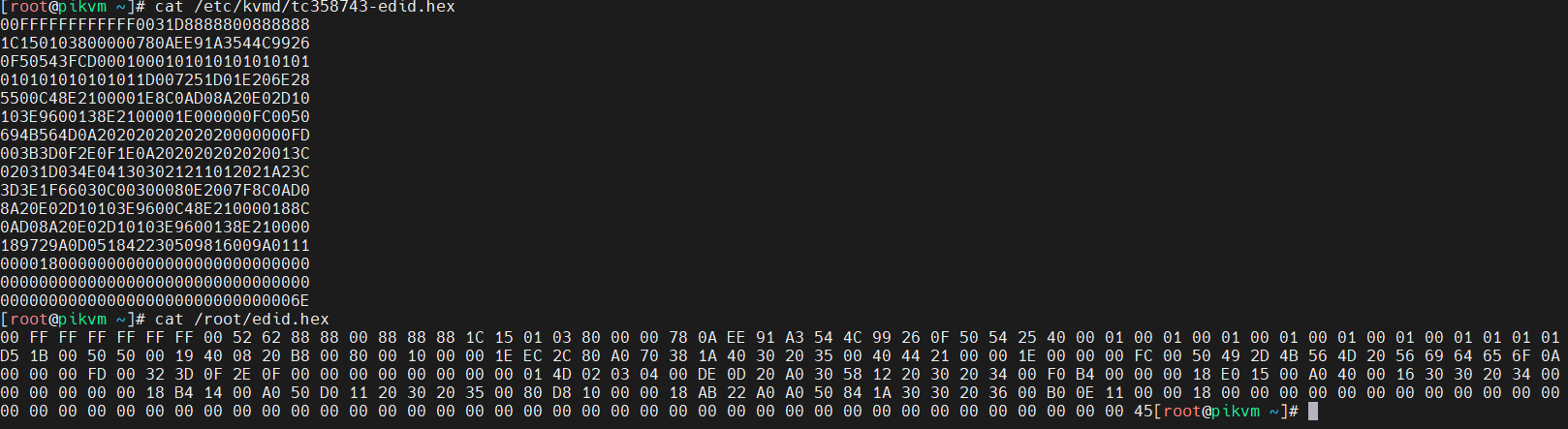
@mdevaev commented on GitHub (Jul 22, 2022):
You can overwrite
tc358743-edid.hex. The default file can be found in/usr/share/kvmd/configs.default/kvmd/tc358743-edid.hex@asheroto commented on GitHub (Jul 22, 2022):
Okay, thanks. Does the formatting matter that it is different (like in the screenshot)?
@mdevaev commented on GitHub (Jul 22, 2022):
No
@asheroto commented on GitHub (Jul 22, 2022):
Thanks :-)
@mdevaev commented on GitHub (Jul 22, 2022):
👌
@TheLinuxGuy commented on GitHub (Sep 1, 2022):
This one worked for me to fix BIOS screen on Intel 12th gen MSI PRO-A DDR4 B660 motherboard.
It would be a nice addition to wiki page discussing this EDID problem, and showing an example of original EDID in hex could help restore settings back to original.
@priddyma commented on GitHub (Sep 1, 2022):
It is explained in a section. Also has reference to the stock file location
on the system.
On Thu, Sep 1, 2022, 10:59 AM Giovanni @.***> wrote:
@stephendt commented on GitHub (Jan 4, 2023):
I also just experienced this issue, very peculiar indeed. The EDID posted by Modac did the trick. An EDID switch would be a very appreciated feature.
@Majestic7979 commented on GitHub (Jan 17, 2024):
Thank you. Here's the file in case someone needs it (can be opened in notepad from Windows or cat on linux to verify the contents):
myedid.zip
And here's the instructions on how to apply (upload to /root/myedid.hex using WinSCP or whatever, and then follow from step 4 but use this instead:
Test by rebooting the device and seeing if the bios appears now (do not reboot the pikvm), if it does then make permanent by doing:
And now it will always work.
@asheroto commented on GitHub (Jan 17, 2024):
Cool! Thanks.
Should we still use the EDID files with...
or use the new
kvmd-edidconftool?Does it depend on the use case?
Just to confirm, the
kvmd-edidconftool keeps it set permanently? How can it be undone if so? 😊Thanks so much!