mirror of
https://github.com/qbittorrent/qBittorrent.git
synced 2026-03-02 22:57:32 -05:00
Receiving message "Errored: The filename, directory name, or volume label syntax is incorrect" for all torrents after a reboot #10078
Labels
No labels
Accessibility
AppImage
Bounty
Build system
CI
Can't reproduce
Code cleanup
Confirmed bug
Confirmed bug
Core
Crash
Data loss
Discussion
Docker
Documentation
Duplicate
Feature
Feature request
Feature request
Feature request
Filters
Flatpak
GUI
Has workaround
I2P
Invalid
Libtorrent
Look and feel
Meta
NSIS
Network
Not an issue
OS: *BSD
OS: Linux
OS: Windows
OS: macOS
PPA
Performance
Project management
Proxy/VPN
Qt bugs
Qt6 compat
RSS
Search engine
Security
Temp folder
Themes
Translations
Triggers
Waiting diagnosis
Waiting info
Waiting upstream
Waiting web implementation
Watched folders
WebAPI
WebUI
autoCloseOldIssue
No milestone
No project
No assignees
1 participant

Notifications
Due date
No due date set.
Dependencies
No dependencies set.
Reference
starred/qBittorrent#10078
Loading…
Add table
Add a link
Reference in a new issue
No description provided.
Delete branch "%!s()"
Deleting a branch is permanent. Although the deleted branch may continue to exist for a short time before it actually gets removed, it CANNOT be undone in most cases. Continue?
Originally created by @gphelan on GitHub (Apr 3, 2020).
Please provide the following information
qBittorrent version and Operating System
Windows 10
qBittorrent v4.2.2 (64-bit)
What is the problem
Receiving message "Errored: The filename, directory name, or volume label syntax is incorrect" for all torrents after a reboot.
What is the expected behavior
That they'd keep going.
Steps to reproduce
Seems to happen every time I reboot the host on which this windows VM is running.
Extra info(if any)
This happens for all torrents active whenever the reboot occurs.
Appears to be related to issue #11552, but is still presenting despite that being marked fixed in 4.2.1. Did not have this issue at all before upgrading to 4.2.2, but I can't confirm that I ever rebooted the host between 4.2.0 and 4.2.2.
Logs do indeed indicate an issue with the path, but they have the incorrect path listed:
(W) 2020-04-03T18:44:49 - File error alert. Torrent: "{TORRENT NAME}". File: "C:/Program Files/qBittorrent/{CORRECT PATH TO TORRENT}". Reason: {TORRENT NAME} file_stat (C:/Program Files/qBittorrent/{CORRECT PATH TO TORRENT}) error: The filename, directory name, or volume label syntax is incorrect
{CORRECT PATH TO TORRENT}: SMB network share that I've confirmed the host OS has full read/write access to (new torrents work fine)
In Progress & Completed torrents are being stored in separate locations, but share a root directory, on the same network share.
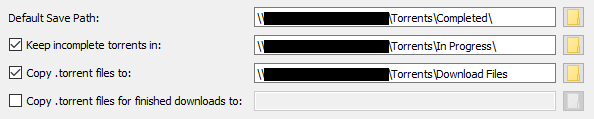
For some reason, upon reboot, qBittorrent appears to be adding its own install directory to the front of the network path I'm using for everything. I'm not sure why this is, but forcing a re-check results in no change. Setting the location pulls up the correct location, and lets me save it, but produces no change. Neither does forcing a re-check after resetting the location.
The majority of these torrents are being automatically added by other media management suites (ex: radarr, sonarr, etc), but this issue occurs for manually added torrents also. Any torrents added after the reboot work fine, though they're saving to the same locations.
If I had to guess, qBittorrent is adding its own install path to the start of every torrent's current path for some reason. I expect this data is stored in the .pdb file, but I've found no way of opening and manually editing the paths.
@xavier2k6 commented on GitHub (Apr 3, 2020):
@gphelan update to 4.2.3 as this issue should be fixed.
@gphelan commented on GitHub (Apr 3, 2020):
Check for Updates within the application says I'm already on the latest version, or I'd probably have already caught that. Guess I'll update manually!
@gphelan commented on GitHub (Apr 4, 2020):
Updating fixed it. I had to force a recheck on every single torrent, but they worked immediately after that.
In case anyone encounters this in the future, I found a workaround by:
@FranciscoPombal commented on GitHub (Apr 4, 2020):
Couldn't you have just paused everything and do right click -> force recheck?