mirror of
https://github.com/qbittorrent/qBittorrent.git
synced 2026-03-02 22:57:32 -05:00
qBittorrent v4.3.0 - Process gets stuck on exit (sometimes it can't even be killed) #11063
Labels
No labels
Accessibility
AppImage
Bounty
Build system
CI
Can't reproduce
Code cleanup
Confirmed bug
Confirmed bug
Core
Crash
Data loss
Discussion
Docker
Documentation
Duplicate
Feature
Feature request
Feature request
Feature request
Filters
Flatpak
GUI
Has workaround
I2P
Invalid
Libtorrent
Look and feel
Meta
NSIS
Network
Not an issue
OS: *BSD
OS: Linux
OS: Windows
OS: macOS
PPA
Performance
Project management
Proxy/VPN
Qt bugs
Qt6 compat
RSS
Search engine
Security
Temp folder
Themes
Translations
Triggers
Waiting diagnosis
Waiting info
Waiting upstream
Waiting web implementation
Watched folders
WebAPI
WebUI
autoCloseOldIssue
No milestone
No project
No assignees
1 participant

Notifications
Due date
No due date set.
Dependencies
No dependencies set.
Reference
starred/qBittorrent#11063
Loading…
Add table
Add a link
Reference in a new issue
No description provided.
Delete branch "%!s()"
Deleting a branch is permanent. Although the deleted branch may continue to exist for a short time before it actually gets removed, it CANNOT be undone in most cases. Continue?
Originally created by @floppyD on GitHub (Oct 21, 2020).
Please provide the following information
qBittorrent version and Operating System
v4.3.0 x64 | Windows 7 Ultimate x64 - Updated (6.1.760x)
What is the problem
When I exit the program, the process simply stays there and can't be killed through Task Manager, thus making it impossible to start the program again. The only solution I found is restarting the machine. This started happening after updating to v4.3.0
What is the expected behavior
That the process ends on exit.
Steps to reproduce
Launch the program
Exit the program
@thalieht commented on GitHub (Oct 21, 2020):
Still happening... #5097
@FranciscoPombal commented on GitHub (Oct 21, 2020):
@floppyD
Please try reproducing the issue with the test build linked here: https://github.com/qbittorrent/qBittorrent/issues/13529#issuecomment-712450594
@thalieht
This is 99% certainly a different underlying cause than that initial report, so it makes sense to keep this separate and not reopen that on. Which platform did you reproduce this on? Windows 7 as well? And with which build, exactly?
P.S. - don't we consider "stuck on exit" to also be covered by the "crash" label? Getting stuck on exit is just another way of saying that some thread has hanged/become stuck/frozen, which is basically "freezing", which falls under "crashing/freezing"
@thalieht commented on GitHub (Oct 21, 2020):
I meant OP, i've never experienced this issue.
I consider crash as the unintentional interruption/closure of the program. I don't think crash==freeze.
@floppyD commented on GitHub (Oct 21, 2020):
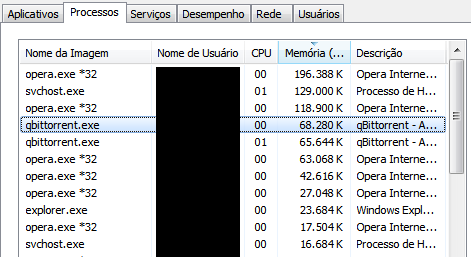
@FranciscoPombal After a launching and exiting it a few times, I got it to get stuck, but I still can launch another instance just fine. The highlighted one can't be killed and doesn't seem to use any CPU time.
@FranciscoPombal commented on GitHub (Oct 21, 2020):
@floppyD This was with the test build, correct? Do you wait for the process to cleanly exit each time before starting again?
@floppyD commented on GitHub (Oct 21, 2020):
@FranciscoPombal Correct. I think I did, the stuck process just stays there and I can start/exit others just fine. In fact it's still on my process list, using the same amount of memory, while the other is gone since I closed the program.
@FranciscoPombal commented on GitHub (Oct 21, 2020):
@floppyD Can't you force terminate it with the task manager?
@floppyD commented on GitHub (Oct 21, 2020):
@FranciscoPombal That's what I said before, it can't be killed by Task Manager.
@xavier2k6 commented on GitHub (Oct 21, 2020):
@floppyD Can you try below:
Task manager => Details
Right click
qbittorrent.exeEnd process tree@floppyD commented on GitHub (Oct 21, 2020):
@xavier2k6 Didn't work either.
@xavier2k6 commented on GitHub (Oct 21, 2020):
Try:
windows +R keytype=>
taskkill /f /im qbittorrent.exe@floppyD commented on GitHub (Oct 21, 2020):
Trust me, I have already tried everything, even external programs like Process Explorer. The only way I found of getting rid of this zombie process is by rebooting.
By the way,
taskkill /f /im qbittorrent.exereturnsAnd
wmic process where name="qbittorrent.exe" call terminatereturns@Evernow commented on GitHub (Oct 21, 2020):
You shouldn't be on Windows 7, it is EOL.
https://support.microsoft.com/en-us/windows/windows-7-support-ended-on-january-14-2020-b75d4580-2cc7-895a-2c9c-1466d9a53962
@xavier2k6 commented on GitHub (Oct 22, 2020):
Are you running vanilla windows 7 or windows 7 with SP1?
Have you run
sfc /scannnowin elevated command prompt (administrator)?@floppyD commented on GitHub (Oct 22, 2020):
Fully updated and with the latest October ESU. I have no reason to believe my system is broken since v4.2.4 doesn't have this issue.
@andrazpoje commented on GitHub (Oct 22, 2020):
It is same for me for the last two versions these days. It hanngs after I add the torrent. I have updated Windows 10.
@FranciscoPombal commented on GitHub (Oct 22, 2020):
@andrazpoje
This is a different issue. You are probably experiencing https://github.com/qbittorrent/qBittorrent/issues/13529. Version 4.3.0.1 fixes that.
@andrazpoje commented on GitHub (Oct 22, 2020):
I have 4.3.0.1. After I click download .torrent qbittorrent hangs. How can I make crash report?
@sfkulyk commented on GitHub (Oct 23, 2020):
I have the same issue - qBittorrent just stucks after a while (hours, days) and doesn't respond.
And I can't kill process in any way (wmic, taskmgr, taskkill, procexp, powershell) - only reboot helps.
Windows 7 Max, SP1.
Just updated to the latest 4.3.0.1 version, will see...
P.S. Somewhere in the internet found, that few people also have such problem and they solve it by installing 32bit version of qBittorrent, but I think it will affect my performance.. I have pretty active torrents up to 10-20 Gb uploads per day with ~500-800 torrents seeding. I really don't want to switch back to uTorrent.
@Evernow commented on GitHub (Oct 23, 2020):
Can you confirm if this happens to you on Windows 10? Would be nice to see if this issue occurs on an OS that isn't a decade old. If it only happens on Windows 7 I personally at least don't see the point in fixing this, people on W7 have much bigger problems than qBittorrent getting stuck.
@floppyD commented on GitHub (Oct 23, 2020):
Dude, chill. No one cares about your opinion on what OS people should use or not, if qBittorrent is still supporting 7, that means this is a valid issue even if it's OS related.
By the way, I tested it on another machine with Windows 7 Professional x86 and this issue didn't happen. I'll give x86 a try on my machine when I get home.
@Evernow commented on GitHub (Oct 23, 2020):
Not my opinion: https://support.microsoft.com/en-us/windows/what-happens-when-windows-7-support-ends-5c740944-b787-a89e-ad23-69ec848ae763
Support for Windows 7 will drop eventually anyways. You do you.
@floppyD commented on GitHub (Oct 23, 2020):
This is not a forum, please refrain from posting if you are not going to contribute with the issue.
I gave the 32bit version of v4.3.0.1 a try on the 7 x64 machine, after a few tries when I was about to conclude that it didn't get stuck like the 64bit version, it did.
When shuting down, Windows waits for qBittorrent and shows a "Saving torrent progress..." message, it doesn't shutdown unless you press "Force shut down", if it helps.
@ghost commented on GitHub (Oct 23, 2020):
The best way to diagnose such issues is to build libtorrent with asio-debugging=on and build qBt without GUI and run from a terminal.
@NelsonFx commented on GitHub (Oct 24, 2020):
this just happened to me twice since the 4.3.0 and .1 updates
and if i let it run for enough time, it crash the network in the pc, killed and get the network running normal.
@DarkVoyage commented on GitHub (Oct 24, 2020):
Process gets into zombie state "normally", when it has a hardware handle that is impossible to be killed, because it will lead to BSOD. So it is kind of protection mechanism. My buddy doesn't get into this state on any version till current. Also Windows 7.
@NelsonFx commented on GitHub (Oct 24, 2020):
rollback to 4.2.1 and now it's working good
@FranciscoPombal commented on GitHub (Oct 24, 2020):
Seems like a pattern is emerging - this only happens on Windows 7, an obsolete proprietary OS whose manufacturer has dropped official support for nearly a year ago. Don't hold your breaths for a fix to this, almost no contributor (or none at all?) tests on Windows 7 anymore, since probably quite some time (I'm also including the other important dependencies, like boost). We should have dropped official support for it long ago and forget about these kinds of issues. If a billion dollar company doesn't support their shitty proprietary OS anymore, neither should we.
@floppyD commented on GitHub (Oct 24, 2020):
Windows 7 is still getting support from Microsoft up to 2023, just not through the mainstream channel. But if there's no contributor that can test on it, please drop official support. Better than giving people a false hope that things will just work.
@NelsonFx commented on GitHub (Oct 24, 2020):
I have windows 10 2004 x64
On Sat, Oct 24, 2020, 5:30 PM floppyD notifications@github.com wrote:
@Aesthermortis commented on GitHub (Oct 25, 2020):
same problem, windows 10 2004 x64 qbittorrent 4.3.0.1.
external harddisk high write noise and the qbitorrent process can only be terminated only if the hard drive is disconnected
@FranciscoPombal commented on GitHub (Oct 25, 2020):
I wonder if this is related to external and/or network drives.
@floppyD commented on GitHub (Oct 25, 2020):
Most of my torrents are on another drive, but it's not external.
@dracuking commented on GitHub (Oct 26, 2020):
Few months ago I ran into the same issue on v4.2.5 running Windows 10 x64 2004 using a usb external hard drive. Qbittorrent was still running in Processes and Details even after shutting down qbittorrent. Couldn't kill it [end task]. Couldn't even uninstall the qbittorrent app since it was still running. Only way for it to clear from the Processes was to do a system reboot. Don't want that Process running when I disconnect from a VPN.
@sfkulyk commented on GitHub (Nov 8, 2020):
I do not have windows 10, and not going to upgrade it.
There were no any issues with uTorrent and all my torrents, but qBittorrent stucks at least once per few days and the only way is to reboot windows, as old process is unable to kill with any options.
@sfkulyk commented on GitHub (Nov 19, 2020):
In process hacker I can see that one of the threads is in infinite loop

qBittorrent v4.3.0.1
@greenbench commented on GitHub (Nov 20, 2020):
I'm on Windows 7 and don't have this problem.
@iznawh commented on GitHub (Nov 22, 2020):
Hi, I have windows 10 build 20H2 with qbittorrent 4.3.0.1 and I experience this problem as well. I usually get this problem when im switching VPN servers so it auto kills qbittorrent and I have to keep restarting the program. The only fix is to restart, log off/re log in, or wait about 15 min for it to finally leave my task manager. edit: added windows build
@rumanzo commented on GitHub (Feb 17, 2021):
with verstion 4.3.0+ I have the same problem, after exit from qbittorrent process stuck and slowly unload from memory (last 350mb per 100 kb/s), and I have to kill manually
win10 build 21313 (dev)
with 4.2.X all fine
@xavier2k6 commented on GitHub (Feb 17, 2021):
@rumanzo although dev/insider builds etc aren't officially supported by qBittorrent - Can you change
Process memory prioritytonormalunder options/advanced/qBittorrent Section using latest qBittorrent version 4.3.3@rumanzo commented on GitHub (Feb 18, 2021):
I understand, but I can't switch to official release until microsoft release new anniversary update :-(
I'm change Process memory priority to normal, seems it work, process shutdown about 30s
UPD. after 30m working try restart qBittorrent, it's stuck on 546176K, I wait 3m and then kill process manually
@reeyon commented on GitHub (Mar 15, 2021):
v4.3.3 is still having the issue. End task or taskkill command won't work.

Until a Force reboot to resolve this.
@xavier2k6 commented on GitHub (Mar 15, 2021):
@reeyon What OS?
@xavier2k6 commented on GitHub (Mar 15, 2021):
@rumanzo Is
Options->Advanced->libtorrent Section=>Enable OS cachechecked or unchecked?@reeyon commented on GitHub (Mar 15, 2021):
Windows 10 20H2.
Process priority set to Normal.
Everything else is default.
Enable OS cache checked.
@ManiacDC commented on GitHub (Mar 25, 2021):
This is happening to me also, Window 10 20H2. The process will also freeze overnight sometimes and cannot be opened, and becomes unkillable via task manager. I can kill the open handles via process explorer, but the only way to close the process is to restart windows.
I tested with both 4.3.2 and 4.3.3. Rolled back to 4.2.5 as that doesn't have the issue.
A bunch of my torrents are on a network drive, btw.
@ManiacDC commented on GitHub (Mar 25, 2021):
Well, I spoke too soon. I did NOT have this problem before with 4.2.5; but now after upgrading to 4.3.3 and rolling back to 4.2.5; this happened with 4.2.5.
@ManiacDC commented on GitHub (Mar 26, 2021):
Maybe this is related to Windows 10 20H2 then? I only upgraded recently. I did not have this issue on Windows 10 1909 with 4.2.5.
@reeyon commented on GitHub (Mar 26, 2021):
Could be. But sorry to say that other clients don't have this issue on my 20h2 machine. Maybe qB code not compatible with 20h2 yet.
@QuakeMan commented on GitHub (Apr 3, 2021):
Also have this bug.
Logout don`t kill process. After logout, from another user - process from first user also don't killing.
Windows 7 pro, 64 bit. qBittorrent v4.3.4.1 64 bit.
I'm new user. Previos version not used.
@ManiacDC commented on GitHub (Apr 6, 2021):
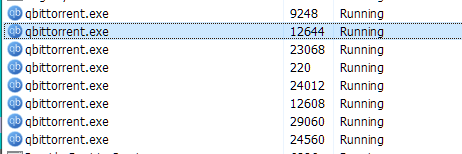
This is a bit out of hand, so many zombie processes. System uptime 11 days.
@ManiacDC commented on GitHub (Apr 9, 2021):
I deleted all of the torrents that had files on my network drive and this is still happening. Worth noting I only see it when I wake the computer up from sleep. It doesn't happen (that I've noticed) if I'm on the computer actively.
@ManiacDC commented on GitHub (Apr 9, 2021):
@FranciscoPombal I'm not sure what info you're waiting for on this, but I'll glad run any debug builds, take dumps, or whatever. I really like qBittorrent, but I won't be able to put up with this much longer.
@xavier2k6 commented on GitHub (Apr 10, 2021):
@ManiacDC
Is it also happening with latest 4.3.4.1?
Are you running
32-bitor64-bitbuild of qBittorrent?Are you running
32-bitor64-bitbuild of Windows?@ManiacDC commented on GitHub (Apr 10, 2021):
@xavier2k6 it happened with 4.3.3 & 4.2.5. I just installed 4.3.4.1 and I'll try it now. I'm running 64-bit qBittorrent on 64 bit windows 10 20H2, I just updated to build 19042.906.
@ManiacDC commented on GitHub (Apr 12, 2021):
@xavier2k6 this just happened for me with 4.3.4.1 64 bit on Windows 10 20H2 64 bit
@Baelyath commented on GitHub (Apr 13, 2021):
I've been having this issue as well. Rebooting the computer resolved it until recently. This ghost/zombie process appears at restart, preventing qbittorrent from working. The only way I've been able to kill it is to reboot in safe mode and uninstall. Task Manager, cmd line Taskkill (run as admin) and Power Shell (as admin) are unable to terminate. As a side note, you are unable to uninstall the program due to this zombie process.
@ManiacDC commented on GitHub (Apr 22, 2021):
So this appears to be related to the computer going to sleep while qBittorrent is running. For the past several days, I've been exiting qBittorrent every time I put the computer to sleep and it has not yet frozen up yet.
This is obviously not convenient, and also not ideal as my PC wakes up during the night for backups, so I lose all that seeding time.
@FranciscoPombal commented on GitHub (Apr 23, 2021):
Interesting. I wonder if others can reproduce the symptoms reliably with this new information. Let's wait for more reports.
@ManiacDC commented on GitHub (Apr 23, 2021):
I appear to have spoken too soon. I tried to launch qBittorrent today and it didn't launch - there was a new zombie process. I had exited it yesterday, but apparently it didn't actually exit.
edit: I guess it's possible I put the computer to sleep before qBittorrent had fully exited.
@Baelyath commented on GitHub (Apr 23, 2021):
I found that the zombie process persists through a full shut down/restart. The only way I've found to truly kill it is to boot into Safe Mode, then boot normally. Typically the process shows up after a reboot, with the same process ID.
@ManiacDC commented on GitHub (Apr 23, 2021):
@Baelyath that's impossible. Can you see if you have fast startup enabled?
https://www.howtogeek.com/243901/the-pros-and-cons-of-windows-10s-fast-startup-mode/
That actually hibernates your computer rather than shutting it down. Disabling fast startup will make your computer shut down.
@Baelyath commented on GitHub (Apr 23, 2021):
Ah, that explains so much. I was pulling my hair out trying to figure out how a zombie process was returning when I rebooted. I've disabled fast start up. Thank you so much!
@ManiacDC commented on GitHub (Apr 23, 2021):
Welcome! It's a decision that Microsoft made, that's for sure.
@ManiacDC commented on GitHub (Apr 25, 2021):
So after a few more days, I seem to be running into this issue in 2 scenarios (both sporadic, neither of these happen every time):
In both cases, qBittorrent cannot be launched again or killed. The only way to fix it is to restart the computer. There is a workaround of killing all open handles via Process Explorer, this allows a new qBittorrent instance to be launched. The zombie process remains, though (and builds up, as this will keep happening).
@Aesthermortis commented on GitHub (Apr 25, 2021):
When it happened to me, when disconnecting the external hard drive, the qbitorrent process closed automatically.
@ManiacDC commented on GitHub (Apr 25, 2021):
All my torrents are on an internal drive. I had some on a network drive, but I've since deleted those.
@ManiacDC commented on GitHub (May 5, 2021):
Just confirming this is still happening with 4.3.5.
@reeyon commented on GitHub (May 5, 2021):
Just an update, it seems problem has been resolved by removing obsolete/unsupported driver from my machine.
Occasionally, my machine will occur BSOD from time to time (Kernel Security Check Failure error) , which I thought it was Windows 10 issues itself or the hardware driver causes this.
Since I have installed WinDbg on my machine while troubleshooting, I've also installed BluescreenView to scan the minidumps to see why there are BSODs occurred randomly.
Turns out it was due to one of the driver resides in
%windir%\system32\driverswas causing this BSOD. I removed it and so far no more BSOD occur again then its good news for me. This custom driver was developed by a company for private VPN usage, and it is very outdated (like XP/Win7 time) and the ex-developers had abandoned the project.@ManiacDC commented on GitHub (May 5, 2021):
As a negative case, I have had no BSOD's on my computer.
@FranciscoPombal commented on GitHub (May 6, 2021):
Nope, qBittorrent works just fine on my machines that are running 20H2. There is no particular reason for such an incompatibility.
@ManiacDC commented on GitHub (Jun 26, 2021):
@FranciscoPombal My computer updated to Windows 10 21H1 about two weeks ago. Since then, qbittorrent has not frozen up once (either on exit or when the computer goes to sleep, both of my problem cases prior to the update). There definitely seems to be some sort of compatibility issue between qbittorrent and Windows 10 20H2.
@FranciscoPombal commented on GitHub (Jun 27, 2021):
@ManiacDC Most likely something was wrong with your Windows installation that was fixed with the update or clean install.
@ManiacDC commented on GitHub (Jun 27, 2021):
@FranciscoPombal entirely possible (I can't remember if I ever ran any SFC or DSIM tools), though it's weird that there would be so many reported issues in that case.
@T1MOXA commented on GitHub (Jul 12, 2021):
I also have the same problem :(
@CordySmith commented on GitHub (Sep 4, 2021):
I had something similar happening to me on Windows 7. Turns out that NTFS is really bad at handling very large (20gb+) 'sparse' files that are being written to in random order (i.e. typical torrent activity).
What will happen is that the housekeeping associated with the updating the sparse files eventually just takes up so much time that no forward progress is made writing to the file. This can eventually hang the entire system.
The fix is to disable sparse files in QBitorrent by setting "Downloads"->"Pre-allocate disk space for all files". Forcing sequential file downloads may also help. This won't fix pre-existing sparse files - for pre-existing half-downloaded files, copy them to another drive and back (before you start QBitTorrent)- you can work out the problematic files by keeping an eye on Task Manager -> Resource Monitor -> Disk, and watching for files that have huge amount of reads and writes while they make little progress in QBittorrent.
Windows 10 apparently has a fix for this issue, unsure about 8.
There are some more details about the issue here in this Microsoft doc
@ManiacDC commented on GitHub (Nov 6, 2021):
This issue has returned for me with Windows 10 21H1 19043.1288. No issues for months, took a windows update and qBittorrent is freezing up and leaving zombie processes around again.
I'm on 4.3.7 btw, haven't updated qBittorrent in a while.
@KirkH420 commented on GitHub (Nov 26, 2021):
I'm having an issue that I've seen described before, but the thread has been locked (as thought this is no longer an issue) where it just gets stuck on "checking resume" and then after that it becomes impossible to terminate the process without restarting the computer. wtf?
How does the process manage to block access to Kill process like that? That shouldn't be happening.
@CordySmith commented on GitHub (Nov 26, 2021):
Kirk,
Before starting qbittorrent, try moving the underlying file to another drive and back again. As I mentioned above, I've seen issues with large NTFS sparse files that cause file operations on the resulting take an extremely long time, since these operations are happening inside the Windows kernel, the thread/process can't be killed.
Moving the file to a different drive and then moving it back may resolve the issue by effectively defragmenting the file.
Appreciate if you could post your windows version, and how big the file is.
Cheers.
@ManiacDC commented on GitHub (Nov 26, 2021):
Windows 10 updated to 21H2 19044.1348, problem seems to be resolved again.Edit: I lied, it stopped working again :(
@ManiacDC commented on GitHub (Dec 7, 2021):
Due to the lack of developer response on this issue, I've unfortunately had to switch torrent Clients. Windows unfortunately gets treated as a second class citizen by many Open Source projects, which is a shame. I definitely prefer qBittorrent.
Again, if the developers want to work on this, I'm more than willing to run debug builds, etc, to try to get pertinent information to them.
@ghost commented on GitHub (May 21, 2022):
This still occurs but it is quite rare
@X1pheR commented on GitHub (Jun 30, 2022):
@ManiacDC which torrent client are you now using?
I'm also facing this problem. Using qbittorrent for downloading to an external USB drive but when closing qbittorrent it keeps hanging on shutting down. And I can't even close the process.
@CordySmith commented on GitHub (Jun 30, 2022):
@X1pheR - which OS and filesystem are you using on the drive? If it's an earlier version of Windows with NTFS - there can be significant performance issues with sparse files that can cause Windows to lock-up/hang almost indefinitely.
The easiest fix is to disable using sparse files (set "Pre-allocate disk space for all files" to enabled) and while qBitTorrent is shutdown, move the files to another drive and back which has the effect of de-fragmenting them and resolving the issue.
@ManiacDC commented on GitHub (Jul 3, 2022):
@X1pheR I switched to Tixati. No issues so far.
@polybiusproxy commented on GitHub (Jul 19, 2022):
This happened to me too. Once disconnecting my USB, qBitTorrent just closed!
@sfkulyk commented on GitHub (Oct 4, 2022):
I have switched to another client. But as I can remember, the issue can be related to external USB drivers, that can be disconnected during usage.
@KirkH420 commented on GitHub (Oct 10, 2022):
Hello,
Thanks for replying. It's been almost a year since I posted that, and I'm not insinuating anything, I'm merely pointing out that I haven't seen an issue like this in quite a long time. However, since then a few things have changed, I believe I was on 10-Pro at the time and now am on 10-LTSC (thank god). I'm having a difficult time remembering the exact report I had made, but I think it did have something to do with External USB disks, like user: sfkulyk is saying. I may have been using a 32 bit version of QBT on a 64 bit machine. I'll give some detail on a problem I encountered and resolved, but I'm not sure if it will be of any help to you. My machine is a 2020 ASUS G15 Zephyrus w/ 4900HS & RTX2060 & 16gb DDR4. I can't supply the OS build from the time of the incident. I wouldn't even be able to supply the QBT version from back then.
A while back (but after my incident report related to this thread), I ran into an issue where I was using a PortableApps.com version of qBittorrent. For some reason, they over at PA have this philosophy that there is no real benefit of x64 applications over a x32 version. So they were only offering a 32 bit version (still are I think). I've tried explaining to them what was happening but I don't think I was heard. The issue was that when writing to an external disk (USB 3.0), QBT's UI would start behaving like client-side Blocking I/O. The GUI would lock up and allow no user input for a random length of time, and then It would unblock for a second or two and it would all happen again. But I've used QBT to write directly to external disks for as long as I've been using the software, it'd never been a problem before. This became worse as transfer speed increased and less when speeds were low. I ended up creating my own x64 PortableApps launcher and the problem disappeared. I have not had any problems like this since then. I hope you find something useful from reading all this. LOL, thanks again.
@ghost commented on GitHub (Oct 30, 2022):
It just happened to me very soon after starting downloading new torrent file. I didn't try to shutdown the client then. Downloading dropped to 0 even though peers were connected
I have some completed torrents on external USB drive. However I have tried to download new torrent to external, not USB device
@H4M5TER commented on GitHub (Sep 4, 2023):
Here is my infomation:
I had this for a long time and my friend inspired me that closing the qBit will send message to every tracker. So I removed all trackers and it just exit smoothly.
When I was a dumb I add a bunch (~100) of "selected" tracker in setting which will be added to every single torrent. I think at least 1/3 of them are dead now. So this may be the cause of problems? (too many and no-responsing network requests)
@glassez commented on GitHub (Sep 4, 2023):
Sure.
@luzpaz commented on GitHub (Sep 23, 2023):
What's the verdict of this ticket ?
@glassez commented on GitHub (Sep 24, 2023):
Have you even read this and other related topics? E.g. #18772.
@ManiacDC commented on GitHub (Sep 25, 2023):
Is that really related to this problem? You can't even kill qbittorrent using task manager and force terminating the process from the Details tab. I don't think some hanging network connections would cause that. This is more deeply rooted.
@glassez commented on GitHub (Sep 25, 2023):
Yes. This is one of the possible reasons. Have you tried to exclude it, for example, by setting the "stop tracker timeout" to 0?
In a good way, it was worth trying to exclude as many possible reasons as possible, for example, disable some subsystems, such as RSS, if you have a lot of torrents running, stop some number of them, etc.
And by the way, what specific version/build of qBittorrent are we talking about at the moment? The version from the OP is too outdated to discuss it.
@ManiacDC commented on GitHub (Sep 25, 2023):
After struggling with this issue for 9 months in 2021, I gave up and have switched to a new client (https://github.com/qbittorrent/qBittorrent/issues/13581#issuecomment-988305177). I follow this thread in case it's ever reported that the issue is fixed, but I'm no longer able to help debug it. I offered numerous times to run debug builds, etc, and did as much troubleshooting as I could on my own.
@aderusha commented on GitHub (Dec 23, 2023):
This issue has reports going back 6 years at this point. Still happening, in my case Windows 11. If you wait long enough it does actually shutdown, but it can take 10 minutes or more on a i9-13900 w/ 128GB of RAM running on PCIE5 NVME storage. Whatever is happening here, it isn't down to system performance.
@liesened commented on GitHub (Feb 2, 2024):
Just encountered this issue on a fresh Arch Linux install using qBittorrent 4.6.3 (with SQLite database) installed through the official repos. (kernel 6.7.2-zen1-1-zen)
I tried adding some torrents when I was away through the web ui, and two of them (out of 3) stuck at "Checking cache data" or something. When I came back to this a few hours later, they were still stuck. Whatever, I thought, and tried restarting qBittorrent. After "exiting" qBittorrent and waiting for a good while it didn't result in anything in particular, so I decided to kill it with kill -9.
Not sure if killing the main process with -9 is what caused it, but after doing so, the main qBittorrent process turned into a defunct zombie (ppid=1) with a bunch of children stuck in an uninterruptible sleep and at this point I decided to hard reboot the machine. After that qBittorrent rechecked the torrents and so far it's running well.
The hard drive where the torrents were lying was mounted with
and was working just fine, I could read and write the entire time.
Everything except ports, database type, web ui settings and some paths was set to default.
UPD: it broke again
@liesened commented on GitHub (Feb 2, 2024):
Reading through this issue, it's possible that the actual problem lies either in NTFS itself or in both Linux (ntfs3) and NT implementations of it or how qBittorrent deals with it, since as far as I can see, 100% of the reports are coming from NTFS users (mostly from Windows for obvious reasons) and it also just happened to me on Linux with NTFS partition used to store files.
@liesened commented on GitHub (Feb 16, 2024):
I changed the NTFS driver from ntfs3 to NTFS-3G and haven't had this problem for at least two weeks. This further confirms that the issue is related to NTFS specifically, or how qBittorrent talks to it, as ntfs3's implementation was ripped off of Windows as far as I know.
@luzpaz commented on GitHub (Mar 16, 2025):
@liesened is this still the case on v5.0.4 ?
@liesened commented on GitHub (Mar 16, 2025):
@luzpaz Unfortunately I can't comment on this anymore, I've switched the main torrent storage fs to exFAT a long time ago and haven't seen this issue appear for quite a while.
@CordySmith commented on GitHub (Mar 16, 2025):
Just to repeat a comment I made upthread. In general, When writing NTFS, Microsoft didn't do a great job of implementing "sparse" files, this tends to impact files larger than 5GB or so - so that if you randomly allocate chunks to a large enough spare file eventually you end up hanging the NTFS driver.
Later versions of Windows do better (7 is broken, 10/11 may work better), but the easiest workaround is tell to qBittorrent to "pre-allocate" space for the torrent, this means it won't use a sparse file, and the space gets allocated immediately.
If you have torrents already in this state - copy them to another drive and back outside of qBittorrent.
This is not a problem with the way qBittorrent or libtorrent do anything - it's a problem with NTFS.
@ManiacDC commented on GitHub (Mar 16, 2025):
@CordySmith I had preallocation on when using qbittorrent. Just checked my settings to verify.
@xavier2k6 commented on GitHub (Mar 16, 2025):
Related #19410
Windows 7 support has been sunset by qBittorrent
Closing - If anyone is still affected by this issue with latest qBittorrent 5.0.4 ATTOW, please open a new ticket! (test both libtorrent variants 1.2.x / 2.0.x)