mirror of
https://github.com/qbittorrent/qBittorrent.git
synced 2026-03-02 22:57:32 -05:00
I/O error on skipped files #14302
Labels
No labels
Accessibility
AppImage
Bounty
Build system
CI
Can't reproduce
Code cleanup
Confirmed bug
Confirmed bug
Core
Crash
Data loss
Discussion
Docker
Documentation
Duplicate
Feature
Feature request
Feature request
Feature request
Filters
Flatpak
GUI
Has workaround
I2P
Invalid
Libtorrent
Look and feel
Meta
NSIS
Network
Not an issue
OS: *BSD
OS: Linux
OS: Windows
OS: macOS
PPA
Performance
Project management
Proxy/VPN
Qt bugs
Qt6 compat
RSS
Search engine
Security
Temp folder
Themes
Translations
Triggers
Waiting diagnosis
Waiting info
Waiting upstream
Waiting web implementation
Watched folders
WebAPI
WebUI
autoCloseOldIssue
No milestone
No project
No assignees
1 participant

Notifications
Due date
No due date set.
Dependencies
No dependencies set.
Reference
starred/qBittorrent#14302
Loading…
Add table
Add a link
Reference in a new issue
No description provided.
Delete branch "%!s()"
Deleting a branch is permanent. Although the deleted branch may continue to exist for a short time before it actually gets removed, it CANNOT be undone in most cases. Continue?
Originally created by @ioistired on GitHub (Feb 1, 2023).
qBittorrent & operating system versions
qBittorrent: 4.5.0 x64
Operating system: Arch Linux 6.1.1-arch1-1
Qt: 5.15.7
libtorrent-rasterbar: 2.0.8-2
What is the problem?
Certain files that I have skipped (unchecked in the content tab / torrent open dialog) give notifications about I/O errors.
For example:

This is a duplicate of https://github.com/qbittorrent/qBittorrent/issues/13080 but that issue said to open a new issue if the problem still occurs.
Steps to reproduce
Additional context
No response
Log(s) & preferences file(s)
No response
@KaptainKitteh commented on GitHub (Feb 3, 2023):
Same issue. v4.5.0 x64 on Win10 Pro 21H2. Libtorrent 1.2.18.0.
Duplicate of #7917, #7802, #7487, etc, none of which were properly resolved.
Have forced recheck of torrents individually and 400+ at once, issue persists.
No torrents have been relocated, just downloaded and seeded from the same folder.
Edit: I ended up disabling all notifications until a fix is available. This is ridiculous.
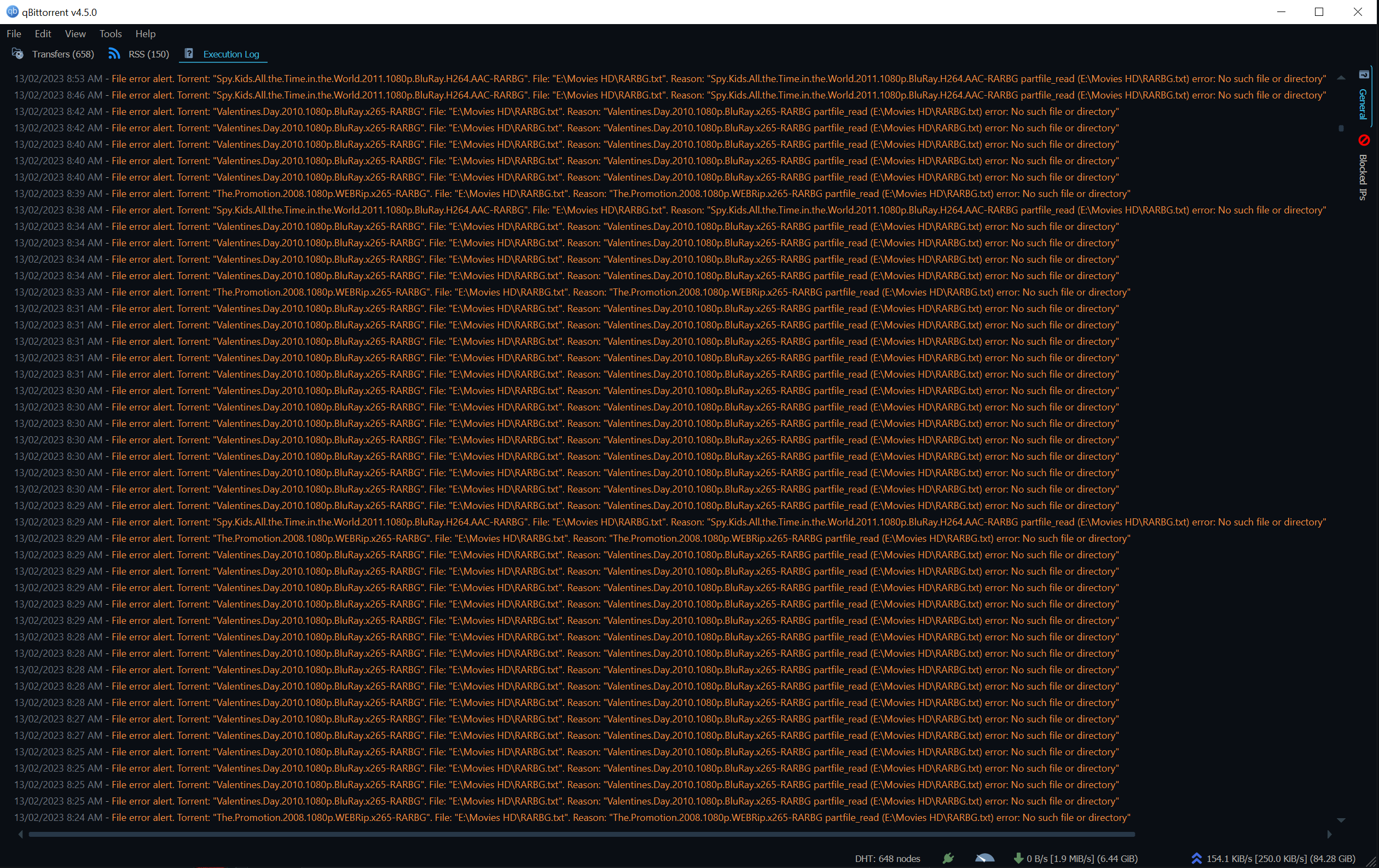
@codeisnotcode commented on GitHub (Mar 13, 2023):
Same issue and it is super annoying because it displays repeatedly every few seconds and is incredibly distracting. Please make it go away forever. Windows 10 version.
@codeisnotcode commented on GitHub (Mar 13, 2023):
OK I found the 3 dots on the error message window and the option to kill all qbittorrent notifications. But I had previously looked under Tools - Options for an equivalent kill capability. Who would have guessed that it is actually under three small dots in a window that pops up every few seconds like a weasel and by the time you almost click on it, its gone again. It might actually make a good game and could speed up even further each time I manage to catch it, but that doesn't really fit the vibe of a normal program - it would just annoy users and they would delete the program. Anyway, Options should really be in the Options section, I think. :^)
@LordZozzy commented on GitHub (Mar 14, 2023):
Hell yeah, this is fricking annoying, and at ~1000 torrents it's basically spamming the logfile
@glassez commented on GitHub (Mar 15, 2023):
libtorrentdoes not provide a way to completely skip any files. All we have is a "Do not download" priority, and the checkboxes are provided only as an alternative way to set it. Related libtorrent issue .@stalkerok commented on GitHub (Jan 1, 2025):
Related/Duplicate of https://github.com/qbittorrent/qBittorrent/issues/18641