mirror of
https://github.com/qbittorrent/qBittorrent.git
synced 2026-03-02 22:57:32 -05:00
Unable to Upload #6011
Labels
No labels
Accessibility
AppImage
Bounty
Build system
CI
Can't reproduce
Code cleanup
Confirmed bug
Confirmed bug
Core
Crash
Data loss
Discussion
Docker
Documentation
Duplicate
Feature
Feature request
Feature request
Feature request
Filters
Flatpak
GUI
Has workaround
I2P
Invalid
Libtorrent
Look and feel
Meta
NSIS
Network
Not an issue
OS: *BSD
OS: Linux
OS: Windows
OS: macOS
PPA
Performance
Project management
Proxy/VPN
Qt bugs
Qt6 compat
RSS
Search engine
Security
Temp folder
Themes
Translations
Triggers
Waiting diagnosis
Waiting info
Waiting upstream
Waiting web implementation
Watched folders
WebAPI
WebUI
autoCloseOldIssue
No milestone
No project
No assignees
1 participant

Notifications
Due date
No due date set.
Dependencies
No dependencies set.
Reference
starred/qBittorrent#6011
Loading…
Add table
Add a link
Reference in a new issue
No description provided.
Delete branch "%!s()"
Deleting a branch is permanent. Although the deleted branch may continue to exist for a short time before it actually gets removed, it CANNOT be undone in most cases. Continue?
Originally created by @JulieMay on GitHub (Sep 4, 2017).
Please provide the following information
qBittorrent version and Operating System: 3.3.15. Windows 7 Professional with service pack 1
What is the problem: Unable to upload using IPv6 as connections keep dropping before any data is sent. Guess is that it is IPv6 related as all other settings have been tried on and off.
What is the expected behavior: Able to upload
Steps to reproduce: Download a file to seed, attempt to seed, see clients attempt to connect, see no data go up. Try everything that you can think of to fix it.
Extra info(if any):
Using qbtorrent 3.3.15 uploads will not stay connected and therefore, there is a 0 upload speed.
The port is open and a simple test to check whichever port I choose works - I have changed ports to make sure that I could no longer see the open port, and to see if a port change would make a difference. Tool used to check to ensure port was open - http://canyouseeme.org/
The only anti-virus software is PitStop's PC Matic, which does not include a firewall. The windows default firewall and anti-malware are both turned off. PC Matic was turned off during testing.
The speedtest shows decent upload is available despite other people doing things on the network (the download was because of them) http://beta.speedtest.net/result/6596606350
The news page shows a beta version available, but it doesn't mention fixing anything with uploads.
Connection
500 •Connections: Global maximum and per torrent
8999 •Listening port (tried two other random ports. Was able to clearly tell if uTorrent was running and that I had changed ports based on attempting to connect to the port using http://canyouseeme.org/
20 •Upload slots: Global maximum and per torrent
20, Also tried unlimited and 5 •Half-open connection value
Off at the moment, tried both going with the least settings for now, so left it off both under Connection, Web UI, and Speed •Is uTP on or off?
** Coudn't find this, perhaps because uTP is already off •Rate limiting uTP?
Tried both, currently set to preferred •Encryption on or off?
On, and the only connection available. IPv4 does not gain an IP •IPv6 on or off?
1.0.11.0 •libtorrent version (use Help -> About -> Libraries to identify that)
Online •Connection status? (the icon on the status bar will tell you)
387 nodese •DHT node count (on the status bar)
No, behind a TELUS supplied firewall that also acts as an ADSL modem; but we turned off all of the firewall blocking that was on by default. •Are you using a proxy or a VPN?
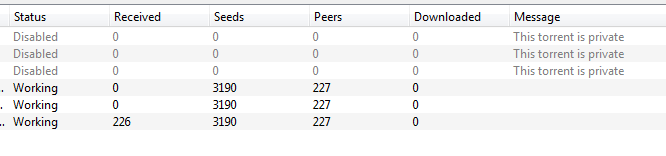
Seeds: 9/3187 Peers 3/227 Up Speed 0B/s
User Profile
Usually upload about a 2:1 ratio.
Haven't been able to upload for a few weeks at this time, have been trying all sorts of settings to try to get it going.
Tasks - 5 to 10
Yes, but usually just a web browser or image rendering. Have tried shutting down all other applications including disabling the PC Pitstop PC Matic
Yes, 2 to 3 other users on the LAN
This is not just one task; all seeds/files have the same problem.