mirror of
https://github.com/qbittorrent/qBittorrent.git
synced 2026-03-02 22:57:32 -05:00
Bitdefender Ransomware Positive Detection, hopefully "False" #7894
Labels
No labels
Accessibility
AppImage
Bounty
Build system
CI
Can't reproduce
Code cleanup
Confirmed bug
Confirmed bug
Core
Crash
Data loss
Discussion
Docker
Documentation
Duplicate
Feature
Feature request
Feature request
Feature request
Filters
Flatpak
GUI
Has workaround
I2P
Invalid
Libtorrent
Look and feel
Meta
NSIS
Network
Not an issue
OS: *BSD
OS: Linux
OS: Windows
OS: macOS
PPA
Performance
Project management
Proxy/VPN
Qt bugs
Qt6 compat
RSS
Search engine
Security
Temp folder
Themes
Translations
Triggers
Waiting diagnosis
Waiting info
Waiting upstream
Waiting web implementation
Watched folders
WebAPI
WebUI
autoCloseOldIssue
No milestone
No project
No assignees
1 participant

Notifications
Due date
No due date set.
Dependencies
No dependencies set.
Reference
starred/qBittorrent#7894
Loading…
Add table
Add a link
Reference in a new issue
No description provided.
Delete branch "%!s()"
Deleting a branch is permanent. Although the deleted branch may continue to exist for a short time before it actually gets removed, it CANNOT be undone in most cases. Continue?
Originally created by @Quoddity on GitHub (Oct 10, 2018).
qBittorrent version and Operating System
qBittorrent version v4.1.3
Windows 7 Home, 64x, SP1
Bitdefender Total Security 2019. Build 23.0.10.31 (up-to-date as of today)
What is the problem
Bitdefender Ransomware Module is currently yielding a positive detection to certain actions in qBittorrent. It does not detect ransomware behavior when I use uTorrent 2.2.1. In my examples, it has always been a false positive, but I am wondering if there is a possible security hole here.
What is the expected behavior
qBittorrent is halted by the Ransomware detection module, and must be restarted until another positive detection halts qBittorrent.
Steps to reproduce
Any one of three separate actions seem to cause the ransomware module to halt qBittorrent. There are possible other actions which also cause it.
Extra info(if any)
This is not urgent, since I can exclude qBittorrent from the Ransomware Detection module, but my concern is a possible security hole (or a faulty detection method on BitDefender's side).
I suspect the false positive is being caused by how qBittorrent is moving files in all of the above reproducible steps. (In example #3, qBittorrent will create a subfolder entitled ".unwanted" and move the file in there.)
I have configured my system to keep incomplete torrents in a separate folder. Both folders are located on a secondary internal HD.
I have the same setup with uTorrent 2.2.1 and it does not cause the Ransomware detection module to detect anything suspicious.
For reasons independent of this problem, I reinstalled my OS and this behavior has repeated itself.
@FranciscoPombal commented on GitHub (Oct 13, 2018):
This is 100% not an issue with qBittorrent.
Either:
a) Btidefender is issuing a false positive;
b) A torrent you downloaded via qBittorrent contains actual ransomware.
@Piccirello commented on GitHub (Oct 14, 2018):
From where did you download and install qBittorrent?
@RayBomb87 commented on GitHub (Jan 1, 2019):
I got the same trouble.
qbittorrent v.4.1.5_x64
@Dasonic commented on GitHub (Jan 30, 2019):
Also getting this issue. Happens across multiple torrents.
@colpocleisis commented on GitHub (Aug 9, 2019):
Had this issue as well, was downloading a trusted video file
qBittorrent v4.1.7 x64
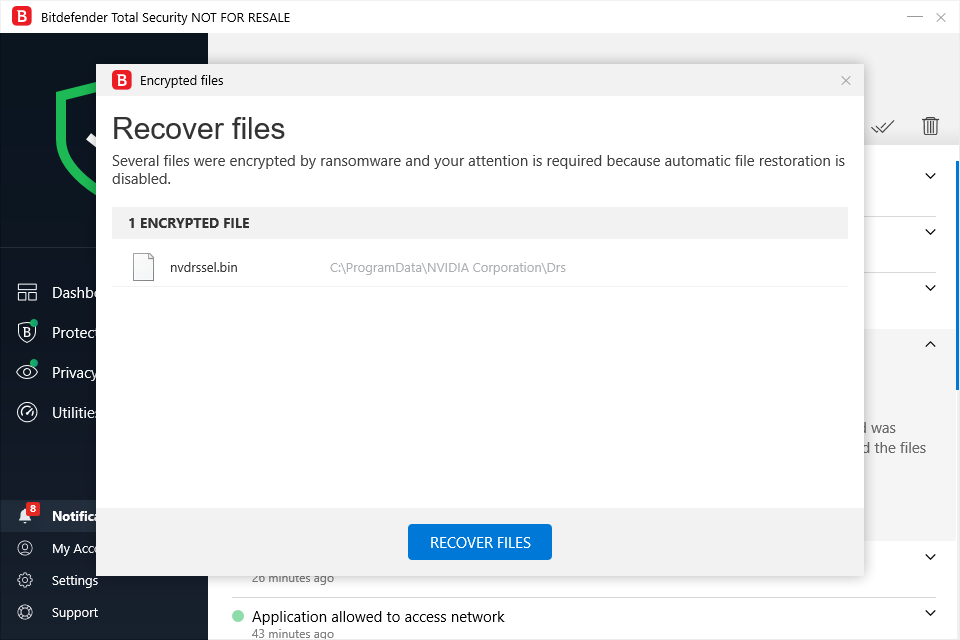
Interestingly the file involved seems to be nvidia drivers
@FranciscoPombal commented on GitHub (Jan 22, 2020):
or
c) you downloaded an infected qBittorrent installer/executable from an untrusted source.
@thalieht close please
@ghost commented on GitHub (Mar 11, 2020):
I faced the same issue once. It's probably due to how qBt renames files after completion(qB extension) just like a ransomware does after encrypting the files..
Definitely a false positive.