mirror of
https://github.com/qbittorrent/qBittorrent.git
synced 2026-03-02 22:57:32 -05:00
Limit speed does not work Monitoring seed speed is not accurate #8164
Labels
No labels
Accessibility
AppImage
Bounty
Build system
CI
Can't reproduce
Code cleanup
Confirmed bug
Confirmed bug
Core
Crash
Data loss
Discussion
Docker
Documentation
Duplicate
Feature
Feature request
Feature request
Feature request
Filters
Flatpak
GUI
Has workaround
I2P
Invalid
Libtorrent
Look and feel
Meta
NSIS
Network
Not an issue
OS: *BSD
OS: Linux
OS: Windows
OS: macOS
PPA
Performance
Project management
Proxy/VPN
Qt bugs
Qt6 compat
RSS
Search engine
Security
Temp folder
Themes
Translations
Triggers
Waiting diagnosis
Waiting info
Waiting upstream
Waiting web implementation
Watched folders
WebAPI
WebUI
autoCloseOldIssue
No milestone
No project
No assignees
1 participant

Notifications
Due date
No due date set.
Dependencies
No dependencies set.
Reference
starred/qBittorrent#8164
Loading…
Add table
Add a link
Reference in a new issue
No description provided.
Delete branch "%!s()"
Deleting a branch is permanent. Although the deleted branch may continue to exist for a short time before it actually gets removed, it CANNOT be undone in most cases. Continue?
Originally created by @Qifcn on GitHub (Dec 11, 2018).
Please provide the following information
qBittorrent version and Operating System
centos7
Linux 127.0.0.1 3.10.0-957.1.3.el7.x86_64 #1 SMP Thu Nov 29 14:49:43 UTC 2018 x86_64 x86_64 x86_64 GNU/Linux
Linux version 3.10.0-957.1.3.el7.x86_64 (mockbuild@kbuilder.bsys.centos.org) (gcc version 4.8.5 20150623 (Red Hat 4.8.5-36) (GCC) ) #1 SMP Thu Nov 29 14:49:43 UTC 2018
CentOS Linux release 7.6.1810 (Core)
If on linux, libtorrent and Qt version
qBittorrent v4.2.0alpha
What is the problem
This is a screenshot


What is the expected behavior
(type here)
Steps to reproduce
This is the traffic speed I see through the external program monitoring network card traffic, very beautiful picture monitoring is to monitor the traffic map on the switch.
The black character interface is the NIC traffic monitored by the nload program.
As for how to install qBittorrent v4.2.0alpha, you can watch this script
I am installing the latest git version via this script
https://github.com/Qifcn/pt/blob/master/qbittorrent-centos7.sh
Extra info(if any)
(type here)
@Seeker2 commented on GitHub (Dec 11, 2018):
In qBT's settings...
Is uTP enabled and allowed to exceed limits?
Is LAN traffic allowed to exceed limits?
@binkobapkins commented on GitHub (Dec 12, 2018):
Also have this issue on my end.
OS: Windows 10 1809
QBT Ver. 1.4.1
Problem:
Torrents do not respect global download limit, normal or alternative, enforcing utp/overhead/LAN or not. Torrents using maximum bandwidth at >5MiB/s instead of global limit of 2.
Upload also does not respect Global Limits.
Only way to circumvent bandwidth eating is setting each torrent to have individual download limits via Right Click > Limit Download Rate.
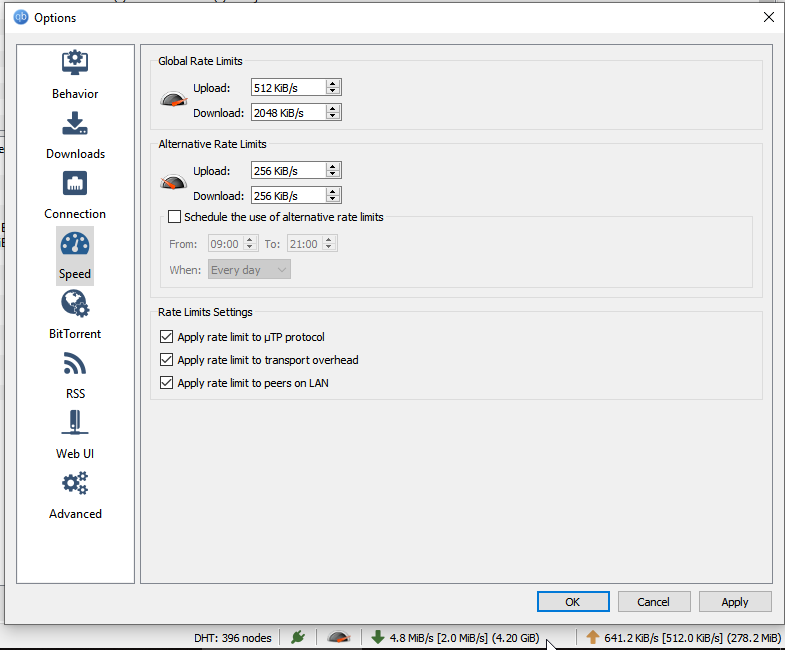
Expected Behaviour:
Total download bandwidth does not exceed 2MiB.
If you require more information, please let me know. Thank you!
@binkobapkins commented on GitHub (Dec 12, 2018):
Update: I cannot explain this, but reversing the Global Rate Limits and Alternative Rate Limits, and reversing the clock to kick in during the night instead of day made it kick in.| It's now behaving itself.
Will update if problem recurs.
@Seeker2 commented on GitHub (Dec 12, 2018):
@binkobapkins
Your picture still shows DL limit is exceeded when settings are reversed, just not as badly.
It's pretty hard to limit DL below a point because every peer+seed uploading to your qBT can briefly exceed the total if some of their packets arrive simultaneously even if their average speed is well below the total. Rogue wave sort-of-thing: https://en.wikipedia.org/wiki/Rogue_wave
@vikktorpenchev commented on GitHub (Apr 8, 2019):
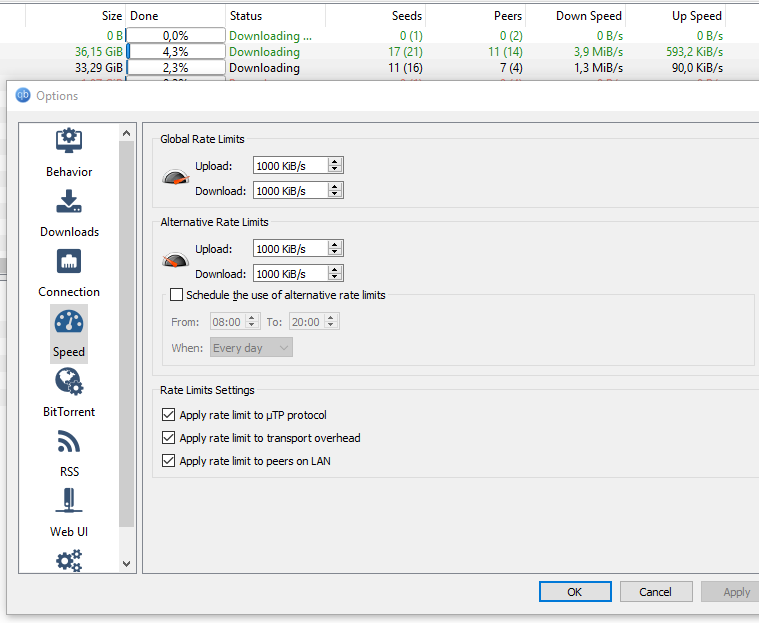
I have the same problem: Limit DL/UL doesn't work
OS: Windows 10 Pro
version: 10.0.17763 Build 17763
qBittorrent: v4.1.5
This is my settings screen:
@1Const1 commented on GitHub (Jun 30, 2019):
I have the same issue: Limit DL/UL doesn't work
OS: Windows 7
qBittorrent: v4.1.6
Maybe somebody can fix limit download | upload?
@thalieht commented on GitHub (Sep 13, 2020):
Duplicate of #12378 and others.