Fully downloaded torrents became partials #9883

Closed
opened 2026-02-21 20:26:12 -05:00 by deekerman · 34 comments
Owner

Originally created by @stdedos on GitHub (Mar 14, 2020).

Please provide the following information

qBittorrent version and Operating System

4.2.1 / Win10 1803 (17134.1006)

10.0.17134

What is the problem

I have two torrents that are fully downloaded and ready to seed. On qbittorrent, some files appear as set "Not downloaded". I paused them, selected all the files, and started re-checking them to correct this inaccurancy.

Then, the torrents are in error state:
image

and that does not change.

Files are there, they work, and I have full effective access rights.

What is the expected behavior

  1. I don't need to do any of this.
  2. If same-name files appear, they are checked if they match the torrent's description (and that is reflected on the UI)
  3. The re-check works.

Steps to reproduce

No idea

Extra info(if any)

14/3/2020 1:03 μμ - File error alert. Torrent: "tortax". File: "F:\Torrents\tortax\a\b\c.sor". Reason: tortax file_open (F:\Torrents\tortax\a\b\c.sor) error: Δεν επιτρέπεται η πρόσβαση
14/3/2020 1:03 μμ - File error alert. Torrent: "torbig". File: "E:\torbig\1.mal". Reason: torbig file_open (E:\torbig\1.mal) error: Δεν επιτρέπεται η πρόσβαση

Notes for me: one dorrent is: AQAAANCMnd8BFdERjHoAwE/Cl+sBAAAANtYZoY5J0E2K/saUA+NZ7gAAAABiAAAARQBuAGMAcgB5AHAAdABlAGQAIAB3AGkAdABoACAAVwBpAG4AZABvAHcAcwAgAEQAUABBAFAASQAgAHQAaAByAG8AdQBnAGgAIABkAHAAYQBwAGkAYgByAGkAZABnAGUAAAAQZgAAAAEAACAAAADtIrujsMoOPdDY5oNKRv8EazXArUgia2bx2gTh0e8/XgAAAAAOgAAAAAIAACAAAACJtbetulvCptI5GhVZt/rXdeaDLFMBoBKT6pJSFgan2TAAAACsBPA1bJmx7CO/zyXcdZqcvduu5gRcTW91JniUMrNqGA6vnEEImfA7p9yKrk5parRAAAAAKQojjj5lJ066QPhzZTgiXNjJd4Id1x0lZBPbF1vy0NitLbfynEQR1AErRSoBEYqkEcMZ++BNq6nN8A3dfq8e0Q==

Originally created by @stdedos on GitHub (Mar 14, 2020). **Please provide the following information** ### qBittorrent version and Operating System 4.2.1 / Win10 1803 (17134.1006) 10.0.17134 ### What is the problem I have two torrents that are fully downloaded and ready to seed. On qbittorrent, some files appear as set "Not downloaded". I paused them, selected all the files, and started re-checking them to correct this inaccurancy. Then, the torrents are in error state: ![image](https://user-images.githubusercontent.com/133706/76680940-fa5ccc80-65f5-11ea-93fd-bc15bc0f6176.png) and that does not change. Files are there, they work, and I have full effective access rights. ### What is the expected behavior 1. I don't need to do _any_ of this. 2. If same-name files appear, they are checked if they match the torrent's description (and that is reflected on the UI) 3. The re-check works. ### Steps to reproduce _No idea_ ### Extra info(if any) ``` 14/3/2020 1:03 μμ - File error alert. Torrent: "tortax". File: "F:\Torrents\tortax\a\b\c.sor". Reason: tortax file_open (F:\Torrents\tortax\a\b\c.sor) error: Δεν επιτρέπεται η πρόσβαση 14/3/2020 1:03 μμ - File error alert. Torrent: "torbig". File: "E:\torbig\1.mal". Reason: torbig file_open (E:\torbig\1.mal) error: Δεν επιτρέπεται η πρόσβαση ``` _Notes for me: one dorrent is: AQAAANCMnd8BFdERjHoAwE/Cl+sBAAAANtYZoY5J0E2K/saUA+NZ7gAAAABiAAAARQBuAGMAcgB5AHAAdABlAGQAIAB3AGkAdABoACAAVwBpAG4AZABvAHcAcwAgAEQAUABBAFAASQAgAHQAaAByAG8AdQBnAGgAIABkAHAAYQBwAGkAYgByAGkAZABnAGUAAAAQZgAAAAEAACAAAADtIrujsMoOPdDY5oNKRv8EazXArUgia2bx2gTh0e8/XgAAAAAOgAAAAAIAACAAAACJtbetulvCptI5GhVZt/rXdeaDLFMBoBKT6pJSFgan2TAAAACsBPA1bJmx7CO/zyXcdZqcvduu5gRcTW91JniUMrNqGA6vnEEImfA7p9yKrk5parRAAAAAKQojjj5lJ066QPhzZTgiXNjJd4Id1x0lZBPbF1vy0NitLbfynEQR1AErRSoBEYqkEcMZ++BNq6nN8A3dfq8e0Q==_
deekerman 2026-02-21 20:26:12 -05:00
Author
Owner

@thalieht commented on GitHub (Mar 14, 2020):

I can't see how anything can be done without steps to reproduce.

and I have full effective access rights.

Not according to the log...

@thalieht commented on GitHub (Mar 14, 2020): I can't see how anything can be done without steps to reproduce. >and I have full effective access rights. Not according to the log...
Author
Owner

@stdedos commented on GitHub (Mar 14, 2020):

I can't see how anything can be done without steps to reproduce.

Steps to reproduce: Download a torrent fully, wait 5 years ... 😕

and I have full effective access rights.

Not according to the log...

Yes according to Windows
image

@stdedos commented on GitHub (Mar 14, 2020): > I can't see how anything can be done without steps to reproduce. Steps to reproduce: Download a torrent fully, wait 5 years ... 😕 > > and I have full effective access rights. > > Not according to the log... Yes according to Windows ![image](https://user-images.githubusercontent.com/133706/76681429-4b22f400-65fb-11ea-9194-ac607ab89b53.png)
Author
Owner

@FranciscoPombal commented on GitHub (Mar 18, 2020):

Well, you do have access, but qBittorrent apparently does not. This looks like an issue with your setup.

@FranciscoPombal commented on GitHub (Mar 18, 2020): Well, you do have access, but qBittorrent apparently does not. This looks like an issue with your setup.
Author
Owner

@stdedos commented on GitHub (Mar 18, 2020):

Well, why wouldn't it? It doesn't make any sense. It also "used to work", so there is nothing that changed since "forever" (except qbittorent updates). Even Windows is stuck to 1803 for a very very long time.

I'd appreciate if you requested some explicit debug information that I could collect to debug this.

@stdedos commented on GitHub (Mar 18, 2020): Well, why wouldn't it? It doesn't make any sense. It also "used to work", so there is nothing that changed since "forever" (except qbittorent updates). Even Windows is stuck to 1803 for a _very very long time_. I'd appreciate if you requested some explicit debug information that I could collect to debug this.
Author
Owner

@FranciscoPombal commented on GitHub (Mar 18, 2020):

Double check the permissions in the directory the torrent is being saved to, the qbittorrent install folder and executable, and check if the path to any of the files in the torrent does not exceed WIndows MAX_PATH. The latter will be fixed in the next release.

@FranciscoPombal commented on GitHub (Mar 18, 2020): Double check the permissions in the directory the torrent is being saved to, the qbittorrent install folder and executable, and check if the path to any of the files in the torrent does not exceed WIndows MAX_PATH. The latter will be fixed in the next release.
Author
Owner

@stdedos commented on GitHub (Mar 18, 2020):

Double check the permissions in the directory the torrent is being saved to,

... so, more screenshots of the same thing? 😕

the qbittorrent install folder and executable,

image
image

and check if the path to any of the files in the torrent does not exceed WIndows MAX_PATH. The latter will be fixed in the next release.

PS C:\Users\stdedos> cmd /c dir /s /b A:\AAAAAAAA\AAAAAAAAAAAAAAAAAAAAAAAAAAAAAAAA |? {$_.length -gt 260}
PS C:\Users\stdedos>
@stdedos commented on GitHub (Mar 18, 2020): > Double check the permissions in the directory the torrent is being saved to, ... so, more screenshots of the same thing? 😕 > the qbittorrent install folder and executable, ![image](https://user-images.githubusercontent.com/133706/77017223-8cf8c500-6982-11ea-9430-687bde590f80.png) ![image](https://user-images.githubusercontent.com/133706/77017206-7f433f80-6982-11ea-9918-7c508fdc358b.png) > and check if the path to any of the files in the torrent does not exceed WIndows MAX_PATH. The latter will be fixed in the next release. ```powershell PS C:\Users\stdedos> cmd /c dir /s /b A:\AAAAAAAA\AAAAAAAAAAAAAAAAAAAAAAAAAAAAAAAA |? {$_.length -gt 260} PS C:\Users\stdedos> ```
Author
Owner

@FranciscoPombal commented on GitHub (Mar 19, 2020):

I'm out of ideas honestly. Until you can find a way to reproduce this, there is no actionable information available to proceed. One thing I also find strange is the tofu in the screenshot in the OP - this is not normal, as qBIttorrent properly supports Unicode. The issue may still be with your setup.

Anyway, let us know if you can further narrow this down and find steps to reproduce. Consider backing up your configuration and .fastresume files and clean installing when testing.

@FranciscoPombal commented on GitHub (Mar 19, 2020): I'm out of ideas honestly. Until you can find a way to reproduce this, there is no actionable information available to proceed. One thing I also find strange is the tofu in the screenshot in the OP - this is not normal, as qBIttorrent properly supports Unicode. The issue may still be with your setup. Anyway, let us know if you can further narrow this down and find steps to reproduce. Consider backing up your configuration and `.fastresume` files and clean installing when testing.
Author
Owner

@stdedos commented on GitHub (Mar 19, 2020):

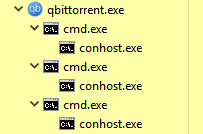
Can I get a child cmd.exe console from qbittorent?

I can try to repeat access rights, directory listings etc, hopefully with the same environment as qbittorent

@stdedos commented on GitHub (Mar 19, 2020): Can I get a child cmd.exe console from qbittorent? I can try to repeat access rights, directory listings etc, hopefully with the same environment as qbittorent
Author
Owner

@FranciscoPombal commented on GitHub (Mar 19, 2020):

Can I get a child cmd.exe console from qbittorent?

Sorry, not sure what you mean by this.

@FranciscoPombal commented on GitHub (Mar 19, 2020): > Can I get a child cmd.exe console from qbittorent? Sorry, not sure what you mean by this.
Author
Owner

@stdedos commented on GitHub (Mar 19, 2020):

Get a shell (cmd.exe/powershell/Cmder.exe in my Windows case), inheriting qbittorents execution context (e.g. access rights), so that I can play with a more realistic playground.

@stdedos commented on GitHub (Mar 19, 2020): Get a shell (cmd.exe/powershell/Cmder.exe in my Windows case), inheriting `qbittorent`s execution context (e.g. access rights), so that I can play with a more realistic playground.
Author
Owner

@FranciscoPombal commented on GitHub (Mar 19, 2020):

You can start qBittorrent from a shell/terminal, not sure how you would start a shell from qBittorrent, if that's what you mean. Maybe using the "run external program on torrent completion" feature might be good enough for you to test what you need?

@FranciscoPombal commented on GitHub (Mar 19, 2020): You can start qBittorrent from a shell/terminal, not sure how you would start a shell from qBittorrent, if that's what you mean. Maybe using the "run external program on torrent completion" feature might be good enough for you to test what you need?
Author
Owner

@stdedos commented on GitHub (Mar 20, 2020):

One thing I also find strange is the tofu in the screenshot in the OP - this is not normal, as qBIttorrent properly supports Unicode.

It took me quite a while to understand what you meant here:
https://en.wikipedia.org/wiki/Noto_fonts#Etymology
image

@stdedos commented on GitHub (Mar 20, 2020): > One thing I also find strange is the tofu in the screenshot in the OP - this is not normal, as qBIttorrent properly supports Unicode. It took me quite a while to understand what you meant here: https://en.wikipedia.org/wiki/Noto_fonts#Etymology ![image](https://user-images.githubusercontent.com/133706/77194673-0f02fe00-6ae9-11ea-93ae-2815c7a06633.png)
Author
Owner

@stdedos commented on GitHub (Mar 20, 2020):

You can start qBittorrent from a shell/terminal, not sure how you would start a shell from qBittorrent, if that's what you mean. Maybe using the "run external program on torrent completion" feature might be good enough for you to test what you need?

It's working
image

but I cannot see anything.

Can it be fixed? Can it be made more "manual/reliable"?

Relates to https://github.com/qbittorrent/qBittorrent/pull/11672#issuecomment-565847082

@stdedos commented on GitHub (Mar 20, 2020): > You can start qBittorrent from a shell/terminal, not sure how you would start a shell from qBittorrent, if that's what you mean. Maybe using the "run external program on torrent completion" feature might be good enough for you to test what you need? It's working ![image](https://user-images.githubusercontent.com/133706/77215100-0f1bf180-6b1b-11ea-9e1f-e700b72bc8cb.png) but I cannot see anything. Can it be fixed? Can it be made more "manual/reliable"? _Relates to https://github.com/qbittorrent/qBittorrent/pull/11672#issuecomment-565847082_
Author
Owner

@FranciscoPombal commented on GitHub (Mar 21, 2020):

but I cannot see anything.

Do you mean the windows don't show? I don't think that's a problem. Just write a script to dump the relevant system you're after to some file and have it run on torrent completion.

Can it be fixed? Can it be made more "manual/reliable"?

Do you mean not having to wait for torrent completion? Not unless there was a feature to explicitly open a shell from qBIttorrent. I guess you'll have to settle for this "hack". Tough I think you can simply remove a small completed torrent and add it again. It will recheck very fast and still count as completion I believe, making the whole process faster.

@FranciscoPombal commented on GitHub (Mar 21, 2020): > but I cannot see anything. Do you mean the windows don't show? I don't think that's a problem. Just write a script to dump the relevant system you're after to some file and have it run on torrent completion. > Can it be fixed? Can it be made more "manual/reliable"? Do you mean not having to wait for torrent completion? Not unless there was a feature to explicitly open a shell from qBIttorrent. I guess you'll have to settle for this "hack". Tough I think you can simply remove a small completed torrent and add it again. It will recheck very fast and still count as completion I believe, making the whole process faster.
Author
Owner

@stdedos commented on GitHub (Mar 21, 2020):

All of the proposed workarounds don't make the process faster, they make it slow and tedious.

Just write a script [...]

How do I know what I need? Do you write your program only by using a text editor, compile, run, and it works? No re-iterations, no compiler errors, nothing?

I've been driving this bughunt alone, and your suggestion is "there is no actionable information available to proceed". I guess I could be at least been given a screwdriver when I am asked to tighen screws ....

Tough I think you can simply remove a small completed torrent [...]

... which I need to find

and add it again

... yes, like the ones that were completed, but qbt decided "it cannot access them, therefore the torrent must be partial, not in error state"

@stdedos commented on GitHub (Mar 21, 2020): All of the proposed workarounds don't make the process _faster_, they make it slow and tedious. > Just write a script [...] How do I know what I need? Do you write your program _only_ by using a text editor, compile, run, and _it works_? No re-iterations, no compiler errors, nothing? I've been driving this bughunt alone, and your suggestion is "there is no actionable information available to proceed". I guess I could be _at least_ been given a screwdriver when I am asked to tighen screws .... > Tough I think you can simply remove a small completed torrent [...] ... which I need to find > and add it again ... yes, like the ones that were completed, but qbt decided "it cannot access them, therefore the torrent _must be partial, not in error state_"
Author
Owner

@FranciscoPombal commented on GitHub (Mar 21, 2020):

All of the proposed workarounds don't make the process faster, they make it slow and tedious.

Just write a script [...]

How do I know what I need? Do you write your program only by using a text editor, compile, run, and it works? No re-iterations, no compiler errors, nothing?

You can edit/compile/debug the script in your favorite IDE, make sure it's working properly and then have qBIttorrent run it. Don't you want the script to just dump a few environment variables, paths and permissions?

I've been driving this bughunt alone, and your suggestion is "there is no actionable information available to proceed". I guess I could be at least been given a screwdriver when I am asked to tighen screws ....

Like I said, I'm not that proficient in WIndows stuff. If you were on a Linux environment, I could have helped writing a bash script. For example, dumping the environment variables and basic file access/permissions is as simple as:

#!/bin/bash

# dump environment
env > env_dump.txt

# test write access and permissions. this could be in a for loop to do so for multiple files.
FILE="/some/interesting/file.avi"

if [ -w "$FILE" ] 
then
   echo "Write permission is granted on $FILE"
else
   echo "Write permission is NOT granted on $FILE, dumping stats for further investigation"
   stat "$FILE" >> files_stats.txt
fi

You just have to do something similar in Powershell or equivalent.

Tough I think you can simply remove a small completed torrent [...]

... which I need to find

and add it again

... yes, like the ones that were completed, but qbt decided "it cannot access them, therefore the torrent must be partial, not in error state"

I thought your bug only occurred if you manually triggered a recheck for already-added torrents. What I am saying is:

  1. Find a small torrent, or create it yourself. On Linux you can just dd if=/dev/urandom of=testfile.bin bs=10M count=1 to create a 10 MiB file with random contents, for example (do the equivalent on powershell, or do it in WSL and then move the file back to WIndows). Then just use qBIttorrent's torrent creator to create a torrent of it or use mktorrent or similar.
  2. Then add the torrent to qBIttorrent, pointing the save path to where the file actually is
  3. The torrent will be added and auto-rechecked, it will complete and the script will run.
  4. If you need to make adjustments to the script and try again, right click -> remove torrent and repeat from 2. This should not trigger your bug because you are completely removing the torrent from qBIttorrent first.

If you write your script carefully from the get go, you only need to iterate through 2-4 once.

@FranciscoPombal commented on GitHub (Mar 21, 2020): > All of the proposed workarounds don't make the process _faster_, they make it slow and tedious. > > > Just write a script [...] > > How do I know what I need? Do you write your program _only_ by using a text editor, compile, run, and _it works_? No re-iterations, no compiler errors, nothing? You can edit/compile/debug the script in your favorite IDE, make sure it's working properly and then have qBIttorrent run it. Don't you want the script to just dump a few environment variables, paths and permissions? > I've been driving this bughunt alone, and your suggestion is "there is no actionable information available to proceed". I guess I could be _at least_ been given a screwdriver when I am asked to tighen screws .... Like I said, I'm not that proficient in WIndows stuff. If you were on a Linux environment, I could have helped writing a bash script. For example, dumping the environment variables and basic file access/permissions is as simple as: ```bash #!/bin/bash # dump environment env > env_dump.txt # test write access and permissions. this could be in a for loop to do so for multiple files. FILE="/some/interesting/file.avi" if [ -w "$FILE" ] then echo "Write permission is granted on $FILE" else echo "Write permission is NOT granted on $FILE, dumping stats for further investigation" stat "$FILE" >> files_stats.txt fi ``` You just have to do something similar in Powershell or equivalent. > > > Tough I think you can simply remove a small completed torrent [...] > > ... which I need to find > > > and add it again > > ... yes, like the ones that were completed, but qbt decided "it cannot access them, therefore the torrent _must be partial, not in error state_" I thought your bug only occurred if you manually triggered a recheck for already-added torrents. What I am saying is: 1. Find a small torrent, or create it yourself. On Linux you can just `dd if=/dev/urandom of=testfile.bin bs=10M count=1` to create a 10 MiB file with random contents, for example (do the equivalent on powershell, or do it in WSL and then move the file back to WIndows). Then just use qBIttorrent's torrent creator to create a torrent of it or use `mktorrent` or similar. 2. Then add the torrent to qBIttorrent, pointing the save path to where the file actually is 3. The torrent will be added and auto-rechecked, it will complete and the script will run. 4. If you need to make adjustments to the script and try again, right click -> remove torrent and repeat from 2. This should not trigger your bug because you are completely removing the torrent from qBIttorrent first. If you write your script carefully from the get go, you only need to iterate through 2-4 once.
Author
Owner

@FranciscoPombal commented on GitHub (Mar 21, 2020):

Unless I completely misunderstood the problem and my advice is completely irrelevant, that's all I can do. I don't feel like learning powershell just to write a script for you nor like hunting down a small torrent, which you can easily do yourself (it's trivial). If this really is an issue with qBittorrent I'm willing to work harder to solve it, but right now we don't even know if this is just simply an issue on your end and if it is I'm not here to personally troubleshoot it. You have to put in the work to prove this is not an issue on your end.

@FranciscoPombal commented on GitHub (Mar 21, 2020): Unless I completely misunderstood the problem and my advice is completely irrelevant, that's all I can do. I don't feel like learning powershell just to write a script for you nor like hunting down a small torrent, which you can easily do yourself (it's trivial). If this really is an issue with qBittorrent I'm willing to work harder to solve it, but right now we don't even know if this is just simply an issue on your end and if it is I'm not here to personally troubleshoot it. You have to put in the work to prove this is not an issue on your end.
Author
Owner

@stdedos commented on GitHub (Mar 21, 2020):

All of the proposed workarounds don't make the process faster, they make it slow and tedious.

Just write a script [...]

How do I know what I need? Do you write your program only by using a text editor, compile, run, and it works? No re-iterations, no compiler errors, nothing?

... and how do I know what I need? see also below

You can edit/compile/debug the script in your favorite IDE, make sure it's working properly and then have qBIttorrent run it. Don't you want the script to just dump a few environment variables, paths and permissions?

Initially, yes. That's the design. What about if that comes back as normal?

Why not have a more-REPL-like environment, instead of the create torrent -> start -> verify -> finish -> remove ... cycle?

I've been driving this bughunt alone, and your suggestion is "there is no actionable information available to proceed". I guess I could be at least been given a screwdriver when I am asked to tighen screws ....

Like I said, I'm not that proficient in WIndows stuff. If you were on a Linux environment, I could have helped writing a bash script. For example, dumping the environment variables and basic file access/permissions is as simple as:

#!/bin/bash

# dump environment
env > env_dump.txt

# test write access and permissions. this could be in a for loop to do so for multiple files.
FILE="/some/interesting/file.avi"

if [ -w "$FILE" ] 
then
   echo "Write permission is granted on $FILE"
else
   echo "Write permission is NOT granted on $FILE, dumping stats for further investigation"
   stat "$FILE" >> files_stats.txt
fi

You just have to do something similar in Powershell or equivalent.

Access rights in Windows are not equivalent. Access rights in Windows are more complicated than SELinux access rights. I am not proficient in Windows either; having a reliable REPL environment limits my learning curve and makes debugging more appealing.

Tough I think you can simply remove a small completed torrent [...]

... which I need to find

and add it again

... yes, like the ones that were completed, but qbt decided "it cannot access them, therefore the torrent must be partial, not in error state"

I thought your bug only occurred if you manually triggered a recheck for already-added torrents. [...]

It sounds I've maybe fallen in the XY problem. Let's try again:

I have torrents that are fully downloaded, 100% status and were working. Nowadays, I randomly discovered 2 torrents, that fill the above criteria, and they are marked as partial in qbittorrent (one folder is marked as not downloaded). The files exist on the drive.

I have also moved one torrent between drives. On the folder, there were non-torrent files. All of the torrent files and folder were moved successfully (including the seemingly not-downloaded part of it), and the non-torrent files stayed in the original directory.

[...] What I am saying is:

  1. Find a small torrent, or create it yourself. On Linux you can just dd if=/dev/urandom of=testfile.bin bs=10M count=1 to create a 10 MiB file with random contents, for example (do the equivalent on powershell, or do it in WSL and then move the file back to WIndows). Then just use qBIttorrent's torrent creator to create a torrent of it or use mktorrent or similar.
  2. Then add the torrent to qBIttorrent, pointing the save path to where the file actually is
  3. The torrent will be added and auto-rechecked, it will complete and the script will run.
  4. If you need to make adjustments to the script and try again, right click -> remove torrent and repeat from 2. This should not trigger your bug because you are completely removing the torrent from qBIttorrent first.

If you write your script carefully from the get go, you only need to iterate through 2-4 once.

Why not have, only on debug builds if necessary, the functionality I propose instead?

@stdedos commented on GitHub (Mar 21, 2020): > > All of the proposed workarounds don't make the process _faster_, they make it slow and tedious. > > > Just write a script [...] > > > > > > How do I know what I need? Do you write your program _only_ by using a text editor, compile, run, and _it works_? No re-iterations, no compiler errors, nothing? ... and how do I know what I need? _see also below_ > You can edit/compile/debug the script in your favorite IDE, make sure it's working properly and then have qBIttorrent run it. Don't you want the script to just dump a few environment variables, paths and permissions? Initially, yes. That's the _design_. What about if that comes back as normal? Why not have a more-REPL-like environment, instead of the create torrent -> start -> verify -> finish -> remove ... cycle? > > I've been driving this bughunt alone, and your suggestion is "there is no actionable information available to proceed". I guess I could be _at least_ been given a screwdriver when I am asked to tighen screws .... > > Like I said, I'm not that proficient in WIndows stuff. If you were on a Linux environment, I could have helped writing a bash script. For example, dumping the environment variables and basic file access/permissions is as simple as: > > ```shell > #!/bin/bash > > # dump environment > env > env_dump.txt > > # test write access and permissions. this could be in a for loop to do so for multiple files. > FILE="/some/interesting/file.avi" > > if [ -w "$FILE" ] > then > echo "Write permission is granted on $FILE" > else > echo "Write permission is NOT granted on $FILE, dumping stats for further investigation" > stat "$FILE" >> files_stats.txt > fi > ``` > > You just have to do something similar in Powershell or equivalent. Access rights in Windows are not _equivalent_. Access rights in Windows are more complicated than SELinux access rights. _I am not proficient in Windows either; having a reliable REPL environment limits my learning curve and makes debugging more appealing._ > > > Tough I think you can simply remove a small completed torrent [...] > > > > > > ... which I need to find > > > and add it again > > > > > > ... yes, like the ones that were completed, but qbt decided "it cannot access them, therefore the torrent _must be partial, not in error state_" > > I thought your bug only occurred if you manually triggered a recheck for already-added torrents. [...] It sounds I've maybe fallen in the XY problem. Let's try again: I have torrents that are fully downloaded, 100% status and _were_ working. Nowadays, I randomly discovered 2 torrents, that fill the above criteria, and they are marked as partial in qbittorrent (one folder is marked as not downloaded). The files exist on the drive. I have also moved one torrent between drives. On the folder, there were non-torrent files. All of the torrent files and folder were moved successfully (including the seemingly not-downloaded part of it), and the non-torrent files stayed in the original directory. > [...] What I am saying is: > > 1. Find a small torrent, or create it yourself. On Linux you can just `dd if=/dev/urandom of=testfile.bin bs=10M count=1` to create a 10 MiB file with random contents, for example (do the equivalent on powershell, or do it in WSL and then move the file back to WIndows). Then just use qBIttorrent's torrent creator to create a torrent of it or use `mktorrent` or similar. > 2. Then add the torrent to qBIttorrent, pointing the save path to where the file actually is > 3. The torrent will be added and auto-rechecked, it will complete and the script will run. > 4. If you need to make adjustments to the script and try again, right click -> remove torrent and repeat from 2. This should not trigger your bug because you are completely removing the torrent from qBIttorrent first. > > If you write your script carefully from the get go, you only need to iterate through 2-4 once. Why not have, only on debug builds if necessary, the functionality I propose instead?
Author
Owner

@FranciscoPombal commented on GitHub (Mar 21, 2020):

Initially, yes. That's the design. What about if that comes back as normal?

What if it doesn't? What if the sky turns red tomorrow? First we need to see the results of that, then we think about what to do next.

Why not have a more-REPL-like environment, instead of the create torrent -> start -> verify -> finish -> remove ... cycle?

Why not have, only on debug builds if necessary, the functionality I propose instead?

Way too much effort to implement an entire subsystem of questionable utility for the vast majority of people. Besides, we are not even sure if this bug report is a legitimate issue or not. Right now the focus is on figuring out whether this is an issue with qBIttorrent or one on your side. Once that is established, we'll think of what to do next.

We're not going to risk implementing a whole feature just to arrive at the conclusion that the problem was on your end in the end.

Access rights in Windows are not equivalent. Access rights in Windows are more complicated than SELinux access rights.

You misunderstood the sentence this quote is replying to. I said "you just have to do something (...) in Powershell or equivalent", meaning the choice is yours of how to actually implement the script/program, I merely suggested Powershell by name because it's the default scripting language/facility on Windows.

Of course the permission data/details you are looking for are very different than on Linux.

It sounds I've maybe fallen in the XY problem. Let's try again:

I have torrents that are fully downloaded, 100% status and were working. Nowadays, I randomly discovered 2 torrents, that fill the above criteria, and they are marked as partial in qbittorrent (one folder is marked as not downloaded). The files exist on the drive.

I have also moved one torrent between drives. On the folder, there were non-torrent files. All of the torrent files and folder were moved successfully (including the seemingly not-downloaded part of it), and the non-torrent files stayed in the original directory.

Again, how does this impact the workflow of "Add a torrent, wait for completion if the files don't already exist, remove torrent, repeat"? Nowhere in this description of the problem do you mention that there is a problem with removing torrents.

Like I said, you don't need many add torrent/run/remove torrent iterations. You just need to make sure the script prints relevant information when run manually (in this stage you do however many edit/compile/debug iterations you need in your favorite development environment), then have qbittorrent run the script once, and then compare the outputs and look for what's different that might cause the problem.

@FranciscoPombal commented on GitHub (Mar 21, 2020): > Initially, yes. That's the design. What about if that comes back as normal? What if it doesn't? What if the sky turns red tomorrow? First we need to see the results of that, then we think about what to do next. > Why not have a more-REPL-like environment, instead of the create torrent -> start -> verify -> finish -> remove ... cycle? > Why not have, only on debug builds if necessary, the functionality I propose instead? Way too much effort to implement an entire subsystem of questionable utility for the vast majority of people. Besides, we are not even sure if this bug report is a legitimate issue or not. Right now the focus is on figuring out whether this is an issue with qBIttorrent or one on your side. Once that is established, we'll think of what to do next. We're not going to risk implementing a whole feature just to arrive at the conclusion that the problem was on your end in the end. > Access rights in Windows are not equivalent. Access rights in Windows are more complicated than SELinux access rights. You misunderstood the sentence this quote is replying to. I said "you just have to do something (...) **in** Powershell or equivalent", meaning the choice is yours of how to actually implement the script/program, I merely suggested Powershell by name because it's the default scripting language/facility on Windows. Of course the permission data/details you are looking for are very different than on Linux. >It sounds I've maybe fallen in the XY problem. Let's try again: > I have torrents that are fully downloaded, 100% status and were working. Nowadays, I randomly discovered 2 torrents, that fill the above criteria, and they are marked as partial in qbittorrent (one folder is marked as not downloaded). The files exist on the drive. >I have also moved one torrent between drives. On the folder, there were non-torrent files. All of the torrent files and folder were moved successfully (including the seemingly not-downloaded part of it), and the non-torrent files stayed in the original directory. Again, how does this impact the workflow of "Add a torrent, wait for completion if the files don't already exist, remove torrent, repeat"? Nowhere in this description of the problem do you mention that there is a problem with removing torrents. Like I said, you don't need many add torrent/run/remove torrent iterations. You just need to make sure the script prints relevant information when run manually (in this stage you do however many edit/compile/debug iterations you need in your favorite development environment), then have qbittorrent run the script once, and then compare the outputs and look for what's different that might cause the problem.
Author
Owner

@stdedos commented on GitHub (Mar 25, 2020):

  • I removed qbittorrent.ini
  • Installed the latest release
  • I started qbittorrent
  • Torrent was 100%, with one folder marked as "don't download"
  • I re-checked the torrent, came back 100%
  • I enabled the "don't download" folder

image

It turns out that probably no diagnostics are necessary. All of the torrents files are marked as read-only (I think there's a qbt option that does that when torrent finishes downloading?). Object mode is one of the following:

Mode           : d-----
Mode           : -ar---

When enabling the "seamingly missing" data, qbt tries to do something [io.file]::OpenWrite()-related - which cannot be done, since the files are marked as read-only.
By Powershell design (at least, I don't know where is this applied), you cannot open a file for writing, if it's marked as read-only https://docs.microsoft.com/en-us/dotnet/api/system.io.file.openwrite?view=netframework-4.8#System_IO_File_OpenWrite_System_String_ ; therefore [ -w "$FILE" ] cannot apply / will always fail.

After de-marking the files inside as read-only (it took a lot of trial and error), check finishes successfully.

Now, the question is: Why doesn't qbt recover from that when I ask it to force-check the torrent?

@stdedos commented on GitHub (Mar 25, 2020): * I removed `qbittorrent.ini` * Installed the latest release * I started qbittorrent * _Torrent was 100%, with one folder marked as "don't download"_ * I re-checked the torrent, came back 100% * I enabled the "don't download" folder ![image](https://user-images.githubusercontent.com/133706/77573886-03914780-6eda-11ea-927e-bfee0826521c.png) It turns out that probably no diagnostics are necessary. All of the torrents files are marked as read-only (I think there's a qbt option that does that when torrent finishes downloading?). _Object_ mode is one of the following: ``` Mode : d----- Mode : -ar--- ``` When enabling the "seamingly missing" data, qbt tries to do _something_ `[io.file]::OpenWrite()`-related - which cannot be done, since the files are marked as read-only. By _Powershell_ design (at least, I don't know where is this applied), you cannot open a file for writing, if it's marked as read-only https://docs.microsoft.com/en-us/dotnet/api/system.io.file.openwrite?view=netframework-4.8#System_IO_File_OpenWrite_System_String_ ; therefore `[ -w "$FILE" ]` cannot apply / will always fail. After de-marking the files inside as read-only (it took a lot of trial and error), check finishes successfully. Now, the question is: Why doesn't qbt recover from that when I ask it to force-check the torrent?
Author
Owner

@stdedos commented on GitHub (Mar 25, 2020):

Please note that AppData\Local\qBittorrent\logs\qbittorrent.log is written with Greek (ISO-8859-7) encoding and not UTF-8!

@stdedos commented on GitHub (Mar 25, 2020): _Please note that `AppData\Local\qBittorrent\logs\qbittorrent.log` is written with Greek (ISO-8859-7) encoding **and not** UTF-8!_
Author
Owner

@FranciscoPombal commented on GitHub (Mar 25, 2020):

So somehow, on your system, files are getting marked read-only when the download finishes? There is no such option in qBIttorrent.
Honestly no idea what could be causing that. If it's qBittorrent, then it is certainly a bug. But I honestly doubt it, otherwise we would have many more issue reports about this. It could still be somewhat qBittorrent's fault (some edge case that reared it's ugly head with your setup) though.

Please note that AppData\Local\qBittorrent\logs\qbittorrent.log is written with Greek (ISO-8859-7) encoding and not UTF-8!

Did you specifically make it so somehow? Or do you have your system's locale settings setup in such a way that this is expected? Otherwise this is definitely not intended either.

@FranciscoPombal commented on GitHub (Mar 25, 2020): So somehow, on your system, files are getting marked read-only when the download finishes? There is no such option in qBIttorrent. Honestly no idea what could be causing that. If it's qBittorrent, then it is certainly a bug. But I honestly doubt it, otherwise we would have many more issue reports about this. It could still be somewhat qBittorrent's fault (some edge case that reared it's ugly head with your setup) though. > _Please note that `AppData\Local\qBittorrent\logs\qbittorrent.log` is written with Greek (ISO-8859-7) encoding **and not** UTF-8!_ Did you specifically make it so somehow? Or do you have your system's locale settings setup in such a way that this is expected? Otherwise this is definitely not intended either.
Author
Owner

@stdedos commented on GitHub (Mar 25, 2020):

So somehow, on your system, files are getting marked read-only when the download finishes? There is no such option in qBIttorrent.

If not, then it was uTorrent's feature around the time I made the transition to qbt.

I must say, though, a lot more torrents would've been hit, and not just 2 (that I found) from 360+.

Honestly no idea what could be causing that. If it's qBittorrent, then it is certainly a bug. But I honestly doubt it, otherwise we would have many more issue reports about this. It could still be somewhat qBittorrent's fault (some edge case that reared it's ugly head with your setup) though.

Please note that AppData\Local\qBittorrent\logs\qbittorrent.log is written with Greek (ISO-8859-7) encoding and not UTF-8!

Did you specifically make it so somehow? Or do you have your system's locale settings setup in such a way that this is expected? Otherwise this is definitely not intended either.

I didn't make anything. I opened my editor (Notepad2-mod), it auto-detected the file as UTF-8, and paths with Greek chars (μTorrent instead of uTorrent) had weird characters. I asked it to open the file with a different encoding (the known suspect when on Greek Windows), and everything looked normal.

@stdedos commented on GitHub (Mar 25, 2020): > So somehow, on your system, files are getting marked read-only when the download finishes? There is no such option in qBIttorrent. If not, then it was uTorrent's feature around the time I made the transition to qbt. I must say, though, **a lot** more torrents would've been hit, and not just 2 (that I found) from 360+. > Honestly no idea what could be causing that. If it's qBittorrent, then it is certainly a bug. But I honestly doubt it, otherwise we would have many more issue reports about this. It could still be somewhat qBittorrent's fault (some edge case that reared it's ugly head with your setup) though. > > > _Please note that `AppData\Local\qBittorrent\logs\qbittorrent.log` is written with Greek (ISO-8859-7) encoding **and not** UTF-8!_ > > Did you specifically make it so somehow? Or do you have your system's locale settings setup in such a way that this is expected? Otherwise this is definitely not intended either. I didn't make anything. I opened my editor (Notepad2-mod), it auto-detected the file as UTF-8, and paths with Greek chars (μTorrent instead of uTorrent) had weird characters. I asked it to open the file with a different encoding (the _known suspect_ when on _Greek_ Windows), and everything looked normal.
Author
Owner

@FranciscoPombal commented on GitHub (Mar 25, 2020):

@glassez @Chocobo1 doesn't qBittorrent always save text files (logs, configs, etc) as UTF-8, even on Windows?

@stdedos

I must say, though, a lot more torrents would've been hit, and not just 2 (that I found) from 360+.

Can you share the specific torrents, or are they private or sensitive in some way? I'd like to examine them, see if there is anything special about them.

@FranciscoPombal commented on GitHub (Mar 25, 2020): @glassez @Chocobo1 doesn't qBittorrent always save text files (logs, configs, etc) as UTF-8, even on Windows? @stdedos >I must say, though, a lot more torrents would've been hit, and not just 2 (that I found) from 360+. Can you share the specific torrents, or are they private or sensitive in some way? I'd like to examine them, see if there is anything special about them.
Author
Owner

@stdedos commented on GitHub (Mar 26, 2020):

I must say, though, a lot more torrents would've been hit, and not just 2 (that I found) from 360+.

Can you share the specific torrents, or are they private or sensitive in some way? I'd like to examine them, see if there is anything special about them.

Unfortunately, that will not be possible.

@stdedos commented on GitHub (Mar 26, 2020): > > I must say, though, a lot more torrents would've been hit, and not just 2 (that I found) from 360+. > > Can you share the specific torrents, or are they private or sensitive in some way? I'd like to examine them, see if there is anything special about them. Unfortunately, that will not be possible.
Author
Owner

@FranciscoPombal commented on GitHub (Apr 4, 2020):

https://github.com/qbittorrent/qBittorrent/pull/12285 has made it into 4.2.3, so the logs are now encoded in UTF-8

@FranciscoPombal commented on GitHub (Apr 4, 2020): https://github.com/qbittorrent/qBittorrent/pull/12285 has made it into 4.2.3, so the logs are now encoded in UTF-8
Author
Owner

@stdedos commented on GitHub (Apr 4, 2020):

And now-a-days, after updating to v4.2.3, without doing anything else, following https://github.com/qbittorrent/qBittorrent/issues/12171#issuecomment-604075433, made this:

image

With no error what-so-ever

I don't understand why the DL priority is marked, or the checkboxes are not marked, but it seems that the progress bars are all 100%, even after restarting qbt.

When I accidentally ticked one of the unticked entries, this happened:

image
image

(W) 2020-04-04T14:30:00 - File error alert. Torrent: "$name". File: "$filename". Reason: $name file_open ($filename) error: Δεν επιτρέπεται η πρόσβαση

tl;dr: Everything seems to work easier nowadays, but the content tab's state is not synced at all. Trying to make it consistent leads to the error above.

@stdedos commented on GitHub (Apr 4, 2020): And now-a-days, after updating to v4.2.3, without doing anything else, following https://github.com/qbittorrent/qBittorrent/issues/12171#issuecomment-604075433, made this: ![image](https://user-images.githubusercontent.com/133706/78441341-b2731780-7680-11ea-938e-c22f13bd12cf.png) With no error what-so-ever I don't understand why the DL priority is marked, or the checkboxes are not marked, but it seems that the progress bars are all 100%, even after restarting qbt. When I accidentally ticked one of the unticked entries, this happened: ![image](https://user-images.githubusercontent.com/133706/78443876-6bd1ed00-7681-11ea-9150-e2ddd2722860.png) ![image](https://user-images.githubusercontent.com/133706/78444175-8310da80-7681-11ea-9e26-66643aa8d0e2.png) ``` (W) 2020-04-04T14:30:00 - File error alert. Torrent: "$name". File: "$filename". Reason: $name file_open ($filename) error: Δεν επιτρέπεται η πρόσβαση ``` tl;dr: Everything seems to work easier nowadays, but the content tab's state is not synced at all. Trying to make it consistent leads to the error above.
Author
Owner

@luzpaz commented on GitHub (Jun 22, 2022):

Is this issue still present in latest v4.4.3.1 ?

@luzpaz commented on GitHub (Jun 22, 2022): Is this issue still present in latest v4.4.3.1 ?
Author
Owner

@stdedos commented on GitHub (Jun 22, 2022):

I am avoiding updating qbt, as I keep getting down rabbitholes every time I do it.

"It's working", don't touch it

@stdedos commented on GitHub (Jun 22, 2022): I am avoiding updating qbt, as I keep getting down rabbitholes every time I do it. "It's working", don't touch it
Author
Owner

@luzpaz commented on GitHub (Jun 22, 2022):

Can you test it on another machine and report back then ?

@luzpaz commented on GitHub (Jun 22, 2022): Can you test it on another machine and report back then ?
Author
Owner

@stdedos commented on GitHub (Jun 22, 2022):

No. Ι "barely" have one Windows machine exhibits the problem.

"I am suspecting" that's some internal state issue, but I'd really like "to keep the history and stats", so, dun-bother me, dun-touch it (I am becoming one of these people ...)

@stdedos commented on GitHub (Jun 22, 2022): No. Ι "barely" have one Windows machine exhibits the problem. "I am suspecting" that's some internal state issue, but I'd really like "to keep the history and stats", so, dun-bother me, dun-touch it (I am becoming _one of these people_ ...)
Author
Owner

@xavier2k6 commented on GitHub (Dec 17, 2023):

@stdedos The 4.2.x series of qBittorrent is now extremely out of date & Windows (1803) is now no longer supported by us.

I'd strongly recommend that you update your OS Build/Version & qBittorrent version incrementally to avoid any other issues & gain functionality improvements.

@xavier2k6 commented on GitHub (Dec 17, 2023): @stdedos The 4.2.x series of qBittorrent is now extremely out of date & Windows (1803) is now no longer supported by us. I'd strongly recommend that you update your OS Build/Version & qBittorrent version incrementally to avoid any other issues & gain functionality improvements.
Author
Owner

@xavier2k6 commented on GitHub (Feb 11, 2024):

The 4.2.x series of qBittorrent is now extremely out of date & Windows (1803) is now no longer supported by us.

I'm inclined to close this ticket for this reason....

@xavier2k6 commented on GitHub (Feb 11, 2024): >The 4.2.x series of qBittorrent is now extremely out of date & Windows (1803) is now no longer supported by us. I'm inclined to close this ticket for this reason....
Author
Owner

@luzpaz commented on GitHub (Feb 11, 2024):

Closing. If there is a need to re-open, then feel free to do so.

@luzpaz commented on GitHub (Feb 11, 2024): Closing. If there is a need to re-open, then feel free to do so.
Sign in to join this conversation.
No milestone
No project
No assignees
1 participant
Notifications
Due date
The due date is invalid or out of range. Please use the format "yyyy-mm-dd".

No due date set.

Dependencies

No dependencies set.

Reference
starred/qBittorrent#9883
No description provided.