mirror of
https://github.com/rustdesk/rustdesk.git
synced 2026-03-02 19:26:56 -05:00
Remote connect to Ubuntu22.04 Gnome: X11 error: connection refused (login as root) #1245
Labels
No labels
bug
documentation
duplicate
enhancement
enhancement
enhancement
good first issue
help wanted
invalid
question
unreproducible
wontfix
No milestone
No project
No assignees
1 participant

Notifications
Due date
No due date set.
Dependencies
No dependencies set.
Reference
starred/rustdesk-rustdesk#1245
Loading…
Add table
Add a link
Reference in a new issue
No description provided.
Delete branch "%!s()"
Deleting a branch is permanent. Although the deleted branch may continue to exist for a short time before it actually gets removed, it CANNOT be undone in most cases. Continue?
Originally created by @btdan on GitHub (Jan 17, 2023).
Describe the bug you encountered:
The rustdesk is installed in Ubuntu22.04 ,and the file /etc/systemd/system/rustdesk.service is as default, just as follows:
------------------------ The begin of file /etc/systemd/system/rustdesk.service ---------------
[Unit]
Description=RustDesk
Requires=network.target
After=systemd-user-sessions.service
[Service]
Type=simple
ExecStart=/usr/bin/rustdesk --service
PIDFile=/var/run/rustdesk.pid
KillMode=mixed
TimeoutStopSec=30
User=root
LimitNOFILE=100000
[Install]

WantedBy=multi-user.target
------------------------ The end of file /etc/systemd/system/rustdesk.service ---------------
And then I restart the Ubuntu22.04 system.I can find the rustdesk process with ps command,just as follows:
But when I want to connect to this ubuntu system, I get the error tip : X11 error: connection refused.
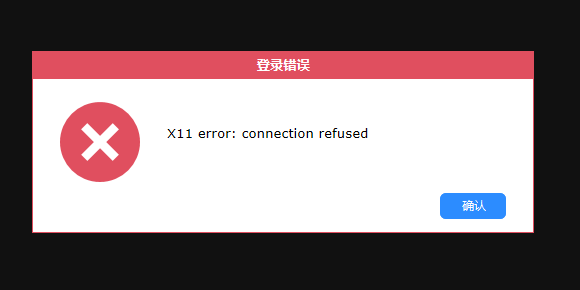
the screenshot is just as follows:
That is to say, I can not connect to the ubuntu22.04 system.
But when I kill all rustdesk process, and then start rustdesk again in the terminal command.
And I can connect to the ubuntu22.04 system.
What did you expect to happen instead?
I want to connect to the ubuntu22.04 system successfully without restarting rustdesk. In this instance, I can connect to the ubuntu22.04 system remotely .
Can anyone tell me how to solve this problem?
By the way, I login the gnome of ubuntu22.04 as root user.
I also find this post https://github.com/rustdesk/rustdesk/issues/2468
And then modify the /usr/bin/rustdesk file just as follows:
I know how to fix it.Just install bless(apt-get install bless) and (bless /usr/bin/rustdesk), and search "geteuid" in text and change it with "getppid" , and save , reopen the rustdesk finally.It's OK to connect! I think it's the root login's problem.
But it does not work at all.
...
How did you install
RustDesk?I just download the xxx.deb file from this website
and then dpkg -i xxx.deb to install RustDesk.
Thanks very much for your help .Best wishes.
RustDesk version and environment
RustDesk 1.1.9 Ubuntu22.04
@rustdesk commented on GitHub (Jan 17, 2023):
Try out nightly build please. https://github.com/rustdesk/rustdesk/releases/tag/nightly
@btdan commented on GitHub (Jan 18, 2023):
Thanks very much for your reply.
But After I reinstall the nightly build. The rustdesk show version 1.2.0
And then I restart the Ubuntu22.04 system.
I can connect to the ubuntu22.04 through rustdesk , but after I type the password in rustdesk and login ubuntu22.04 remotely,
The connection is discard. RustDesk tell that Connection refused
Can you tell me how to solve this problem?
Thanks again.
@btdan commented on GitHub (Jan 18, 2023):
In the picture below, I can NOT modify anything.
That is to say, I can not modify the password.
Can you tell me how to solve this problem?
Thanks very much.
@grummbeer commented on GitHub (Jan 18, 2023):
just scroll up a bit in this dialog and then …
@rustdesk commented on GitHub (Jan 18, 2023):
@grummbeer Thanks
@btdan commented on GitHub (Jan 19, 2023):
Hello, Thanks very much for your reply. And with your help, I can change the password successfully.
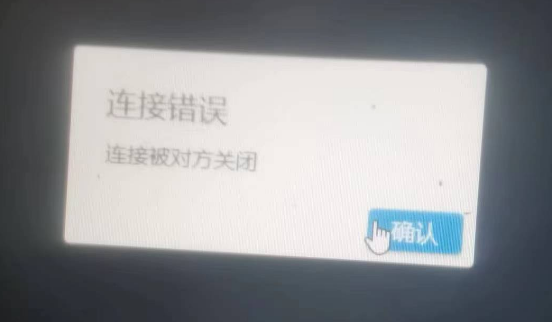
But when I connect to the remote Ubuntu 22.04 system, the login screen is displayed. And I can input the user name and password to login. However, after I login the system and imediately disconnect to the remote Ubuntu22.04.
And get a small window with the tip just as follows:
I have tested several times. If I login as an ordinary user (that is to say ,not root) . I get the same window as shown above.
But if i close the rustdesk and open rustdesk again, I can get the remote desttop of remote ubuntu22.04.
If I login the remote Ubuntu22.04 as root user. I get the same window as shown above. But I can NOT connect to the remote Ubuntu22.04 again if I close the rustdesk and open it again.
Can you help me to solve this problem?
Thanks very much.
@rustdesk commented on GitHub (Jan 30, 2023):
solution here: https://github.com/rustdesk/rustdesk/issues/2573#issuecomment-1408672281
@rustdesk commented on GitHub (Apr 6, 2023):
#440