mirror of
https://github.com/rustdesk/rustdesk.git
synced 2026-03-02 19:26:56 -05:00
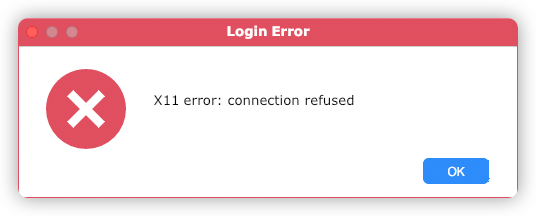
connect to ubuntu 20.04 from mac os 11.4(m1 chip) pops x11 err dialog #41
Labels
No labels
bug
documentation
duplicate
enhancement
enhancement
enhancement
good first issue
help wanted
invalid
question
unreproducible
wontfix
No milestone
No project
No assignees
1 participant

Notifications
Due date
No due date set.
Dependencies
No dependencies set.
Reference
starred/rustdesk-rustdesk#41
Loading…
Add table
Add a link
Reference in a new issue
No description provided.
Delete branch "%!s()"
Deleting a branch is permanent. Although the deleted branch may continue to exist for a short time before it actually gets removed, it CANNOT be undone in most cases. Continue?
Originally created by @jsrdzhk on GitHub (Jun 3, 2021).
host machine:mac mini(m1 chip)
target machine:ubuntu 20.04.02
ubuntu use x11 as windowing system
@rustdesk commented on GitHub (Jun 3, 2021):
picture?
@jsrdzhk commented on GitHub (Jun 3, 2021):
@jsrdzhk commented on GitHub (Jun 3, 2021):
@rustdesk commented on GitHub (Jun 3, 2021):
Can you show me the output of
loginctl?@rustdesk commented on GitHub (Jun 3, 2021):
and /root/.local/share/logs/RustDesk/service/rustdesk_rCURRENT.log
@jsrdzhk commented on GitHub (Jun 3, 2021):
➜ ~ loginctl
SESSION UID USER SEAT TTY
10 1000 rodneycheung seat0 tty2
12 1000 rodneycheung pts/1
13 1000 rodneycheung
c3 125 gdm seat0 tty1
@jsrdzhk commented on GitHub (Jun 3, 2021):
[2021-06-03 15:46:58.289020 +08:00] INFO [src/main.rs:90] start --service
[2021-06-03 15:46:58.712423 +08:00] INFO [src/platform/linux.rs:165] uid of seat0: 1000
[2021-06-03 15:46:58.712452 +08:00] DEBUG [src/platform/linux.rs:506] Run: ps -u 1000 -o pid= | xargs -I__ cat /proc//environ 2>/dev/null | tr '\0' '\n' | grep -m1 '^XAUTHORITY=' | sed 's/XAUTHORITY=//g'
[2021-06-03 15:46:59.190358 +08:00] DEBUG [src/platform/linux.rs:506] Run: ps -u 1000 -o pid= | xargs -I cat /proc//environ 2>/dev/null | tr '\0' '\n' | grep -m1 '^DISPLAY=' | sed 's/DISPLAY=//g'
[2021-06-03 15:46:59.528308 +08:00] INFO [src/platform/linux.rs:192] DISPLAY: rodneycheung-OptiPlex-9020:1
[2021-06-03 15:46:59.528339 +08:00] INFO [src/platform/linux.rs:193] XAUTHORITY: /run/user/1000/gdm/Xauthority
[2021-06-03 16:39:44.888021 +08:00] INFO [src/platform/linux.rs:165] uid of seat0: 125
[2021-06-03 16:39:44.944312 +08:00] DEBUG [src/platform/linux.rs:506] Run: ps -u 125 -o pid= | xargs -I cat /proc//environ 2>/dev/null | tr '\0' '\n' | grep -m1 '^XAUTHORITY=' | sed 's/XAUTHORITY=//g'
[2021-06-03 16:39:45.133643 +08:00] DEBUG [src/platform/linux.rs:506] Run: ps -u 125 -o pid= | xargs -I cat /proc//environ 2>/dev/null | tr '\0' '\n' | grep -m1 '^DISPLAY=' | sed 's/DISPLAY=//g'
[2021-06-03 16:39:45.479860 +08:00] DEBUG [src/platform/linux.rs:277] w gdm
[2021-06-03 16:39:45.917217 +08:00] DEBUG [src/platform/linux.rs:280] 16:39:45 up 1:02, 0 users, load average: 3.59, 3.46, 3.79
[2021-06-03 16:39:45.917240 +08:00] DEBUG [src/platform/linux.rs:280] USER TTY FROM LOGIN@ IDLE JCPU PCPU WHAT
[2021-06-03 16:39:45.917245 +08:00] DEBUG [src/platform/linux.rs:291] ls -l /tmp/.X11-unix/
[2021-06-03 16:39:45.938549 +08:00] DEBUG [src/platform/linux.rs:297] total 0
[2021-06-03 16:39:45.938579 +08:00] DEBUG [src/platform/linux.rs:297] srwxrwxrwx 1 gdm gdm 0 6月 3 16:39 X0
[2021-06-03 16:39:45.938585 +08:00] INFO [src/platform/linux.rs:192] DISPLAY: :0
[2021-06-03 16:39:45.938589 +08:00] INFO [src/platform/linux.rs:193] XAUTHORITY: /run/user/125/gdm/Xauthority
[2021-06-03 16:40:18.650065 +08:00] INFO [src/platform/linux.rs:165] uid of seat0: 1000
[2021-06-03 16:40:18.650103 +08:00] DEBUG [src/platform/linux.rs:506] Run: ps -u 1000 -o pid= | xargs -I cat /proc//environ 2>/dev/null | tr '\0' '\n' | grep -m1 '^XAUTHORITY=' | sed 's/XAUTHORITY=//g'
[2021-06-03 16:40:18.787717 +08:00] DEBUG [src/platform/linux.rs:506] Run: ps -u 1000 -o pid= | xargs -I cat /proc/__/environ 2>/dev/null | tr '\0' '\n' | grep -m1 '^DISPLAY=' | sed 's/DISPLAY=//g'
[2021-06-03 16:40:18.944155 +08:00] INFO [src/platform/linux.rs:192] DISPLAY: rodneycheung-OptiPlex-9020:1
[2021-06-03 16:40:18.944179 +08:00] INFO [src/platform/linux.rs:193] XAUTHORITY: /run/user/1000/gdm/Xauthority
[2021-06-03 16:44:07.901731 +08:00] INFO [src/platform/linux.rs:212] restart server
@rustdesk commented on GitHub (Jun 3, 2021):
Looks like this causes the problem. rodneycheung-OptiPlex-9020 is your localhost?
@jsrdzhk commented on GitHub (Jun 3, 2021):
rodneycheung-OptiPlex-9020 is the guest machine(ubuntu 20.04)'s name,log is from guest machine's
/root/.local/share/logs/RustDesk/service/rustdesk_rCURRENT.logerr dialog is from host machine(mac os big sur 11.4)
@rustdesk commented on GitHub (Jun 3, 2021):
how about
echo $XAUTHORITYandecho $DISPLAY?@rustdesk commented on GitHub (Jun 3, 2021):
Try out this new build https://github.com/rustdesk/rustdesk/releases/download/1.1.5/rustdesk-1.1.5.deb
Remove old version first.
@jsrdzhk commented on GitHub (Jun 3, 2021):
echo $XAUTHORITY and echo $DISPLAY returned empty.And I already use the latest version of rustdesk
@rustdesk commented on GitHub (Jun 3, 2021):
this is a new build for u
@jsrdzhk commented on GitHub (Jun 3, 2021):
It works.Btw,does rustdesk support connect guest directly by LAN?I mean use IP to connect guest machine.
@rustdesk commented on GitHub (Jun 3, 2021):
1.1.6
@SEUZTh commented on GitHub (Jun 6, 2021):
Hello, I have the same problem between Win10 and Ubuntu18.04. After I reboot my ubuntu18.04, my Win10 can't connect to it. But Ubuntu18.04 can connect to Win10.
Then I try to reboot these computers. Win10 can connect to Ubuntu18.04 between Ubuntu18.04 is unlock. However, the connection is refused after the Ubuntu18.03 is unlock.
@rustdesk commented on GitHub (Jun 6, 2021):
The same error dialog?
@rustdesk commented on GitHub (Jun 6, 2021):
The latest 1.1.5 build (20210604)? Also please show me /root/.local/share/logs/RustDesk/service/rustdesk_rCURRENT.log
@SEUZTh commented on GitHub (Jun 6, 2021):
I deleted the software in Ubuntu18.04 and re-install it, then the Win10 can connect to it. But after I reboot the Ubuntu18.04, there is still the same problem.
@SEUZTh commented on GitHub (Jun 6, 2021):
@SEUZTh commented on GitHub (Jun 6, 2021):
After I re-install it, the file is like this:
[2021-06-07 01:08:40.401035 +08:00] INFO [src/main.rs:90] start --service [2021-06-07 01:08:40.416470 +08:00] INFO [src/platform/linux.rs:165] uid of seat0: 1000 [2021-06-07 01:08:40.416485 +08:00] DEBUG [src/platform/linux.rs:507] Run: ps -u 1000 -o pid= | xargs -I__ cat /proc/__/environ 2>/dev/null | tr '\0' '\n' | grep -m1 '^XAUTHORITY=' | sed 's/XAUTHORITY=//g' [2021-06-07 01:08:40.431407 +08:00] DEBUG [src/platform/linux.rs:507] Run: ps -u 1000 -o pid= | xargs -I__ cat /proc/__/environ 2>/dev/null | tr '\0' '\n' | grep -m1 '^DISPLAY=' | sed 's/DISPLAY=//g' [2021-06-07 01:08:40.442976 +08:00] INFO [src/platform/linux.rs:193] DISPLAY: :1 [2021-06-07 01:08:40.442991 +08:00] INFO [src/platform/linux.rs:194] XAUTHORITY: /run/user/1000/gdm/Xauthority@rustdesk commented on GitHub (Jun 6, 2021):
What error dialog?
@SEUZTh commented on GitHub (Jun 6, 2021):
After I reboot the Ubuntu18.04, the file is like this:
@SEUZTh commented on GitHub (Jun 6, 2021):
the same dialog
@SEUZTh commented on GitHub (Jun 6, 2021):
After I use Win10 unlock the Ubuntu18.04 remotely, the dialog is 连接已被断开
@rustdesk commented on GitHub (Jun 6, 2021):
This is login screen.
Still can not connect, after login in?
@SEUZTh commented on GitHub (Jun 6, 2021):
@rustdesk commented on GitHub (Jun 6, 2021):
Please try out
sudo service restart rustdesk, check if you can connect, then give me the full copy of /root/.local/share/logs/RustDesk/service/rustdesk_rCURRENT.log@SEUZTh commented on GitHub (Jun 9, 2021):
@SEUZTh commented on GitHub (Jun 9, 2021):
[2021-06-10 10:59:12.758527 +08:00] INFO [src/main.rs:90] start --service
[2021-06-10 10:59:13.295555 +08:00] INFO [src/platform/linux.rs:165] uid of seat0: 121
[2021-06-10 10:59:13.295578 +08:00] DEBUG [src/platform/linux.rs:507] Run: ps -u 121 -o pid= | xargs -I__ cat /proc//environ 2>/dev/null | tr '\0' '\n' | grep -m1 '^XAUTHORITY=' | sed 's/XAUTHORITY=//g'
[2021-06-10 10:59:13.305845 +08:00] DEBUG [src/platform/linux.rs:507] Run: ps -u 121 -o pid= | xargs -I cat /proc//environ 2>/dev/null | tr '\0' '\n' | grep -m1 '^DISPLAY=' | sed 's/DISPLAY=//g'
[2021-06-10 10:59:13.319053 +08:00] DEBUG [src/platform/linux.rs:278] w gdm
[2021-06-10 10:59:13.323279 +08:00] DEBUG [src/platform/linux.rs:281] 10:59:13 up 0 min, 0 users, load average: 0.00, 0.00, 0.00
[2021-06-10 10:59:13.323289 +08:00] DEBUG [src/platform/linux.rs:281] USER TTY 来自 LOGIN@ IDLE JCPU PCPU WHAT
[2021-06-10 10:59:13.323292 +08:00] DEBUG [src/platform/linux.rs:292] ls -l /tmp/.X11-unix/
[2021-06-10 10:59:13.323982 +08:00] DEBUG [src/platform/linux.rs:298] 总用量 0
[2021-06-10 10:59:13.323991 +08:00] DEBUG [src/platform/linux.rs:298] srwxrwxrwx 1 root root 0 6月 10 10:59 X0
[2021-06-10 10:59:13.323999 +08:00] INFO [src/platform/linux.rs:193] DISPLAY: :0
[2021-06-10 10:59:13.324001 +08:00] INFO [src/platform/linux.rs:194] XAUTHORITY: /run/user/121/gdm/Xauthority
[2021-06-10 10:59:33.248582 +08:00] INFO [src/platform/linux.rs:165] uid of seat0: 1000
[2021-06-10 10:59:33.248604 +08:00] DEBUG [src/platform/linux.rs:507] Run: ps -u 1000 -o pid= | xargs -I cat /proc//environ 2>/dev/null | tr '\0' '\n' | grep -m1 '^XAUTHORITY=' | sed 's/XAUTHORITY=//g'
[2021-06-10 10:59:33.260876 +08:00] DEBUG [src/platform/linux.rs:507] Run: ps -u 1000 -o pid= | xargs -I cat /proc/__/environ 2>/dev/null | tr '\0' '\n' | grep -m1 '^DISPLAY=' | sed 's/DISPLAY=//g'
[2021-06-10 10:59:33.274424 +08:00] DEBUG [src/platform/linux.rs:278] w zth
[2021-06-10 10:59:33.278181 +08:00] DEBUG [src/platform/linux.rs:281] 10:59:33 up 0 min, 0 users, load average: 1.32, 0.33, 0.11
[2021-06-10 10:59:33.278193 +08:00] DEBUG [src/platform/linux.rs:281] USER TTY 来自 LOGIN@ IDLE JCPU PCPU WHAT
[2021-06-10 10:59:33.278198 +08:00] DEBUG [src/platform/linux.rs:292] ls -l /tmp/.X11-unix/
[2021-06-10 10:59:33.278861 +08:00] DEBUG [src/platform/linux.rs:298] 总用量 0
[2021-06-10 10:59:33.278870 +08:00] DEBUG [src/platform/linux.rs:298] srwxrwxrwx 1 root root 0 6月 10 10:59 X0
[2021-06-10 10:59:33.278875 +08:00] DEBUG [src/platform/linux.rs:298] srwxrwxrwx 1 root root 0 6月 10 10:59 X1
[2021-06-10 10:59:33.278881 +08:00] INFO [src/platform/linux.rs:193] DISPLAY: :0
[2021-06-10 10:59:33.278886 +08:00] INFO [src/platform/linux.rs:194] XAUTHORITY: /run/user/1000/gdm/Xauthority
@rustdesk commented on GitHub (Jun 9, 2021):
You ubuntu 18.4 looks very wield, totally different from mine. Try out https://github.com/rustdesk/rustdesk/releases/download/tmp/rustdesk-1.1.6.deb
@SEUZTh commented on GitHub (Jun 10, 2021):
Thanks, the problem has been solved!
@rustdesk commented on GitHub (Jun 10, 2021):
Could you give me the full copy of /root/.local/share/logs/RustDesk/service/rustdesk_rCURRENT.log again? This is a workaround, I need to give a more robust solution.
@SEUZTh commented on GitHub (Jun 11, 2021):
@jsrdzhk commented on GitHub (Jun 23, 2021):
😂after I update rustdesk to 1.1.6,x11 error appear again,here's the content of
/root/.local/share/logs/RustDesk/service/rustdesk_rCURRENT.log:@rustdesk commented on GitHub (Jun 23, 2021):
Could you show me
ls -ls /root/.local/share/logs/RustDesk/server/?@jsrdzhk commented on GitHub (Jun 23, 2021):
@rustdesk commented on GitHub (Jun 23, 2021):
Can you confirm if below variables are correct?
@jsrdzhk commented on GitHub (Jun 23, 2021):
There's no display connected to guest machine.Does it matter?
@rustdesk commented on GitHub (Jun 23, 2021):
Yes, matters
@rustdesk commented on GitHub (Jun 23, 2021):
Was there display when RustDesk worked?
@jsrdzhk commented on GitHub (Jun 23, 2021):
I switched the display's input source after start RustDesk.
@rustdesk commented on GitHub (Jun 23, 2021):
Maybe this is the problem though I have never tested. Without display, how can RustDesk know the display size?
@jsrdzhk commented on GitHub (Jun 23, 2021):
Microsoft remote control can adjust display resolution.Maybe you can try some protocol like RDP.😂
@rustdesk commented on GitHub (Jun 23, 2021):
#59
@rustdesk commented on GitHub (Jun 23, 2021):
It is not a small project.
@rustdesk commented on GitHub (Jun 23, 2021):
As a temp solution, you can install xrdp on Ubuntu, and rdp to Ubuntu using RustDesk port forwarding.