mirror of
https://github.com/rustdesk/rustdesk.git
synced 2026-03-02 19:26:56 -05:00
Privacy Mode (Blacken the screen) #52
Labels
No labels
bug
documentation
duplicate
enhancement
enhancement
enhancement
good first issue
help wanted
invalid
question
unreproducible
wontfix
No milestone
No project
No assignees
1 participant

Notifications
Due date
No due date set.
Dependencies
No dependencies set.
Reference
starred/rustdesk-rustdesk#52
Loading…
Add table
Add a link
Reference in a new issue
No description provided.
Delete branch "%!s()"
Deleting a branch is permanent. Although the deleted branch may continue to exist for a short time before it actually gets removed, it CANNOT be undone in most cases. Continue?
Originally created by @rustdesk on GitHub (Jun 6, 2021).
Need your help, I have no idea how to implement it yet.
@vmfunc commented on GitHub (Jun 21, 2021):
You mean, clicking on a button to hide the screen ? But still keep the audio?
Sorry for bumping by the way
@rustdesk commented on GitHub (Jun 21, 2021):
Blacken the physical screen, but remote display still works
@rustdesk commented on GitHub (Jun 21, 2021):
Need to write display card driver.
@rustdesk commented on GitHub (Jun 21, 2021):
https://www.wowza.com/community/t/blocking-screen-capture/38423/5
@vmfunc commented on GitHub (Jun 21, 2021):
Oh I see ! But how will you re-enable it after ? If you want to enable it from the physical pc ? A keybind ?
@vmfunc commented on GitHub (Jun 21, 2021):
https://en.wikipedia.org/wiki/Hardware_overlay
Something like this ?
@rustdesk commented on GitHub (Jun 21, 2021):
Maybe, I am not sure if "hardware overlay window" affects remote display
@rustdesk commented on GitHub (Jun 21, 2021):
After connection closed
@vmfunc commented on GitHub (Jun 21, 2021):
Ok
I will try to learn more info about this ASAP
@rustdesk commented on GitHub (Jun 21, 2021):
@geshii Thanks
@atomsos commented on GitHub (Oct 16, 2021):
Software 向日葵(https://sunlogin.oray.com/download/) and teamviewer has the function. It seems involving a driver hacking.
e.g.

@rustdesk commented on GitHub (Oct 17, 2021):
any idea how to hack?
@rustdesk commented on GitHub (Nov 14, 2021):
toDesk: https://docs.todesk.com/zh-CN/privacyscreen
@Veiintc commented on GitHub (Feb 6, 2022):
it seems use "Magnification.dll"(MagSetWindowFilterList) to Windows 8 or later
@rustdesk commented on GitHub (Feb 6, 2022):
@fufesou
@fufesou commented on GitHub (Feb 6, 2022):
Thank you. I'll learn that function.
@zhangxaochen commented on GitHub (Nov 5, 2022):
is there a 'Privacy Mode' button when using the PC(win11) client? I'm using the latest version v1.1.9, but I dont find a button/option to toggle on this...
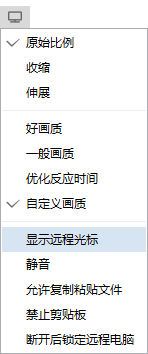
@rustdesk commented on GitHub (Nov 8, 2022):
try out nightly build (Windows) on both side for privacy mode.
@Tchiimy commented on GitHub (Dec 20, 2022):
Hello,
I'm a new user and I wanted to try the privacy mode so I installed the nightly build (windows) on both computers. But I don't see where can I can enable this option ? Is it actually available ?
@fufesou commented on GitHub (Dec 20, 2022):
@Tchiimy

@Tchiimy commented on GitHub (Dec 20, 2022):
Hmmm it seems that I don't have this option available (tested with 2 nighly version of rustdesk in 2 computers, a dell with windows 10 and an asus with windows 11).
I suppose the problem might come from the difference windows 10 / 11 ?
What version do you use ? Did you installed some drivers on your computer ?
Edit : a recent test I did with the firewall deactivated for both computers :
Do you have any ideas about this ?
@fufesou commented on GitHub (Dec 21, 2022):
@Tchiimy I've tested Win11, the provacy mode is supported.
Privacy mode need
Magnificationsupport. Maybe you have multiple screens. Or Magnification is not supported on you system (x86?). BTW, Magnification's api may be removed in the future. We'll consider another privacy mode implemetation.github.com/rustdesk/rustdesk@7f006102b5/src/server/connection.rs (L768)github.com/rustdesk/rustdesk@7f006102b5/src/server/video_service.rs (L76)github.com/rustdesk/rustdesk@7f006102b5/libs/scrap/src/dxgi/mag.rs (L271)github.com/rustdesk/rustdesk@7f006102b5/libs/scrap/src/dxgi/mag.rs (L130)@Tchiimy commented on GitHub (Dec 21, 2022):
I don't know if it's linked but activating the license of W11 seems to have resolved the problem thanks !
@Zhang-0952 commented on GitHub (Jan 16, 2023):
所有终端都有这个隐私屏选项么?
Do all terminals have this privacy screen option?
@fufesou commented on GitHub (Jan 20, 2023):
@Zhang-0952 The remote side should be at lease Win10.
@rustdesk commented on GitHub (Mar 28, 2023):
Some point about this for android (borrowed from srccpy, not sure if depends on adb) https://github.com/rustdesk/rustdesk/pull/3815
@sabxp commented on GitHub (Mar 30, 2023):
It's not depending on adb, it's java code from API setDisplayPowerMode():
passing the display mode as the argument - 0 for screen off and 2 for screen on
@Karbust commented on GitHub (May 24, 2023):
Privacy Mode is not working when connecting from Windows 11 to Windows 10 when using the portable executable.
I haven't tested with the full installation as I don't have admin permissions.
Do I need to make any changes on the remote computer (Windows 10)?
I also tried enabling "RDP Session Sharing", also didn't work.
From iPhone (iOS 16.5) to Windows 10 it works.
@fufesou commented on GitHub (May 24, 2023):
No. It's where we don't do well enough.
PR 4473 will enable privacy mode on the portable version.
@Karbust commented on GitHub (May 24, 2023):
After trying the Nightly version, the option shows up, so I guess it wasn't needed any changes.
I'm assuming it works, I haven't tried being next to the computer... (from iPhone it works, that I already tried)
@fufesou commented on GitHub (May 24, 2023):
Do you mean the Privacy mode works on iPhone -> Windows portable?
I'm confused. But it should not work before PR 4473.
@Karbust commented on GitHub (May 24, 2023):
On both the host and the client I'm running the nightly version: rustdesk-1.2.0-x86_64.exe
https://github.com/rustdesk/rustdesk/releases/tag/nightly
The iPhone worked without any issues on the desktop running the nightly version.
Running the same version on the host and client computers, the client is running in Portable, the host is installed.
@fufesou commented on GitHub (May 24, 2023):
It is the controlled side that causes the failing.
The installed version has this file, while the portable version does not have this file.
@Karbust commented on GitHub (May 24, 2023):
But the Privacy Mode is working on Nightly, and I'm connecting to the host using the Portable. (both computers using Nightly, host is using the installed version).
Not entirely sure what your changes on #4473 are for, I don't know Rust, but so far it's working.
@cxtem commented on GitHub (Jun 29, 2023):
do you have any solution that leaves the android screen black in privacy mode, do I need my clients android to dim while I do support ??
@cxtem commented on GitHub (Jun 29, 2023):
tell me whatsapp +551195928027
@hooligans44 commented on GitHub (Sep 29, 2023):
Its called curtain mode.
@bartquant commented on GitHub (Mar 31, 2025):
@hooligans44 can you explain more? I have enabled privacy mode on the android and macos application but it keeps the screen on.