Read-Only mode with access to dashboard without logging in. #1990

Open
opened 2026-02-28 02:39:24 -05:00 by deekerman · 10 comments
Owner

Originally created by @iTerminate on GitHub (Mar 10, 2023).

⚠️ Please verify that this feature request has NOT been suggested before.

  • I checked and didn't find similar feature request

🏷️ Feature Request Type

UI Feature, Other

🔖 Feature description

New security mode that allows home page of uptime-kuma to navigate to dashboard (not login page) and user cannot add or edit anything. Provide a login popup to allow user to enable editing/admin features (settings page).

✔️ Solution

I want to expose dashboard to users of uptime-kuma but I do not want to provide everyone admin access.

Alternatives

Multi-user support with different permissions. #1322

📝 Additional Context

No response

Originally created by @iTerminate on GitHub (Mar 10, 2023). ### ⚠️ Please verify that this feature request has NOT been suggested before. - [X] I checked and didn't find similar feature request ### 🏷️ Feature Request Type UI Feature, Other ### 🔖 Feature description New security mode that allows home page of uptime-kuma to navigate to dashboard (not login page) and user cannot add or edit anything. Provide a login popup to allow user to enable editing/admin features (settings page). ### ✔️ Solution I want to expose dashboard to users of uptime-kuma but I do not want to provide everyone admin access. ### ❓ Alternatives Multi-user support with different permissions. #1322 ### 📝 Additional Context _No response_
Author
Owner

@Schwoby commented on GitHub (Mar 13, 2023):

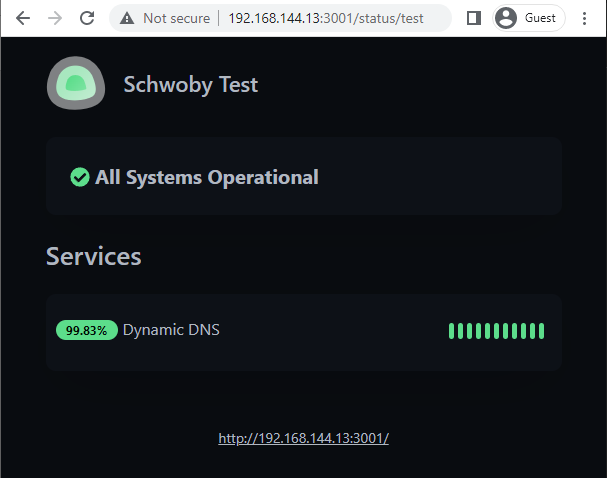
i might be missing something here, but isn't this type of result what the Status Page does? what is the functionality that would be different between sharing a status page (which already does not allow users to add/edit/remove monitors and using the Footer Text area, you can past the link to the login page) vs creating multiple users (from what i can tell hasn't been implemented yet) and then giving them limited access? i've provided an image of how a link listed in the footer to the login page would make a simple point-click option instead of the user having to edit the URL to get to the login page.
image

@Schwoby commented on GitHub (Mar 13, 2023): i might be missing something here, but isn't this type of result what the Status Page does? what is the functionality that would be different between sharing a status page (which already does not allow users to add/edit/remove monitors and using the Footer Text area, you can past the link to the login page) vs creating multiple users (from what i can tell hasn't been implemented yet) and then giving them limited access? i've provided an image of how a link listed in the footer to the login page would make a simple point-click option instead of the user having to edit the URL to get to the login page. ![image](https://user-images.githubusercontent.com/65581397/224634148-17f6e9c6-edf0-44e4-9e45-e984a6c7cbbc.png)
Author
Owner

@iTerminate commented on GitHub (Mar 13, 2023):

@Schwoby Thanks for your reply, I'm aware of status pages and they are helpful but status pages are not what I need. The Dashboard provides much more information than status pages such as Status change history with messages. Access to graphs. Access to all the monitors and tags. Ability to search for a specific monitor. Etc.

@iTerminate commented on GitHub (Mar 13, 2023): @Schwoby Thanks for your reply, I'm aware of status pages and they are helpful but status pages are not what I need. The Dashboard provides much more information than status pages such as Status change history with messages. Access to graphs. Access to all the monitors and tags. Ability to search for a specific monitor. Etc.
Author
Owner

@401U commented on GitHub (Mar 14, 2023):

Emm, maybe what you really want is to add more info on status page, like the graphs, tags, and search box? IMO the dashboard is used for admins only, and the status page is open for everyone.

@401U commented on GitHub (Mar 14, 2023): Emm, maybe what you really want is to add more info on status page, like the graphs, tags, and search box? IMO the dashboard is used for admins only, and the status page is open for everyone.
Author
Owner

@iTerminate commented on GitHub (Mar 14, 2023):

@401U That would work too but I've seen other issues open with this approach that have gotten nowhere. The status pages are simple for a reason. The dashboard access for everyone as a setting is an easy solution since everything is already there and it doesn't require re-implementation on status page. I'm not asking this to be a global change affecting everyone but as an additional security model option.

@iTerminate commented on GitHub (Mar 14, 2023): @401U That would work too but I've seen other issues open with this approach that have gotten nowhere. The status pages are simple for a reason. The dashboard access for everyone as a setting is an easy solution since everything is already there and it doesn't require re-implementation on status page. I'm not asking this to be a global change affecting everyone but as an additional security model option.
Author
Owner

@sampl3x commented on GitHub (Jul 9, 2023):

Im looking for this option to.

@sampl3x commented on GitHub (Jul 9, 2023): Im looking for this option to.
Author
Owner

@CommanderStorm commented on GitHub (Jul 9, 2023):

@iTerminate
Just allowing anybody access to the dashboard is not a great idea.
Punching a hole into the security is something that should not be done unless nessesary.

What you are really requesting is something like https://github.com/louislam/uptime-kuma/issues/637 or other display options (see other open issues)
=> lets fix this properly and not bodge around this issue

@CommanderStorm commented on GitHub (Jul 9, 2023): @iTerminate Just allowing anybody access to the dashboard is not a great idea. Punching a hole into the security is something that should not be done unless nessesary. What you are really requesting is something like https://github.com/louislam/uptime-kuma/issues/637 or other display options (see other open issues) => lets fix this properly and not [bodge around](https://www.youtube.com/watch?v=lIFE7h3m40U) this issue
Author
Owner

@CommanderStorm commented on GitHub (Jul 9, 2023):

@sampl3x
Please refrain from posting +1 / requests for updates things on issues, as this makes issue-management harder.
Issues are for discussing what needs to be done how by whom.
We use 👍🏻 on issues to prioritise work.

@CommanderStorm commented on GitHub (Jul 9, 2023): @sampl3x Please refrain from posting `+1` / requests for updates things on issues, as this makes issue-management harder. Issues are for discussing what needs to be done how by whom. [We use 👍🏻 on issues to prioritise work](https://github.com/louislam/uptime-kuma/issues?q=is%3Aissue+is%3Aopen+sort%3Areactions-%2B1-desc).
Author
Owner

@dimasandreanr commented on GitHub (Nov 2, 2023):

i might be missing something here, but isn't this type of result what the Status Page does? what is the functionality that would be different between sharing a status page (which already does not allow users to add/edit/remove monitors and using the Footer Text area, you can past the link to the login page) vs creating multiple users (from what i can tell hasn't been implemented yet) and then giving them limited access? i've provided an image of how a link listed in the footer to the login page would make a simple point-click option instead of the user having to edit the URL to get to the login page. image

How to?

@dimasandreanr commented on GitHub (Nov 2, 2023): > i might be missing something here, but isn't this type of result what the Status Page does? what is the functionality that would be different between sharing a status page (which already does not allow users to add/edit/remove monitors and using the Footer Text area, you can past the link to the login page) vs creating multiple users (from what i can tell hasn't been implemented yet) and then giving them limited access? i've provided an image of how a link listed in the footer to the login page would make a simple point-click option instead of the user having to edit the URL to get to the login page. ![image](https://user-images.githubusercontent.com/65581397/224634148-17f6e9c6-edf0-44e4-9e45-e984a6c7cbbc.png) How to?
Author
Owner

@mlouguid commented on GitHub (Sep 2, 2025):

i might be missing something here, but isn't this type of result what the Status Page does? what is the functionality that would be different between sharing a status page (which already does not allow users to add/edit/remove monitors and using the Footer Text area, you can past the link to the login page) vs creating multiple users (from what i can tell hasn't been implemented yet) and then giving them limited access? i've provided an image of how a link listed in the footer to the login page would make a simple point-click option instead of the user having to edit the URL to get to the login page. image

how do you make this read-only page? base repo?

@mlouguid commented on GitHub (Sep 2, 2025): > i might be missing something here, but isn't this type of result what the Status Page does? what is the functionality that would be different between sharing a status page (which already does not allow users to add/edit/remove monitors and using the Footer Text area, you can past the link to the login page) vs creating multiple users (from what i can tell hasn't been implemented yet) and then giving them limited access? i've provided an image of how a link listed in the footer to the login page would make a simple point-click option instead of the user having to edit the URL to get to the login page. ![image](https://user-images.githubusercontent.com/65581397/224634148-17f6e9c6-edf0-44e4-9e45-e984a6c7cbbc.png) how do you make this read-only page? base repo?
Author
Owner

@CommanderStorm commented on GitHub (Sep 2, 2025):

You can create status pages by clicking on Status page > new status page

Image
@CommanderStorm commented on GitHub (Sep 2, 2025): You can create status pages by clicking on `Status page` > `new status page` <img width="1209" height="474" alt="Image" src="https://github.com/user-attachments/assets/572131b2-47ce-4b00-8460-d7d9ccec1607" />
Sign in to join this conversation.
No milestone
No project
No assignees
1 participant
Notifications
Due date
The due date is invalid or out of range. Please use the format "yyyy-mm-dd".

No due date set.

Dependencies

No dependencies set.

Reference
starred/uptime-kuma#1990
No description provided.