Ping stopped working with Debian base on Podman #216

Closed
opened 2026-02-28 01:39:01 -05:00 by deekerman · 17 comments
Owner

Originally created by @Eskander on GitHub (Sep 10, 2021).

Is it a duplicate question?
No

Describe the bug
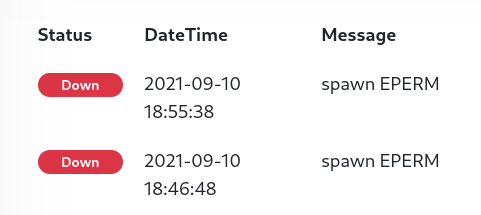
Monitoring using Ping stopped working with error spawn EPERM after pulling latest Docker image 1.6
Public domains like google.com or IP addresses didn't work either.
Reverting back to the Alpine base with uptime-kuma:alpine fixed the issue.
I'm also using HTTP and TCP monitoring and they work as expected.

To Reproduce

services:
  kuma:
    image: louislam/uptime-kuma
    container_name: kuma
    volumes:
      - /containers/uptime-kuma:/app/data:Z

Expected behavior
Monitoring using ping should resolve correctly.

Info

  • Uptime Kuma Version: 1.6 from louislam/uptime-kuma:latest
  • Using Docker?: Podman 3.3
  • OS: Fedora 34 (Server Edition) x86_64
  • Browser: Firefox 92

Screenshots
image

Error Log

Monitor #11 ' Internet': Failing: spawn EPERM | Type: ping
Originally created by @Eskander on GitHub (Sep 10, 2021). **Is it a duplicate question?** No **Describe the bug** Monitoring using Ping stopped working with error `spawn EPERM` after pulling latest Docker image 1.6 Public domains like `google.com` or IP addresses didn't work either. Reverting back to the Alpine base with `uptime-kuma:alpine` fixed the issue. I'm also using HTTP and TCP monitoring and they work as expected. **To Reproduce** ``` services: kuma: image: louislam/uptime-kuma container_name: kuma volumes: - /containers/uptime-kuma:/app/data:Z ``` **Expected behavior** Monitoring using ping should resolve correctly. **Info** - Uptime Kuma Version: 1.6 from `louislam/uptime-kuma:latest` - Using Docker?: **Podman 3.3** - OS: Fedora 34 (Server Edition) x86_64 - Browser: Firefox 92 **Screenshots** ![image](https://user-images.githubusercontent.com/11521400/132898330-27362e87-4021-4100-b210-85f53a63ca0a.png) **Error Log** ``` Monitor #11 ' Internet': Failing: spawn EPERM | Type: ping Monitor #11 ' Internet': Failing: spawn EPERM | Type: ping Monitor #11 ' Internet': Failing: spawn EPERM | Type: ping ```
deekerman 2026-02-28 01:39:01 -05:00
  • closed this issue
  • added the
    bug
    label
Author
Owner

@louislam commented on GitHub (Sep 10, 2021):

Strange, it is working is my side.

image

@louislam commented on GitHub (Sep 10, 2021): Strange, it is working is my side. ![image](https://user-images.githubusercontent.com/1336778/132898729-29e3dd0e-25ff-483a-a255-55a07d871e26.png)
Author
Owner

@louislam commented on GitHub (Sep 10, 2021):

"ping" command is missing in your side, but I don't know why, because we should be using the same docker image.

@louislam commented on GitHub (Sep 10, 2021): "ping" command is missing in your side, but I don't know why, because we should be using the same docker image.
Author
Owner

@Eskander commented on GitHub (Sep 10, 2021):

REPOSITORY                               TAG         IMAGE ID      CREATED       SIZE
docker.io/louislam/uptime-kuma           latest      12b5a5eefa17  8 hours ago   928 MB
@Eskander commented on GitHub (Sep 10, 2021): ``` REPOSITORY TAG IMAGE ID CREATED SIZE docker.io/louislam/uptime-kuma latest 12b5a5eefa17 8 hours ago 928 MB ```
Author
Owner

@thespad commented on GitHub (Sep 10, 2021):

It's probably a selinux issue as you're running fedora. I'd check the selinux logs on the host to see if it's blocking the ping execution.

@thespad commented on GitHub (Sep 10, 2021): It's probably a selinux issue as you're running fedora. I'd check the selinux logs on the host to see if it's blocking the ping execution.
Author
Owner

@Eskander commented on GitHub (Sep 10, 2021):

I also suspected SELinux at first, and set it to permissive but nothing changed. Also that wouldn't explain why Alpine worked but Debian didn't.

It does appear to be a permission issue though:

sudo docker exec -it f376fb4ff154 sh
# ping
sh: 1: ping: Operation not permitted
# 

sudo docker exec -it f376fb4ff154 /bin/bash
root@f376fb4ff154:/# ping 8.8.8.8
bash: /bin/ping: Operation not permitted
root@f376fb4ff154:/# ls -l /bin/ping
-rwxr-xr-x. 1 root root 77432 Feb  2  2021 /bin/ping
@Eskander commented on GitHub (Sep 10, 2021): I also suspected SELinux at first, and set it to permissive but nothing changed. Also that wouldn't explain why Alpine worked but Debian didn't. It does appear to be a permission issue though: ``` sudo docker exec -it f376fb4ff154 sh # ping sh: 1: ping: Operation not permitted # sudo docker exec -it f376fb4ff154 /bin/bash root@f376fb4ff154:/# ping 8.8.8.8 bash: /bin/ping: Operation not permitted root@f376fb4ff154:/# ls -l /bin/ping -rwxr-xr-x. 1 root root 77432 Feb 2 2021 /bin/ping ```
Author
Owner

@thespad commented on GitHub (Sep 10, 2021):

Alpine and Debian ship very different ping binaries, not least because of glibc vs muslc, so it's not that odd for it to work in one but not the other

@thespad commented on GitHub (Sep 10, 2021): Alpine and Debian ship very different ping binaries, not least because of glibc vs muslc, so it's not that odd for it to work in one but not the other
Author
Owner

@louislam commented on GitHub (Sep 10, 2021):

Looks like your issue
https://github.com/mviereck/dockerfile-x11docker-deepin/issues/19

I wanna cry again😂

@louislam commented on GitHub (Sep 10, 2021): Looks like your issue https://github.com/mviereck/dockerfile-x11docker-deepin/issues/19 I wanna cry again😂
Author
Owner

@louislam commented on GitHub (Sep 10, 2021):

I can reproduce the problem with --cap-drop=net_raw

I don't know what to say, but yeah... come on, it is the simplest command ping in linux, how could it fail....

image

@louislam commented on GitHub (Sep 10, 2021): I can reproduce the problem with `--cap-drop=net_raw` I don't know what to say, but yeah... come on, it is the simplest command `ping` in linux, how could it fail.... ![image](https://user-images.githubusercontent.com/1336778/132902329-7882a976-8a87-4609-8ccd-6a4cb5aa4fe0.png)
Author
Owner

@Eskander commented on GitHub (Sep 10, 2021):

Can confirm! the following fixed the issue:

services:
  kuma:
    image: louislam/uptime-kuma
    container_name: kuma
    volumes:
      - /containers/uptime-kuma:/app/data:Z
    cap_add:
      - NET_RAW

I can submit a PR to add it to documentation if required.
I'm still curious about why it worked it Alpine though, how does it bypass the permission..

@Eskander commented on GitHub (Sep 10, 2021): Can confirm! the following fixed the issue: ``` services: kuma: image: louislam/uptime-kuma container_name: kuma volumes: - /containers/uptime-kuma:/app/data:Z cap_add: - NET_RAW ``` I can submit a PR to add it to documentation if required. I'm still curious about why it worked it Alpine though, how does it bypass the permission..
Author
Owner

@louislam commented on GitHub (Sep 10, 2021):

I'm still curious about why it worked it Alpine though, how does it bypass the permission..

If I set cap-drop=net_raw on alpine, it is not working too in my side.

image

Another question is, I actually tested on Ubuntu, Centos 7, AlmaLinux, Oracle Linux. They are working without NET_RAW.

Is it related to Docker version? My docker version is 20.10.8, installed with official guide.

@louislam commented on GitHub (Sep 10, 2021): > I'm still curious about why it worked it Alpine though, how does it bypass the permission.. If I set `cap-drop=net_raw` on alpine, it is not working too in my side. ![image](https://user-images.githubusercontent.com/1336778/132904637-be080343-af1e-495a-b111-2aa6d98283d4.png) Another question is, I actually tested on Ubuntu, Centos 7, AlmaLinux, Oracle Linux. They are working without NET_RAW. Is it related to Docker version? My docker version is 20.10.8, installed with official guide.
Author
Owner

@thespad commented on GitHub (Sep 10, 2021):

NET_RAW is one of the default caps in docker, see here, so you shouldn't need to add it explicitly.

@thespad commented on GitHub (Sep 10, 2021): NET_RAW is one of the default caps in docker, see [here](https://docs.docker.com/engine/reference/run/#runtime-privilege-and-linux-capabilities), so you shouldn't need to add it explicitly.
Author
Owner

@Eskander commented on GitHub (Sep 10, 2021):

Aha my bad! I'm actually using rootful Podman as a docker replacement with podman-docker, I should've mentioned it from the start. It probably comes down to differences in default capabilities.
I edited my original post for whoever ends up in the same situation.

@Eskander commented on GitHub (Sep 10, 2021): Aha my bad! I'm actually using rootful Podman as a docker replacement with `podman-docker`, I should've mentioned it from the start. It probably comes down to differences in default capabilities. I edited my original post for whoever ends up in the same situation.
Author
Owner

@danielo515 commented on GitHub (Mar 9, 2022):

Hey, not sure if I should open a new issue or not.
If I add this option to my docker-compose:

    security_opt:
      - no-new-privileges:true

Ping related checks fails because permissions. Is there any way I can keep that option (for security reasons) but still allow ping? I tried adding cap-add but that doesn't seem to work

@danielo515 commented on GitHub (Mar 9, 2022): Hey, not sure if I should open a new issue or not. If I add this option to my docker-compose: ``` security_opt: - no-new-privileges:true ``` Ping related checks fails because permissions. Is there any way I can keep that option (for security reasons) but still allow ping? I tried adding cap-add but that doesn't seem to work
Author
Owner

@thespad commented on GitHub (Mar 9, 2022):

Unlikely, I expect ping has suid set to enable it to run without you having to run the container as root. No new privs will stop suid from working, by design.

@thespad commented on GitHub (Mar 9, 2022): Unlikely, I expect ping has suid set to enable it to run without you having to run the container as root. No new privs will stop suid from working, by design.
Author
Owner

@danielo515 commented on GitHub (Mar 9, 2022):

Sorry, I don't understand your answer completely. What is unlikely? being able to cap no new privs and being able to execute ping because it uses suid?

@danielo515 commented on GitHub (Mar 9, 2022): Sorry, I don't understand your answer completely. What is unlikely? being able to cap no new privs and being able to execute ping because it uses suid?
Author
Owner

@thespad commented on GitHub (Mar 9, 2022):

It's unlikely that you'll make it work with no-new-privileges:true because that prevents elevation of the account, and if ping has suid set to allow elevation so that a non-root user can run it, then no-new-privileges:true will prevent that from working.

@thespad commented on GitHub (Mar 9, 2022): It's unlikely that you'll make it work with `no-new-privileges:true` because that prevents elevation of the account, and if ping has suid set to allow elevation so that a non-root user can run it, then `no-new-privileges:true` will prevent that from working.
Author
Owner

@Jackbennett commented on GitHub (May 6, 2025):

For some reason updating an older 1.x to 1.23.16 didn't have a problem but moving to v2.0.0-beta.2 triggered this. Adding --cap-add=NET_RAW to my rootless podman exec in the user service unit file sorted out the spawn EPERM.

@Jackbennett commented on GitHub (May 6, 2025): For some reason updating an older 1.x to 1.23.16 didn't have a problem but moving to v2.0.0-beta.2 triggered this. Adding `--cap-add=NET_RAW` to my rootless podman exec in the user service unit file sorted out the spawn EPERM.
Sign in to join this conversation.
No milestone
No project
No assignees
1 participant
Notifications
Due date
The due date is invalid or out of range. Please use the format "yyyy-mm-dd".

No due date set.

Dependencies

No dependencies set.

Reference
starred/uptime-kuma#216
No description provided.