mirror of
https://github.com/louislam/uptime-kuma.git
synced 2026-03-02 22:57:00 -05:00
Label cant't fit in the "pill" margins #326
Labels
No labels
A:accessibility
A:api
A:cert-expiry
A:core
A:dashboard
A:deployment
A:documentation
A:domain expiry
A:incidents
A:maintenance
A:metrics
A:monitor
A:notifications
A:reports
A:settings
A:status-page
A:ui/ux
A:user-management
Stale
ai-slop
blocked
blocked-upstream
bug
cannot-reproduce
dependencies
discussion
duplicate
feature-request
feature-request
good first issue
hacktoberfest
help
help wanted
house keeping
invalid
invalid-format
invalid-format
question
releaseblocker 🚨
security
spam
type:enhance-existing
type:new
wontfix
No milestone
No project
No assignees
1 participant

Notifications
Due date
No due date set.
Dependencies
No dependencies set.
Reference
starred/uptime-kuma#326
Loading…
Add table
Add a link
Reference in a new issue
No description provided.
Delete branch "%!s()"
Deleting a branch is permanent. Although the deleted branch may continue to exist for a short time before it actually gets removed, it CANNOT be undone in most cases. Continue?
Originally created by @MrEddX on GitHub (Oct 5, 2021).
Is it a duplicate question?
Can't find another one, maybe because it is language specific.
Info
Uptime Kuma Version: 1.7.3
Using Docker?: Yes
Docker Version: 20.10.8
OS: Ubuntu 20.04, Windows 10
Browser: Firefox, Chrome
The Problem
On language where the word for "Down" is a bit longer, the text can't fit in the "red pill" margins on the Dashboard.
Visual representation
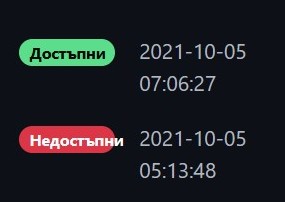
I don't think it's a bug, that's why i put the "help" label.
Questions
bg-BG.jslanguage file? Or,@ImmaZoni commented on GitHub (Oct 6, 2021):
Yes if there is an applicable shorter word to fit in the spot on
bg-BG.jsthis would be an easy fix.To extend the button you will need to modify the source, so you cant use the docker route.
Unofficial Fix Instructions.
uptime-kuma/src/components/Status.vue<template>line to this block of codenpm run setupto recompile everything.node server/server.jsand you should be good to go :)Excuse my super official testing variable name
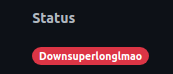
@ImmaZoni commented on GitHub (Oct 6, 2021):
https://github.com/louislam/uptime-kuma/pull/588 Fixes this issue, submitted for you. We will see if @louislam agrees :)