mirror of
https://github.com/louislam/uptime-kuma.git
synced 2026-03-02 22:57:00 -05:00
Coming from Uptime Robot I have a couple suggestions #434
Labels
No labels
A:accessibility
A:api
A:cert-expiry
A:core
A:dashboard
A:deployment
A:documentation
A:domain expiry
A:incidents
A:maintenance
A:metrics
A:monitor
A:notifications
A:reports
A:settings
A:status-page
A:ui/ux
A:user-management
Stale
ai-slop
blocked
blocked-upstream
bug
cannot-reproduce
dependencies
discussion
duplicate
feature-request
feature-request
good first issue
hacktoberfest
help
help wanted
house keeping
invalid
invalid-format
invalid-format
question
releaseblocker 🚨
security
spam
type:enhance-existing
type:new
wontfix
No milestone
No project
No assignees
1 participant

Notifications
Due date
No due date set.
Dependencies
No dependencies set.
Reference
starred/uptime-kuma#434
Loading…
Add table
Add a link
Reference in a new issue
No description provided.
Delete branch "%!s()"
Deleting a branch is permanent. Although the deleted branch may continue to exist for a short time before it actually gets removed, it CANNOT be undone in most cases. Continue?
Originally created by @cien-fuegos on GitHub (Oct 18, 2021).
Is it a duplicate question?
I searched but didn't find anything
Is your feature request related to a problem? Please describe.
More like quality of life than a problem.
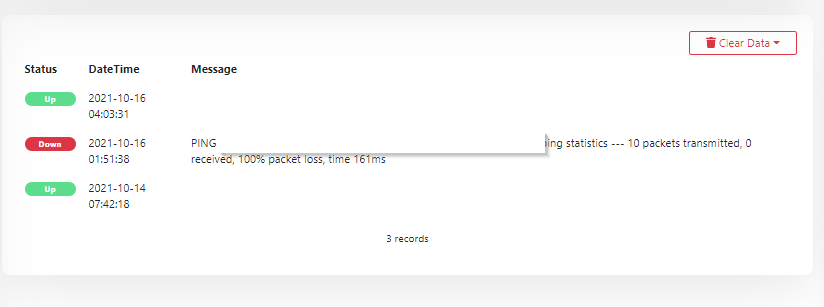
First: I noticed today that whenever I see a monitor it doesn't show me the total time it has been up/down. It tells me the ping lost and then comes up some time later. I'm just used to Uptime Robot that shows the total time it has been up or the total down time.
Second: Whenever an email comes in notifying me of downtime, it shows the UTC and doesn't change for time zone. For example my monitor went down at 01:51 on Uptime Kuma and the email says 06:51. I just know from experience if a customer or client gets that email (we often send emails to them and to our ticketing system) and the time is different, they'll be confused.
Third: This is the most quality of life change I'd like to see...it's just to display the number of down monitors in the tab of the browser.
Fourth: I'd like there to be an option to turn off the email when it comes Up. Since I will be sending emails to a ticketing system...if I get an email whenever it goes down and when it comes up this would create 2 tickets for me instead of just 1.
Describe the solution you'd like
First: I'd like the total downtime or uptime to be added to each event. If a monitor went down for 49 minutes...I'd like that displayed. If it has been up for 12 days 10 hours and 19 minutes I'd like that displayed as well next to the uptime events.
Second: Adjust email time to timezone in the monitors.
Third: I'd like there to be a number displayed in the tab of the browser that shows any down (not paused) monitors that updates every so often (probably every few minutes or every minute?)
Fourth: Radio button or switch to opt in to getting emails for Up events
Describe alternatives you've considered
None
Additional context
@deefdragon commented on GitHub (Oct 19, 2021):
The first and second are items that I have been considering options for in implementing the template engine, as having how long the monitor has been down is a useful metric, and setting time zones on the notification is also very useful. However, I suspect the both of them will be added separately, and not with the template PR itself.
Third is a duplicate of #728
Fourth request is similar to a number of other issues, but referencing specifically #233, where notification options are being centralized.
@louislam commented on GitHub (Oct 19, 2021):
First: Duplicate of #177
Second: Duplicate of #40
Third: Duplicate of #728
Fourth: Duplicate of #508