mirror of
https://github.com/louislam/uptime-kuma.git
synced 2026-03-02 22:57:00 -05:00
SSL error in Uptime-kuma #639
Labels
No labels
A:accessibility
A:api
A:cert-expiry
A:core
A:dashboard
A:deployment
A:documentation
A:domain expiry
A:incidents
A:maintenance
A:metrics
A:monitor
A:notifications
A:reports
A:settings
A:status-page
A:ui/ux
A:user-management
Stale
ai-slop
blocked
blocked-upstream
bug
cannot-reproduce
dependencies
discussion
duplicate
feature-request
feature-request
good first issue
hacktoberfest
help
help wanted
house keeping
invalid
invalid-format
invalid-format
question
releaseblocker 🚨
security
spam
type:enhance-existing
type:new
wontfix
No milestone
No project
No assignees
1 participant

Notifications
Due date
No due date set.
Dependencies
No dependencies set.
Reference
starred/uptime-kuma#639
Loading…
Add table
Add a link
Reference in a new issue
No description provided.
Delete branch "%!s()"
Deleting a branch is permanent. Although the deleted branch may continue to exist for a short time before it actually gets removed, it CANNOT be undone in most cases. Continue?
Originally created by @shardharma on GitHub (Dec 9, 2021).
⚠️ Please verify that this bug has NOT been raised before.
🛡️ Security Policy
📝 Describe your problem
Hi,
We are getting errors while configuring the slack integration for notification, please help.
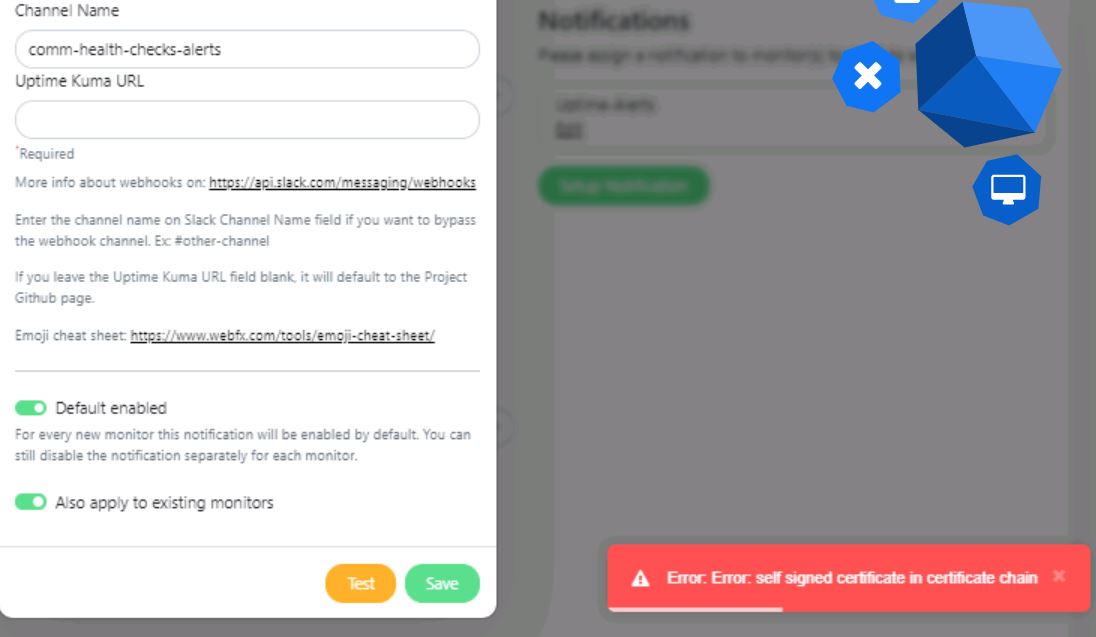
Error- self signed certificate in certificate chain
Attached screenshot for your reference.
🐻 Uptime-Kuma Version
1.6.2
💻 Operating System and Arch
No
🌐 Browser
Chrome
🐋 Docker Version
Docker desktop 2.2.0.5
🟩 NodeJS Version
No
@cruzanstx commented on GitHub (Dec 9, 2021):
I am also having a similar issue with the mattermost notifications. I think we may be able to over come it by adding the CA cert to the image or if we could expose a flag to ignore certificate errors.
@xiazeyu commented on GitHub (Dec 11, 2021):
Hey, I also met the problem, and it is solved by https://github.com/louislam/uptime-kuma/issues/850.
@zafarasyed commented on GitHub (Apr 6, 2022):
There is a much easier way, upon investigating the code I realized that there are two variables and if they are set properly it will automatically default to https.
set the above enviroment variable in your docker compose file also make sure that you have the certificate in the data/certs directory below is the sample example
version: "3.1"
services:
uptime-kuma:
image: louislam/uptime-kuma:1
container_name: UptimeKuma
volumes:
environment:
ports:
restart: unless-stopped
security_opt:
@DaniW42 commented on GitHub (Apr 13, 2022):
Hey @zafarasyed,
I was trying to follow your environment variable hint but didn't had any success. Which certificate needs to go to the container? The one for my uptime-kuma or the intermediate?
@github-actions[bot] commented on GitHub (Sep 23, 2022):
We are clearing up our old issues and your ticket has been open for 3 months with no activity. Remove stale label or comment or this will be closed in 2 days.
@github-actions[bot] commented on GitHub (Sep 25, 2022):
This issue was closed because it has been stalled for 2 days with no activity.