mirror of
https://github.com/go-vikunja/vikunja.git
synced 2026-03-03 00:46:57 -05:00
Render image attachments on card (kanban view) #50
Labels
No labels
area/api
area/caldav
area/filters
area/frontend
area/gantt
area/internal-code
area/typesense
bug
changes requested
confirmed
dependencies
enhancement
good first issue
help wanted
kind/bug
kind/feature
needs reproduction
question
security
support
upstream issue
waiting for reply
wontfix
No milestone
No project
No assignees
1 participant

Notifications
Due date
No due date set.
Dependencies
No dependencies set.
Reference
starred/vikunja-go-vikunja#50
Loading…
Add table
Add a link
Reference in a new issue
No description provided.
Delete branch "%!s()"
Deleting a branch is permanent. Although the deleted branch may continue to exist for a short time before it actually gets removed, it CANNOT be undone in most cases. Continue?
Originally created by @throwabird on GitHub (May 24, 2022).
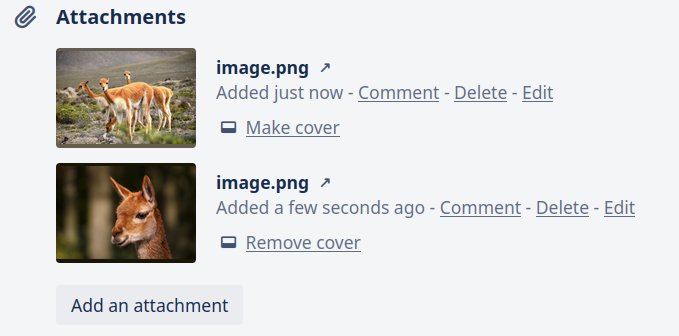
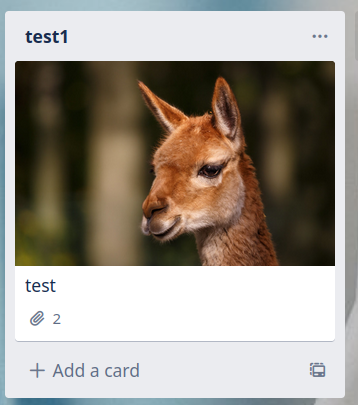
I think it would be nice to have the attachments render on the card view of the kanban board (similar to trello).
To decide which of the attachments is chosen the user should probably be able to "make primary" an image or something simmilar.
This would also allow uploading attachments without this feature and wouldn't change the behavior for users not interested in this feature.
@kolaente commented on GitHub (May 27, 2022):
How would that work? Uploading an attachment and then being able to select it as the header? Or selecting a title image separately (the way trello does it)?
@throwabird commented on GitHub (May 27, 2022):
I mean being able to select a cover image (as trello calls it) or header (as you called it) from the attachments. AFAIK trello does it like that aswell, you just choose a cover from your attachments and don't need to upload a cover separately.
@kolaente commented on GitHub (May 27, 2022):
Awesome, thanks for the explanation. I've added this to the backlog.
@dpschen commented on GitHub (Sep 21, 2022):
Love the visualisation! :)
@dpschen commented on GitHub (Oct 5, 2022):
This was implemented in https://kolaente.dev/vikunja/frontend/pulls/2460
Looking at the inspiration images above:
We are still missing an inline preview for attached images.
@kolaente: Would you consider this a new ticket?
@kolaente commented on GitHub (Oct 5, 2022):
@dpschen Yeah inline preview is a new task.
@dpschen commented on GitHub (Oct 5, 2022):
Ticket in backlog: https://my.vikunja.cloud/tasks/16628