mirror of
https://github.com/ytdl-org/youtube-dl.git
synced 2026-03-02 23:07:04 -05:00
Updating in Windows using -U or --update switch results in cmd crash #11234
Open
opened 2026-02-21 04:35:20 -05:00 by deekerman
·
6 comments
No Branch/Tag specified
master
pull/30733/head
gh-pages
df-fmt-ext-patch
dlp-fifa-backport
df-test-cleanup
pull/29816/head
download-server
totalwebcasting
rtmp_test
2024.07.11-nightly
2021.12.17
2021.06.06
2021.05.16
2021.04.26
2021.04.17
2021.04.07
2021.04.01
2021.03.31
2021.03.25
2021.03.14
2021.03.03
2021.03.02
2021.02.22
2021.02.10
2021.02.04.1
2021.02.04
2021.01.24.1
2021.01.24
2021.01.16
2021.01.08
2021.01.03
2020.12.31
2020.12.29
2020.12.26
2020.12.22
2020.12.14
2020.12.12
2020.12.09
2020.12.07
2020.12.05
2020.12.02
2020.11.29
2020.11.26
2020.11.24
2020.11.21.1
2020.11.21
2020.11.19
2020.11.18
2020.11.17
2020.11.12
2020.11.01.1
2020.11.01
2020.09.20
2020.09.14
2020.09.06
2020.07.28
2020.06.16.1
2020.06.16
2020.06.06
2020.05.29
2020.05.08
2020.05.03
2020.03.24
2020.03.08
2020.03.06
2020.03.01
2020.02.16
2020.01.24
2020.01.15
2020.01.01
2019.12.25
2019.11.28
2019.11.22
2019.11.05
2019.10.29
2019.10.22
2019.10.16
2019.09.28
2019.09.12.1
2019.09.12
2019.09.01
2019.08.13
2019.08.02
2019.07.30
2019.07.27
2019.07.16
2019.07.14
2019.07.12
2019.07.02
2019.06.27
2019.06.21
2019.06.08
2019.05.20
2019.05.11
2019.04.30
2019.04.24
2019.04.17
2019.04.07
2019.04.01
2019.03.18
2019.03.09
2019.03.01
2019.02.18
2019.02.08
2019.01.30.1
2019.01.30
2019.01.27
2019.01.24
2019.01.23
2019.01.17
2019.01.16
2019.01.10
2019.01.02
2018.12.31
2018.12.17
2018.12.09
2018.12.03
2018.11.23
2018.11.18
2018.11.07
2018.11.03
2018.10.29
2018.10.05
2018.09.26
2018.09.18
2018.09.10
2018.09.08
2018.09.01
2018.08.28
2018.08.22
2018.08.04
2018.07.29
2018.07.21
2018.07.10
2018.07.04
2018.06.25
2018.06.19
2018.06.18
2018.06.14
2018.06.11
2018.06.04
2018.06.02
2018.05.30
2018.05.26
2018.05.18
2018.05.09
2018.05.01
2018.04.25
2018.04.16
2018.04.09
2018.04.03
2018.03.26.1
2018.03.26
2018.03.20
2018.03.14
2018.03.10
2018.03.03
2018.02.26
2018.02.25
2018.02.22
2018.02.11
2018.02.08
2018.02.04
2018.02.03
2018.01.27
2018.01.21
2018.01.18
2018.01.14
2018.01.07
2017.12.31
2017.12.28
2017.12.23
2017.12.14
2017.12.10
2017.12.02
2017.11.26
2017.11.15
2017.11.06
2017.10.29
2017.10.20
2017.10.15.1
2017.10.15
2017.10.12
2017.10.07
2017.10.01
2017.09.24
2017.09.15
2017.09.11
2017.09.10
2017.09.02
2017.08.27.1
2017.08.27
2017.08.23
2017.08.18
2017.08.13
2017.08.09
2017.08.06
2017.07.30.1
2017.07.23
2017.07.15
2017.07.09
2017.07.02
2017.06.25
2017.06.23
2017.06.18
2017.06.12
2017.06.05
2017.05.29
2017.05.26
2017.05.23
2017.05.18.1
2017.05.18
2017.05.14
2017.05.09
2017.05.07
2017.05.01
2017.04.28
2017.04.26
2017.04.17
2017.04.16
2017.04.15
2017.04.14
2017.04.11
2017.04.09
2017.04.03
2017.04.02
2017.03.26
2017.03.24
2017.03.22
2017.03.20
2017.03.16
2017.03.15
2017.03.10
2017.03.07
2017.03.06
2017.03.05
2017.03.02
2017.02.28
2017.02.27
2017.02.24.1
2017.02.24
2017.02.22
2017.02.21
2017.02.17
2017.02.16
2017.02.14
2017.02.11
2017.02.10
2017.02.07
2017.02.04.1
2017.02.04
2017.02.01
2017.01.31
2017.01.29
2017.01.28
2017.01.25
2017.01.24
2017.01.22
2017.01.18
2017.01.16
2017.01.14
2017.01.10
2017.01.08
2017.01.05
2017.01.02
2016.12.31
2016.12.22
2016.12.20
2016.12.18
2016.12.15
2016.12.12
2016.12.09
2016.12.01
2016.11.27
2016.11.22
2016.11.18
2016.11.14.1
2016.11.14
2016.11.08.1
2016.11.08
2016.11.04
2016.11.02
2016.10.31
2016.10.30
2016.10.26
2016.10.25
2016.10.21.1
2016.10.21
2016.10.19
2016.10.16
2016.10.12
2016.10.07
2016.10.02
2016.09.27
2016.09.24
2016.09.19
2016.09.18
2016.09.15
2016.09.11.1
2016.09.11
2016.09.08
2016.09.04.1
2016.09.04
2016.09.03
2016.08.31
2016.08.28
2016.08.24.1
2016.08.24
2016.08.22
2016.08.19
2016.08.17
2016.08.13
2016.08.12
2016.08.10
2016.08.07
2016.08.06
2016.08.01
2016.07.30
2016.07.28
2016.07.26.2
2016.07.26.1
2016.07.26
2016.07.24
2016.07.22
2016.07.17
2016.07.16
2016.07.13
2016.07.11
2016.07.09.2
2016.07.09.1
2016.07.09
2016.07.07
2016.07.06
2016.07.05
2016.07.03.1
2016.07.03
2016.07.02
2016.07.01
2016.06.30
2016.06.27
2016.06.26
2016.06.25
2016.06.23.1
2016.06.23
2016.06.22
2016.06.20
2016.06.19.1
2016.06.19
2016.06.18.1
2016.06.18
2016.06.16
2016.06.14
2016.06.12
2016.06.11.3
2016.06.11.2
2016.06.11.1
2016.06.11
2016.06.05
2016.06.04
2016.06.03_tmp
2016.06.03
2016.06.02
2016.05.30.2
2016.05.30.1
2016.05.30
2016.05.21.2
2016.05.21.1
2016.05.21
2016.05.16
2016.05.10
2016.05.01
2016.04.24
2016.04.19
2016.04.13
2016.04.06
2016.04.05
2016.04.01
2016.03.27
2016.03.26
2016.03.25
2016.03.18
2016.03.14
2016.03.06
2016.03.01
2016.02.27
2016.02.22
2016.02.13
2016.02.10
2016.02.09.1
2016.02.09
2016.02.05.1
2016.02.05
2016.02.04
2016.02.01
2016.01.31
2016.01.29
2016.01.27
2016.01.23
2016.01.15
2016.01.14
2016.01.09
2016.01.01
2015.12.31
2015.12.29
2015.12.23
2015.12.21
2015.12.18
2015.12.13
2015.12.10
2015.12.09
2015.12.06
2015.12.05
2015.11.27.1
2015.11.27
2015.11.24
2015.11.23
2015.11.21
2015.11.19
2015.11.18
2015.11.15
2015.11.13
2015.11.10
2015.11.02
2015.11.01
2015.10.24
2015.10.23
2015.10.18
2015.10.16
2015.10.13
2015.10.12
2015.10.09
2015.10.06.2
2015.10.06.1
2015.10.06
2015.09.28
2015.09.22
2015.09.09
2015.09.03
2015.08.28
2015.08.23
2015.08.16.1
2015.08.16
2015.08.09
2015.08.06.1
2015.08.06
2015.07.28
2015.07.21
2015.07.18
2015.07.07
2015.07.04
2015.06.25
2015.06.15
2015.06.04.1
2015.06.04
2015.05.29
2015.05.20
2015.05.15
2015.05.10
2015.05.04
2015.05.03
2015.04.28
2015.04.26
2015.04.17
2015.04.09
2015.04.03
2015.03.28
2015.03.24
2015.03.18
2015.03.15
2015.03.09
2015.03.03.1
2015.03.03
2015.02.28
2015.02.26.2
2015.02.26.1
2015.02.26
2015.02.24.2
2015.02.24.1
2015.02.24
2015.02.23.1
2015.02.23
2015.02.21
2015.02.20
2015.02.19.3
2015.02.19.2
2015.02.19.1
2015.02.19
2015.02.18.1
2015.02.18
2015.02.17.2
2015.02.17.1
2015.02.17
2015.02.16.1
2015.02.16
2015.02.11
2015.02.10.5
2015.02.10.4
2015.02.10.3
2015.02.10.2
2015.02.10.1
2015.02.10
2015.02.09.3
2015.02.09.2
2015.02.09.1
2015.02.09
2015.02.08
2015.02.06
2015.02.04
2015.02.03.1
2015.02.03
2015.02.02.5
2015.02.02.4
2015.02.02.3
2015.02.02.2
2015.02.02.1
2015.02.02
2015.02.01
2015.01.30.2
2015.01.30.1
2015.01.30
2015.01.25
2015.01.23.4
2015.01.23.3
2015.01.23.2
2015.01.23.1
2015.01.23
2015.01.22
2015.01.16
2015.01.15.1
2015.01.15
2015.01.11
2015.01.10.2
2015.01.10.1
2015.01.10
2015.01.09.2
2015.01.09.1
2015.01.09
2015.01.08
2015.01.07.2
2015.01.07.1
2015.01.07
2015.01.05.1
2015.01.05
2015.01.04
2015.01.03
2015.01.02
2015.01.01
2014.12.17.2
2014.12.17.1
2014.12.17
2014.12.16.2
2014.12.16.1
2014.12.16
2014.12.15
2014.12.14
2014.12.13.1
2014.12.13
2014.12.12.7
2014.12.12.6
2014.12.12.5
2014.12.12.4
2014.12.12.3
2014.12.12.2
2014.12.12.1
2014.12.12
2014.12.11
2014.12.10.3
2014.12.10.2
2014.12.10.1
2014.12.10
2014.12.06.1
2014.12.06
2014.12.04.2
2014.12.04.1
2014.12.04
2014.12.03
2014.12.01
2014.11.27
2014.11.26.4
2014.11.26.3
2014.11.26.2
2014.11.26.1
2014.11.26
2014.11.25.1
2014.11.25
2014.11.24
2014.11.23.1
2014.11.23
2014.11.21.1
2014.11.21
2014.11.20.1
2014.11.20
2014.11.16
2014.11.15.1
2014.11.15
2014.11.14
2014.11.13.3
2014.11.13.2
2014.11.13.1
2014.11.13
2014.11.12.1
2014.11.12
2014.11.09
2014.11.04
2014.11.02.1
2014.11.02
2014.10.30
2014.10.29
2014.10.27
2014.10.26.2
2014.10.26.1
2014.10.26
2014.10.25
2014.10.24
2014.10.23
2014.10.18
2014.10.15
2014.10.13
2014.10.12
2014.10.05.2
2014.10.05.1
2014.10.05
2014.10.02
2014.09.29.2
2014.09.29.1
2014.09.29
2014.09.28.1
2014.09.28
2014.09.25
2014.09.24.1
2014.09.24
2014.09.22.1
2014.09.22
2014.09.19
2014.09.18
2014.09.16.1
2014.09.16
2014.09.15.1
2014.09.15
2014.09.14.3
2014.09.14.2
2014.09.14.1
2014.09.14
2014.09.12
2014.09.10.1
2014.09.10
2014.09.06
2014.09.04.3
2014.09.04.2
2014.09.04.1
2014.09.04
2014.09.01.2
2014.09.01.1
2014.09.01
2014.08.29
2014.08.28.2
2014.08.28.1
2014.08.28
2014.08.27.1
2014.08.27
2014.08.26
2014.08.25.3
2014.08.25.2
2014.08.25.1
2014.08.25
2014.08.24.6
2014.08.24.5
2014.08.24.4
2014.08.24.3
2014.08.24.2
2014.08.24.1
2014.08.24
2014.08.23
2014.08.22.3
2014.08.22.2
2014.08.22.1
2014.08.22
2014.08.21.3
2014.08.21.2
2014.08.21.1
2014.08.21
2014.08.10
2014.08.05
2014.08.02.1
2014.08.02
2014.07.30
2014.07.25.1
2014.07.25
2014.07.24
2014.07.23.2
2014.07.23.1
2014.07.23
2014.07.22
2014.07.21
2014.07.20.2
2014.07.20.1
2014.07.20
2014.07.15
2014.07.11.3
2014.07.11.2
2014.07.11.1
2014.07.11
2014.07.10
2014.06.26
2014.06.25
2014.06.24.1
2014.06.24
2014.06.19
2014.06.16
2014.06.09
2014.06.07
2014.06.04
2014.06.02
2014.05.31.4
2014.05.31.3
2014.05.31.2
2014.05.31.1
2014.05.31
2014.05.30.1
2014.05.30
2014.05.19
2014.05.17
2014.05.16.1
2014.05.16
2014.05.13
2014.05.12
2014.05.05
2014.04.30.1
2014.04.30
2014.04.21.6
2014.04.21.5
2014.04.21.4
2014.04.21.3
2014.04.21.2
2014.04.21.1
2014.04.21
2014.04.19
2014.04.13
2014.04.11.2
2014.04.11.1
2014.04.11
2014.04.07.4
2014.04.07.3
2014.04.07.2
2014.04.07.1
2014.04.07
2014.04.04.7
2014.04.04.6
2014.04.04.5
2014.04.04.4
2014.04.04.2
2014.04.04.3
2014.04.04.1
2014.04.04
2014.04.03.3
2014.04.03.2
2014.04.03.1
2014.04.03
2014.04.02
2014.04.01.3
2014.04.01.2
2014.04.01.1
2014.04.01
2014.03.30.1
2014.03.30
2014.03.29
2014.03.28
2014.03.27.1
2014.03.27
2014.03.25.1
2014.03.25
2014.03.24.5
2014.03.24.4
2014.03.24.3
2014.03.24.2
2014.03.24.1
2014.03.24
2013.03.24.2
2013.03.24.1
2013.03.24
2014.03.23
2014.03.21.5
2014.03.21.4
2014.03.21.3
2014.03.21.2
2014.03.21.1
2014.03.21
2014.03.20
2014.03.18.1
2014.03.18
2014.03.17
2014.03.12
2014.03.11
2014.03.10
2014.03.07.1
2014.03.07
2014.03.06
2014.03.04.2
2014.03.04.1
2014.03.04
2014.03.03
2014.02.28
2014.02.27.1
2014.02.27
2014.02.26
2014.02.25.1
2014.02.25
2014.02.24
2014.02.22.1
2014.02.22
2014.02.21.1
2014.02.21
2014.02.20
2014.02.19.1
2014.02.19
2014.02.17
2014.02.13
2014.02.10
2014.02.08.2
2014.02.08.1
2014.02.08
2014.02.06.3
2014.02.06.2
2014.02.06.1
2014.02.06
2014.02.05
2014.02.04.1
2014.02.04
2014.02.03.1
2014.02.03
2014.01.30.2
2014.01.30.1
2014.01.30
2014.01.29
2014.01.28.1
2014.01.28
2014.01.27.2
2014.01.27.1
2014.01.27
2014.01.23.4
2014.01.23.3
2014.01.23.2
2014.01.23.1
2014.01.23
2014.01.22.5
2014.01.22.4
2014.01.22.3
2014.01.22.2
2014.01.22.1
2014.01.22
2014.01.21.1
2014.01.21
2014.01.20
2014.01.17.2
2013.01.17.1
2013.01.17
2014.01.08
2014.01.07.5
2014.01.07.4
2014.01.07.3
2014.01.07.2
2014.01.07.1
2014.01.07
2014.01.06.1
2014.01.06
2014.01.05.6
2014.01.05.5
2014.01.05.4
2014.01.05.3
2014.01.05.1
2014.01.05
2014.01.03
2013.12.26
2013.12.23.4
2013.12.23.3
2013.12.23.2
2013.12.23.1
2013.12.23
2013.12.20
2013.12.17.2
2013.12.17.1
2013.12.17
2013.12.16.7
2013.12.16.6
2013.12.16.5
2013.12.16.4
2013.12.16.3
2013.12.16.2
2013.12.16.1
2013.12.16
2013.12.11.2
2013.12.11.1
2013.12.11
2013.12.10
2013.12.09.4
2013.12.09.3
2013.12.09.2
2013.12.09.1
2013.12.09
2013.12.08.1
2013.12.08
2013.12.04
2013.12.03
2013.12.02
2013.11.29
2013.11.28.1
2013.11.28
2013.11.26
2013.11.25.3
2013.11.25.2
2013.11.25.1
2013.11.25
2013.11.24.1
2013.11.24
2013.11.22.2
2013.11.22.1
2013.11.22
2013.11.21
2013.11.20
2013.11.19
2013.11.18.1
2013.11.18
2013.11.17
2013.11.15.1
2013.11.15
2013.11.13
2013.11.11
2013.11.07
2013.11.06.1
2013.11.06
2013.11.03
2013.11.02
2013.10.30
2013.10.29
2013.10.28
2013.10.23.2
2013.10.23.1
2013.10.23
2013.10.22
2013.10.18.2
2013.10.18.1
2013.10.18
2013.10.17
2013.10.15
2013.10.09
2013.10.07
2013.10.06
2013.10.04
2013.10.01.1
2013.10.01
2013.09.29
2013.09.24.2
2013.09.24.1
2013.09.24
2013.09.20.1
2013.09.20
2013.09.17
2013.09.16
2013.09.12
2013.11.09
2013.09.10
2013.09.07
2013.09.06.1
2013.09.06
2013.09.05
2013.09.04
2013.08.30
2013.08.29
2013.08.28.1
2013.08.28
2013.08.27
2013.08.23
2013.08.22
2013.08.21
2013.08.17
2013.08.15
2013.08.14
2013.08.09
2013.08.08.1
2013.08.08
2013.08.02
2013.07.31
2013.07.25.2
2013.07.25.1
2013.07.25
2013.07.24.2
2013.07.24.1
2013.07.24
2013.07.23.1
2013.07.23
2013.07.19
2013.07.18
2013.07.17.1
2013.07.17
2013.07.12
2013.07.11
2013.07.10
2013.07.08.1
2013.07.08
2013.07.07.01
2013.07.07
2013.07.05
2013.07.04
2013.07.02
2013.06.34.4
2013.06.34.3
2013.06.34.2
2013.06.34.1
2013.06.34
2013.06.33
2013.06.32
2013.06.31
2013.06.30
2013.06.29
2013.06.28
2013.06.27
2013.06.26
2013.06.25
2013.06.23
2013.06.21
2013.05.23
2013.05.14
2013.05.13
2013.05.10
2013.05.07
2013.05.06
2013.05.05
2013.05.04
2013.05.01
2013.04.31
2013.04.30
2013.04.28
2013.04.27
2013.04.22
2013.04.21
2013.04.18
2013.04.11
2013.04.03
2013.03.29
2013.02.25
2013.02.22
2012.02.22
2013.02.19
2013.02.18
2013.02.02
2013.02.01
2013.01.28
2013.01.27
2013.01.13
2013.01.12
2012.12.99
2013.01.11
2013.01.08
2013.01.06
2013.01.02
2012.12.11
2012.11.29
2012.11.28
2012.11.27
2012.11.17
2012.10.09
2012.09.27
2012.02.27
2012.02.26
2012.01.08b
2012.01.08
2012.01.05
2011.12.18
2011.12.15
2011.12.08
2011.11.23
2011.11.22
2011.11.21
2011.10.19
2011.09.30
2011.09.27
2011.09.18c
2011.09.18b
2011.09.18
2011.09.17
2011.09.16
2011.09.15
2011.09.14
2011.09.13
2011.08.04
2011.03.29
2011.02.25c
2011.02.25b
2011.02.25
2011.01.30
2010.12.09
2010.11.19
2010.10.24
2010.10.03
2010.08.04
2010.07.24
2010.07.22
2010.07.14
2010.06.06
2010.04.04
2010.04.03
2010.04.02
2010.03.13
2010.03.07
2010.02.13
2010.01.19
2010.01.06
2010.01.05
2009.12.26
2009.09.13
2009.09.08
2009.08.08
2009.06.29
2009.05.30
2009.05.25
2009.05.23
2009.05.13
2009.05.11
2009.04.25
2009.04.06
2009.03.28
2009.03.03
2009.02.07
2009.01.31
2008.11.01
2008.10.16
2008.09.20
2008.08.09
2008.07.22
Labels
Clear labels
DRM
Good first issue
account-needed
broken-IE
bug
build/update
cant-reproduce
clarification-needed
documentation
duplicate
external-bugs
fixed
geo-restricted
gh-pages
help-wanted
hls
incomplete
invalid
linux
mpd
not-a-bug
nsfw
offtopic
out-of-scope
outdated-version
patch-available
pending-fixes
php
postprocessors
question
regression
request
request
site-support-request
site-update-request
spam
subtitles
test-needed
tv-provider-account-needed
windows
won't fix
yt-dlp
No labels
DRM
Good first issue
account-needed
broken-IE
bug
build/update
cant-reproduce
clarification-needed
documentation
duplicate
external-bugs
fixed
geo-restricted
gh-pages
help-wanted
hls
incomplete
invalid
linux
mpd
not-a-bug
nsfw
offtopic
out-of-scope
outdated-version
patch-available
pending-fixes
php
postprocessors
question
regression
request
request
site-support-request
site-update-request
spam
subtitles
test-needed
tv-provider-account-needed
windows
won't fix
yt-dlp
Milestone
Clear milestone
No items
No milestone
Projects
Clear projects
No items
No project
Assignees
Clear assignees
No assignees
1 participant

Notifications
Due date
The due date is invalid or out of range. Please use the format "yyyy-mm-dd".
No due date set.
Dependencies
No dependencies set.
Reference
starred/youtube-dl#11234
Loading…
Add table
Add a link
Reference in a new issue
No description provided.
Delete branch "%!s()"
Deleting a branch is permanent. Although the deleted branch may continue to exist for a short time before it actually gets removed, it CANNOT be undone in most cases. Continue?
Originally created by @xCONFLiCTiONx on GitHub (Jul 9, 2017).
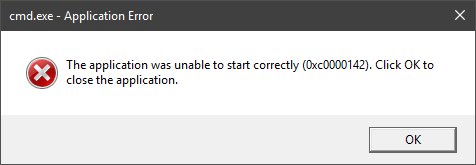
Updating in windows causes cmd to crash and I believe the problem is in the batch file code.
`
@echo off
echo Waiting for file handle to be closed ...
ping 127.0.0.1 -n 5 -w 1000 > NUL
move /Y "C:\Michael Hall\Workspace\Development\Old Projects\MediaDownloader\MediaDownloader\bin\Release\youtube-dl.exe.new" "C:\Michael Hall\Workspace\Development\Old Projects\MediaDownloader\MediaDownloader\bin\Release\youtube-dl.exe" > NUL
echo Updated youtube-dl to version 2017.07.09.
start /b "" cmd /c del "%~f0"&exit /b"
`
Should not the last line have 2 & and spaces? Eg. start /b "" cmd /c del "%~f0" && exit /b" or even better:
start /b "" cmd /c del "%~f0"
exit
Honestly I don't know but it gets stuck in cmd window and throws an error if using C# for example for standard output;
@dstftw commented on GitHub (Jul 9, 2017):
No, it should not.
@siddht4 commented on GitHub (Jul 10, 2017):
Try this one once.Copy your executable to any folder residing in any other drive other than C. eg : In d: drive. paste youtube-dl.exe there. copy this into bat file
@echo off youtube-dl.exe -Uto update. Then try to download something. Try this@echo off youtube-dl [url]. Please provide did these two succed.The first should update the youtube-dl.exe and close itself. The other should download some video which you provided instead of [url] and close itself.Anything other than these is a windows issue
@xCONFLiCTiONx commented on GitHub (Jul 10, 2017):
I cant seem to narrow it down to where the problem is and I made a workaround for my application...
@siddht4 commented on GitHub (Jul 12, 2017):
@mikeyhalla If the problem was fixed with a workaround you can help others who may have similar or same issue.
If you simply put these in your batch file,cmd would run,read the script,update youtube-dl and exit itself
the script being
@echo off youtube-dl.exe -UIf the script is not being called then either you dont have youtube-dl.exe in the path where the batch file is present or their is cmd restriction in your active directory.Which can done via invoking c:\windows\system32\cmd.exe.
By the way the error code is likely due to these issues. http://www.techsupportforum.com/forums/f10/solved-error-0xc0000142-178253.html
@xCONFLiCTiONx commented on GitHub (Jul 12, 2017):
Yeah, thx but I tried pretty much everything to fix it and since I don't code in Python then I can't test youtube-dl. But just to let you know it only happens when the batch file is created for replacing the file.
My workaround was to create another exe that runs the update and ends before the update is finished so no error is even acknowledged.
I suggest the dev take a close look at this issue. I am pretty wise about my computer and this is the only program giving me problems. Bugs happen whether it be in youtube-dl or mine. I cant find it in mine so I just did the workaround.
@siddht4 commented on GitHub (Jul 12, 2017):
okay but as I am a developer,not here though.If you have python 2.7 installed try this one once.Open this in browser or any dowonload manager https://yt-dl.org/downloads/latest/youtube-dl.You will find a 1.5 MB youtube-dl file.As soon as it downloads run cmd and type the command "python youtube-dl".If it works its ok so far.Then in the file add .zip extension and unzip it via winzip or winrar or any utlitiy. The folder structure will have
Navigate to this folder using cd,and once its reaches.Try this in terminal "python main.py ".If it works then write a batch script here that would contain these codes for now.
@echo off python __main__.py set /p DUMMY=Hit ENTER to continue.... Run the batch script and tell which part had the issue.