Question: reverse lookup client names for IPV6 addresses #2643

Closed
opened 2026-03-04 02:10:23 -05:00 by deekerman · 15 comments
Owner

Originally created by @ghost on GitHub (Apr 12, 2021).

Have a question or an idea? Please search it on our forum to make sure it was not yet asked. If you cannot find what you had in mind, please submit it here.

Prerequisites

  • [ x] I am running the latest version
  • [x ] I checked the documentation and found no answer

Problem Description

client names are not displayed in the dashboard for IPV6 addresses

Proposed Solution

I would like to have client names in the dashboard for IPV4 and IPV6 addresses.

Additional Information

AFAIK there is no hint in the wiki how to solve this.

Originally created by @ghost on GitHub (Apr 12, 2021). Have a question or an idea? Please search it [on our forum](https://github.com/AdguardTeam/AdGuardHome/discussions) to make sure it was not yet asked. If you cannot find what you had in mind, please [submit it here](https://github.com/AdguardTeam/AdGuardHome/discussions/new). ### Prerequisites - [ x] I am running the latest version - [x ] I checked the documentation and found no answer ### Problem Description client names are not displayed in the dashboard for **IPV6** addresses ### Proposed Solution I would like to have client names in the dashboard for **IPV4** and **IPV6** addresses. ### Additional Information AFAIK there is no hint in the wiki how to solve this.
deekerman 2026-03-04 02:10:23 -05:00
  • closed this issue
  • added the
    duplicate
    label
Author
Owner

@ainar-g commented on GitHub (Apr 12, 2021):

Duplicate of #1868?

@ainar-g commented on GitHub (Apr 12, 2021): Duplicate of #1868?
Author
Owner

@ghost commented on GitHub (Apr 12, 2021):

Yes, i did not find this topic.
Any idea when this will be solved?
thx

@ghost commented on GitHub (Apr 12, 2021): Yes, i did not find this topic. Any idea when this will be solved? thx
Author
Owner

@ainar-g commented on GitHub (Apr 12, 2021):

Not precisely, but I'll ask my colleagues to bump that task in the queue.

@ainar-g commented on GitHub (Apr 12, 2021): Not precisely, but I'll ask my colleagues to bump that task in the queue.
Author
Owner

@ghost commented on GitHub (Apr 13, 2021):

Thank you.
I know you can solve this, pi-hole developers have done this too, but you are better ;)

@ghost commented on GitHub (Apr 13, 2021): Thank you. I know you can solve this, pi-hole developers have done this too, but you are better ;)
Author
Owner

@EugeneOne1 commented on GitHub (Apr 13, 2021):

It seems to be fixed in the latest edge snapshots. Could you please check if rDNS works properly there?

@EugeneOne1 commented on GitHub (Apr 13, 2021): It seems to be fixed in the latest edge snapshots. Could you please check if rDNS works properly there?
Author
Owner

@ghost commented on GitHub (Apr 13, 2021):

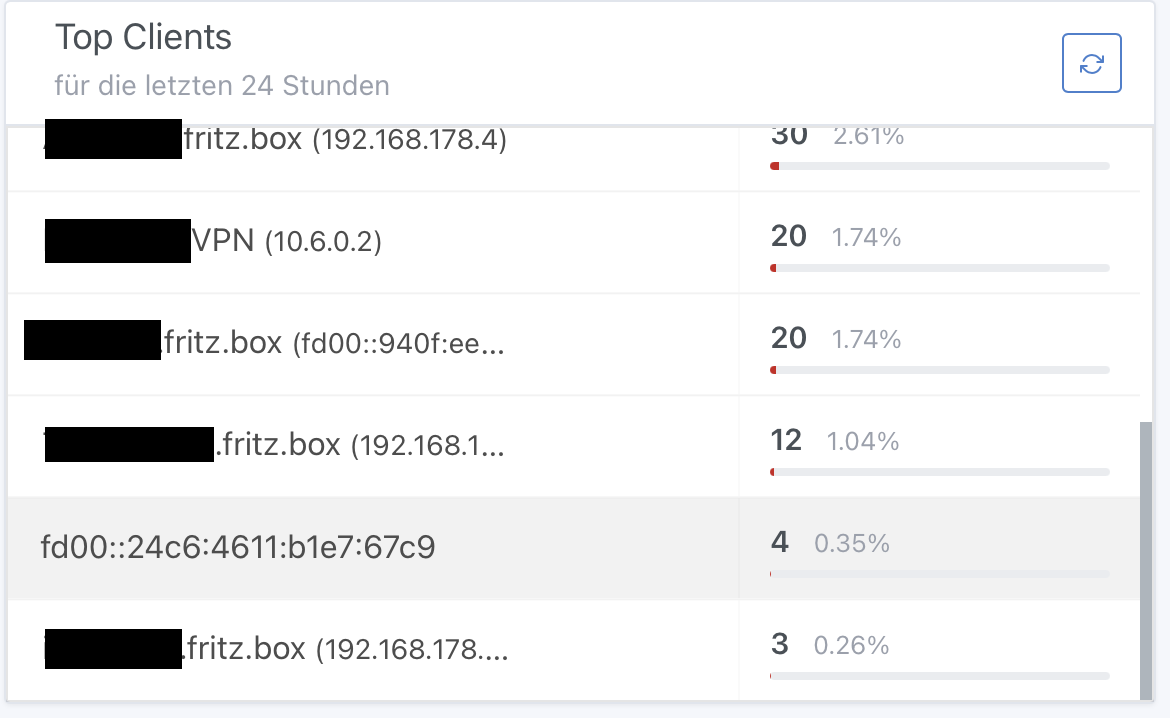
Bildschirmfoto 2021-04-13 um 14 01 16 Hi, i have tested, unfortunately it is not fixed. Do i have to adjust some settings (yaml), or should it work out of the box? Bildschirmfoto 2021-04-13 um 13 57 04
@ghost commented on GitHub (Apr 13, 2021): <img width="290" alt="Bildschirmfoto 2021-04-13 um 14 01 16" src="https://user-images.githubusercontent.com/51493890/114549004-c9b7ee00-9c60-11eb-8256-b36766f732aa.png"> Hi, i have tested, unfortunately it is not fixed. Do i have to adjust some settings (yaml), or should it work out of the box? <img width="604" alt="Bildschirmfoto 2021-04-13 um 13 57 04" src="https://user-images.githubusercontent.com/51493890/114548874-a2612100-9c60-11eb-997a-c4d160808754.png">
Author
Owner

@EugeneOne1 commented on GitHub (Apr 13, 2021):

It seems we've missed one of the registries from RFC-6303 which contains the address you're trying to resolve. Should be fixed as of snapshot d7b2d63. Could you please check it once again?

@EugeneOne1 commented on GitHub (Apr 13, 2021): It seems we've missed one of the registries from [RFC-6303](https://tools.ietf.org/html/rfc6303) which contains the address you're trying to resolve. Should be fixed as of snapshot d7b2d63. Could you please check it once again?
Author
Owner

@ghost commented on GitHub (Apr 13, 2021):

Hi again,
after testing, unfortunately it works partially, only...
Bildschirmfoto 2021-04-13 um 16 38 25

It seems that Apple devices are not recognized....

@ghost commented on GitHub (Apr 13, 2021): Hi again, after testing, unfortunately it works partially, only... <img width="585" alt="Bildschirmfoto 2021-04-13 um 16 38 25" src="https://user-images.githubusercontent.com/51493890/114571449-f840c380-9c76-11eb-8367-f6cb63ef9950.png"> It seems that Apple devices are not recognized....
Author
Owner

@EugeneOne1 commented on GitHub (Apr 13, 2021):

Hmm, that's weird cause it shouldn't depend on device's nature. It looks like the default resolver (which is provided by your OS) can't resolve this specific IPv6. Try dig @resolver -x fd00::24c6:4611:b1e7:67c9 where resolver is an address of the device which leased your unrecognized IPv6 device.

@EugeneOne1 commented on GitHub (Apr 13, 2021): Hmm, that's weird cause it shouldn't depend on device's nature. It looks like the default resolver (which is provided by your OS) can't resolve this specific IPv6. Try `dig @resolver -x fd00::24c6:4611:b1e7:67c9` where `resolver` is an address of the device which leased your unrecognized IPv6 device.
Author
Owner

@ghost commented on GitHub (Apr 13, 2021):

Hi Eugene,
if remember correctly, pihole had the same "problem".
Apple devices answer the dig -x command with "nxdomain".
I think the pihole developers have chosen the way to use the MAC address as the identifier and sort the different IPs under the MAC address.

Bildschirmfoto 2021-04-13 um 17 59 44
@ghost commented on GitHub (Apr 13, 2021): Hi Eugene, if remember correctly, pihole had the same "problem". Apple devices answer the dig -x command with "nxdomain". I think the pihole developers have chosen the way to use the MAC address as the identifier and sort the different IPs under the MAC address. <img width="899" alt="Bildschirmfoto 2021-04-13 um 17 59 44" src="https://user-images.githubusercontent.com/51493890/114583848-4dce9d80-9c82-11eb-9208-f6e30ed5524b.png">
Author
Owner

@ghost commented on GitHub (Apr 28, 2021):

Hi Eugene,
i have found something interesting regarding this issue.
With the actual 1.06 beta or edge versions the user friendly names work when i delete the net-tools package (arp).
That means: when Adguard Home does not find the client names via arp but rDNS everything is ok.
Unfortunately i need the net-tools package for my VPN connection on the raspberry (wireguard).
Would you please check how to deal with this?
Is it possible to make arp optional?

thank you!

@ghost commented on GitHub (Apr 28, 2021): Hi Eugene, i have found something interesting regarding this issue. With the actual 1.06 beta or edge versions the user friendly names work when i delete the net-tools package (arp). That means: when Adguard Home does not find the client names via arp but rDNS everything is ok. Unfortunately i need the net-tools package for my VPN connection on the raspberry (wireguard). Would you please check how to deal with this? Is it possible to make arp optional? thank you!
Author
Owner

@ainar-g commented on GitHub (Apr 28, 2021):

@Ulmisch, very interesting, thank you for the information! I've filed #3020 for a more general feature about better control over client info enriching.

@ainar-g commented on GitHub (Apr 28, 2021): @Ulmisch, very interesting, thank you for the information! I've filed #3020 for a more general feature about better control over client info enriching.
Author
Owner

@ghost commented on GitHub (May 3, 2021):

@ainar-g after some more testing, it does not work for all devices. I am not able to reproduce my first finding.
Especially Apple devices ipv6 addresses can not be turned into client names.
Sorry...

@ghost commented on GitHub (May 3, 2021): @ainar-g after some more testing, it does not work for all devices. I am not able to reproduce my first finding. Especially Apple devices ipv6 addresses can not be turned into client names. Sorry...
Author
Owner

@moether commented on GitHub (Aug 18, 2021):

@Ulmisch From the IP address range it look like you use a Fritzbox as the DNS / DHCP server.
I was investigation the same problem as you see for quite some time now as this is a really nasty one.

The problem I see is that the Fritzbox is not able to answer a rDNS query for IPv6 correctly in all cases. Most of the time the PTR record answer is just empty when doing a reverse DNS lookup. Even though the Fritzbox shows the IPv6 address for the corresponding device in the its webinterface. Really strange!
I found that rDNS works correctly for Windows clients while Linux and our Samsung Smartphones don't.

You see the same in the comment above: https://github.com/AdguardTeam/AdGuardHome/issues/2943#issuecomment-818854333

The PiHole guys decided to use Neighbor discovering Protocol (NDP) for IPv6 to map the IPv6 addresses to MAC / Link Layer addresses. So, a client rule can be defined based on the MAC address instead of the IP.

This is currently not possible with AdGuardHome as it does not seem to use NDP (or on the command line "ip neigh") to see what MAC address is behind the actual IPv6 the query came from.

Strange enough, it meanwhile seems to use ARP ( "arp -a" ) which is the equivalent for IPv4. At least I see that on the verbose debug output when I run AGH:

2021/08/18 10:10:12.404137 1370#32 [debug] clients: added 192.168.178.1 -> "fritz.box" [6]
2021/08/18 10:10:12.404417 1370#32 [debug] clients: added 192.168.178.27 -> "pc.fritz.box" [7]
2021/08/18 10:10:12.404650 1370#32 [debug] clients: added 2 client aliases from 'arp -a' command output`

I tried to work this out with the author of Blocky (another ad-filtering DNS proxy project) without any useful result. See here: https://github.com/0xERR0R/blocky/discussions/194

@moether commented on GitHub (Aug 18, 2021): @Ulmisch From the IP address range it look like you use a Fritzbox as the DNS / DHCP server. I was investigation the same problem as you see for quite some time now as this is a really nasty one. The problem I see is that the Fritzbox is not able to answer a rDNS query for IPv6 correctly in all cases. Most of the time the PTR record answer is just empty when doing a reverse DNS lookup. Even though the Fritzbox shows the IPv6 address for the corresponding device in the its webinterface. Really strange! I found that rDNS works correctly for Windows clients while Linux and our Samsung Smartphones don't. You see the same in the comment above: https://github.com/AdguardTeam/AdGuardHome/issues/2943#issuecomment-818854333 The PiHole guys decided to use Neighbor discovering Protocol (NDP) for IPv6 to map the IPv6 addresses to MAC / Link Layer addresses. So, a client rule can be defined based on the MAC address instead of the IP. This is currently not possible with AdGuardHome as it does not seem to use NDP (or on the command line "ip neigh") to see what MAC address is behind the actual IPv6 the query came from. Strange enough, it meanwhile seems to use ARP ( "arp -a" ) which is the equivalent for IPv4. At least I see that on the verbose debug output when I run AGH: > 2021/08/18 10:10:12.404137 1370#32 [debug] clients: added 192.168.178.1 -> "fritz.box" [6] > 2021/08/18 10:10:12.404417 1370#32 [debug] clients: added 192.168.178.27 -> "pc.fritz.box" [7] > 2021/08/18 10:10:12.404650 1370#32 [debug] clients: added 2 client aliases from 'arp -a' command output` I tried to work this out with the author of Blocky (another ad-filtering DNS proxy project) without any useful result. See here: https://github.com/0xERR0R/blocky/discussions/194
Author
Owner

@agross commented on GitHub (Dec 16, 2021):

This is currently not possible with AdGuardHome as it does not seem to use NDP (or on the command line "ip neigh") to see what MAC address is behind the actual IPv6 the query came from.

I found a solution using systemd-resolved which supports NDP and is also able to query upstream servers. I run a systemd-resolved stub resolver on a different port than 53/udp to not collide with AdGuard's DNS. In the AdGuard DNS settings / Private reverse DNS servers I have this bit:

# Resolve IPv4 PTR using dnsmasq...
[/in-addr.arpa/]127.0.0.1:53000
# ...and IPv6 PTR using systemd-networkd which supports NDP to resolve link-local addresses.
[/ip6.arpa/]127.0.0.1:53002

You might wonder why I use dnsmasq as my upstream. This is totally unrelated to this issue here, but I like its DHCP capabilities better.

@agross commented on GitHub (Dec 16, 2021): > This is currently not possible with AdGuardHome as it does not seem to use NDP (or on the command line "ip neigh") to see what MAC address is behind the actual IPv6 the query came from. I found a solution using systemd-resolved which supports NDP and is also able to query upstream servers. I run a systemd-resolved stub resolver [on a different port than 53/udp](https://www.freedesktop.org/software/systemd/man/resolved.conf.html#DNSStubListenerExtra=) to not collide with AdGuard's DNS. In the AdGuard DNS settings / Private reverse DNS servers I have this bit: ```config # Resolve IPv4 PTR using dnsmasq... [/in-addr.arpa/]127.0.0.1:53000 # ...and IPv6 PTR using systemd-networkd which supports NDP to resolve link-local addresses. [/ip6.arpa/]127.0.0.1:53002 ``` You might wonder why I use dnsmasq as my upstream. This is totally unrelated to this issue here, but I like its [DHCP capabilities better](https://github.com/AdguardTeam/AdGuardHome/issues/2983#issuecomment-940224394).
Sign in to join this conversation.
No milestone
No project
No assignees
1 participant
Notifications
Due date
The due date is invalid or out of range. Please use the format "yyyy-mm-dd".

No due date set.

Dependencies

No dependencies set.

Reference
starred/AdGuardHome#2643
No description provided.